Skip to content
OnlyTG Icon
  • ProductsExpand
    • Echo
    • Recorder
  • ResourcesExpand
    • Help
    • Blog
    • Channel & Bot Finder
    • SMM Panel
  • PricingExpand
    • Echo Pricing
  • EnglishExpand
    • 中文 (中国)
    • Русский
    • English
Contact us

OnlyTG Echo

  • Introduction
  • How to start
  • Chatbots
    • Message Receive and Reply
    • Set Start Message
    • Dynamic Start Message
    • Set Auto-reply and keywords-based reply
    • Set Quick Reply
    • Create Broadcast Task
    • Tracking Links
    • Bot Menu
    • Ban Contacts
    • Recall Messages
  • Channels
    • Channel Management
    • Channel Post
    • Channel Post Edit
    • Pro Communities – Channel
    • Loop Post on Telegram Channels
  • Groups
    • Group Management
    • Group CAPTCHA
    • Group Greeting
    • Group Rules
    • Keywords Reply for Group
    • Pro Communities – Group
    • Group Post and Loop Post
  • Others
    • Multi-form Messages Builder
    • Change to Topic Mode
    • Multimedia Messages
    • Set and use content module
    • Edit bot infomation
    • View My Bot’s Statistics
    • Tag Contacts
    • Authorization

OnlyTG Recorder

  • Introduction
  • Record Message and Foward
  • Save Record
  • Lock Record
  • Edit Record Title
  • Timezone
View Categories
  • Home
  • Docs
  • Channel Post Edit

Channel Post Edit

1 min read

OnlyTG Echo provides the function to Edit Channel Post via your bot. You can modify a published post.

Video Tutorial

step 1

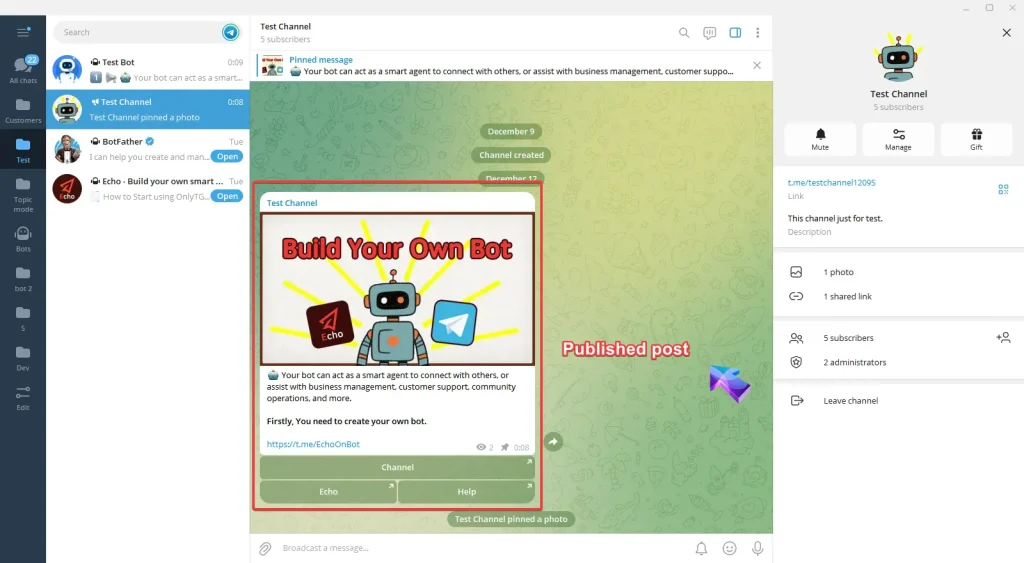
Published Post
Channel Post Edit

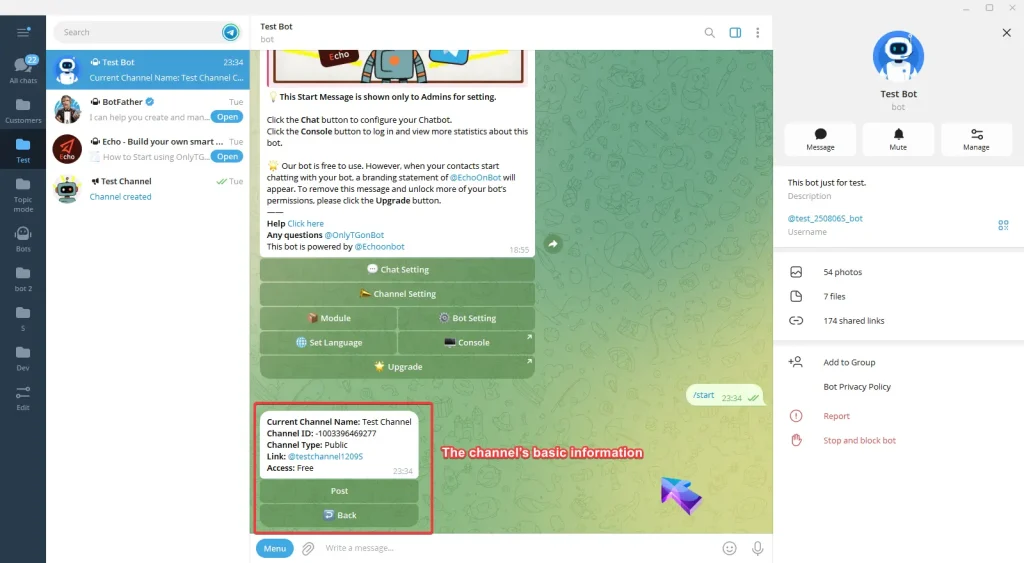
Send /start command to your bot and click Channel Setting button.
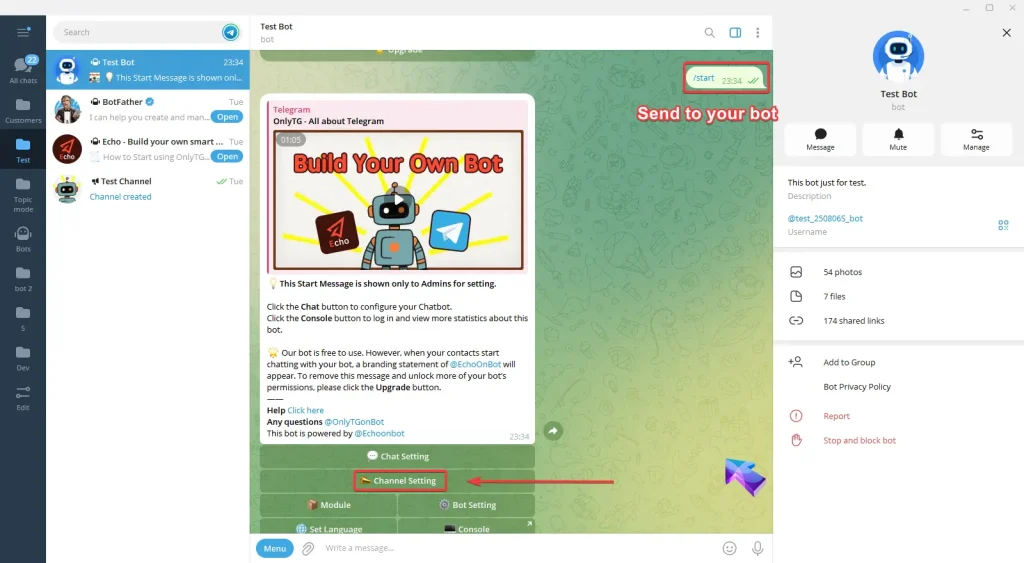
Channel Post Edit

Now select your channel and you can view the channel’s basic information. (Click here to learn how to add channels?)
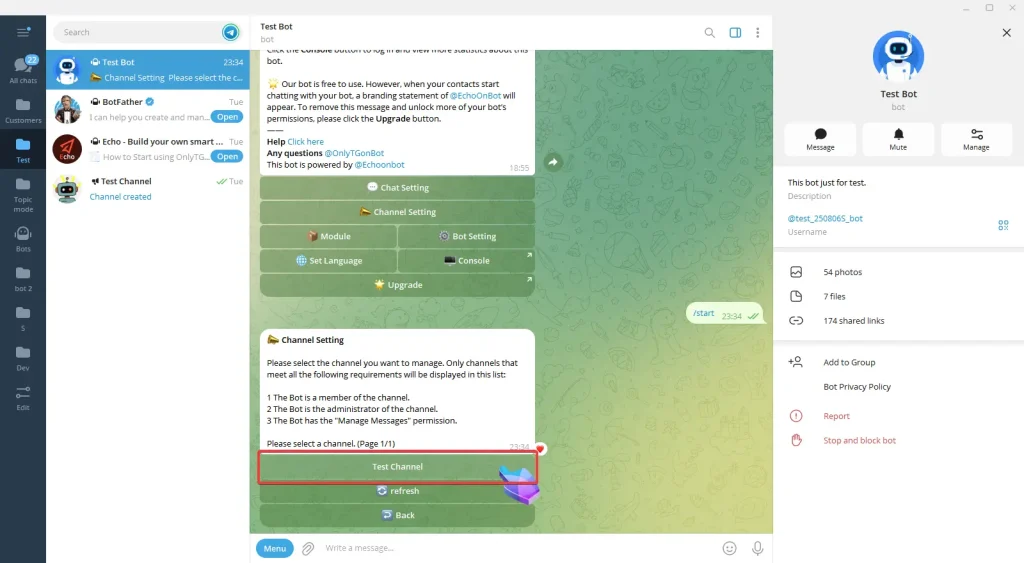
Channel Post Edit
Channel Post Edit

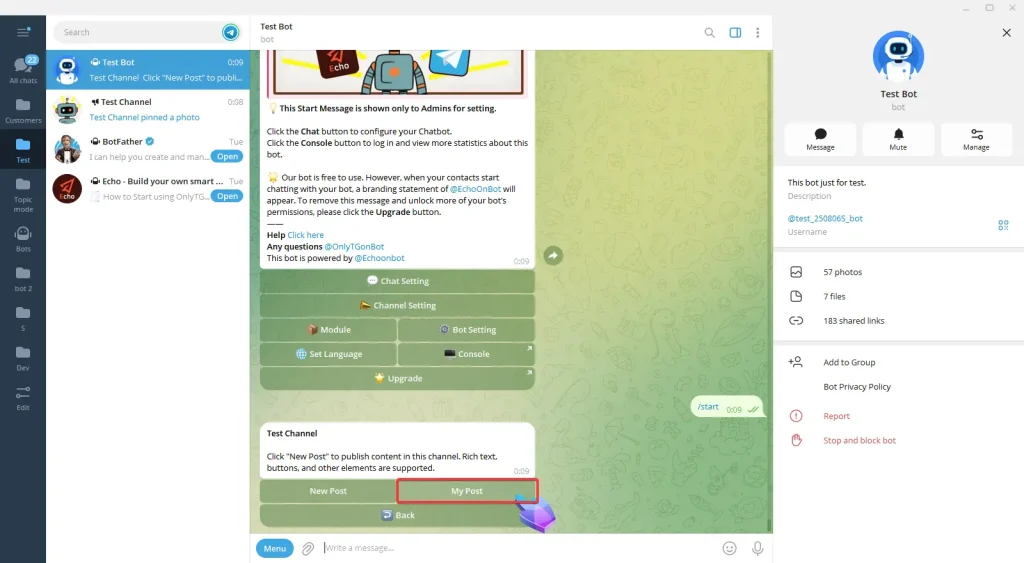
Click Post button and then My Post button.
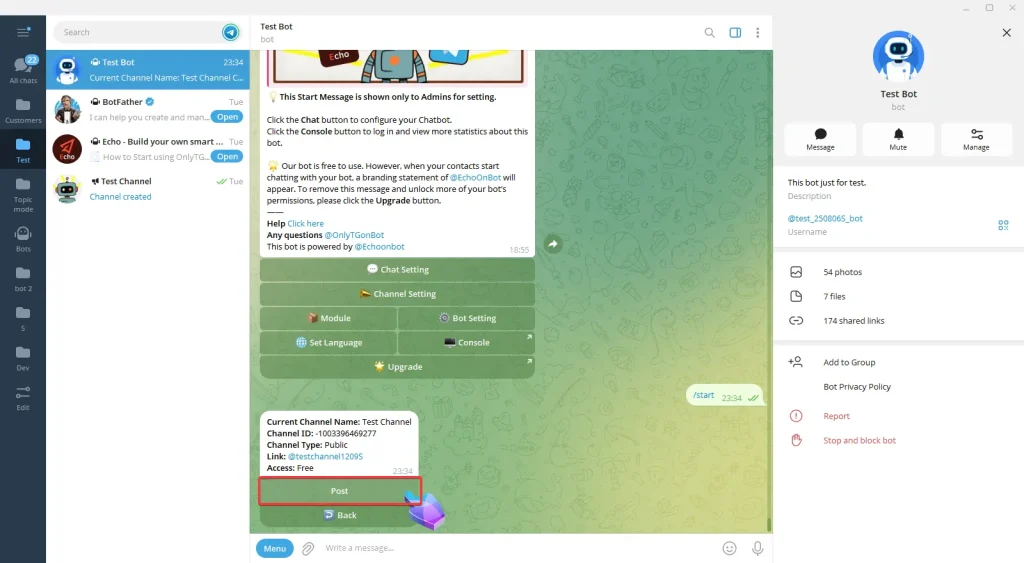
Channel Post Edit
Channel Post Edit

Click Edit Post next to the post you want to modify.
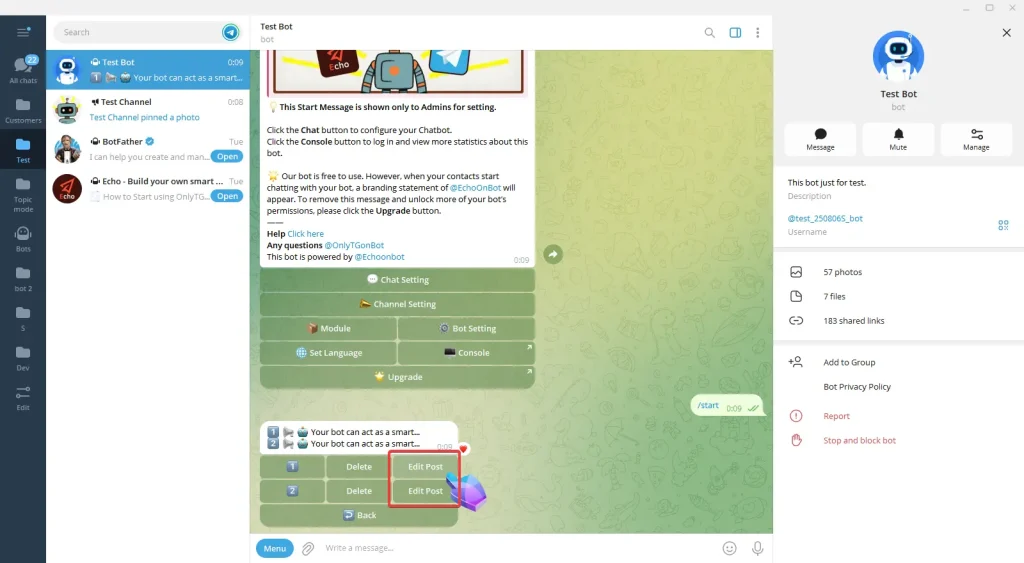
Channel Post Edit

step 2

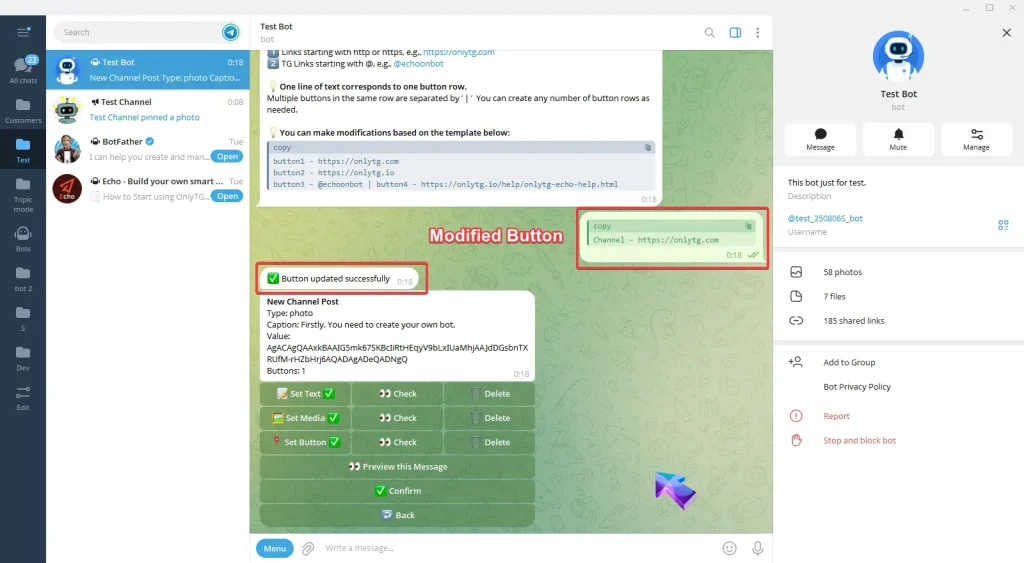
Now you can modify Text/Media/Button for your post.
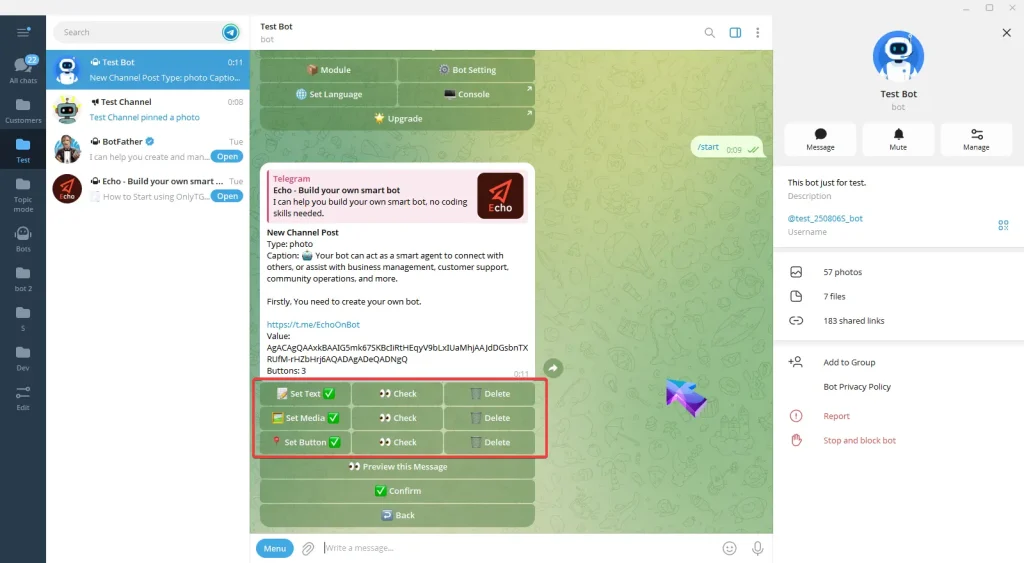
Channel Post Edit

A. Set Text: Reply with your text. Once the update success message pops up, it means the process is complete.
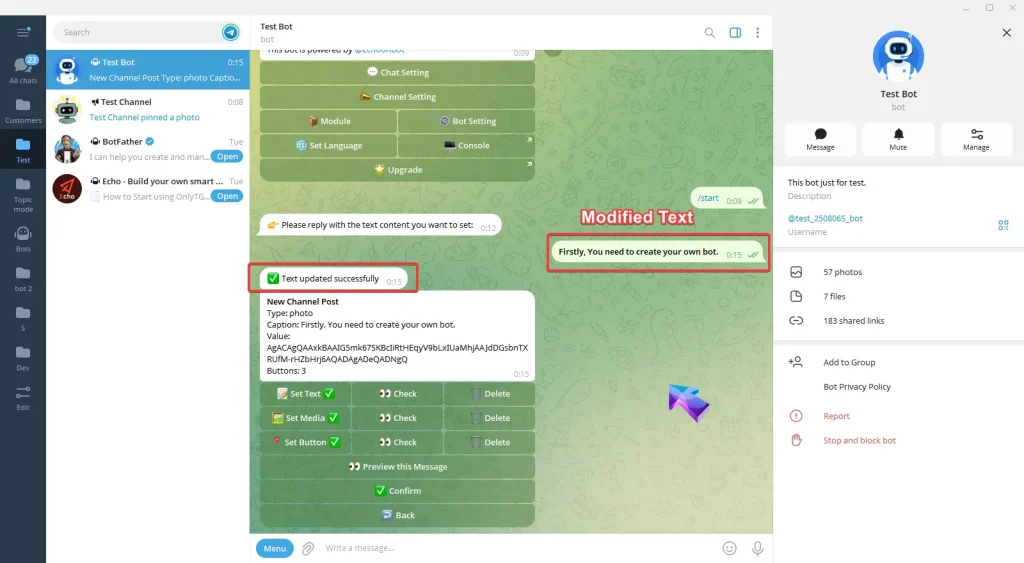
Channel Post Edit

B. Set Media: Reply with the content you want to set: picture, video or file. Once the update success message pops up, it means the process is complete.
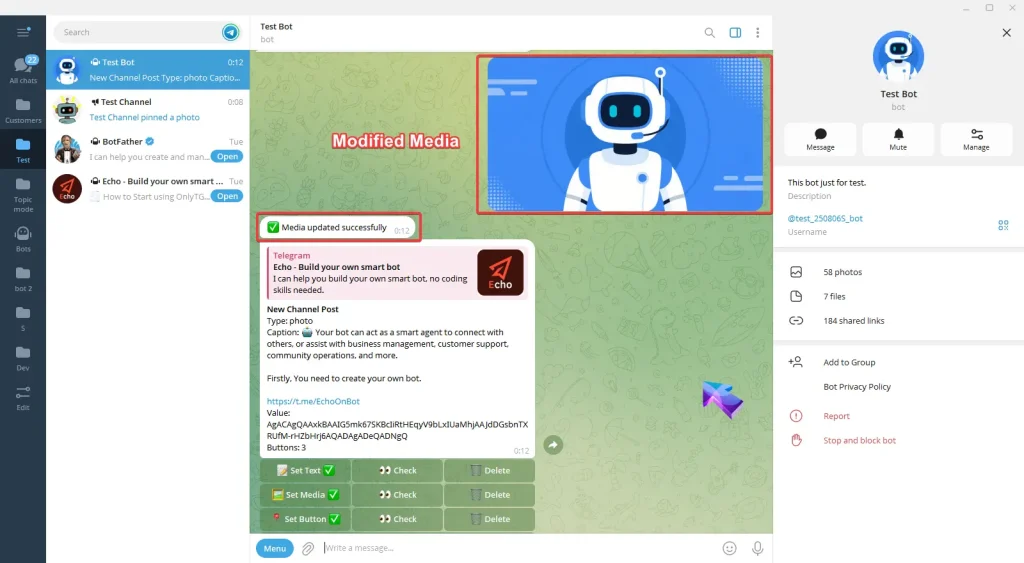
Channel Post Edit

C. Set Button: Reply the content following the format in the prompt. You can also directly copy the template then send it after editing. Once the update success message pops up, it means the process is complete..
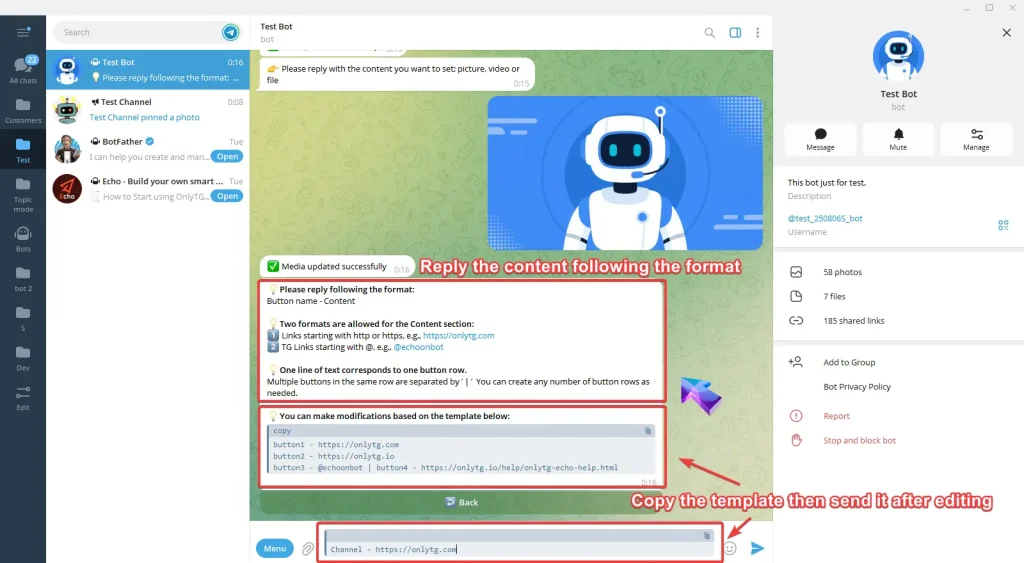
Channel Post Edit
Channel Post Edit

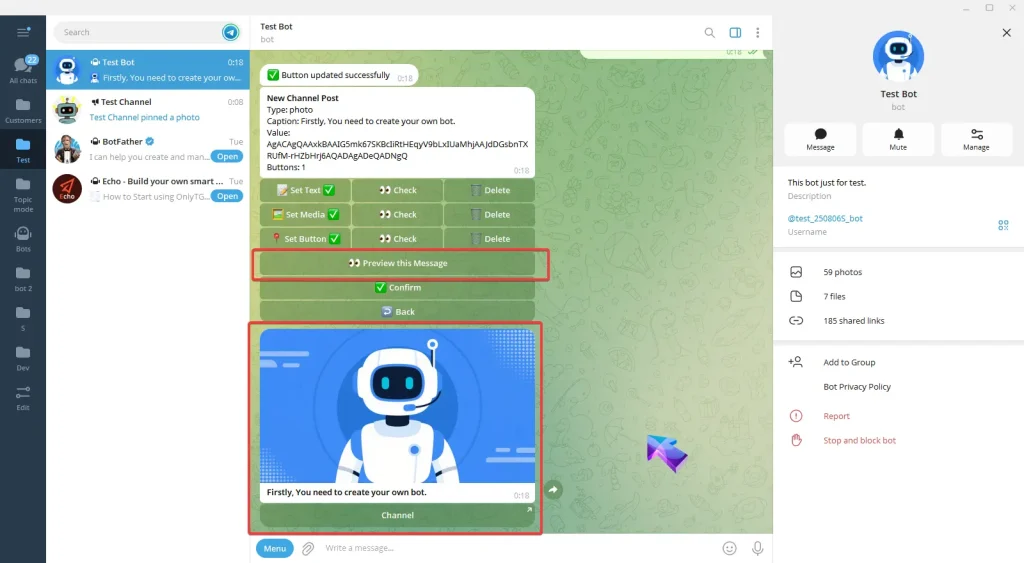
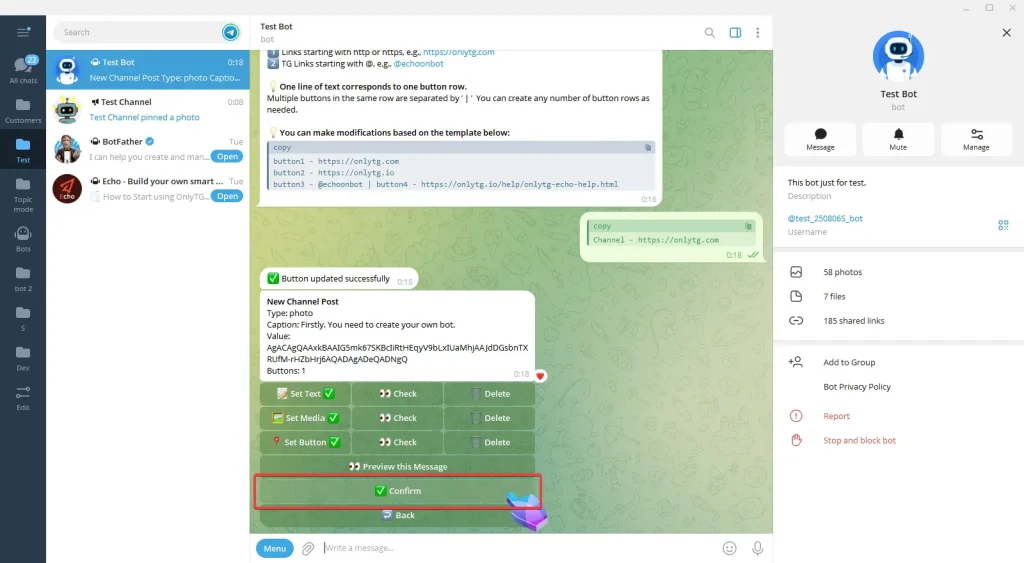
After completing the above configurations, click here to preview this message.

Click Confirm.
Channel Post Edit

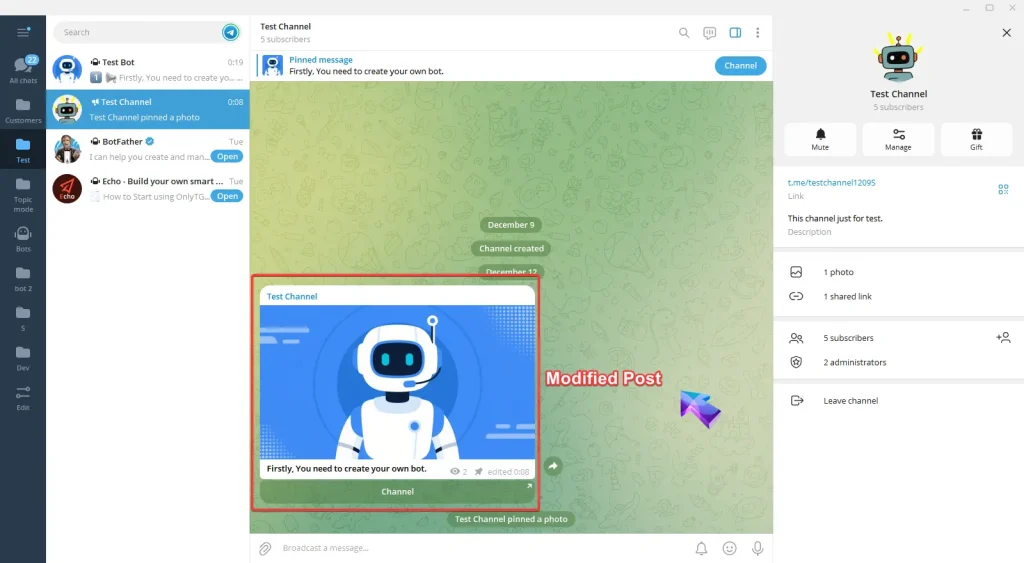
Return to the channel and you will see the post has been updated.
Channel Post Edit

Share This Article :

  • Facebook
  • X
  • LinkedIn
Channel PostPro Communities – Channel
Table of Contents
  • Video Tutorial
  • step 1
  • step 2
  • Latest Post
  • Echo
  • Recorder
  • Tips
Telegram Tips

Auto Greeting on Telegram for Business Leads in 2026: A Practical Playbook

Learn how to use auto greeting on Telegram for business leads in 2026, including Telegram Business settings, bot limits, response workflows, compliance tips, and practical automation examples.

Telegram Tips

Free Auto Greeting Bot Telegram Small Business Guide in 2026

A practical 2026 guide to using Telegram greetings, business automation, bots, and community workflows for small businesses without turning your channel into spam.

Telegram Tips

How to Setup Auto Greeting on Telegram Group Customers in 2026

A practical 2026 guide for Telegram admins and digital marketers on how to setup auto greeting on Telegram group customers, improve onboarding, reduce spam, and build cleaner community workflows.

Telegram Tips

How to Set Up Auto Greeting on Telegram Business Chat in 2026

A practical 2026 guide to auto greeting on Telegram Business chat, covering setup, message strategy, customer response workflows, automation limits, and lightweight tool options for Telegram operators.

Telegram Tips

No Code Auto Greeting Telegram Bot Tutorial in 2026: Build a Cleaner Onboarding Flow Without Developers

A practical 2026 guide to Telegram welcome automation, covering group onboarding, anti-spam basics, bot permissions, no-code setup steps, use cases, and lightweight tool options.

Telegram Tips

Auto Greeting Telegram With Clickable Buttons in 2026: A Practical Guide for Better Onboarding

Learn how to build an auto greeting Telegram with clickable buttons in 2026, improve group onboarding, reduce spam, guide new members, and use automation without turning your community into a bot-driven mess.

Telegram Tips

Bulk Auto Greeting for Telegram New Contacts in 2026: A Practical, Spam-Safe Growth Guide

Learn how to use bulk auto greeting for Telegram new contacts in 2026 without looking spammy, breaking trust, or hurting deliverability. A practical guide for Telegram marketers, channel operators, and community builders.

Telegram Tips

Auto Greeting Telegram After Hours Business Reply in 2026: A Practical Guide for Faster Customer Conversations

Learn how to build an auto greeting Telegram after hours business reply system in 2026, with Telegram Business settings, message templates, automation tips, and practical workflows.

How to Get Unbanned from Telegram in 2026: A Practical Step-by-Step Guide

If your Telegram account or phone number has been restricted, this guide explains how to confirm the ban, appeal to Telegram support, reduce spam flags, and avoid getting blocked again in 2026.

How to create telegram bot in 2026?

Learn how to create a Telegram bot in 2026 using BotFather, with step-by-step coding and no-code methods, plus tips for security, deployment, and choosing the best setup.

How to Loop Post in Channel via Telegram Bot

OnlyTG Echo provides the function to automatically loop posts in your channel. Firstly, you need to create a new bot via @botfather and…

How to Configure Multiple Media when Setting OnlyTG Echo Features

OnlyTG Echo provides the function to configure multiple media to a single message when setting Start Message/Auto Reply/Quick Reply/Broadcast and other features. Firstly, you need…

How to Upgrade Channel to Pro Channel in Telegram

OnlyTG Echo provides the function to upgrade your channel to Pro Channel. This will consume your Pro Communities slots and unlock more advanced features….

How to Edit a Published Post via Telegram Bot

OnlyTG Echo provides the function to Edit Channel Post via your bot. Firstly, you need to create a new bot via @botfather and…

How to Publish Channel Post via Telegram Bot

OnlyTG Echo provides the function to Publish Channel Post via your bot. Firstly, you need to create a new bot via @botfather and…

How to Manage Channel via Telegram Bot

OnlyTG Echo provides the function to Manage Channel via your bot. Firstly, you need to create a new bot via @botfather and send its…

How to Use OnlyTG Recorder?

Welcome to OnlyTG Recorder! Developed by our dedicated bot development team, OnlyTG Recorder is designed to serve as an assistant…

Auto Greeting on Telegram for Business Leads in 2026: A Practical Playbook

Learn how to use auto greeting on Telegram for business leads in 2026, including Telegram Business settings, bot limits, response workflows, compliance tips, and practical automation examples.

Free Auto Greeting Bot Telegram Small Business Guide in 2026

A practical 2026 guide to using Telegram greetings, business automation, bots, and community workflows for small businesses without turning your channel into spam.

How to Setup Auto Greeting on Telegram Group Customers in 2026

A practical 2026 guide for Telegram admins and digital marketers on how to setup auto greeting on Telegram group customers, improve onboarding, reduce spam, and build cleaner community workflows.

How to Set Up Auto Greeting on Telegram Business Chat in 2026

A practical 2026 guide to auto greeting on Telegram Business chat, covering setup, message strategy, customer response workflows, automation limits, and lightweight tool options for Telegram operators.

No Code Auto Greeting Telegram Bot Tutorial in 2026: Build a Cleaner Onboarding Flow Without Developers

A practical 2026 guide to Telegram welcome automation, covering group onboarding, anti-spam basics, bot permissions, no-code setup steps, use cases, and lightweight tool options.

Auto Greeting Telegram With Clickable Buttons in 2026: A Practical Guide for Better Onboarding

Learn how to build an auto greeting Telegram with clickable buttons in 2026, improve group onboarding, reduce spam, guide new members, and use automation without turning your community into a bot-driven mess.

Bulk Auto Greeting for Telegram New Contacts in 2026: A Practical, Spam-Safe Growth Guide

Learn how to use bulk auto greeting for Telegram new contacts in 2026 without looking spammy, breaking trust, or hurting deliverability. A practical guide for Telegram marketers, channel operators, and community builders.

Auto Greeting Telegram After Hours Business Reply in 2026: A Practical Guide for Faster Customer Conversations

Learn how to build an auto greeting Telegram after hours business reply system in 2026, with Telegram Business settings, message templates, automation tips, and practical workflows.

  • OnlyTG
  • Echo
  • Recorder
  • Help
  • Blog
  • Echo Pricing
  • Channel & Bot Finder
  • SMM Panel
OnlyTG EchoTelegram VK YouTube Facebook X Email

© 2026 OnlyTG

Scroll to top
  • Products
    • Echo
    • Recorder
  • Resources
    • Help
    • Blog
    • Channel & Bot Finder
    • SMM Panel
  • Pricing
    • Echo Pricing
Contact us