
This guide walks you through the most practical and evidence-based ways to handle a Telegram ban in 2026.
Why Telegram bans accounts and phone numbers
Telegram bans are not always the same thing. In some cases, a user is blocked from sending messages or joining groups because Telegram’s systems have flagged the account for spam-like behavior. In other cases, the restriction may be linked to the phone number, the IP address, or a security concern such as unusual login activity.
Understanding the type of restriction matters because the recovery path is different.
Common reasons Telegram restricts users
- Spam signals: sending many unsolicited messages, mass-adding users, or posting repeated links can trigger anti-spam systems.
- Suspicious activity: logging in from unusual locations or devices may raise security flags.
- Policy violations: abusive content, fraud, or illegal activity can lead to restrictions.
- IP restrictions: frequently switching between unsecured IP addresses.
In practice, Telegram’s own anti-spam systems and user reports can both play a role.
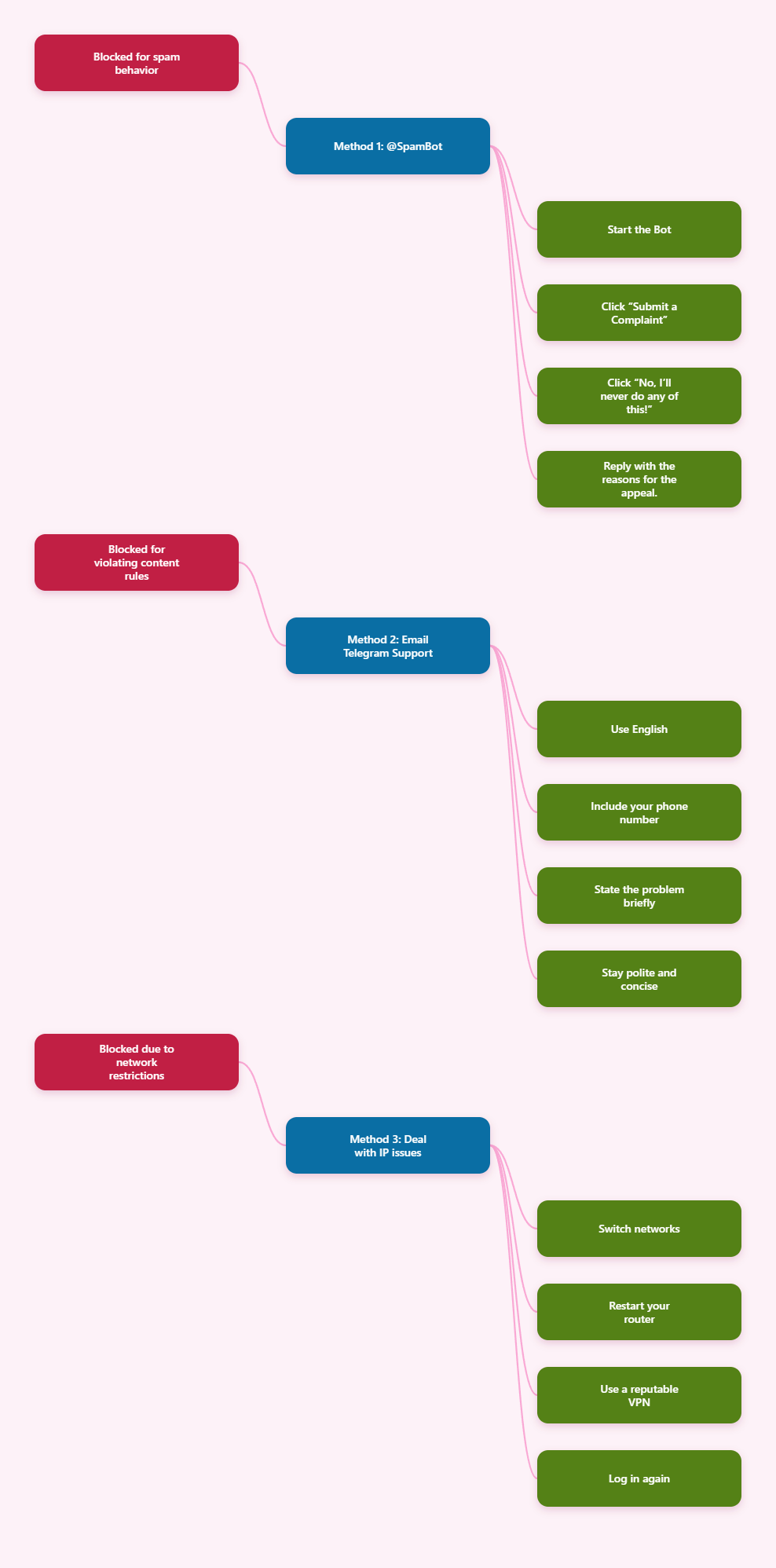
Method 1: Using @SpamBot for Appeals
This method works perfectly for removing Telegram mutual restrictions.
Practical steps
- Search @SpamBot in Telegram and tap “Start”
- After the bot responds, click “Submit a Complaint”
- Then click “No, I’ll never do any of this!”
- Finally, reply this sentence: “I don’t know. I think nothing went wrong. But I am unable to send any message to anyone.”
Method 2: Send a clear, polite appeal to Telegram support
If your number or account appears banned, the most direct recovery method is to contact Telegram support. We recommend contacting Telegram through official support channels or support email addresses such as [email protected] or using the in-app support feature when available. Another commonly cited route is the Telegram support page at telegram.org/support.
The goal is simple: explain the issue clearly, provide identifying details, and ask for review without sounding aggressive or automated.
Step-by-step appeal process
- Use English unless Telegram tells you otherwise. Support messages should be easy to read.
- Include your phone number in international format.
- State the problem briefly: account banned, number restricted, or unable to send messages.
- Explain your legitimate use in one or two short sentences.
- Mention any error messages or time when the issue started.
- Stay polite and concise. Long emotional explanations often reduce clarity.
Example appeal: “Hello Telegram Support, my account linked to +[country code][number] appears to be restricted. I use Telegram for normal personal communication and did not intend to violate rules. Please review my account status and let me know if any additional information is needed.”
Common mistakes:
- Sending multiple angry messages in a short time.
- Writing a vague complaint without your phone number.
- Claiming innocence without giving any context.
- Submitting the same appeal repeatedly within minutes.
Method 3: Fix IP and device issues if the restriction is network-related
Some 2025 guidance notes that if Telegram blocks access due to IP restrictions, changing your IP address can help you regain access. A VPN can mask your real IP and make your connection appear to come from a different location. This is most relevant when the issue is tied to network trust rather than account behavior.
Practical steps
- Switch networks first: try mobile data if you were on Wi-Fi, or vice versa.
- Restart your router if your ISP uses dynamic IP assignment.
- Use a reputable VPN if the block appears tied to your IP.
- Log in again and check whether access is restored.
Example: If Telegram works on mobile data but not on your home Wi-Fi, the issue may be local to that network rather than your account.
Common mistakes:
- Assuming a VPN will fix a spam ban. It may only help with IP-based blocks.
- Using a low-quality VPN with unstable connections.
- Continuing to log in from the same blocked network repeatedly without testing alternatives.
Safety tips to avoid getting banned again
Once you regain access, focus on keeping the account clean. Telegram’s moderation systems are designed to react to behavior patterns, not just isolated messages.
Best practices
- Enable account security with a strong password and two-step verification if available.
- Avoid unsolicited bulk outreach to strangers.
- Join and leave groups normally instead of in bursts.
- Watch for phishing links that could compromise your account and trigger suspicious activity.
- Use trusted devices and review login sessions regularly.
Example: A creator who needs to message many followers should do it gradually and with permission, not through copy-paste blasts to new contacts.
Common mistake: Treating Telegram like an open mass-marketing platform. It is not designed for aggressive outreach.
FAQ
1. How do I know if my Telegram account is banned or only restricted?
Use @SpamBot and test basic actions like messaging a contact or joining a group. If you can still access the app but cannot send messages, it may be a restriction rather than a full ban.
2. What is the fastest way to get unbanned from Telegram?
The fastest realistic path is to send a clear, polite appeal through an official support channel with your phone number and a short explanation. If the issue is IP-related, switching networks or using a reputable VPN may help, but only for network-level blocks.
3. Should I email Telegram more than once?
You can follow up if needed, but do not spam support. Wait a reasonable amount of time and keep follow-ups short and factual.
4. Does Telegram respond to ban appeals?
Sometimes yes, sometimes not immediately. Public guides recommend patience, clear wording, and accurate account details to improve the chance of review.
5. What should I include in an appeal email?
Include your phone number, a short explanation of the issue, the approximate time it started, and any relevant screenshots or error messages.
Conclusion
If you want to know how to get unban from Telegram in 2026, the most reliable approach is straightforward: confirm the restriction, submit a clear appeal, correct any network or behavior issues, and avoid repeating the actions that triggered the ban. For many users, the combination of @SpamBot, official support contact, and better account hygiene is the best path back to normal use.