
If you want to create group with bots for Telegram marketing, affiliate communities, customer support, or paid traffic funnels in 2026, the first problem is expectation. Many operators assume a bot can automatically create groups, invite users, assign itself admin rights, and run the whole community. That is not how Telegram’s official Bot API works.
The practical solution is to build a compliant bot-assisted workflow: a human account creates and owns the group, the bot is added with limited permissions, and automation handles onboarding, moderation, FAQ replies, and conversion routing. This guide explains the safe way to plan, launch, and scale Telegram groups with bots in 2026.
Can You Create Group with Bots in 2026?
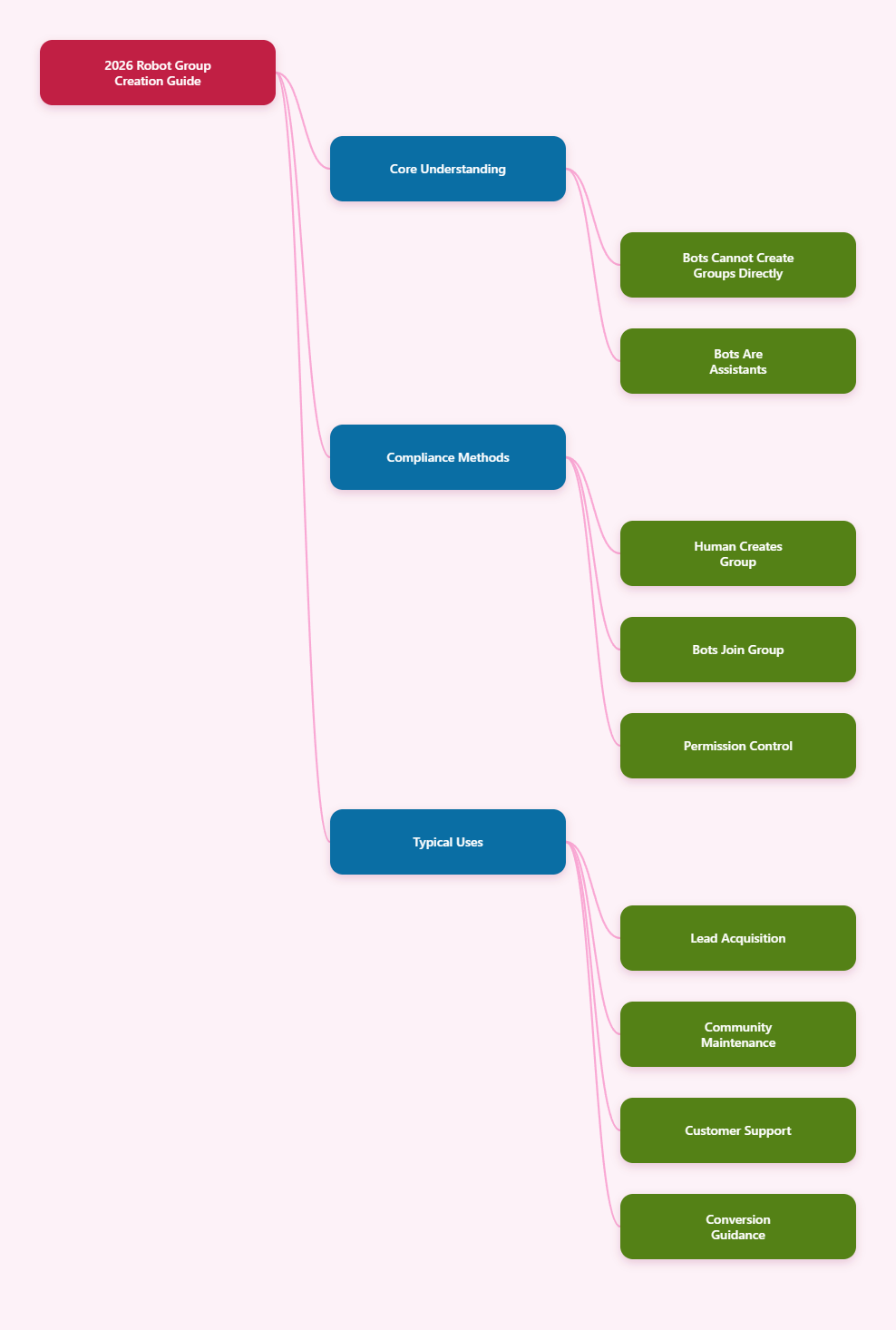
The short answer is: not directly through the official Telegram Bot API. Telegram bots are special accounts controlled through HTTPS API methods, but they cannot independently create new groups, channels, or supergroups. A human user must create the group in the Telegram client and then add the bot manually or through an approved user action.
This distinction matters for business automation. A bot can manage messages, respond to commands, moderate spam, process join requests when it has the right permissions, and interact with users after it is added. It cannot become a group owner by itself, force its way into a chat, or grant itself admin rights.
In 2026, the compliant setup looks like this:
- Create the Telegram group using a real owner account.
- Add the bot created through BotFather.
- Promote the bot to admin only if the use case requires it.
- Grant granular rights instead of “all permissions.”
- Use invite links, join requests, and moderation rules to control traffic.
This model works well for affiliate marketers, SaaS communities, crypto education groups, e-commerce VIP rooms, agency support channels, and lead nurturing funnels. The key is to treat bots as operational assistants, not as hidden account factories.
A safe Telegram bot group setup should also avoid fake engagement tactics. Do not use bots to impersonate users, mass-DM strangers, scrape members, or bypass platform limits. Those practices create compliance risk and can destroy the reputation of your brand community.
Best Business Use Cases for Telegram Bot Groups
Before building automation, define why the group exists. A Telegram group used for private support needs different bot permissions than a high-volume announcement discussion group. Clear use cases reduce permission creep and prevent unnecessary exposure.
For commercial teams, bot-assisted groups usually support one of four goals: lead capture, community retention, customer support, or campaign conversion. A bot can welcome new members, show rules, collect preferences, route users to landing pages, and answer repetitive questions without forcing your team to monitor every message.
Common commercial workflows
- Affiliate onboarding: deliver program rules, tracking links, payout FAQs, and approval steps.
- Cross-border e-commerce: support VIP buyers, product drops, pre-sale questions, and warranty instructions.
- Paid traffic funnels: qualify leads after ad clicks and segment them by country, language, or intent.
- Web3 or fintech education: moderate scam links, pin risk warnings, and guide users to official resources.
- SaaS customer success: automate setup answers and escalate billing or technical issues to human staff.
The business value comes from consistency. Every new member receives the same welcome message, the same rule reminder, and the same conversion path. This is especially useful when your team runs multiple markets across time zones.
However, groups should not replace owned assets. Use Telegram as a community and conversion layer, while keeping critical customer data in your CRM, helpdesk, or email platform. Bots can collect consent-based signals, but they should not become the only place where your customer relationship lives.
Step-by-Step: Safe Telegram Bot Group Setup
To create group with bots safely, start with the human-controlled group. Open Telegram, create a new group, add at least one trusted admin, set a clear name, and write a short description that explains who the group is for. If the community is part of a paid offer or affiliate funnel, include official brand links and risk disclaimers.
Next, create your bot through BotFather. BotFather is Telegram’s official bot management tool. It gives you a bot username and API token. Store the token like a password, because anyone with access to it can control the bot through the API until you revoke or regenerate it.
Recommended launch sequence
- Create the group with a human owner account.
- Create the bot through BotFather and save the token securely.
- Add the bot to the group from the group settings or member search.
- Promote it to admin only if it must moderate, delete messages, pin posts, or manage join requests.
- Test commands in a small internal group before sending paid traffic.
- Turn on logging in your bot backend so admins can review actions.
Telegram bots in privacy mode receive limited group messages by default, such as commands, replies to the bot, and service messages. If a bot needs to scan every message for moderation, privacy mode may need to be disabled through BotFather and the bot may need to be re-added for the change to apply. Use this only when necessary, because it increases the amount of group content processed by your system.
Finally, test the full flow with a new user account. Confirm the welcome message, rules, CAPTCHA or verification step, pinned resources, support routing, and unsubscribe or exit guidance. A group that feels clean on launch usually scales better when traffic increases.
Permissions, Privacy, and Risk Controls
Bot permissions should follow the principle of least privilege. If the bot only sends welcome messages, it does not need permission to ban users. If it only answers slash commands, it may not need admin rights at all. Over-permissioned bots are a common operational risk because a compromised token can turn into a group-wide incident.
Telegram supports granular admin rights for groups, including capabilities such as deleting messages, banning users, inviting users, pinning messages, managing video chats, and managing topics where applicable. Choose permissions based on the exact job the bot performs.
| Bot Task | Needed Rights | Business Risk | Safer Control |
|---|---|---|---|
| Welcome messages | Usually no admin rights | Low | Use commands and service events |
| Spam deletion | Delete messages | False positives | Log deleted content for review |
| User bans | Ban users | Wrongful removal | Use warning thresholds first |
| Join requests | Manage invite or join requests | Lost leads | Manual override for VIP users |
| Pinned announcements | Pin messages | Wrong promotion pinned | Require admin approval |
Protect the bot token with environment variables, restricted server access, and rotation procedures. If your agency manages multiple client groups, never reuse one bot token across unrelated brands unless there is a clear operational reason and permission from the client.
Privacy is also a trust issue. If your bot scans messages, state that in group rules. Avoid collecting sensitive personal data unless it is necessary and legally supported. For global campaigns, align your data handling with the regions where your users live.
Anti-Spam Setup for Paid Traffic and Public Groups
Public Telegram groups and ad-driven communities attract spam quickly. When you run ads, influencer campaigns, or affiliate traffic, low-quality users, phishing links, and copycat support accounts may appear within minutes. A bot-assisted moderation system reduces this risk, but it must be tuned carefully.
Start with entry controls. Private invite links can be rotated, limited, or paired with join approval depending on your group strategy. If you publish a public username, assume anyone can find and enter the group. For high-value offers, private links with approval are usually safer.
Practical anti-spam layers
- New member verification: use a simple challenge, rules confirmation, or delayed posting window.
- Link filtering: block suspicious domains, fake support links, and repeated referral spam.
- Rate limits: restrict flooding, repeated emojis, copied pitches, and rapid message bursts.
- Keyword rules: flag impersonation phrases such as “official admin DM me” or fake wallet support claims.
- Admin escalation: send questionable cases to a private admin log instead of instantly banning everyone.
Telegram also provides native anti-spam options for eligible supergroups. Where available, combine native controls with your own bot rules instead of relying on one layer. Native filters can reduce obvious spam, while your bot can enforce brand-specific policies, language rules, and campaign-specific link controls.
Be careful with aggressive automation. If your bot deletes too much legitimate discussion, the group becomes silent and users stop trusting it. Track appeals and false positives. In commercial communities, losing a qualified buyer because of a strict bot rule can be more expensive than manually reviewing a few suspicious posts.
Scaling Multiple Telegram Groups Without Account Problems
Many overseas growth teams do not run one group. They run country groups, language groups, product groups, affiliate cohorts, VIP buyer rooms, and campaign-specific communities. The challenge is to scale without turning operations into spam or losing control over permissions.
Use a clear ownership structure. Each important group should have a real accountable owner, at least one backup admin, and a documented recovery process. Avoid giving every marketer full admin rights just because they need to post promotions. Separate posting, moderation, analytics, and technical control.
For multi-account operations, do not use Telegram accounts in ways that imitate spam networks. Keep business identities consistent, avoid mass unsolicited invitations, and let users join through transparent links, ads, landing pages, or opt-in flows. If you manage regional teams, assign local admins who understand the language and compliance expectations of that market.
Operational checklist for group matrices
- Use one naming convention for all groups and bots.
- Keep a registry of owners, admins, bot usernames, and token custodians.
- Review admin permissions every month.
- Rotate invite links after campaigns or partner promotions.
- Archive inactive groups instead of letting them become spam targets.
- Use UTM-tagged landing pages before Telegram links when attribution matters.
Analytics should focus on business outcomes, not vanity activity. Track join source, verification completion, active questions, support resolution, link clicks, trial starts, purchases, or affiliate approvals. A smaller moderated group that converts is better than a huge noisy group full of bots and uninterested users.
Monetization Workflow After You Create Group with Bots
Once the group is stable, connect automation to revenue. The bot should not only block spam; it should guide users toward the next valuable action. In a Telegram marketing funnel, that action may be booking a demo, claiming a coupon, joining an affiliate program, reading a compliance guide, or opening a support ticket.
Design the first five minutes carefully. New members are most attentive right after joining. Your bot can send a short welcome, ask one segmentation question, and provide the most relevant path. Do not overload users with ten buttons and a long sales pitch.
Conversion paths that work well
- Lead qualification: ask country, role, budget range, or use case, then route users to the right resource.
- Affiliate activation: send approved partners to tracking setup, creatives, payout terms, and policy reminders.
- E-commerce sales: guide users to product bundles, shipping answers, and limited-time offers.
- Support deflection: answer common questions before handing complex cases to human agents.
- Retention: schedule reminders for webinars, product drops, renewal dates, or community events.
Keep promotional messages controlled. Too many automated sales posts can make users mute the group. A healthier pattern is to pin core offers, answer questions quickly, and use scheduled announcements only when there is real value.
Also separate official admins from community members. Scammers often impersonate support staff in active Telegram groups. Pin a rule saying admins will not ask for passwords, seed phrases, payment codes, or remote access. Your bot can repeat this warning when users mention risky keywords.
FAQ: Create Group with Bots
Can a Telegram bot create a group by itself?
No. Through the official Telegram Bot API, bots cannot independently create groups, channels, or supergroups. A human user creates the group and adds the bot afterward.
Can a bot add itself to my Telegram group?
No. A user or admin must add the bot. In public groups, admin permissions may be required to add bots depending on the group settings.
Does a bot need to be admin to work in a group?
Not always. A bot can answer commands without admin rights. It needs admin rights only for tasks such as deleting messages, banning users, pinning messages, or managing join requests.
Should I disable Telegram bot privacy mode?
Only if the bot genuinely needs to read all group messages, such as for anti-spam moderation. For command-based bots, keeping privacy mode on is usually safer and more privacy-friendly.
How many bots can I add to a Telegram group?
Telegram limits can change, so check current official information before planning a large deployment. In practice, you should keep bot count low and use only the tools that serve a clear operational purpose.
What is the safest way to create group with bots for business?
Create the group manually, add a BotFather-created bot, grant minimal permissions, document admin roles, use controlled invite links, and test all automation before sending paid traffic.
Can bots scrape all members from a Telegram group?
The official Bot API does not provide a simple bulk export of all group members. Avoid tools that promise mass scraping through unofficial methods, especially for commercial campaigns.
Conclusion
To create group with bots in 2026, think compliance first. Bots cannot create Telegram groups by themselves, but they can make a human-created group far more scalable and profitable.
Focus on three actions: build the group with a real owner account, grant the bot only the permissions it needs, and connect automation to moderation, onboarding, and conversion. When your setup is transparent and controlled, Telegram groups can become a reliable channel for affiliate growth, customer support, and cross-border community monetization.