
If you want to Customize new Telegram group settings for a business community in 2026, the challenge is no longer just choosing a name and adding members. Brands, affiliate teams, SaaS founders, crypto communities, and cross-border sellers now use Telegram as a traffic, support, and retention channel, but poorly configured groups quickly attract spam, fake support accounts, link abuse, and confused customers.
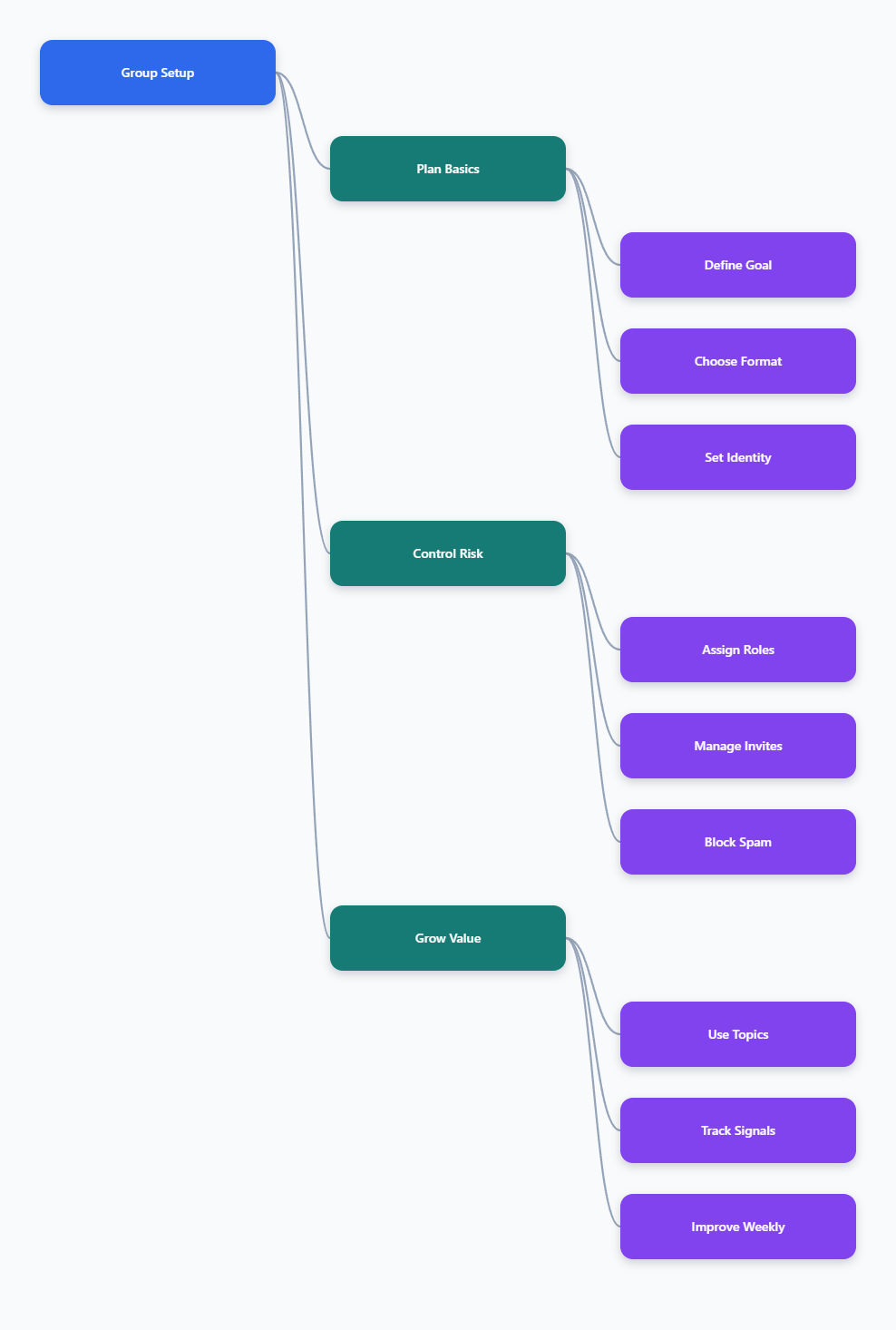
This guide gives you a practical setup framework: structure the group, set permissions, design invite flows, add moderation, organize topics, and protect commercial operations without violating Telegram rules. The goal is simple: build a Telegram group that is easy to join, hard to abuse, and useful for conversion.
Why Customize New Telegram Group Settings Before Growth
Many teams create a group only after traffic starts coming in from ads, influencers, an affiliate campaign, or an independent store launch. That timing is risky. Telegram groups can scale to very large communities, but scale without rules creates operational noise, support overload, and higher abuse exposure.
Telegram groups are designed for two-way conversation. That makes them valuable for buyer questions, user feedback, community proof, and partner coordination. It also means every member can potentially post messages unless you configure permissions carefully.
Before inviting traffic, define the business role of the group. A product support group needs different controls from a VIP deal group. An affiliate operations group needs stricter identity checks than a public fan community. A trading or crypto discussion group needs especially clear rules against impersonation and unsolicited direct messages.
- Public acquisition group: open discovery, strict anti-spam, limited links.
- Customer support group: clear topics, pinned FAQ, verified admin list.
- Affiliate partner group: approval-based entry, role separation, fewer posting rights.
- Private buyer group: invite tracking, member screening, controlled media sharing.
In 2026, good customization is not cosmetic. It is a risk-control layer for overseas community management, Telegram group moderation, and private traffic conversion. The earlier you build the system, the fewer emergency bans, complaints, and fake account problems you will face later.
Choose the Right Telegram Format for Your Business
Before you Customize new Telegram group workflows, confirm that a group is the correct format. Telegram groups and channels solve different business problems. A group is for conversation, while a channel is for one-to-many publishing where only admins post.
Telegram’s official materials state that groups can support communities of up to 200,000 members. Channels can have an unlimited number of subscribers and are better for announcements, newsletters, product drops, and content broadcasting. Many businesses use both: a channel for clean updates and a linked group for discussion.
This hybrid model works well for cross-border sellers and affiliate marketers. The channel keeps promotional messages, coupon drops, product updates, and campaign deadlines visible. The group collects questions, testimonials, objections, and partner feedback without cluttering the official broadcast feed.
| Format | Best Business Use | Main Risk | Recommended Control |
|---|---|---|---|
| Group | Support, discussion, community proof | Spam, impersonation, off-topic noise | Permissions, topics, anti-spam, admins |
| Channel | Announcements, offers, education | Low interaction | Link a discussion group |
| Private Group | Paid users, partners, VIP buyers | Leaked invite links | Expiring links and approval |
| Public Group | Discovery and community growth | Bot joins and promotion spam | Strict posting rules |
If your goal is controlled conversion, do not rely on a public group alone. Use a channel for official content, a group for community interaction, and a website or CRM form for high-intent lead capture.
Customize New Telegram Group Identity and Discovery
Your group identity should reduce confusion and impersonation. Start with a name that matches your brand, product, or campaign. Avoid names that look like unofficial deal rooms, fake support desks, or generic money-making communities because those attract low-quality traffic and scam reports.
Telegram public usernames create short links that are easier to share. Telegram username rules are strict: public usernames must be unique and use allowed characters such as Latin letters, numbers, and underscores, with a minimum length requirement. If exact brand naming matters, secure the username early.
For private communities, use invite links instead of public discovery. Telegram supports invite links, including links that can be revoked. Admin approval can also be used when you want to review join requests before a user enters the group.
- Write a group name that clearly states the brand and purpose.
- Add a profile image that matches your official website or channel.
- Create a short description with rules, support hours, and admin warning.
- Pin a welcome post with official links and scam prevention notes.
- Use a public username only when open discovery is part of the strategy.
For overseas business teams, the description should be practical rather than promotional. Tell members what they can ask, what is not allowed, and how admins will contact them. If admins never send first-message payment links, say that directly. Clear identity settings improve trust and reduce the workload of Telegram anti-spam tools.
Set Permissions, Admin Roles, and Posting Rules
Permissions are where many commercial groups fail. Giving every admin full control feels convenient at the beginning, but it creates avoidable risk. Telegram supports granular admin privileges in groups and supergroups, so each team member should receive only the rights needed for their role.
A support agent may need to delete messages and reply to members, but not add new admins. A campaign manager may need to pin posts and manage invite links, but not change ownership-level settings. A community moderator may need ban and message-management rights during raids, but not control over the group identity.
Default member permissions should also match the business model. If the group is public, restrict new members from immediately sending links, media, or forwarded promotions where appropriate. If the group is private and paid, you can allow richer discussion but still control invite links and impersonation attempts.
- Owner: final authority, recovery control, senior approval only.
- Lead admin: manages rules, topics, pinned posts, and moderators.
- Moderator: removes spam, warns users, handles reports.
- Support agent: answers questions but has limited configuration rights.
- Campaign admin: posts approved offers and manages event threads.
Write posting rules in plain language. Avoid vague instructions like “be respectful” as the only rule. For business groups, specify whether members can share referral links, competitor links, screenshots, discount codes, job posts, or direct-message offers.
Telegram’s Terms of Service prohibit spam, scams, and illegal activity. Your group rules should align with that baseline. Do not build a growth strategy around unsolicited messaging, forced adding, or mass promotion because users can report unwanted contact and group admins can report spam inside groups.
Build Safer Invite Links and Onboarding Flows
Invite flows determine member quality. If you drop one permanent link across every ad, influencer post, and forum thread, you will not know where spam came from. You also lose control when the link is copied into low-quality directories or abuse networks.
Use separate invite links for separate traffic sources when possible. For example, create different links for newsletter subscribers, paid customers, influencer traffic, partner onboarding, and retargeting campaigns. If one source starts sending bad traffic, you can revoke or replace that link without disrupting everyone else.
For higher-risk groups, enable join approval. This is useful for affiliate teams, private beta communities, paid learning cohorts, and sensitive B2B customer groups. Approval adds friction, but it protects the discussion quality and helps moderators catch obvious fake accounts before they enter.
- Create a unique invite link for each campaign or partner.
- Use expiring or limited-use links for short promotions.
- Enable approval when the group contains customers, partners, or paid users.
- Pin a first-read message explaining rules and official support contacts.
- Review suspicious joins before granting posting freedom.
Onboarding should also reduce repeated questions. A welcome post can link to the website, FAQ, pricing page, refund policy, affiliate terms, or product documentation. If your group supports multiple languages, create separate topics or pinned guides rather than letting every question mix together.
For multi-account operations and overseas teams, avoid sharing one admin account among several employees. Use named accounts, documented roles, and internal access reviews. This improves accountability and reduces the chance that a compromised device damages the whole community.
Customize New Telegram Group Topics for Cleaner Operations
Topics are especially useful for larger Telegram groups because they separate conversations into focused spaces. Telegram introduced topics to help large communities organize discussions, and newer interface improvements make topic navigation faster. For business groups, this turns a chaotic chat into a lightweight community workspace.
Do not create too many topics on day one. Start with the few categories that directly support revenue, retention, and moderation. Too many empty topics make the group look inactive, while too few topics bury important questions under casual conversation.
A cross-border ecommerce group might use topics for order questions, product feedback, shipping updates, influencer cooperation, and announcements discussion. A SaaS group might use setup help, bug reports, feature requests, billing questions, and use cases. An affiliate community might use campaign updates, payout questions, creatives, compliance reminders, and success sharing.
- Start Here: rules, official links, admin list, onboarding guide.
- Support: product, order, account, or technical questions.
- Announcements: discussion under official channel updates.
- Feedback: user ideas, complaints, testimonials, objections.
- Partners: affiliate assets, campaign terms, cooperation requests.
Assign moderators to monitor specific topics. This prevents the common problem where everyone assumes someone else is watching the group. It also gives your team better insight into commercial signals: repeated objections, confusing offers, broken checkout flows, weak creatives, or suspicious promotional behavior.
Keep topic names short and action-oriented. Members should know where to post within two seconds. If they cannot, they will post anywhere, and your group will return to chaos.
Prevent Spam, Scams, and Account Ban Risks
Spam prevention is part of Telegram group customization, not an optional plugin. Public and fast-growing groups are attractive to bots, fake support agents, phishing links, fake airdrops, adult spam, and repetitive promotions. The best defense combines native Telegram settings, human moderation, and carefully selected bots.
Telegram provides admin tools such as message management, member restrictions, reporting, and anti-spam options for large groups. Third-party moderation bots can add CAPTCHA checks, flood control, blocklists, logging, and rule-based filtering, but you should only use trusted tools that fit your privacy and compliance needs.
Do not over-automate without review. Aggressive filters can remove legitimate customer complaints, competitor comparisons, or payment questions that your team should see. For commercial communities, moderation is not only about deleting bad content; it is also market research.
- Block obvious scam phrases, fake support claims, and suspicious payment wording.
- Restrict new members from posting links until they pass basic trust checks.
- Pin a warning that admins will not ask for passwords, seed phrases, or remote access.
- Use slow mode during raids, launches, or heated campaign periods.
- Review moderation logs to avoid blocking real buyers by mistake.
Account safety also matters. Telegram’s public policies warn against spam and unwanted commercial harassment. Avoid mass-adding users, cold messaging strangers, or using automation to push unsolicited ads. These tactics can lead to reports, restrictions, and reputational damage.
If your team manages multiple Telegram communities, separate roles, devices, and access permissions carefully. The goal is not to evade platform rules; it is to reduce operational mistakes, protect customer conversations, and maintain clear accountability.
Measure Business Value After Customization
A well-customized Telegram group should produce measurable business value. Track more than member count. A large group with low trust, spam complaints, and unanswered questions is weaker than a smaller group that helps buyers make decisions.
Useful metrics depend on the group purpose. For support communities, watch response time, repeated questions, unresolved issues, and topic activity. For affiliate communities, track campaign participation, creative downloads, compliance questions, and payout-related issues. For ecommerce groups, monitor product objections, coupon usage, user-generated content, and repeat purchase conversations.
Make a weekly review routine. Export or record insights manually if your tool stack allows it responsibly. Summarize what members asked, which offers caused confusion, which links attracted spam, and which topics drove conversions.
- Review join sources and revoke low-quality invite links.
- Update pinned FAQs based on repeated questions.
- Remove inactive or over-permissioned admins.
- Adjust filters that create false positives.
- Collect testimonials and objections for landing page improvements.
For private traffic operations, the group should feed your broader funnel. Add compliant paths from Telegram to email, CRM, help desk, or your website. Do not depend on Telegram alone for customer ownership, especially if you run paid ads or affiliate campaigns across multiple regions.
Customization is a continuous process. As member quality, campaign goals, and platform features change, your settings should evolve. The best groups feel simple to users because the operating system behind them is disciplined.
FAQ: Customize New Telegram Group in 2026
How do I Customize new Telegram group settings for business?
Start with the business purpose, then configure name, description, invite links, member permissions, admin roles, pinned rules, topics, and anti-spam controls. Do this before bringing paid traffic or customers into the group.
Should I use a Telegram group or channel for marketing?
Use a channel for one-way announcements and a group for discussion. Many businesses combine both: the channel keeps offers and updates clean, while the group handles questions and community interaction.
What is the Telegram group member limit in 2026?
Telegram’s official materials describe groups as supporting communities of up to 200,000 members. Channels are different and can have an unlimited number of subscribers.
Can I stop new members from posting spam links?
Yes. Use member permissions, admin approval, link restrictions where appropriate, slow mode, moderation bots, and clear rules. For public groups, review new-member behavior before allowing unrestricted posting.
Are Telegram invite links safe for paid communities?
They can be safe if managed properly. Use separate links by source, revoke leaked links, apply expiration or usage limits when needed, and enable approval for sensitive or paid groups.
How many admins should a business Telegram group have?
Use enough admins to cover time zones and response needs, but avoid giving everyone full permissions. Assign granular rights based on job function and review access regularly.
Do Telegram topics help conversion?
Yes, when they reduce confusion. Topics make support, offers, feedback, and partner discussions easier to find, which can improve response speed and buyer confidence.
Conclusion
To Customize new Telegram group operations successfully in 2026, treat the group as a business asset, not just a chat room. First, choose the right format and identity. Second, control permissions, invite links, topics, and moderation before growth. Third, measure member quality, support outcomes, and conversion signals every week.