

A business publishes regularly, but its social media posts receive few comments, shares, or meaningful replies. Some posts attract views without starting conversations, while others reach existing followers but fail to encourage participation. Publishing more content may not solve either problem.
To increase social media interactions, you need to understand what your audience wants to respond to, create content that gives people a reason to participate, and make it easy for them to take the next step. The goal is not simply to make engagement numbers rise. It is to build a repeatable process that turns relevant content into conversations, shares, and stronger audience relationships.
Start by Identifying the Interaction You Want
Before changing your content strategy, define what a useful interaction means for your business.
A creator may want more comments and shares because these actions help reveal which topics resonate with viewers. An e-commerce brand may prioritize questions about products, saved buying guides, and conversations that help potential customers make decisions. A Telegram channel may focus on reactions, discussion, and replies that encourage members to return.
These objectives overlap, but they are not interchangeable. A post can attract many reactions without generating meaningful discussion. A smaller number of detailed questions may reveal more about audience interest than a large number of simple likes.
Choose one primary engagement objective for each campaign. You can still monitor other metrics, but one clear priority makes it easier to decide whether a content experiment has worked.
For example, if your goal is to encourage discussion, measure relevant comments and replies rather than treating every view as evidence of success. If you want people to share your content, examine shares relative to reach and identify what makes a post useful enough to pass along.
The first decision is therefore simple: define the behavior you want before deciding what to publish.
Find Out Why Your Audience Would Participate

People interact when content gives them a reason to do so. That reason might be learning something useful, expressing an opinion, solving a problem, sharing an experience, or connecting with others who have similar interests.
Start with the audience’s existing behavior instead of guessing what it wants.
Review recent comments, direct messages, customer questions, community discussions, and feedback on previous posts. Look for recurring concerns, misunderstandings, preferences, and questions that remain unanswered. These signals can provide practical ideas for content that invites a response.
Turn audience questions into content opportunities
Imagine a small e-commerce business selling skincare products. Its audience repeatedly asks how to choose products for different skin types.
Instead of publishing another general product promotion, the business could create a comparison post, explain common selection mistakes, or ask followers which concern they find hardest to address. Each format gives the audience a more specific reason to participate.
The same principle applies to other industries. A software company can ask users which step in a workflow takes the most time. A creator can invite viewers to choose between two approaches to a familiar problem. A Telegram community can ask members what topic they want covered in the next discussion.
The important distinction is that the question must matter to the audience. Asking for opinions about an unrelated topic merely to generate comments can attract low-value responses without improving the relationship.
Use previous interactions as research
Your audience’s responses are a source of information for the next publishing cycle.
Look beyond the number of comments. Identify which questions produce detailed answers, which posts get shared with others, and which discussions bring people back to your account. These patterns can reveal whether your audience prefers practical advice, personal experiences, demonstrations, comparisons, or open-ended discussions.
Do not assume that one successful post establishes a permanent rule. Treat it as a hypothesis worth testing again.
Create Posts That Make Interaction Easy
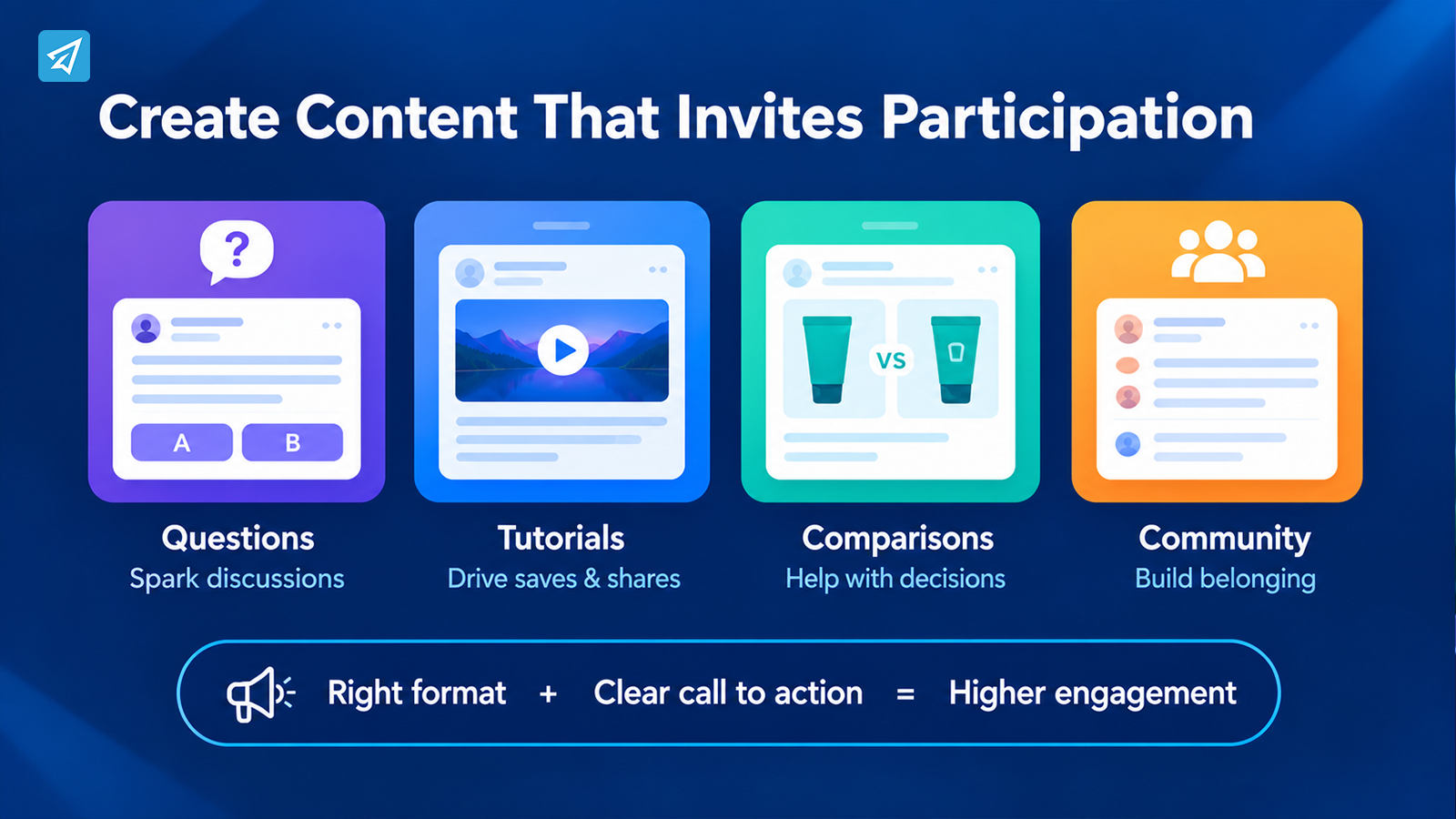
Once you understand your audience, shape the content around a clear participation opportunity.
A post does not need several calls to action. Too many requests can make it difficult for people to decide what to do. One relevant action is often easier to understand and complete.
Match the format to the response
Different formats create different opportunities for participation.
- Questions and opinion posts: Invite people to explain a preference, share an experience, or choose between reasonable alternatives.
- Tutorials and practical guides: Encourage saves and shares when the information is useful for later reference.
- Short videos: Use a clear opening, a focused idea, and a natural question or discussion prompt when appropriate.
- Comparisons: Help audiences evaluate options and explain why they prefer one.
- Community discussions: Give members a specific topic to discuss and a reason to respond to one another.
Choose the format that supports the desired behavior rather than following trends automatically. A complex product question may work better as a detailed post than as a short video. A simple visual demonstration may communicate more effectively through video than through a long caption.
Write calls to action that fit the content
Generic requests such as “Like, comment, and share” do not explain why someone should participate.
A more useful prompt connects directly to the information in the post. A tutorial might ask which step readers find most difficult. A comparison might ask which option they would choose and why. A community update might invite members to suggest the next topic.
The response should feel like a natural continuation of the content, not a separate demand for engagement.
Also consider accessibility and clarity. Avoid questions that require excessive effort to answer, and make sure the audience understands what kind of response would be useful.
Adapt the Engagement Strategy to Each Platform
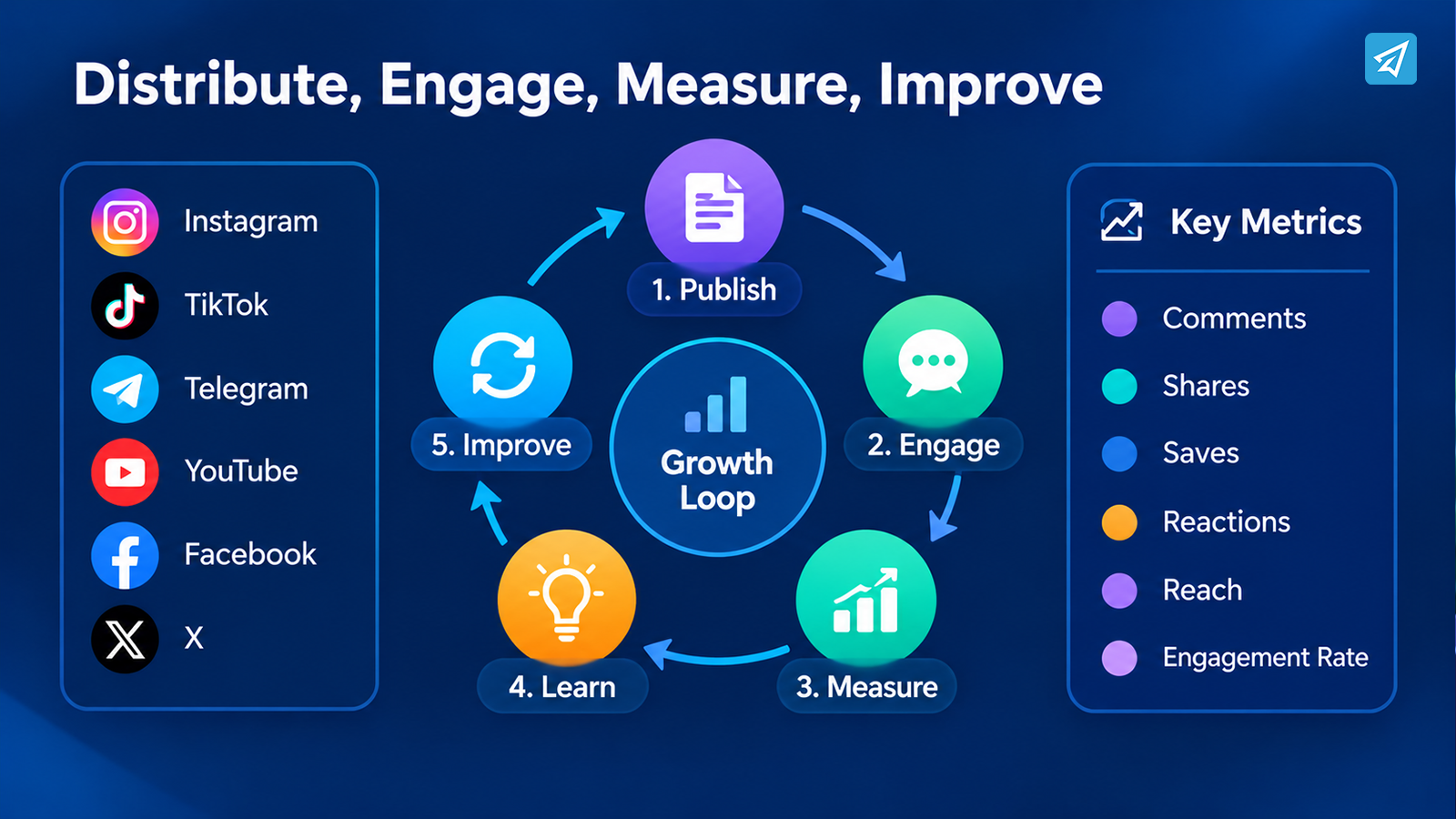
A single campaign can be distributed across several platforms, but its interaction strategy should reflect how people use each one.
Instagram: Encourage saves, shares, and relevant conversations
For Instagram, consider whether the post offers something people want to revisit, send to a friend, or discuss. Practical carousels, clear visual demonstrations, and focused questions can support different forms of engagement.
Review which content themes generate profile visits as well as interactions. If a post receives attention but visitors do not explore the account, the content or profile may not clearly communicate what followers can expect next.
TikTok: Build interaction around the video idea
For TikTok, the opening should quickly establish the topic or problem. The video should deliver on that promise, while any question at the end should be closely related to the subject.
Comments can reveal requests for follow-up videos or areas that need clarification. Use those responses to develop related content instead of treating every video as an isolated publication.
Telegram: Make participation part of the community experience
For Telegram channels and groups, engagement can extend beyond reactions to recurring discussions, replies, and member contributions.
A channel can publish a useful update and invite members to respond through a related discussion. A group can organize a focused question around a shared interest. Consistent themes and timely responses can help members understand why participation is worthwhile.
Channels and groups serve different purposes, so choose interaction formats that fit the available discussion features and community structure.
YouTube, Facebook, and X: Follow the audience’s preferred response
On YouTube, consider questions that encourage relevant comments on a video, as well as follow-up content based on viewer feedback. On Facebook, discussions may work well when the topic connects to a shared interest, local concern, or group activity. On X, concise questions, timely commentary, and substantive replies can help sustain a conversation.
These are starting points, not universal rules. Your own audience’s behavior should determine which formats deserve more investment.
Distribute Content Where Relevant People Can Find It
Even a strong post cannot generate much interaction if the intended audience never encounters it.
Review how each post will be discovered before publishing. Depending on the platform and content, useful distribution methods may include relevant search terms, topic labels, appropriate hashtags, community participation, creator collaborations, and sharing content through another channel where the audience is active.
Cross-platform distribution works best when the content is adapted rather than copied without adjustment. A detailed tutorial might become a short video, a visual summary, or a Telegram discussion prompt. Each version should fit the expectations of the destination platform.
Collaborations can also introduce your content to people who are likely to care about the topic. Choose partners based on audience relevance and shared interests, not simply their audience size.
Avoid distributing every post to unrelated communities or adding irrelevant hashtags. More exposure is useful only when it reaches people who have a reason to engage.
Turn Engagement Into an Ongoing Conversation
Increasing social media interactions is not only a publishing task. What happens after someone responds can influence whether they participate again.
Reply to meaningful comments with relevant information. When someone asks a useful question, provide an answer rather than relying on a generic reaction. If several people raise the same issue, consider addressing it in a future post.
For community managers, this process can become a simple feedback loop:
- Publish content around a clear audience need.
- Invite one relevant form of participation.
- Review and respond to the answers.
- Identify repeated questions or interests.
- Create the next post using those insights.
For example, a creator who receives repeated questions about a tutorial can produce a follow-up video. A business that sees confusion about a product feature can publish a clearer demonstration. A Telegram group administrator can use recurring member questions to plan future discussions.
The aim is to make participation valuable for both sides. Audiences should feel that their responses contribute to the experience rather than disappearing into an inactive comment section.
Diagnose Engagement With the Right Metrics
A useful engagement review connects each metric to a decision. Looking at raw numbers without context can lead to the wrong conclusion.
Start with a consistent measurement period and compare similar posts where possible. Account size, format, topic, distribution, and campaign objectives can all affect results, so avoid drawing firm conclusions from one post.
Here is a practical way to interpret common patterns:
| What you observe | What it may indicate | What to do next |
|---|---|---|
| Views increase, but comments and shares remain low | The content attracts attention but may not offer a clear reason to respond | Review audience relevance, content depth, and the participation prompt |
| Reactions increase, but meaningful discussion stays limited | The post is easy to acknowledge but may not encourage deeper participation | Test a focused question or a topic that invites explanation |
| Engagement is strong among followers, but discovery remains limited | Existing followers respond, but distribution to new audiences may be weak | Test relevant collaborations, searchable topics, and platform-appropriate distribution |
| Comments are active, but repeat participation is low | Individual posts create interest without building a recurring community habit | Develop follow-up discussions and respond consistently |
| One format performs better than others | The audience may prefer that format for a particular topic or action | Repeat the format with a related topic and compare results |
Track the metrics that match your goal. These may include comments, shares, saves, reactions, replies, engagement rate, reach, or returning participants. When possible, compare engagement relative to reach instead of relying only on totals.
Interpret metrics together. A rise in comments is not automatically positive if the discussion is unrelated to the brand or dominated by spam. Likewise, fewer comments can still be valuable when the responses are detailed and relevant.
Run Small Experiments Instead of Changing Everything
When engagement is weak, changing the topic, format, posting schedule, caption, and distribution method simultaneously makes it difficult to identify what helped.
Instead, create a small test with one clear hypothesis.
For example, suppose educational posts receive more saves than promotional posts, but neither format generates many comments. Keep the audience and publishing conditions reasonably consistent, then test whether a more specific discussion prompt encourages responses.
Record the original approach, the change, the result, and the next decision. Repeat a promising experiment before treating it as a reliable pattern.
Use three possible decisions after each review:
- Keep: The change appears useful and supports the primary objective.
- Adjust: The content has potential, but a specific element needs improvement.
- Stop: The approach repeatedly fails to serve the audience or the campaign goal.
This process helps a business improve its engagement strategy without relying on guesswork or reacting to every short-term fluctuation.
How to Use OnlyTG SMM Panel as a Supporting Tool
If an SMM panel fits a specific operational need, OnlyTG keeps the ordering process relatively straightforward. You can use the Telegram bot or the OnlyTG Console. The official documentation describes selecting a platform and growth type, choosing a service, reviewing its available details, entering the target link and quantity, and confirming the order.
Option 1: Telegram Bot
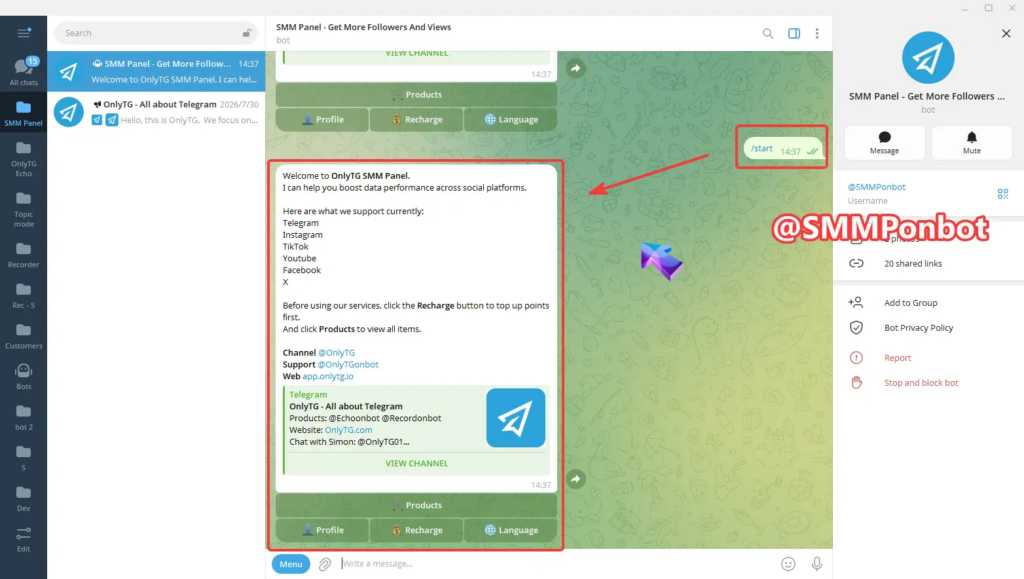
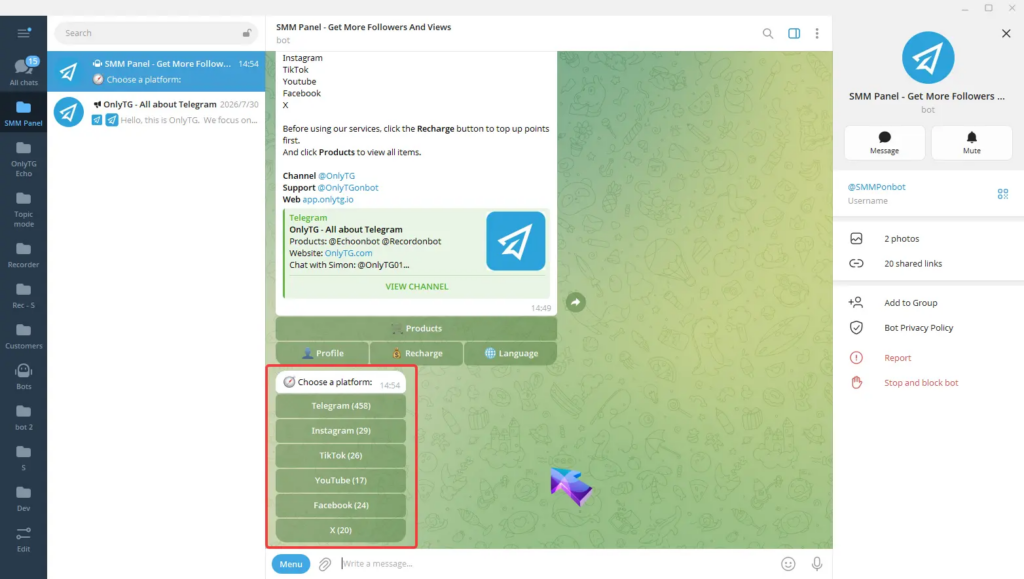
Step 1 — Open the Bot
Find @SMMPonbot on Telegram and send /start.
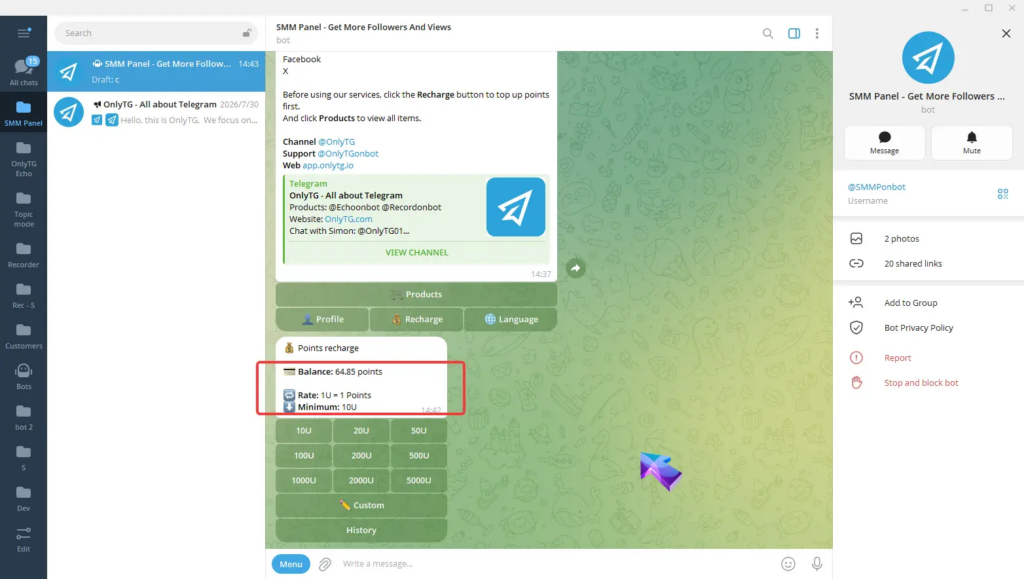
Step 2 — Add Balance
Use Recharge to fund the account. OnlyTG’s documentation currently lists 1 USDT = 1 point and a minimum recharge of 10 USDT.
Step 3 — Select the Platform and Growth Type
Open Products, choose the platform, then select the relevant growth category.
Step 4 — Review the Service
Check the service information, including price, quantity information, estimated waiting time, and notes.
Step 5 — Create the Order
Select Buy, enter the target link and quantity, review the details, and confirm.
Step 6 — Monitor the Order
Use Profile → Orders to review order records and status.
Option 2: OnlyTG Console
The Console provides a browser-based workflow.
Open app.onlytg.io, log in, and select Shop. Choose a platform and growth category, review the available services, enter the target link and quantity, and create the order. The Console also provides service details and an My Orders area for reviewing order records and statuses.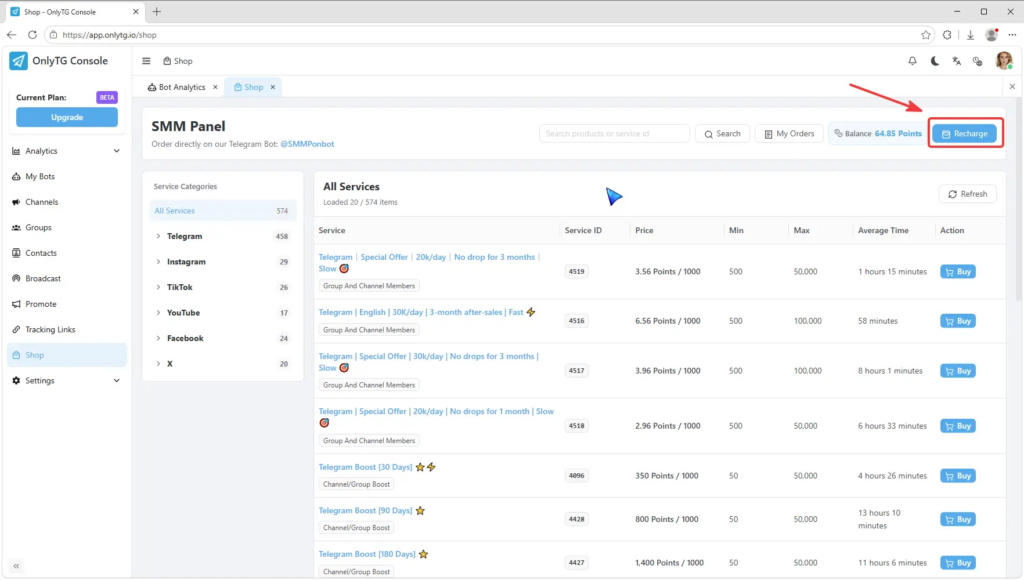
Build a Repeatable Interaction Loop
The most useful way to increase social media interactions is to make every publishing cycle inform the next one.
Start with a clear objective. Identify what your audience cares about. Create a post that gives people a specific reason to respond. Distribute it where relevant users can discover it. Participate in the resulting conversation, measure the response, and use what you learn to improve the next post.
Do not judge the entire strategy by one successful publication or one disappointing result. Look for patterns across comparable content and give experiments enough consistency to produce useful information.
When you need additional operational support, use tools selectively and keep their role separate from your content and community strategy.
Ready to organize selected social media growth tasks? Review the available services in OnlyTG SMM Panel and determine whether they fit your defined execution needs.
Frequently Asked Questions
1. How can I increase social media interactions organically?
Start with a clear audience and engagement objective. Publish relevant content that invites a specific response, distribute it through appropriate channels, reply to meaningful comments, and use engagement data to improve future posts. Test one change at a time so you can identify which approaches work for your audience.
2. Why do my social media posts get views but few interactions?
Views indicate that content was seen, but they do not establish that viewers found it relevant or worth responding to. The topic may not match audience interests, the post may deliver little practical value, or the content may lack a natural participation opportunity. Review comments, shares, saves, and engagement relative to reach to identify where the problem may lie.
3. Can an SMM Panel help increase social media interactions?
An SMM Panel can support selected social media execution tasks involving available metrics and services. It does not replace audience research, content creation, community management, or analytics. Check the specific service details, and evaluate meaningful audience participation separately from changes in individual metrics.