Skip to content
OnlyTG Icon
  • ProductsExpand
    • Echo
    • Recorder
  • ResourcesExpand
    • Help
    • Blog
  • PricingExpand
    • Echo Pricing
  • EnglishExpand
    • 中文 (中国)
    • Русский
    • English
Contact us

OnlyTG Echo

  • Introduction
  • How to start
  • Chatbots
    • Message Receive and Reply
    • Set Start Message
    • Dynamic Start Message
    • Set Auto-reply and keywords-based reply
    • Set Quick Reply
    • Create Broadcast Task
    • Tracking Links
    • Bot Menu
  • Channels
    • Channel Management
    • Channel Post
    • Channel Post Edit
    • Pro Communities – Channel
    • Loop Post on Telegram Channels
  • Groups
    • Group Management
    • Group CAPTCHA
    • Group Greeting
    • Group Rules
    • Keywords Reply for Group
    • Pro Communities – Group
    • Group Post and Loop Post
  • Others
    • Multi-form Messages Builder
    • Change to Topic Mode
    • Multimedia Messages
    • Set and use content module
    • Edit bot infomation
    • View My Bot’s Statistics
    • Tag Contacts
    • Authorization

OnlyTG Recorder

  • Introduction
  • Record Message and Foward
  • Save Record
  • Lock Record
  • Edit Record Title
  • Timezone
View Categories
  • Home
  • Docs
  • Create Broadcast Task

Create Broadcast Task

1 min read

OnlyTG Echo provides the function to broadcast content to your bots’ contacts. It require you to preset the content module that is sent to contacts, then you can create the broadcast task in the OnlyTG Console.

Video Tutorial

step 1

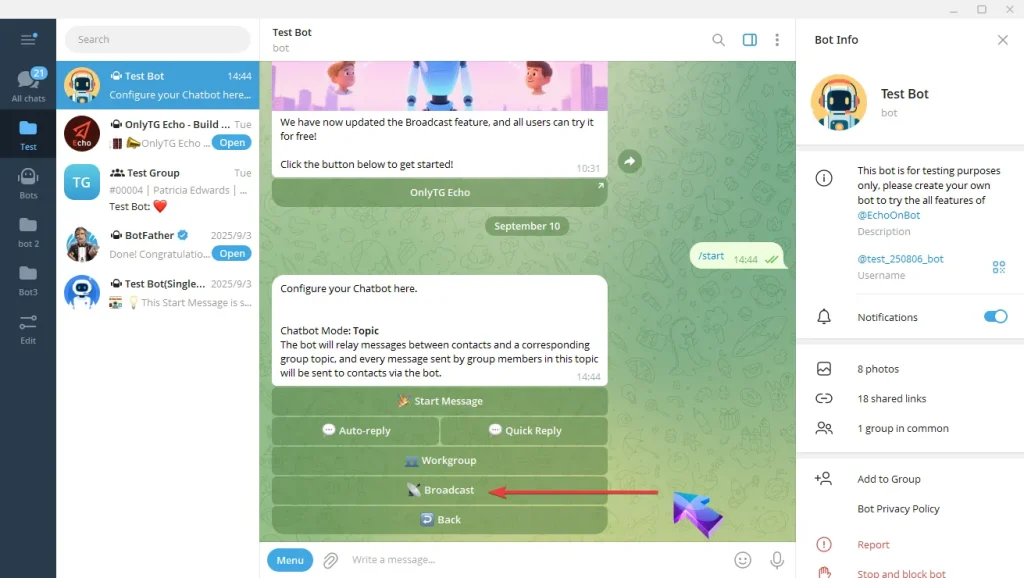
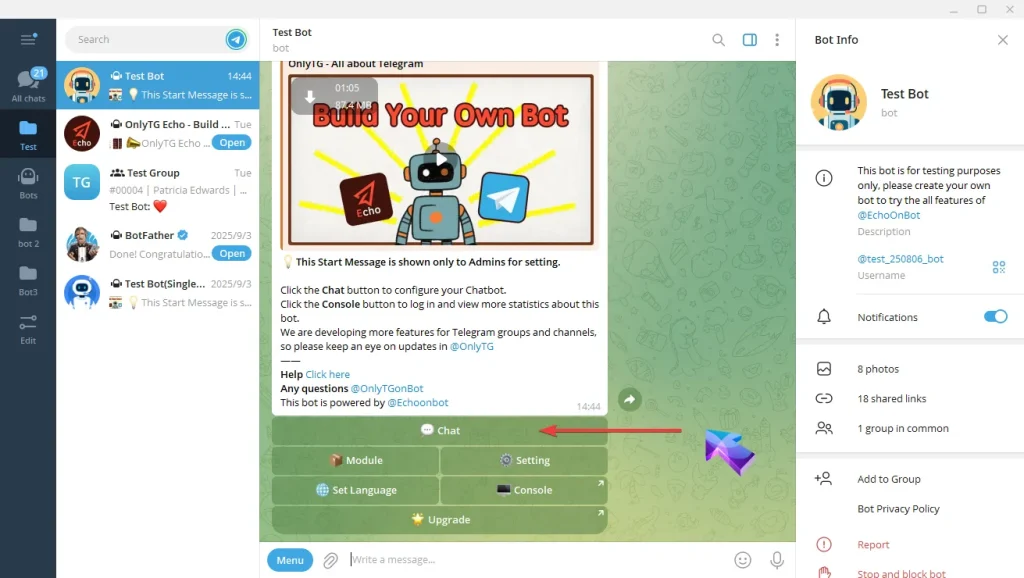
A. Send the /start command to your bot, and click the Chat button.
Create Broadcast Task

B. Click the Broadcast button.

Create Broadcast Task

step 2

A. Click the Module button to create content module that is sent to contacts.

If you’ve already set up the module content to be sent, Click the Broadcast to navigate to Console page. (app.onlytg.io)
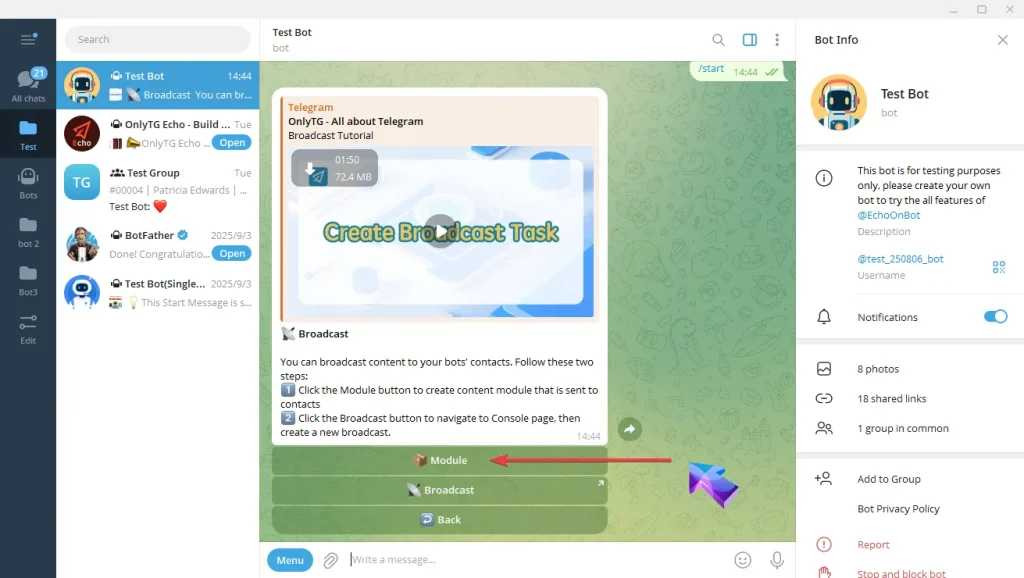
Create Broadcast Task

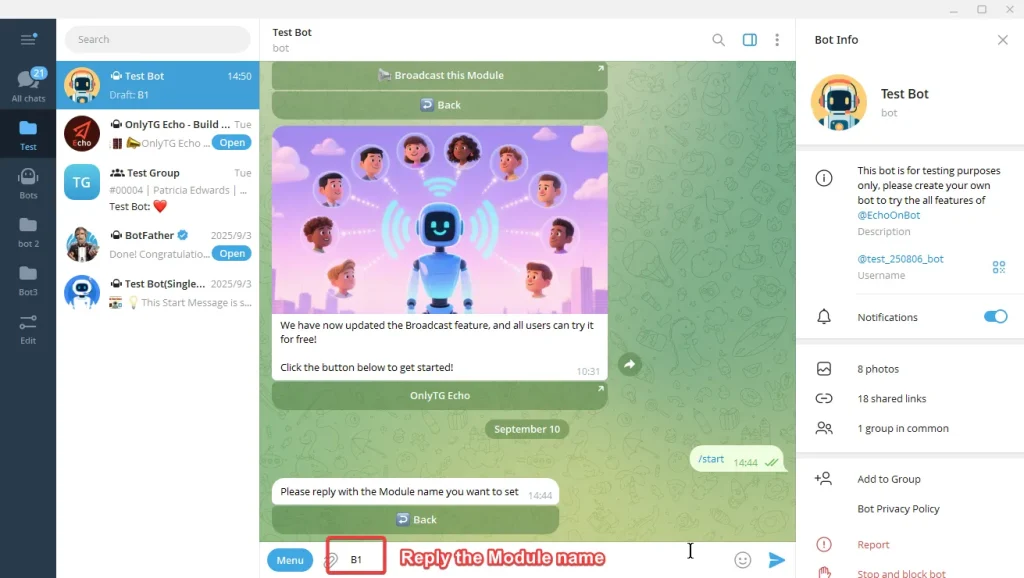
B. Click the Add module button and reply with the Module name you want to set.
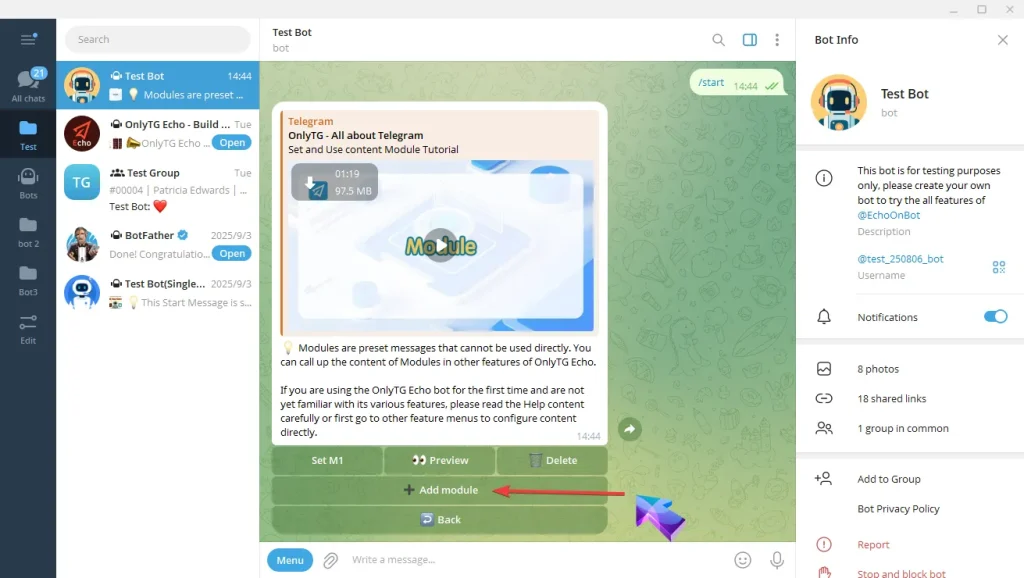
Create Broadcast Task

C. Module content supporting Text, Media and Button.
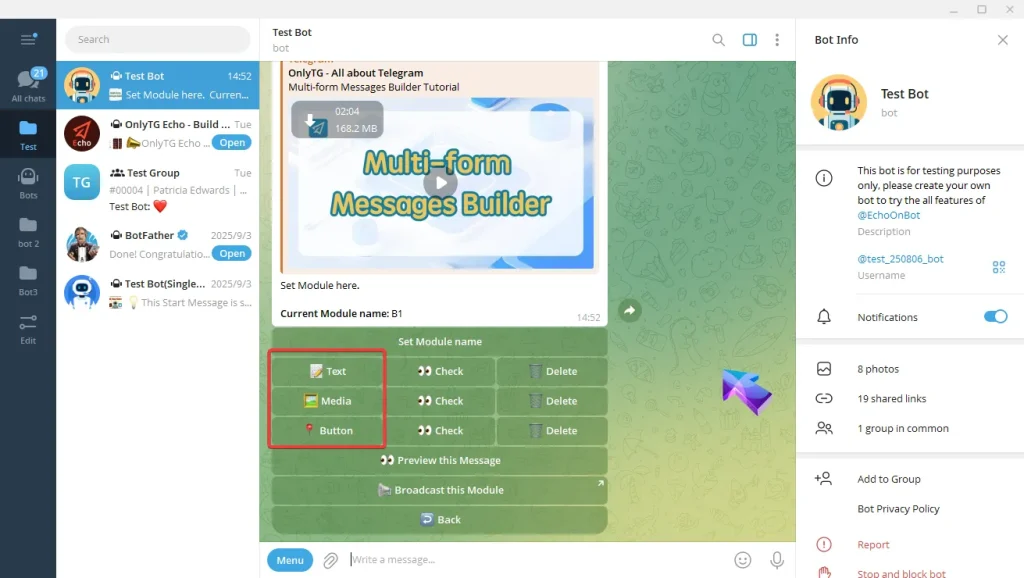
Create Broadcast Task

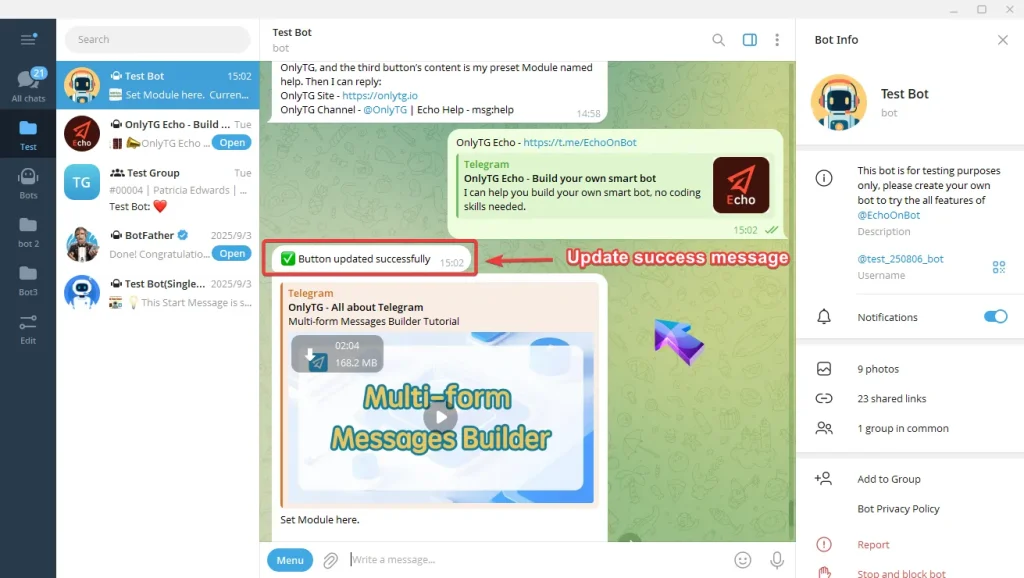
a. Add Text, type your text and send, Once the update success message pops up, it means the process is complete.
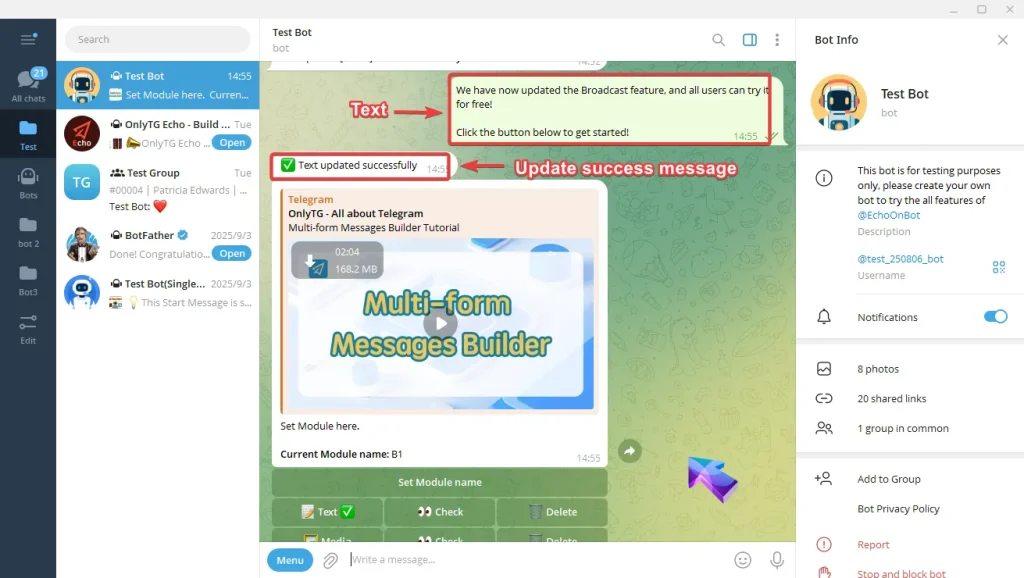
Create Broadcast Task

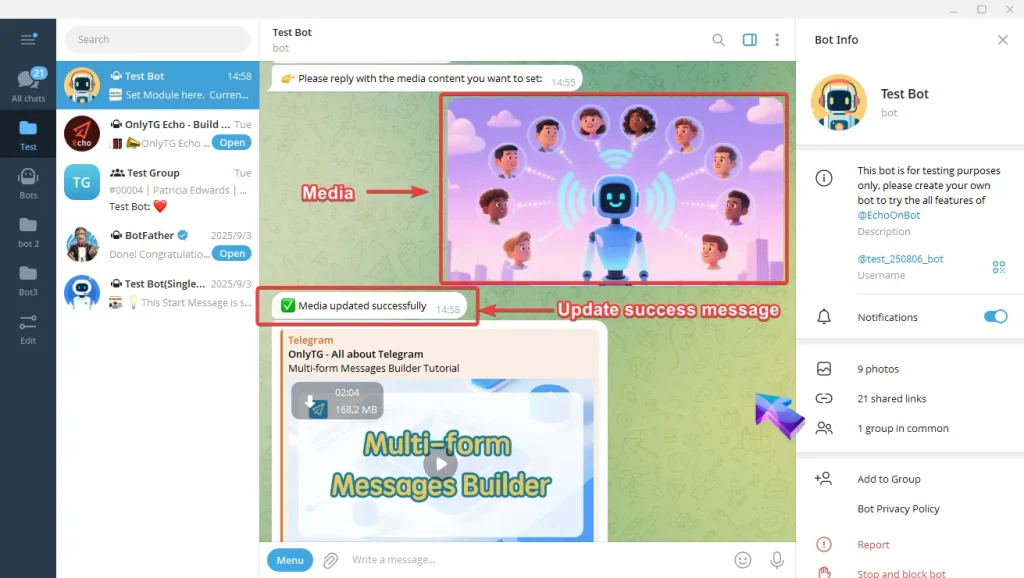
b. Add Media, select a media file to upload, can be pictures, videos or other media files. Once the update success message pops up, it means the process is complete.
Create Broadcast Task

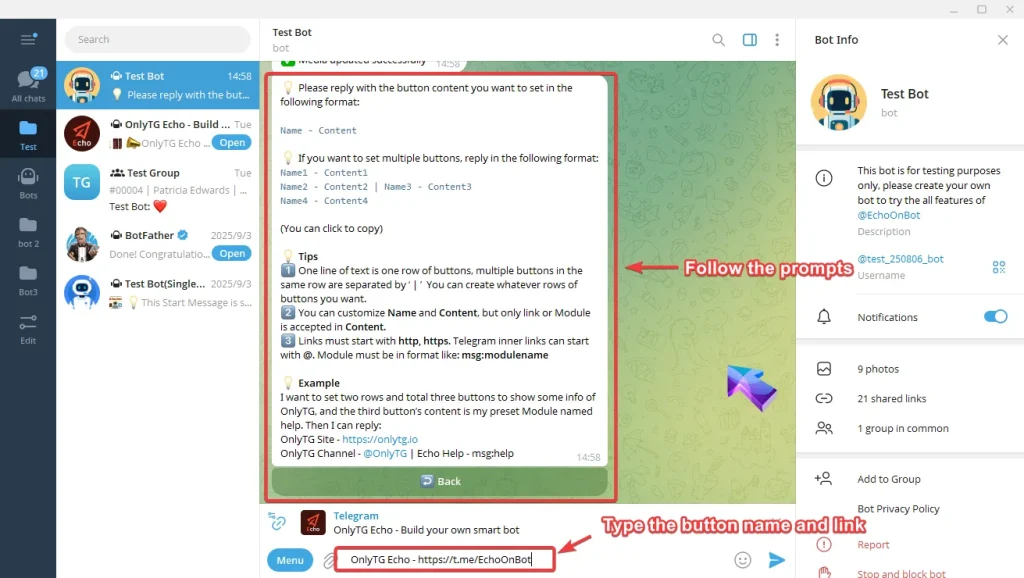
c. Add Button, type button’s name and the content but only link or Module is accepted in Content.

Note:

One line of text is one row of buttons, multiple buttons in the same row are separated by ‘ | ’  .

Links must start with http, https.

Module must be in format like: msg:modulename.
Create Broadcast Task

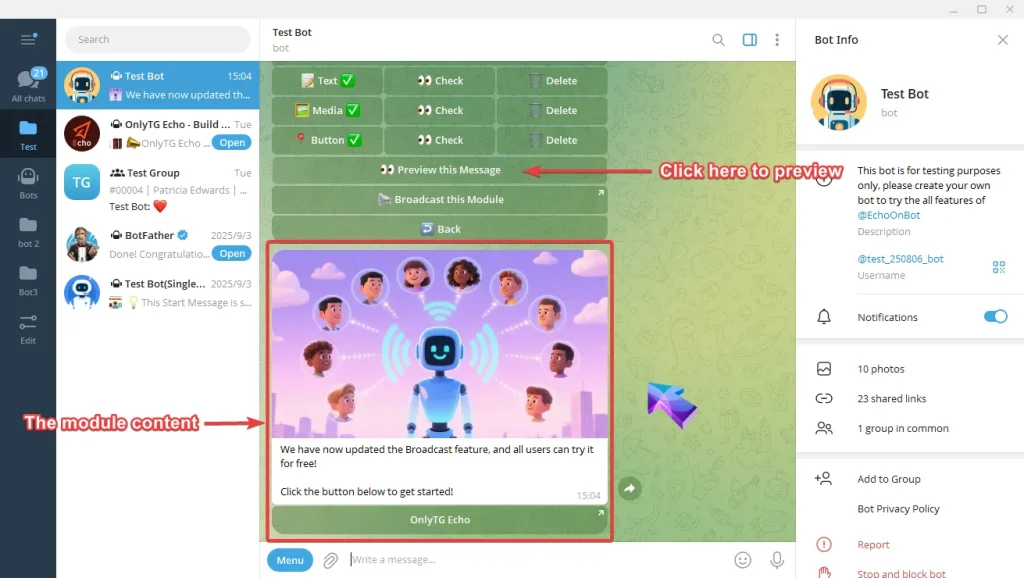
D. Click the Preview this message button can check this content module.
Create Broadcast Task


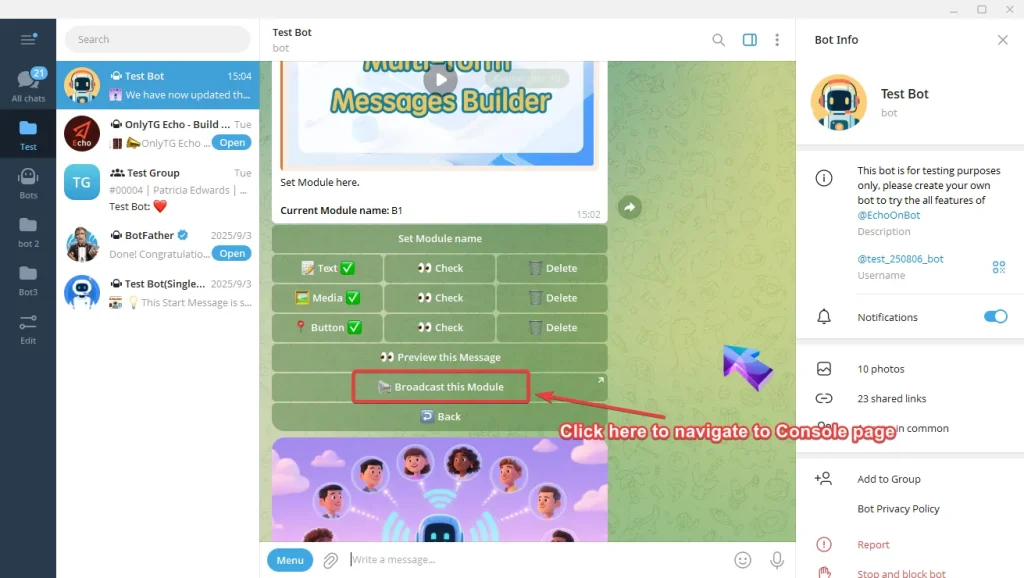
E. Click the Broadcast this Module button to navigate to Console page. (app.onlytg.io)
Create Broadcast Task

step 3

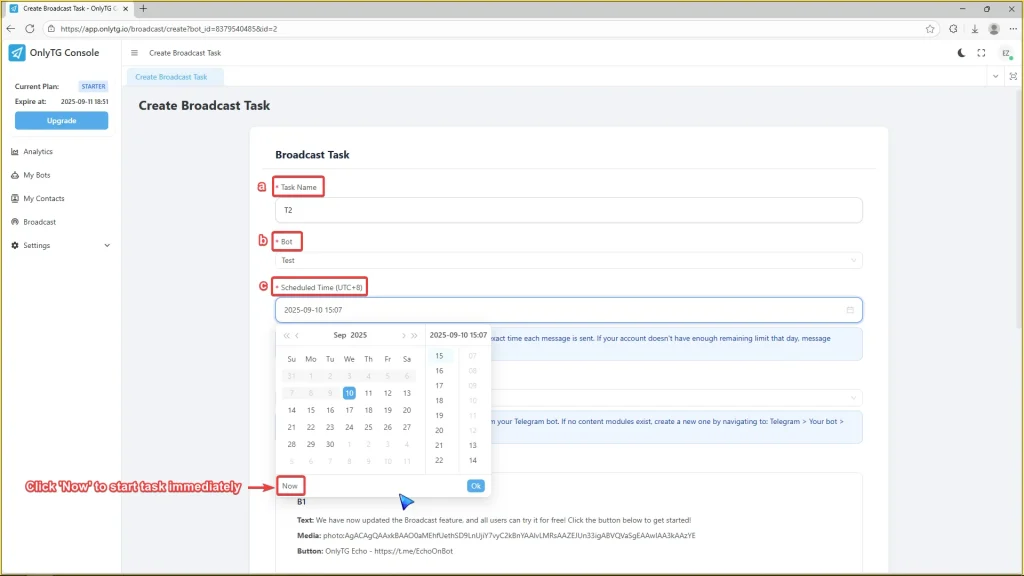
A. Create the broadcast task.

a. Enter task name.

b. Select the bot to be used to broadcast.

c. Scheduled the task start time.

(If the scheduled time isn’t specified, the task will start immediately.)
Create Broadcast Task

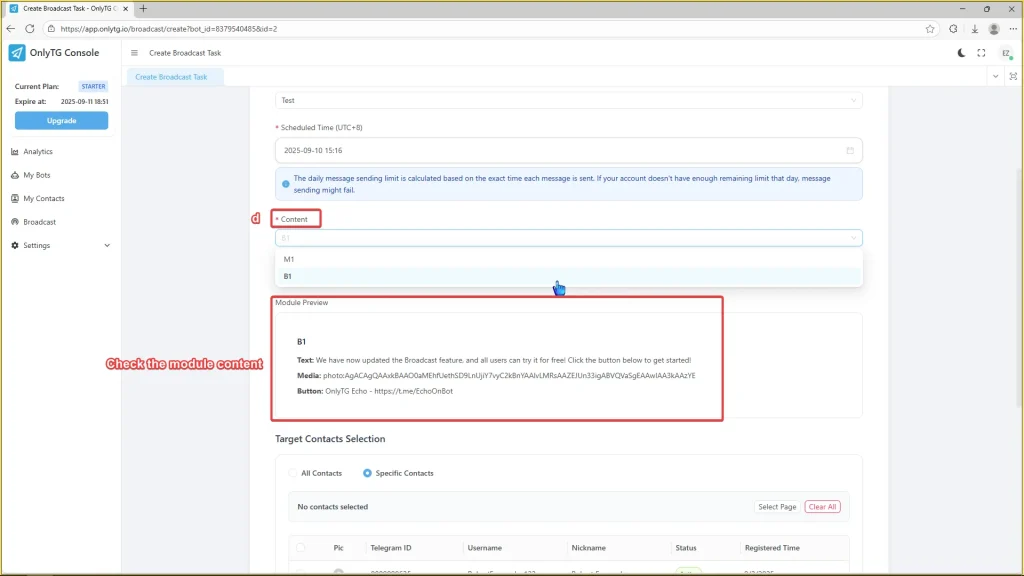
d. Select the preset content module you want to broadcast, and you can preview the moduel here.
Create Broadcast Task

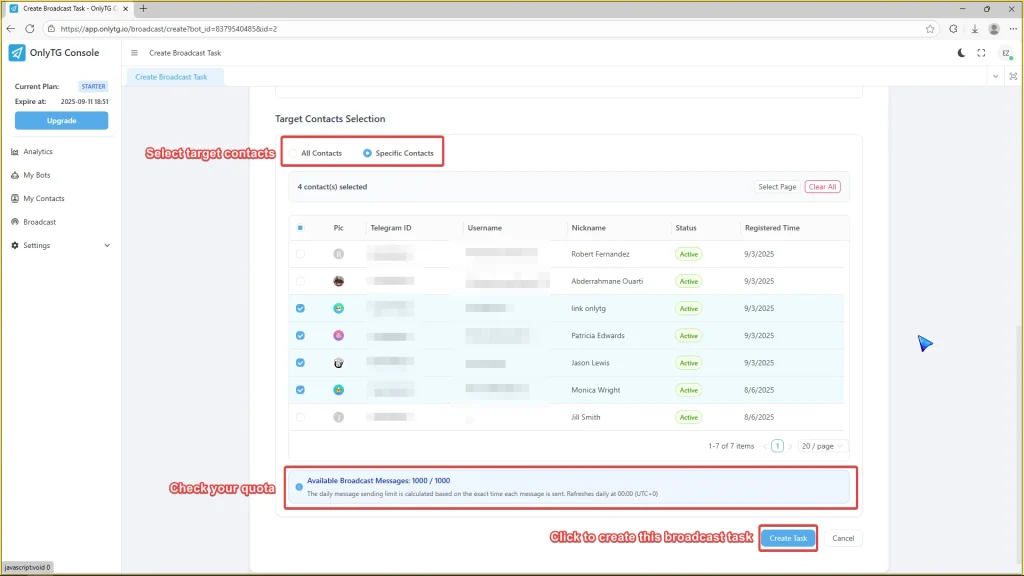
e. Select your target contacts. You can click “All Contacts” to message everyone, or pick specific contacts.

(Only the contacts who started your bot can be selected.)

f. Check you available broadcast messages, then click the Create Task button.

(The daily message sending limit is calculated based on the exact time each message is sent. Refreshes daily at 00:00 (UTC+0).)
Create Broadcast Task

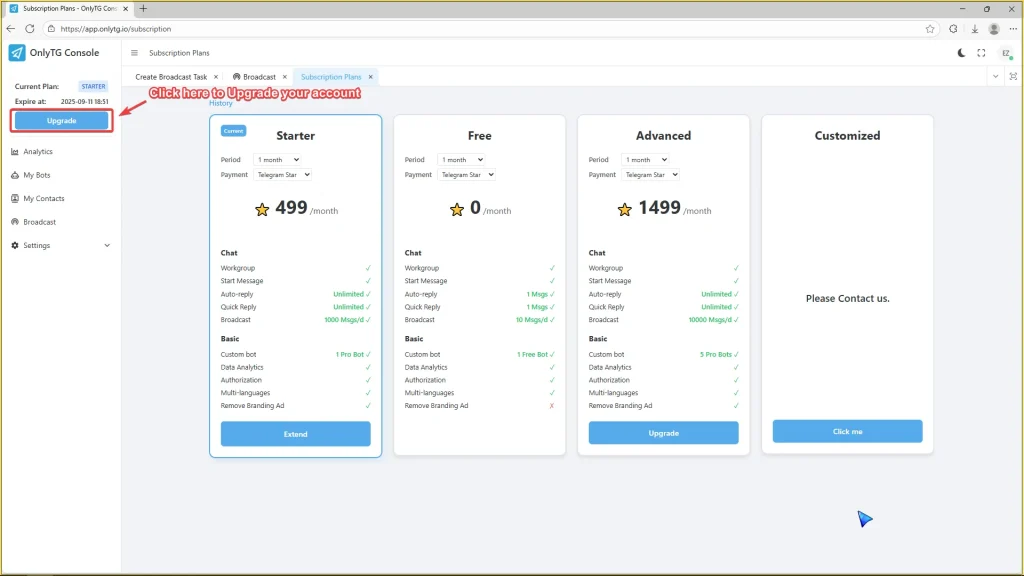
B. Upgrade your account to unlock higher broadcast limits.
Create Broadcast Task

step 4

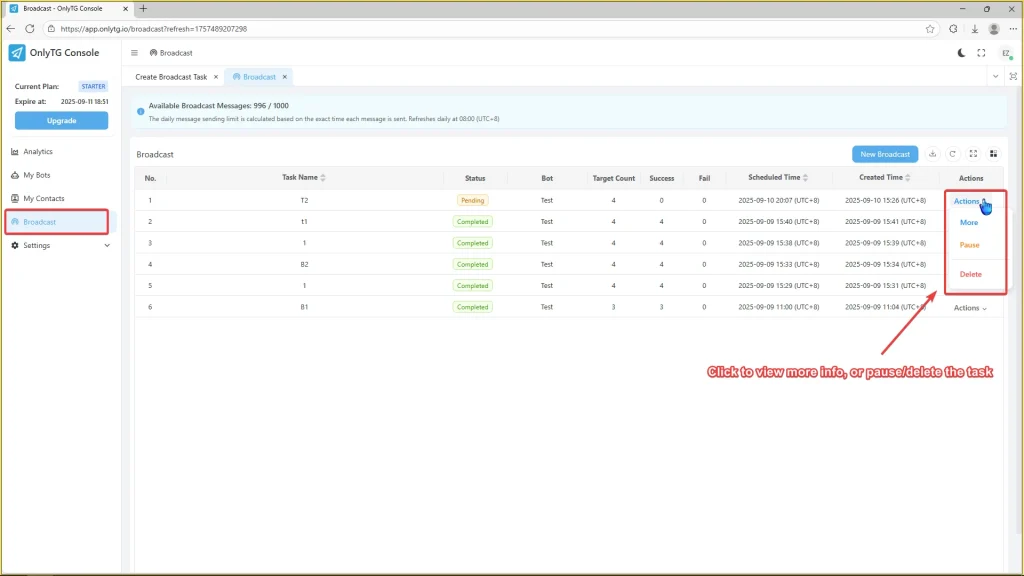
You can check the task info in the Broadcast interface.

Click the Actions to view more info or pause/delete the task if you need to.
Create Broadcast Task

Share This Article :

  • Facebook
  • X
  • LinkedIn
Set Quick ReplyTracking Links
Table of Contents
  • Video Tutorial
  • step 1
  • step 2
  •  
  • step 3
  • step 4
  • Latest Post
  • Echo
  • Recorder
  • Tips
Telegram Tips

Telegram Content Strategy That Actually Works in 2026

A practical Telegram content strategy for 2026 with channel setup, posting cadence, Stories, polls, comments, analytics, and monetization basics.

Telegram Tips

Top Telegram Features You Should Actually Use in 2026

Explore the most useful Telegram features in 2026, from channels and large groups to bots, stories, secret chats, file sharing, and business tools.

Telegram Tips

Passive Income on Telegram in 2026

Learn practical, proven ways to build passive income on Telegram in 2026 using channel ad revenue, paid memberships, bots, digital products, Telegram Stars, and compliant affiliate offers.

Telegram Tips

Telegram Earning Money: Best Ways to Start in 2026

Learn the most practical ways to make money on Telegram in 2026, from channel ads and subscriptions to Stars, bots, mini apps, affiliates, and digital sales.

Telegram Tips

Public Telegram Channels Guide in 2026

Learn what public Telegram channels are, how they work, how to create one, and when to use them in 2026. This practical guide covers features, limits, discovery, moderation, content planning, and common mistakes.

Telegram Tips

Telegram Mini Apps Explained in 2026

Learn what Telegram Mini Apps are, how they work, key features, launch methods, payments, security, limitations, and practical use cases in 2026.

Telegram Tips

Best Telegram AI Tools to Try in 2026

Explore the most useful Telegram AI tools in 2026, including chatbots, agents, image generators, builders, and Mini Apps. This guide explains what they do, how they work, and how to choose the right option for personal use, teams, or business workflows.

Telegram Tips

Telegram Bot Automation Guide in 2026

Learn how Telegram bot automation works in 2026, including setup, Bot API basics, webhooks vs long polling, business bots, Mini Apps, rate limits, and practical deployment tips.

How to Get Unbanned from Telegram in 2026: A Practical Step-by-Step Guide

If your Telegram account or phone number has been restricted, this guide explains how to confirm the ban, appeal to Telegram support, reduce spam flags, and avoid getting blocked again in 2026.

How to create telegram bot in 2026?

Learn how to create a Telegram bot in 2026 using BotFather, with step-by-step coding and no-code methods, plus tips for security, deployment, and choosing the best setup.

How to Loop Post in Channel via Telegram Bot

OnlyTG Echo provides the function to automatically loop posts in your channel. Firstly, you need to create a new bot via @botfather and…

How to Configure Multiple Media when Setting OnlyTG Echo Features

OnlyTG Echo provides the function to configure multiple media to a single message when setting Start Message/Auto Reply/Quick Reply/Broadcast and other features. Firstly, you need…

How to Upgrade Channel to Pro Channel in Telegram

OnlyTG Echo provides the function to upgrade your channel to Pro Channel. This will consume your Pro Communities slots and unlock more advanced features….

How to Edit a Published Post via Telegram Bot

OnlyTG Echo provides the function to Edit Channel Post via your bot. Firstly, you need to create a new bot via @botfather and…

How to Publish Channel Post via Telegram Bot

OnlyTG Echo provides the function to Publish Channel Post via your bot. Firstly, you need to create a new bot via @botfather and…

How to Manage Channel via Telegram Bot

OnlyTG Echo provides the function to Manage Channel via your bot. Firstly, you need to create a new bot via @botfather and send its…

How to Use OnlyTG Recorder?

Welcome to OnlyTG Recorder! Developed by our dedicated bot development team, OnlyTG Recorder is designed to serve as an assistant…

Telegram Content Strategy That Actually Works in 2026

A practical Telegram content strategy for 2026 with channel setup, posting cadence, Stories, polls, comments, analytics, and monetization basics.

Top Telegram Features You Should Actually Use in 2026

Explore the most useful Telegram features in 2026, from channels and large groups to bots, stories, secret chats, file sharing, and business tools.

Passive Income on Telegram in 2026

Learn practical, proven ways to build passive income on Telegram in 2026 using channel ad revenue, paid memberships, bots, digital products, Telegram Stars, and compliant affiliate offers.

Telegram Earning Money: Best Ways to Start in 2026

Learn the most practical ways to make money on Telegram in 2026, from channel ads and subscriptions to Stars, bots, mini apps, affiliates, and digital sales.

Public Telegram Channels Guide in 2026

Learn what public Telegram channels are, how they work, how to create one, and when to use them in 2026. This practical guide covers features, limits, discovery, moderation, content planning, and common mistakes.

Telegram Mini Apps Explained in 2026

Learn what Telegram Mini Apps are, how they work, key features, launch methods, payments, security, limitations, and practical use cases in 2026.

Best Telegram AI Tools to Try in 2026

Explore the most useful Telegram AI tools in 2026, including chatbots, agents, image generators, builders, and Mini Apps. This guide explains what they do, how they work, and how to choose the right option for personal use, teams, or business workflows.

Telegram Bot Automation Guide in 2026

Learn how Telegram bot automation works in 2026, including setup, Bot API basics, webhooks vs long polling, business bots, Mini Apps, rate limits, and practical deployment tips.

  • OnlyTG
  • Echo
  • Recorder
  • Help
  • Blog
  • Echo Pricing
OnlyTG EchoTelegram VK YouTube Facebook X Email

© 2026 OnlyTG

Scroll to top
  • Products
    • Echo
    • Recorder
  • Resources
    • Help
    • Blog
  • Pricing
    • Echo Pricing
Contact us