Skip to content
OnlyTG Icon
  • ProductsExpand
    • Echo
    • Recorder
  • ResourcesExpand
    • Help
    • Blog
    • Telegram Channel&Bot Finder
  • PricingExpand
    • Echo Pricing
  • EnglishExpand
    • 中文 (中国)
    • Русский
    • English
Contact us

OnlyTG Echo

  • Introduction
  • How to start
  • Chatbots
    • Message Receive and Reply
    • Set Start Message
    • Dynamic Start Message
    • Set Auto-reply and keywords-based reply
    • Set Quick Reply
    • Create Broadcast Task
    • Tracking Links
    • Bot Menu
    • Ban Contacts
    • Recall Messages
  • Channels
    • Channel Management
    • Channel Post
    • Channel Post Edit
    • Pro Communities – Channel
    • Loop Post on Telegram Channels
  • Groups
    • Group Management
    • Group CAPTCHA
    • Group Greeting
    • Group Rules
    • Keywords Reply for Group
    • Pro Communities – Group
    • Group Post and Loop Post
  • Others
    • Multi-form Messages Builder
    • Change to Topic Mode
    • Multimedia Messages
    • Set and use content module
    • Edit bot infomation
    • View My Bot’s Statistics
    • Tag Contacts
    • Authorization

OnlyTG Recorder

  • Introduction
  • Record Message and Foward
  • Save Record
  • Lock Record
  • Edit Record Title
  • Timezone
View Categories
  • Home
  • Docs
  • Dynamic Start Message

Dynamic Start Message

2 min read

OnlyTG Echo provides the function to set Dynamic Start Message. Bot can automatically send different start messages to users coming from different sources.

Video Tutorial

step 1

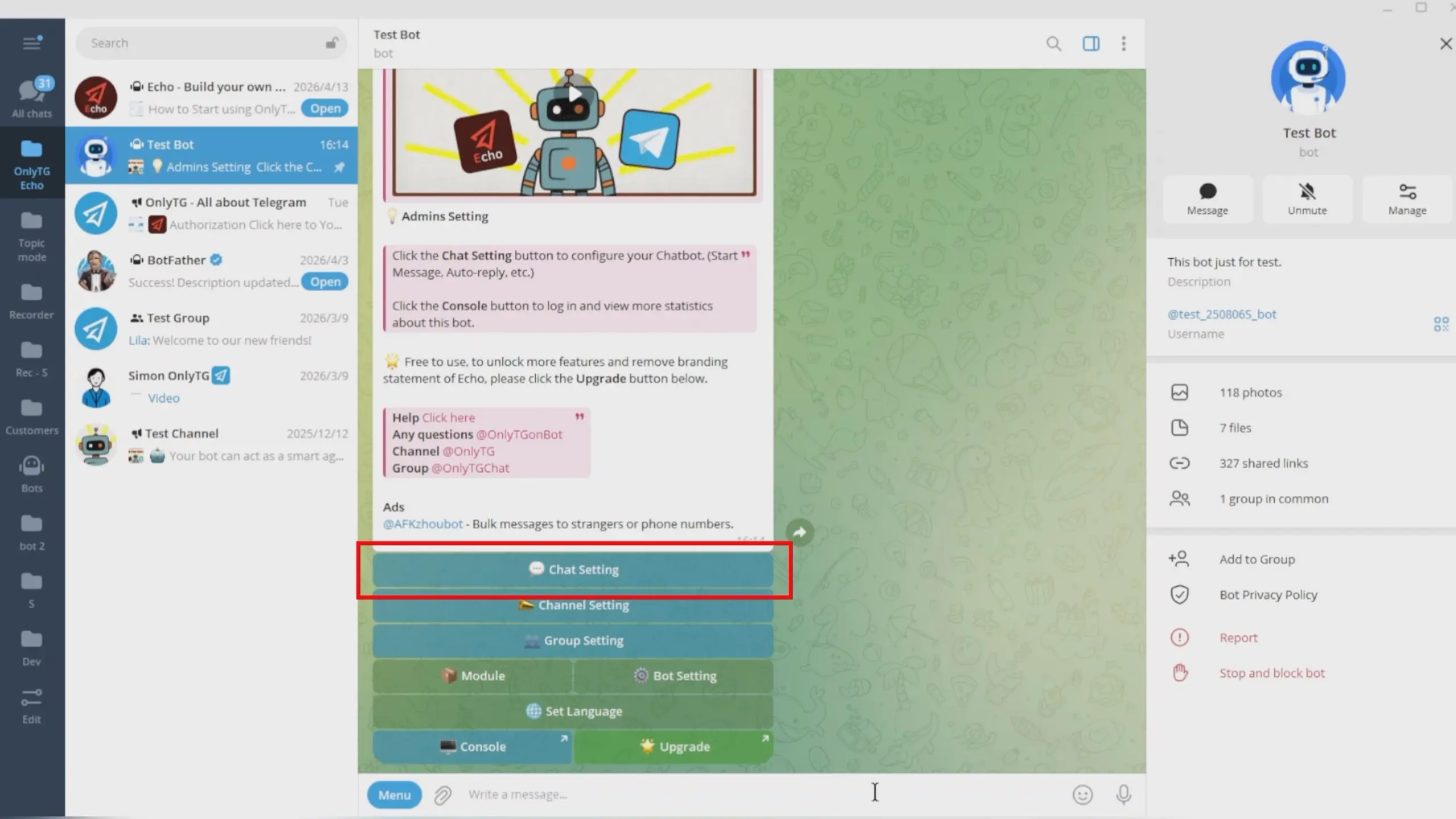
Send /start command to your Bot, select Chat Setting.
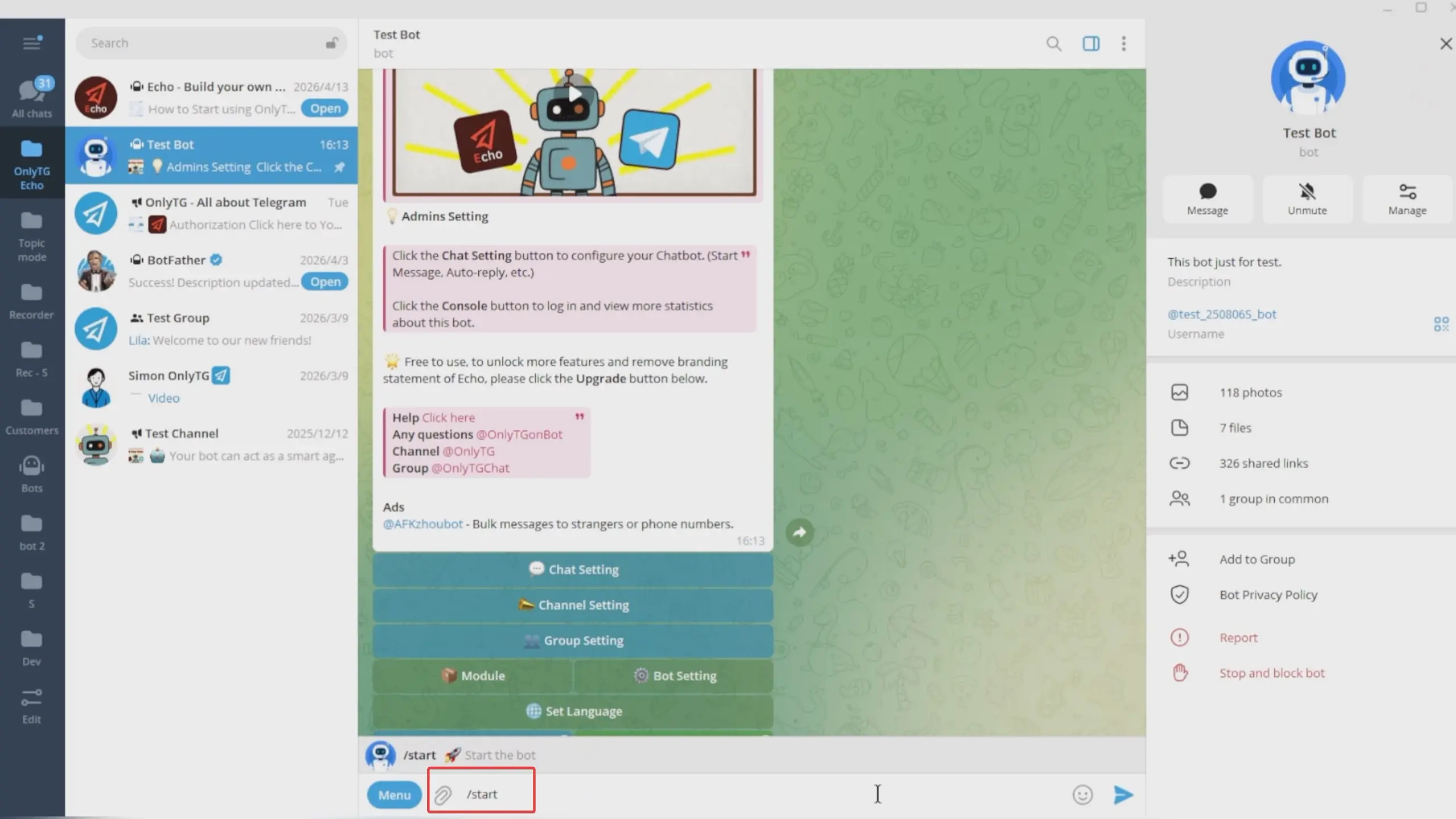
Dynamic Start Message

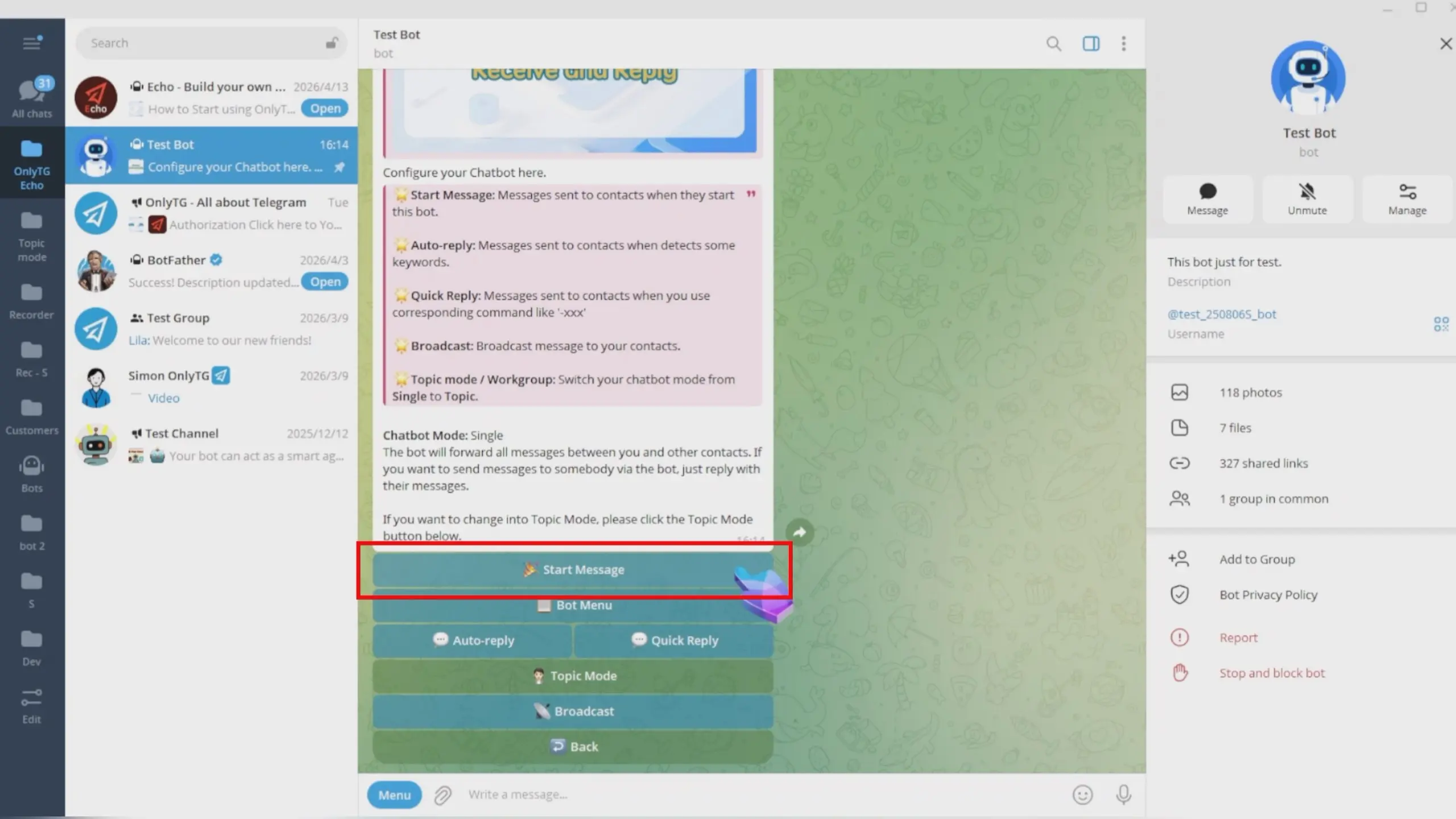
Click Start Message.

Dynamic Start Message

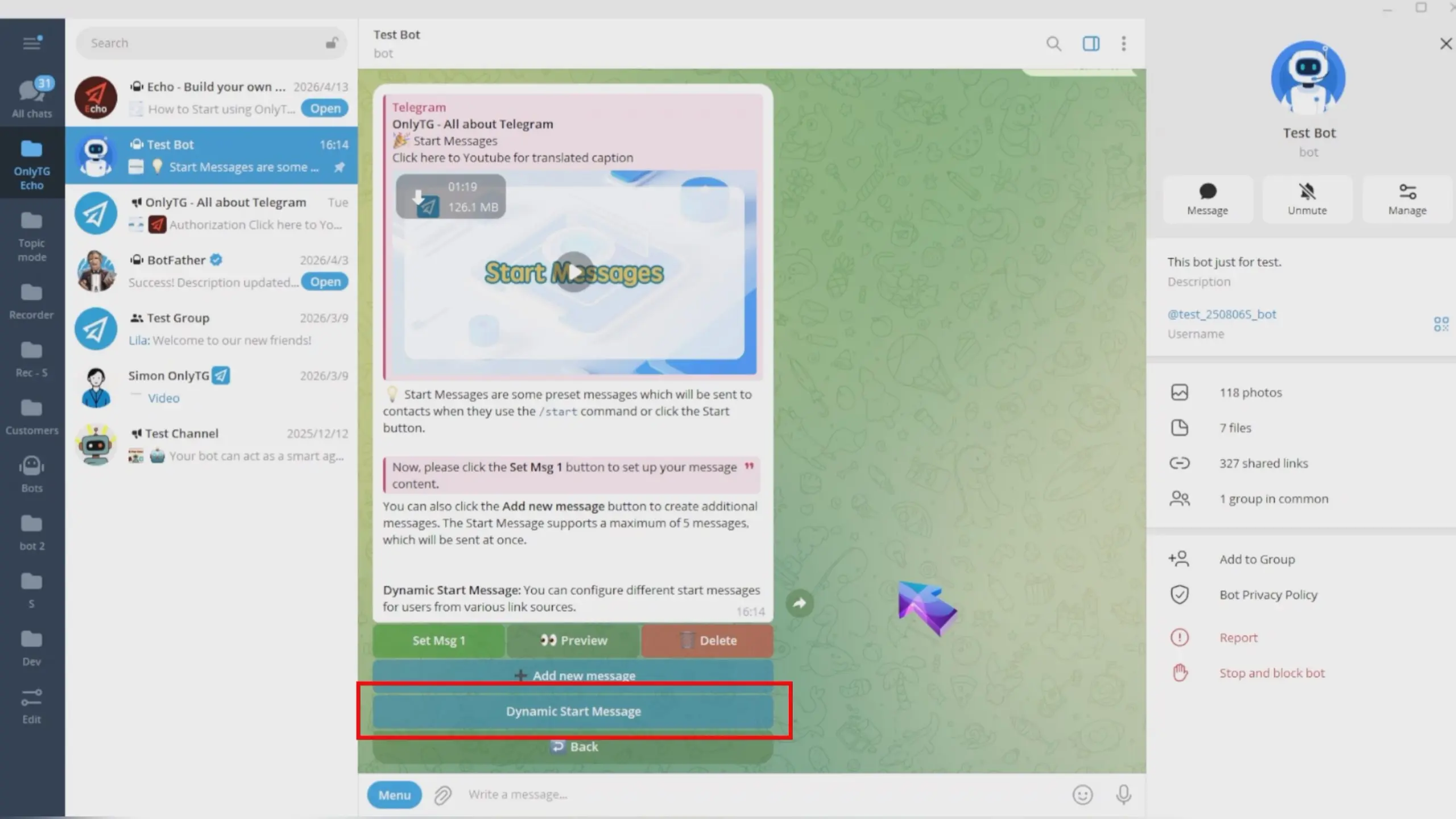
Click Dynamic Start Message.

Dynamic Start Message

These start messages will be displayed dynamically based on different tracking links added for contacts. If you have not set up the corresponding Tracking Links, the bot will only send a regular start message.
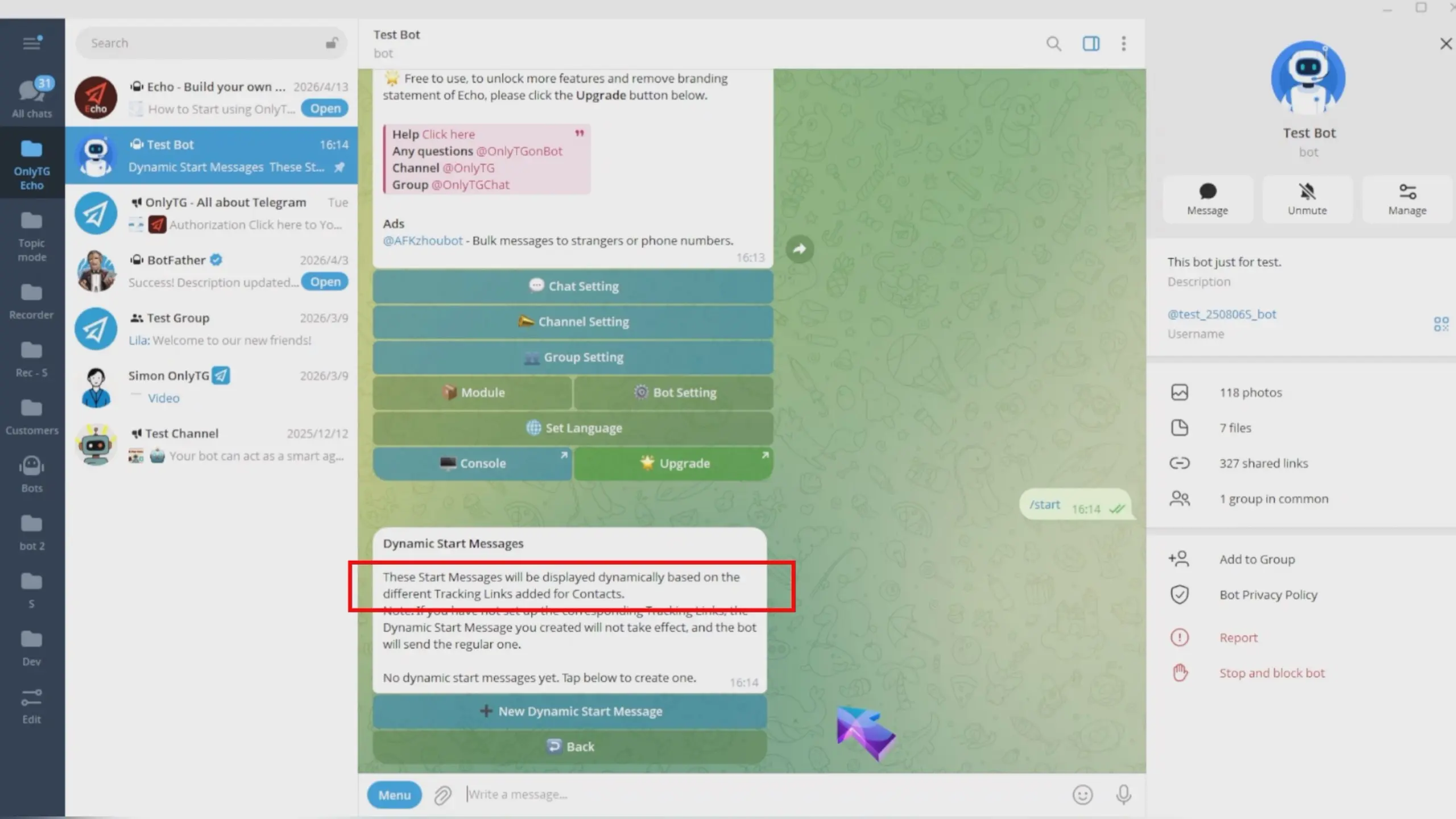
Dynamic Start Message

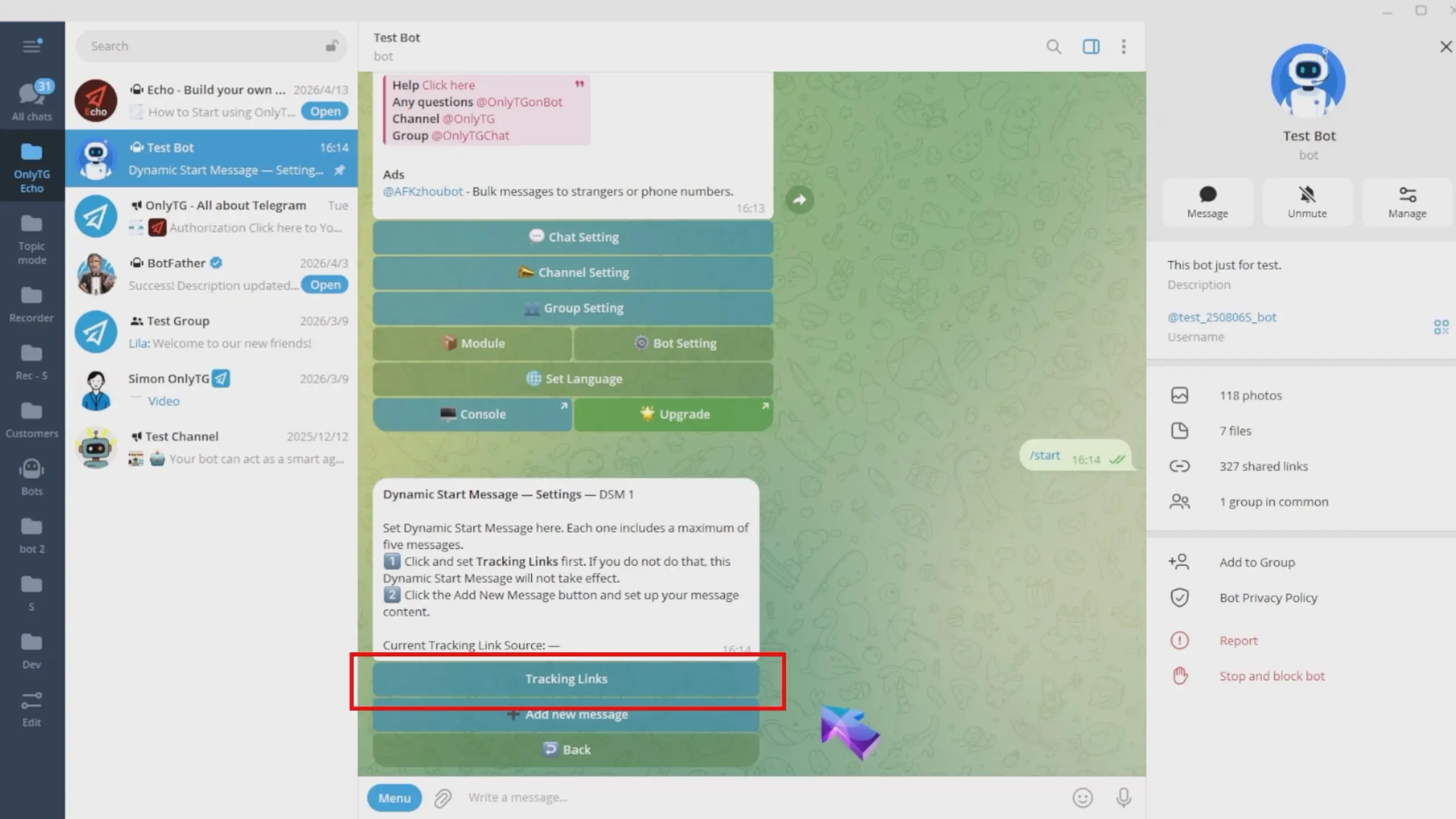
Tracking links refer to distinct invitation links for the same bot. You can set them up by following the subsequent steps below, or refer to our past tracking link tutorial to configure them in the OnlyTG Console.(Click here to learn how to set Tracking Links)

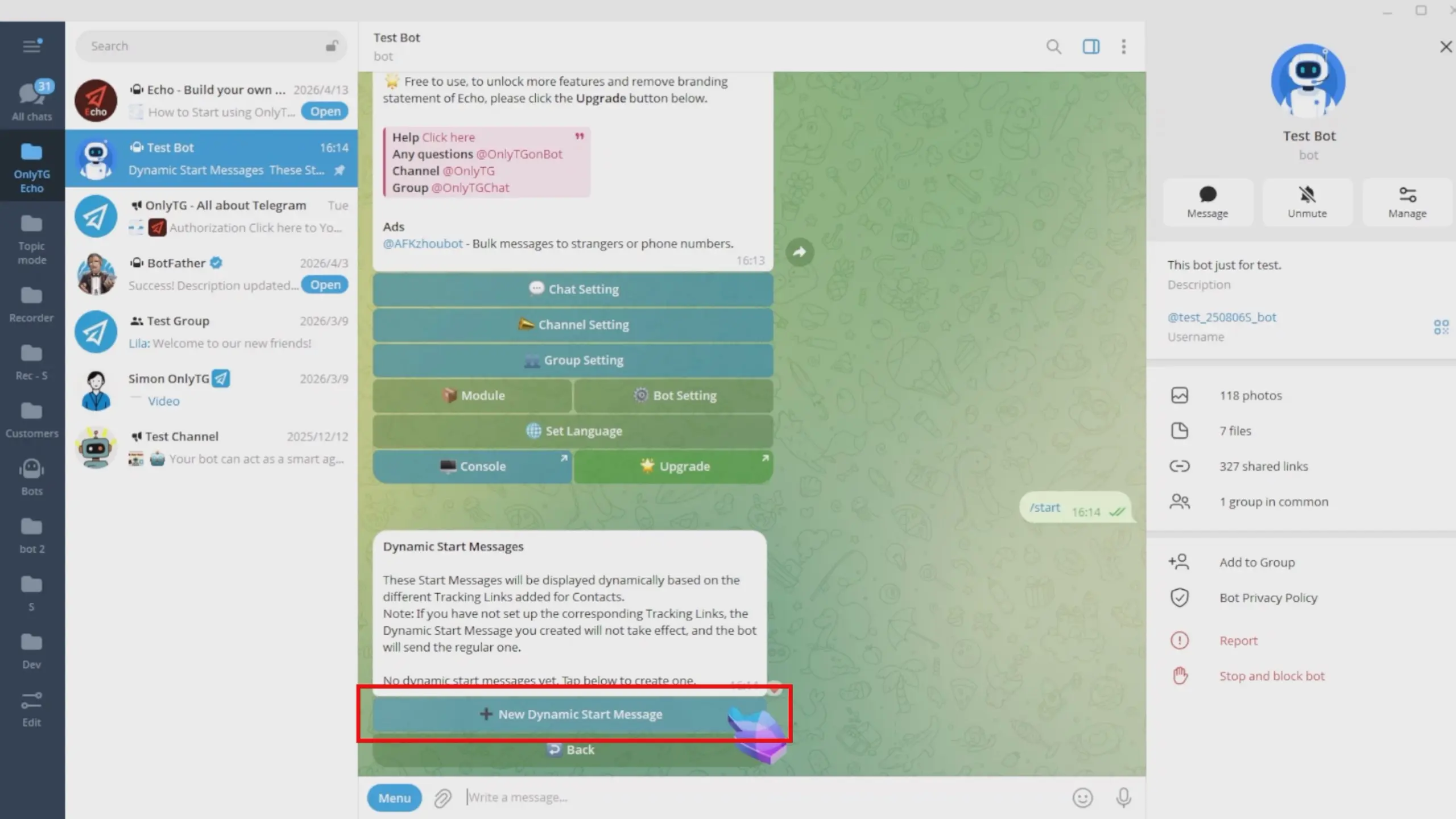
Click New Dynamic Start Message.
Dynamic Start Message

step 2

First, Click Tracking Links.

Dynamic Start Message

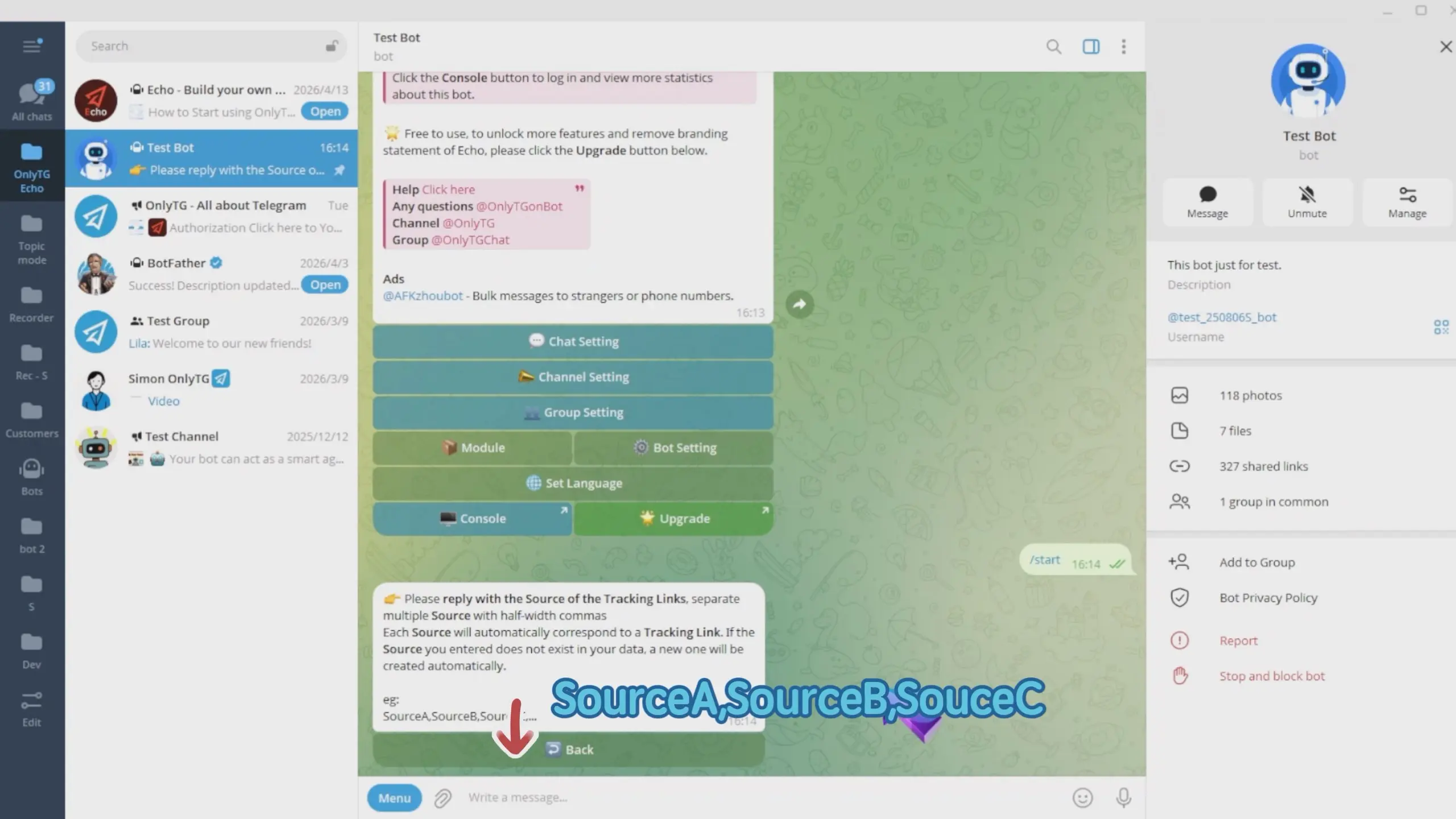
Enter your Source here, and separate multiple sources with half-width commas.
Dynamic Start Message

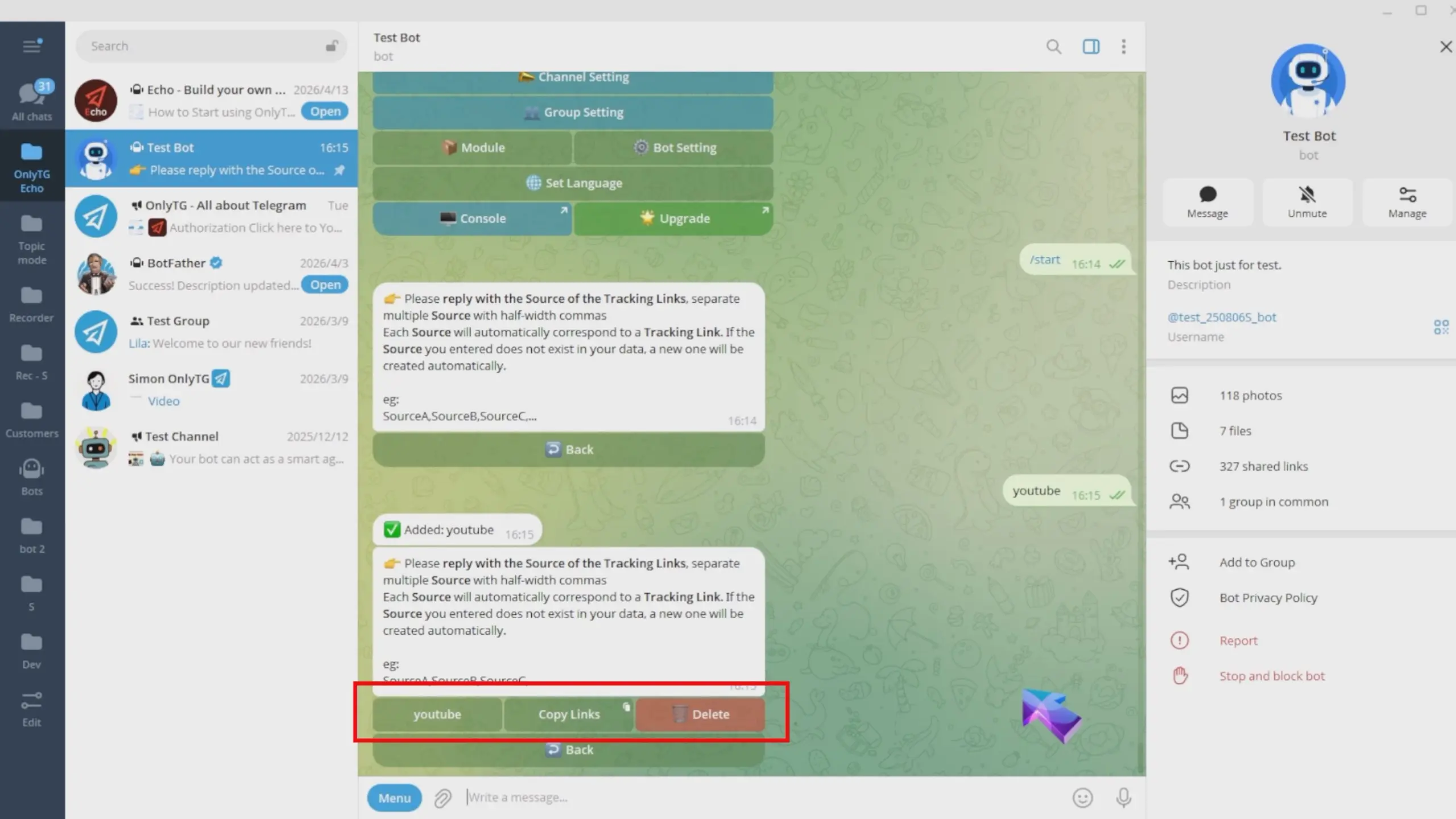
Each source will be automatically matched with a tracking link.
Dynamic Start Message

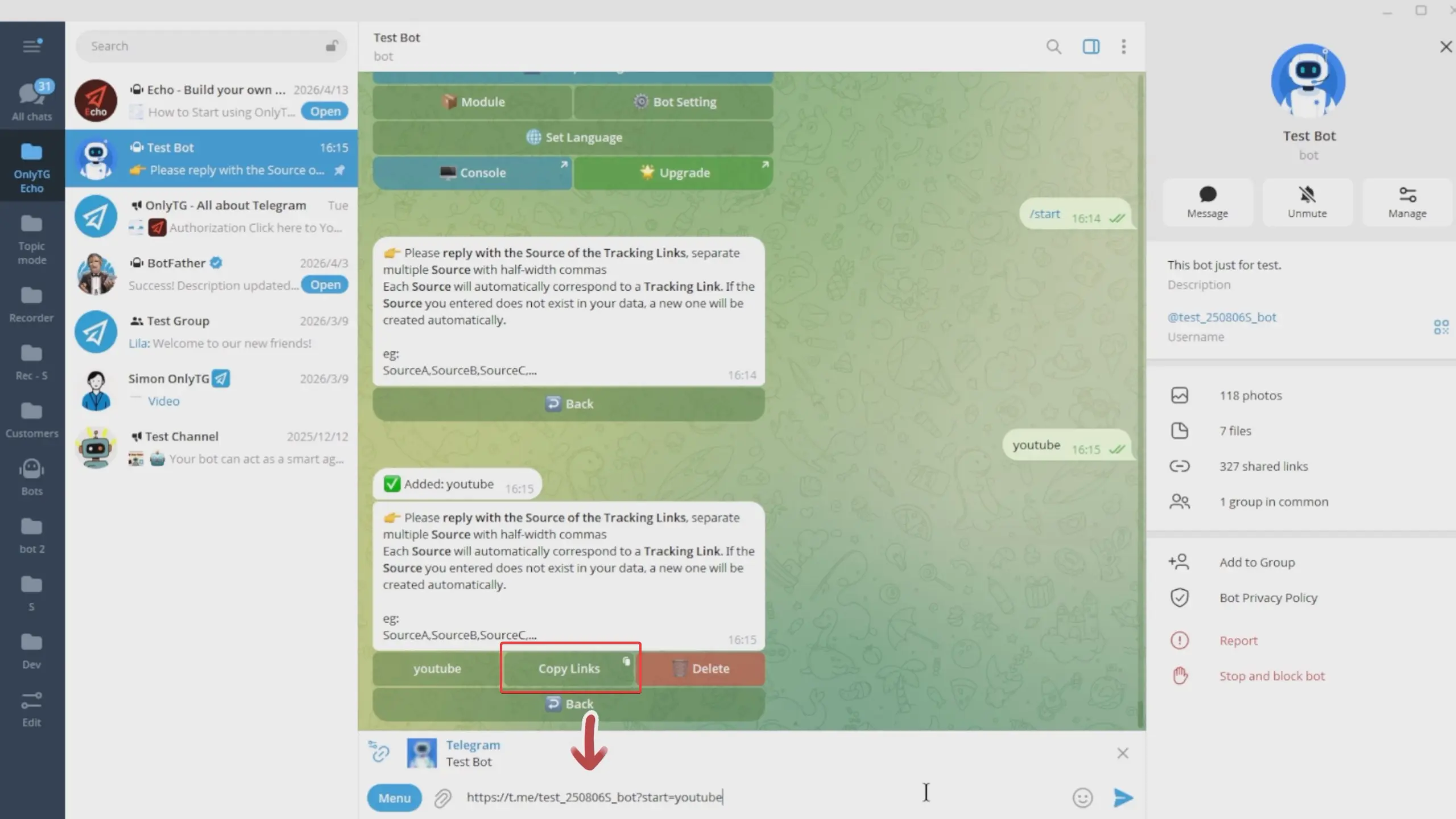
Click the Copy Links to copy it for use on your target platforms.
Dynamic Start Message

After configuring tracking links, click Back to return to the previous menu.
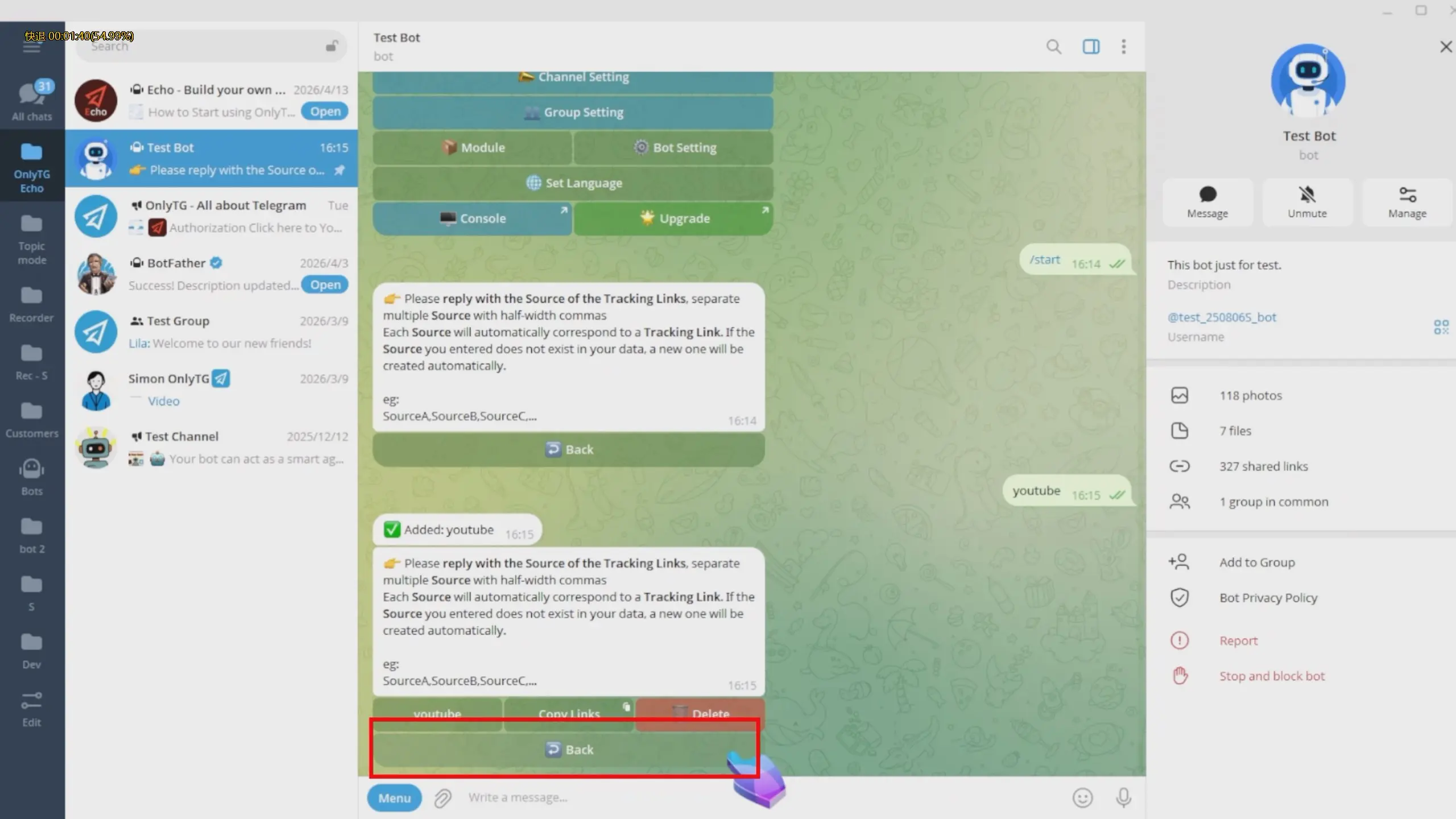
Dynamic Start Message

Here, you can view which Tracking Link Source matched with this dynamic start message. This means all users who add the bot through these link will receive this dynamic start message.
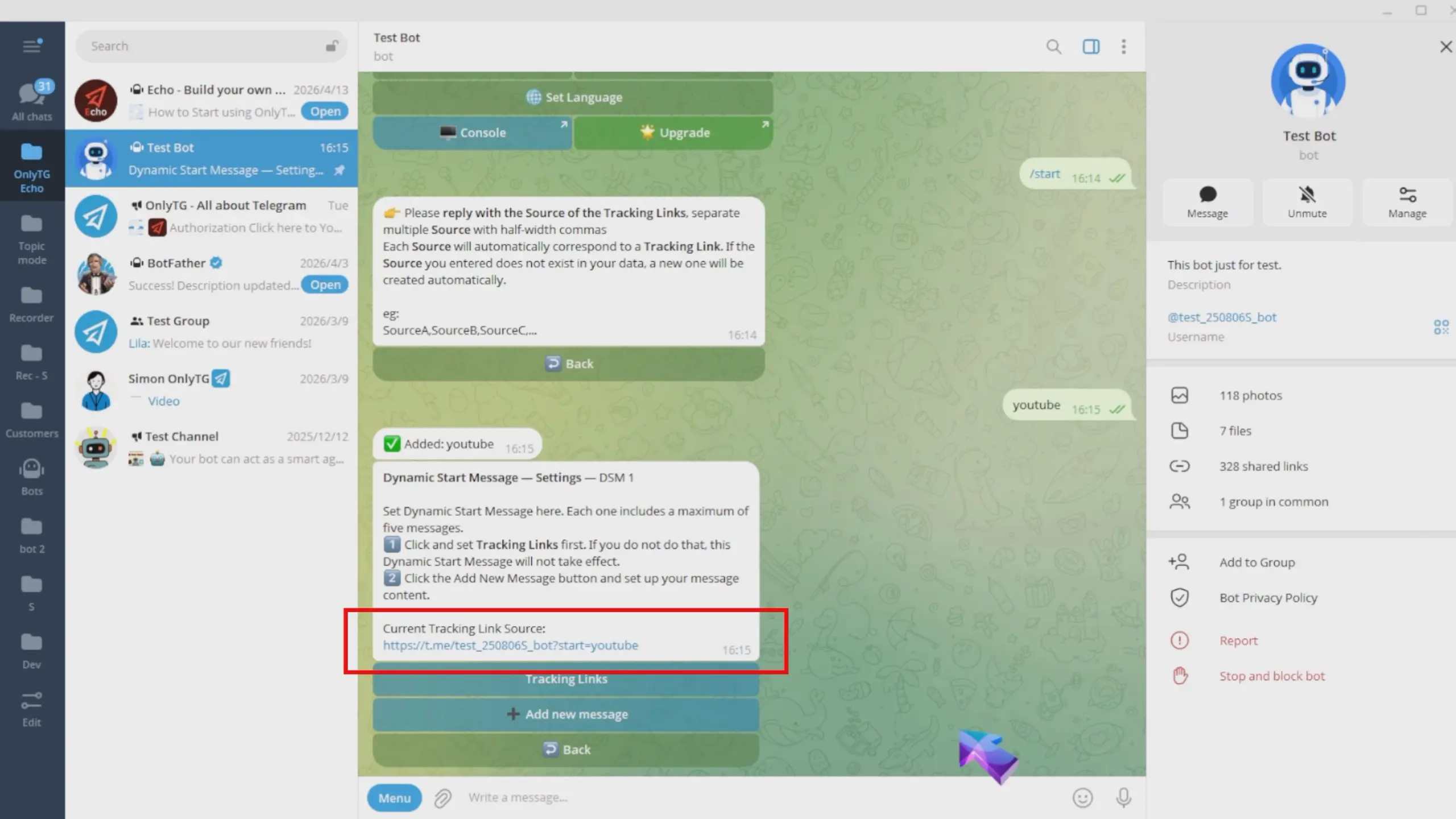
Dynamic Start Message

step 3

Next, configure the message content, Click Add New Message.
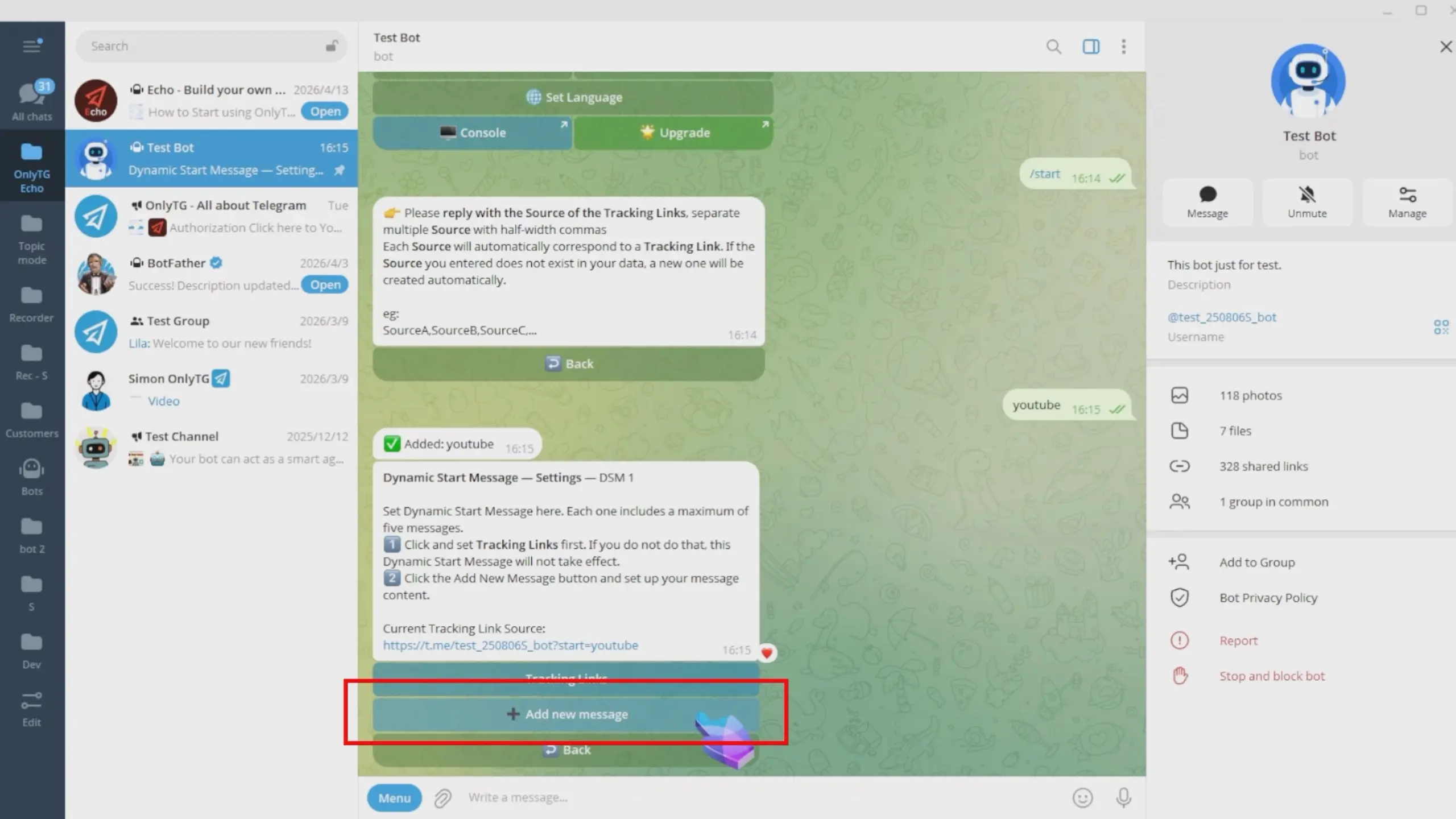
Dynamic Start Message

You can add text, media and buttons, with options to switch to Multimedia mode or directly use existing modules. For detailed steps, check our previous tutorial on the Multi-form Messages Builder.(Click here to learn how to set Multi-form Messages Builde )
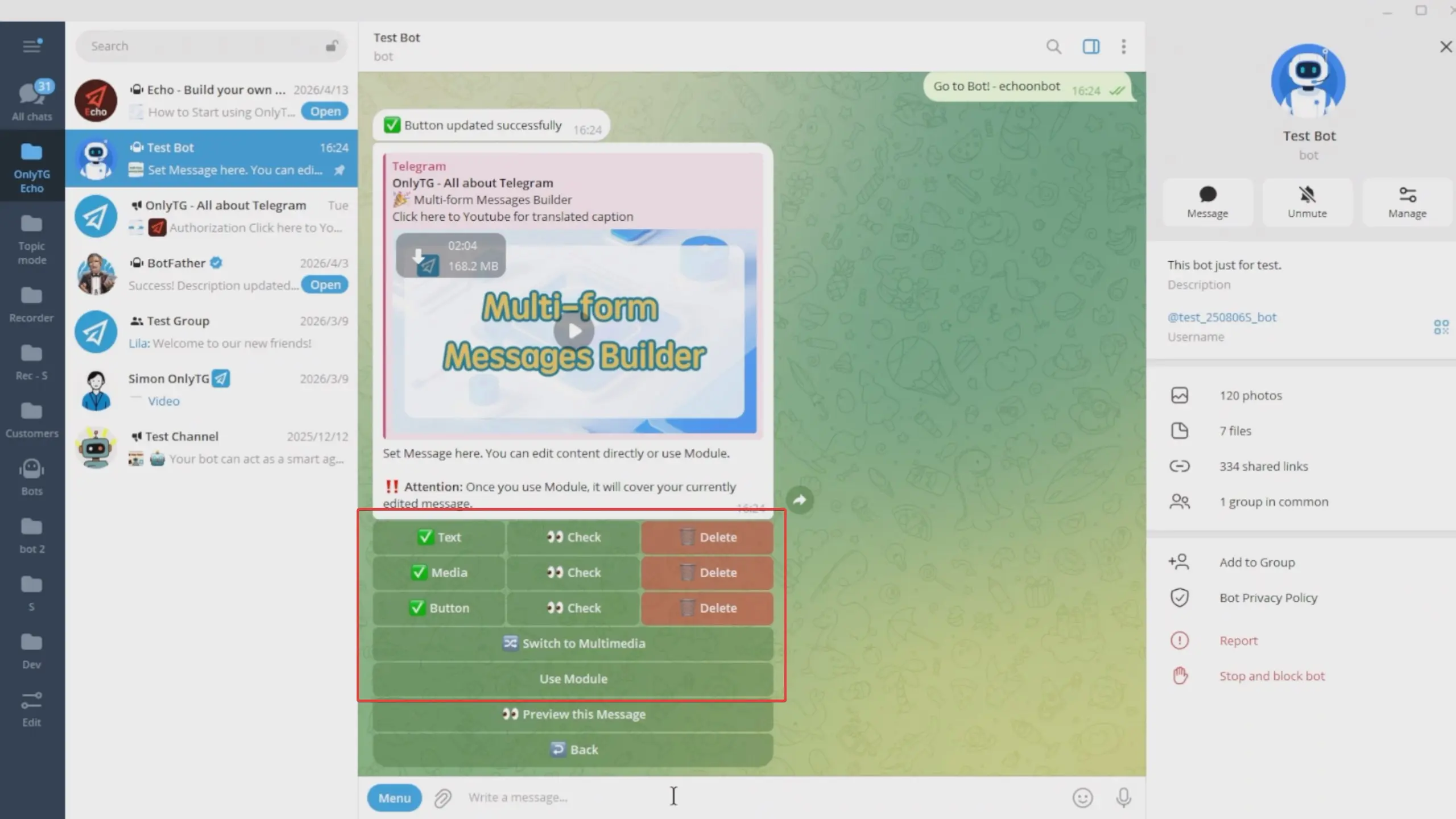
Dynamic Start Message

Now that the content setup is complete, click Preview This Message to preview it.
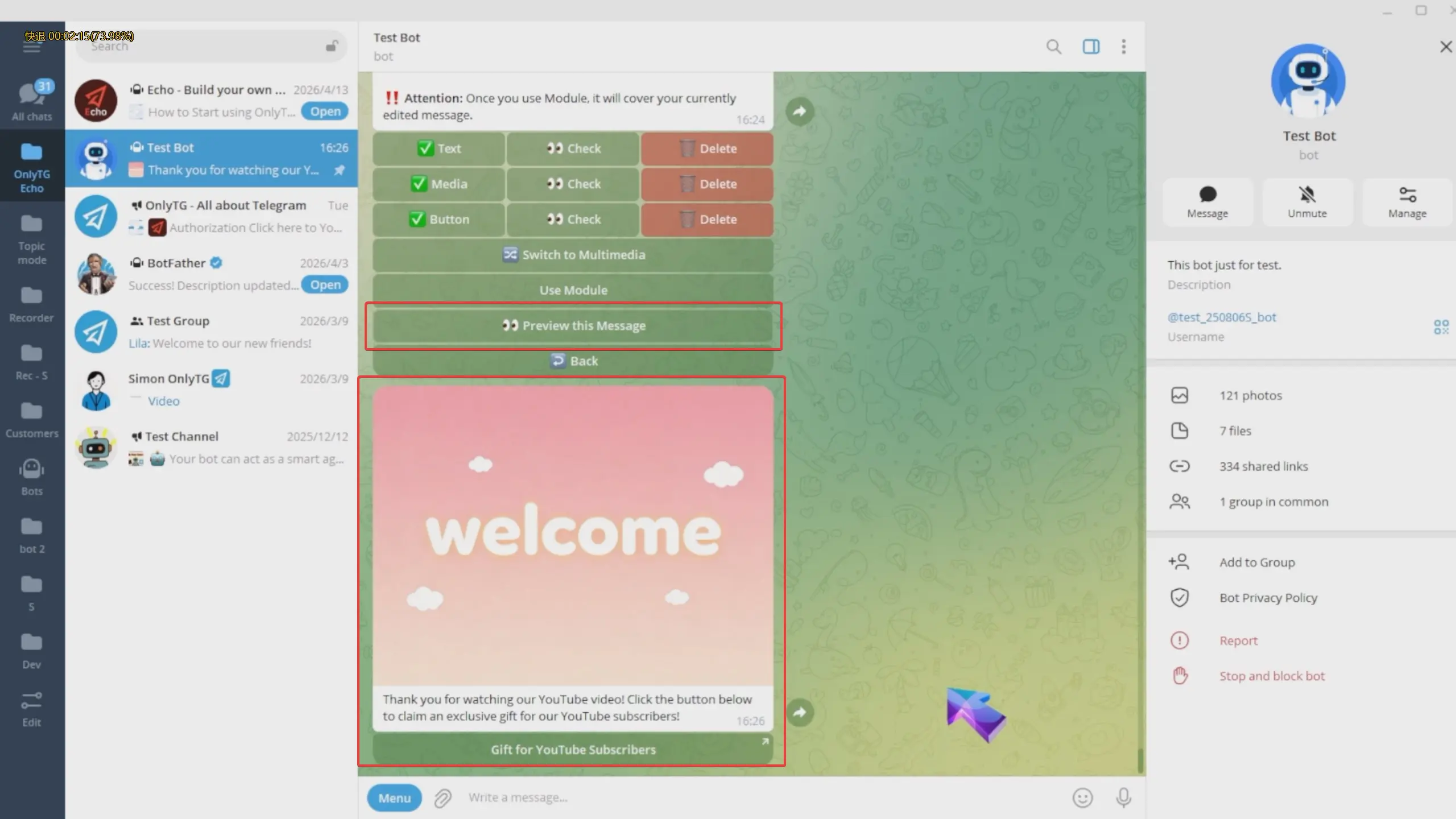
Dynamic Start Message

Each dynamic start message includes a maximum of five messages, which will be sent to users in sequential order.
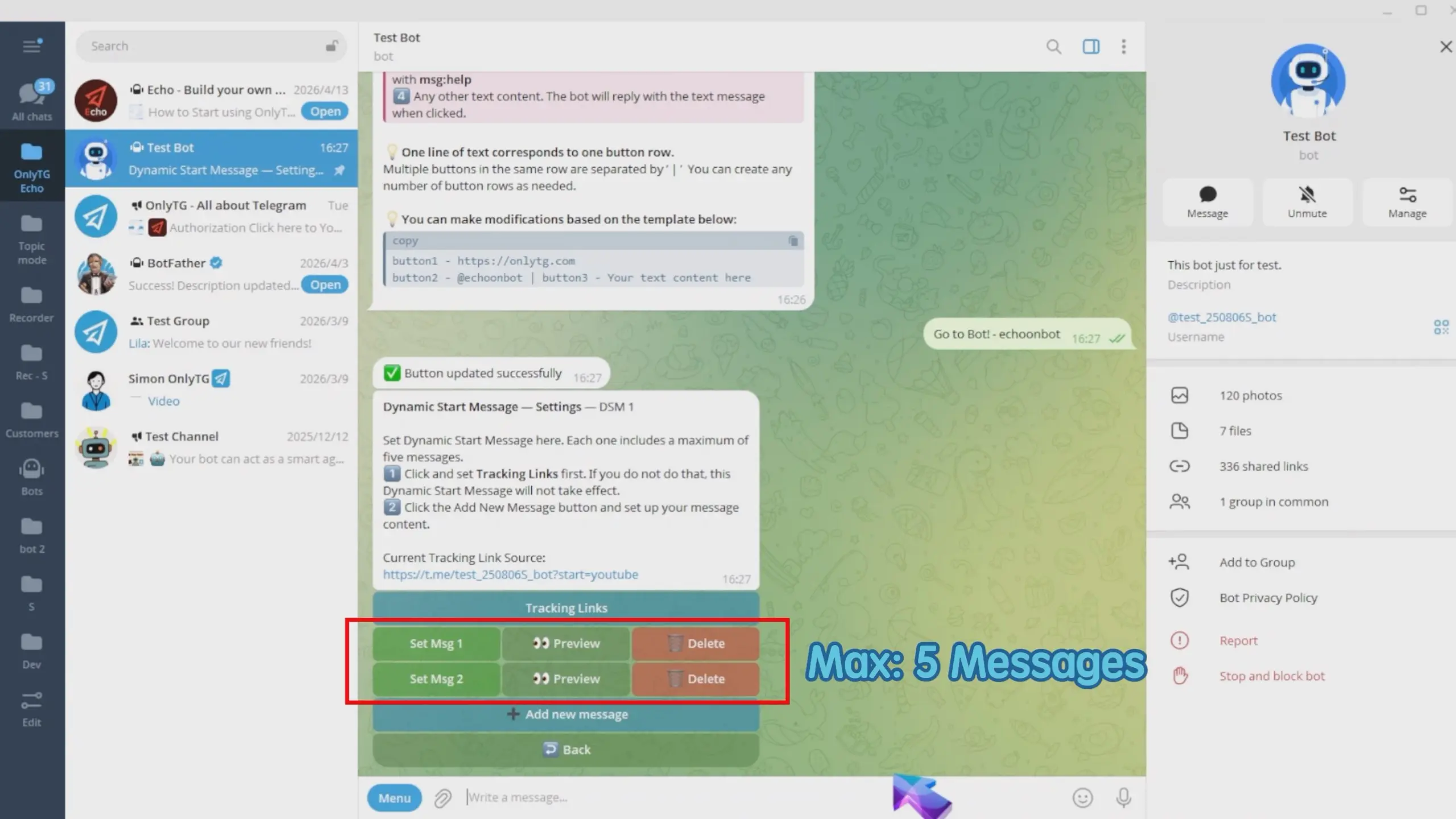
Dynamic Start Message

step 4

This dynamic start message setup is now complete. Click Back and repeat the same process to add multiple dynamic start messages.
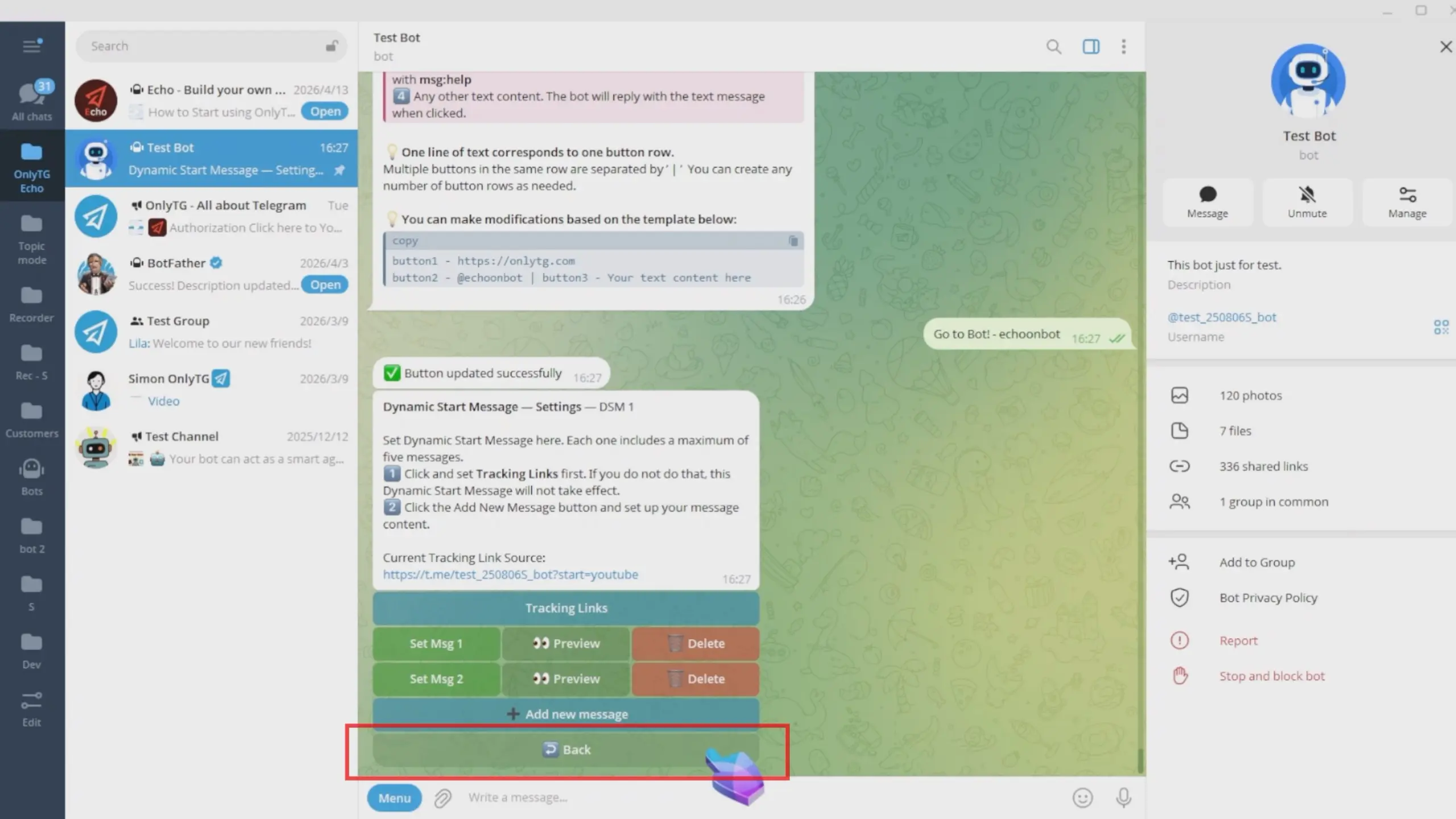
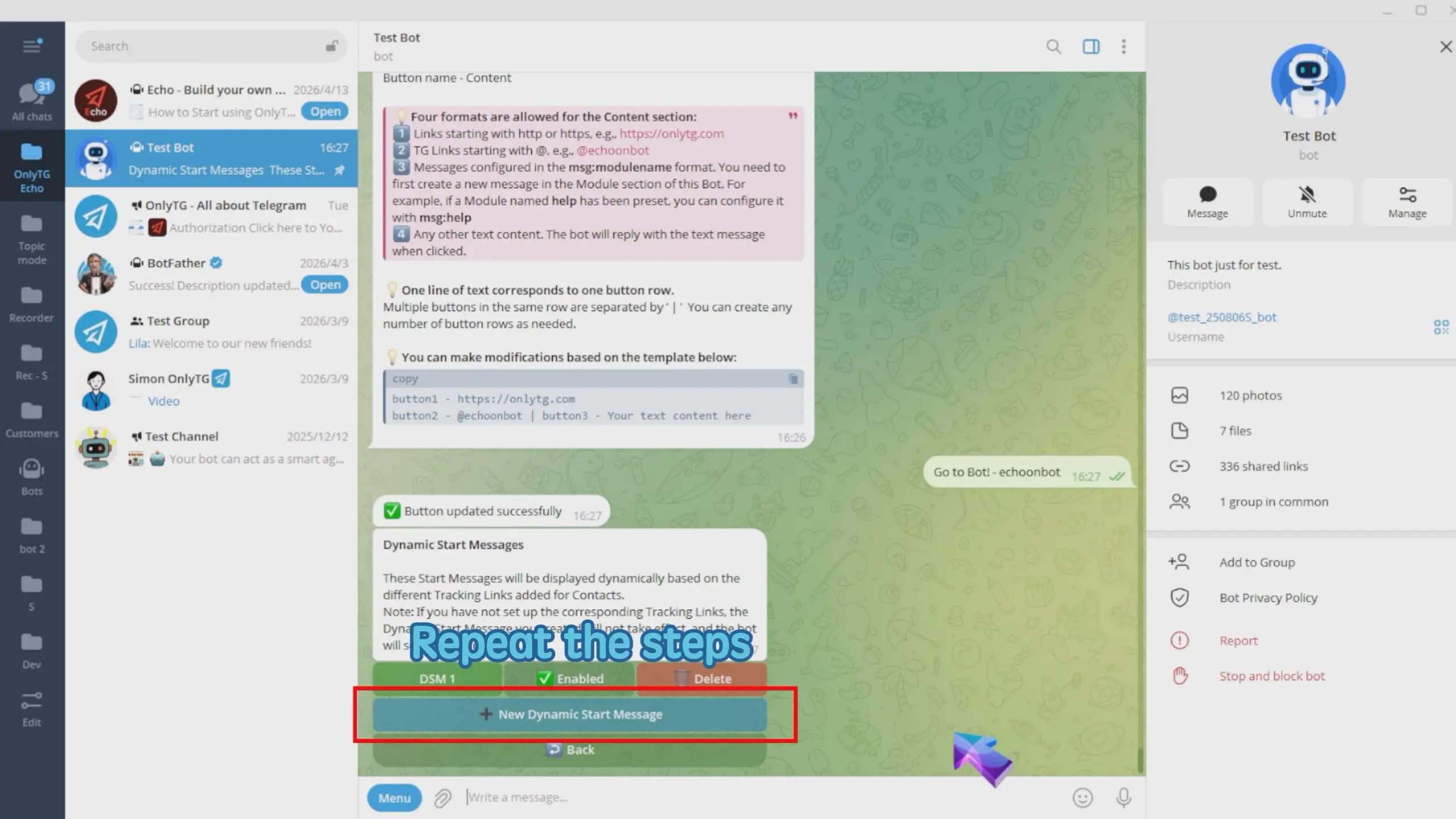
Dynamic Start Message

I added two dynamic start messages created here correspond to the YouTube and Facebook sources respectively
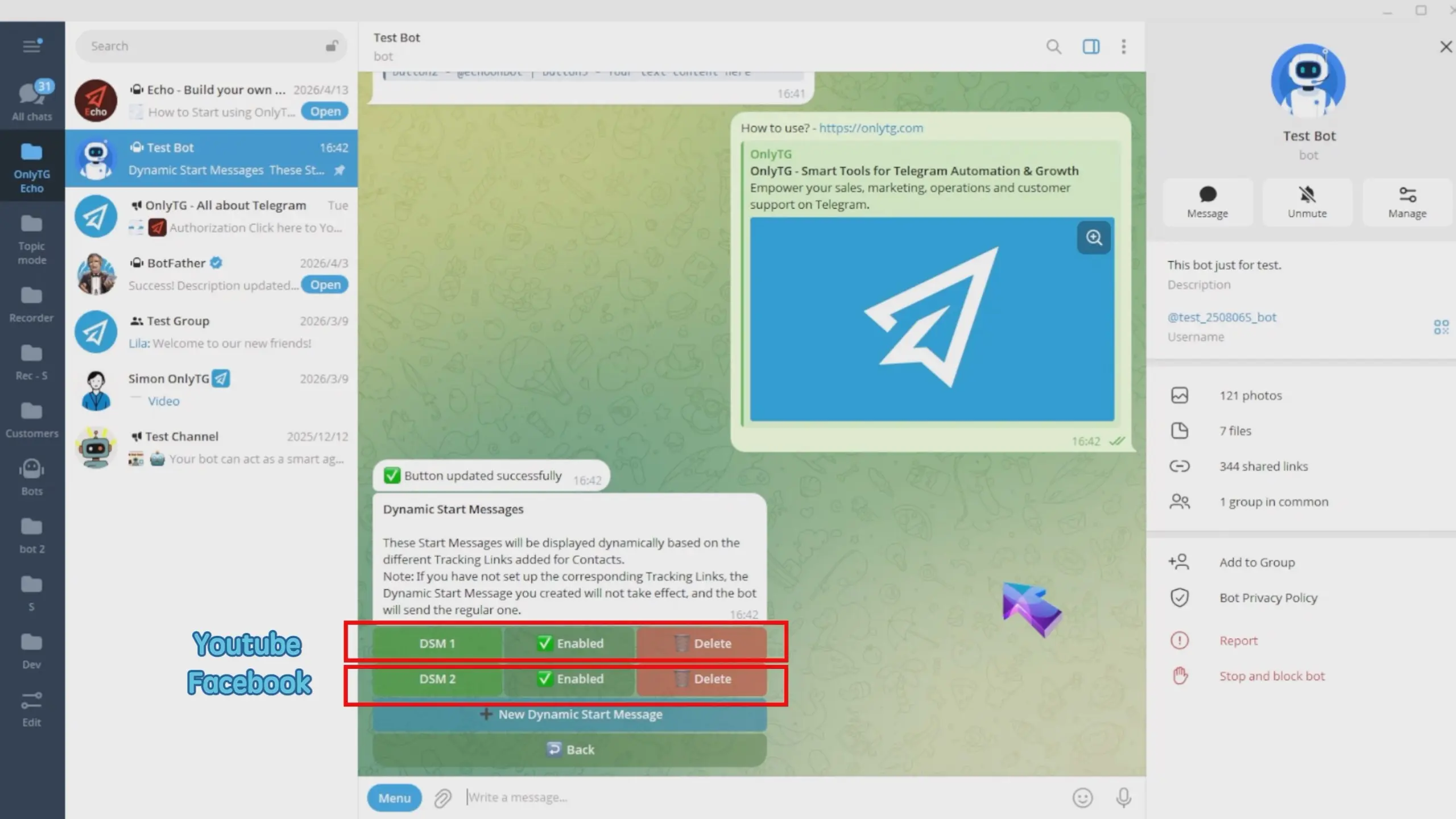
Dynamic Start Message

You can click here to Enabled or Disabled these dynamic start message.
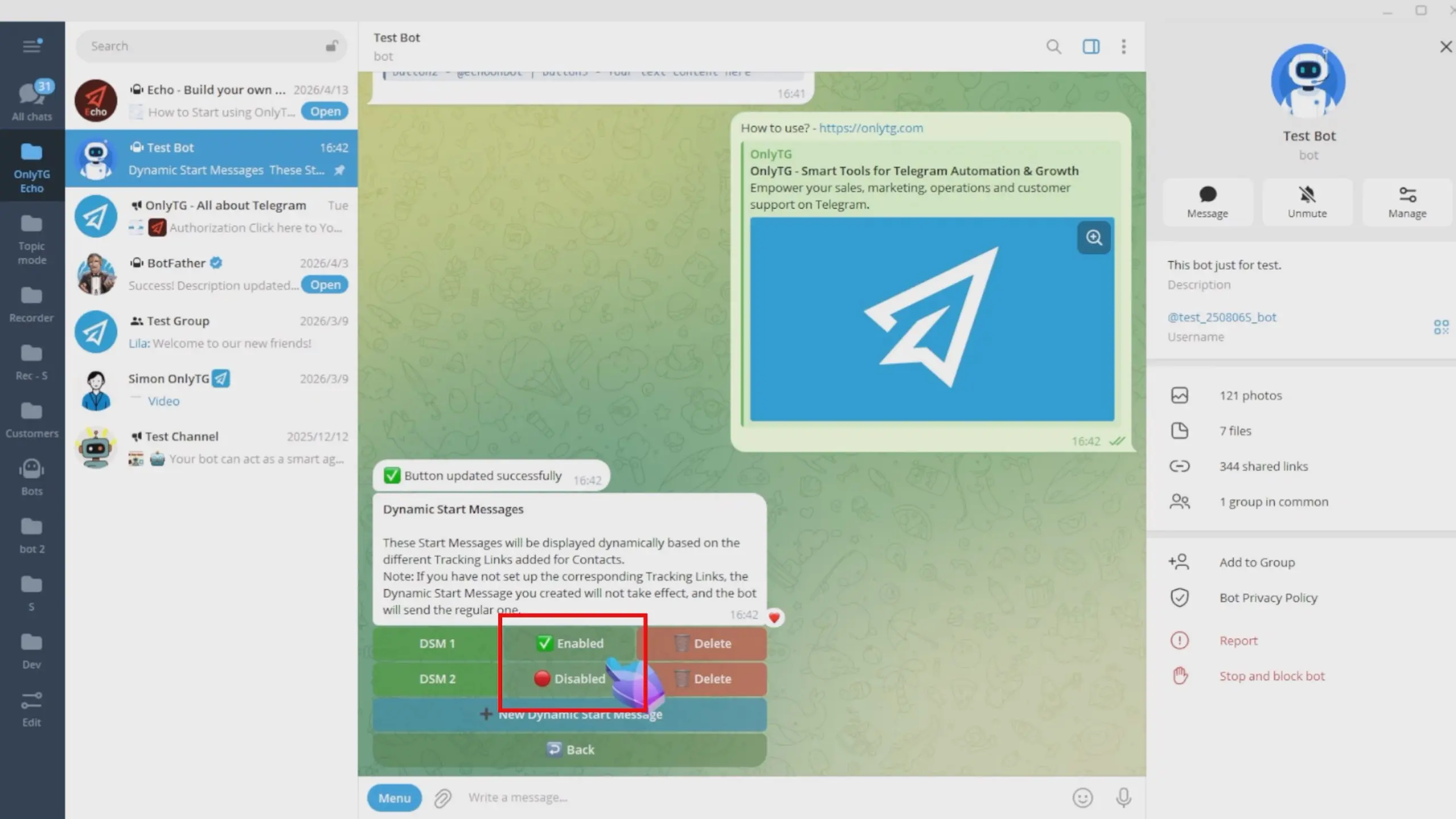
Dynamic Start Message

Effect

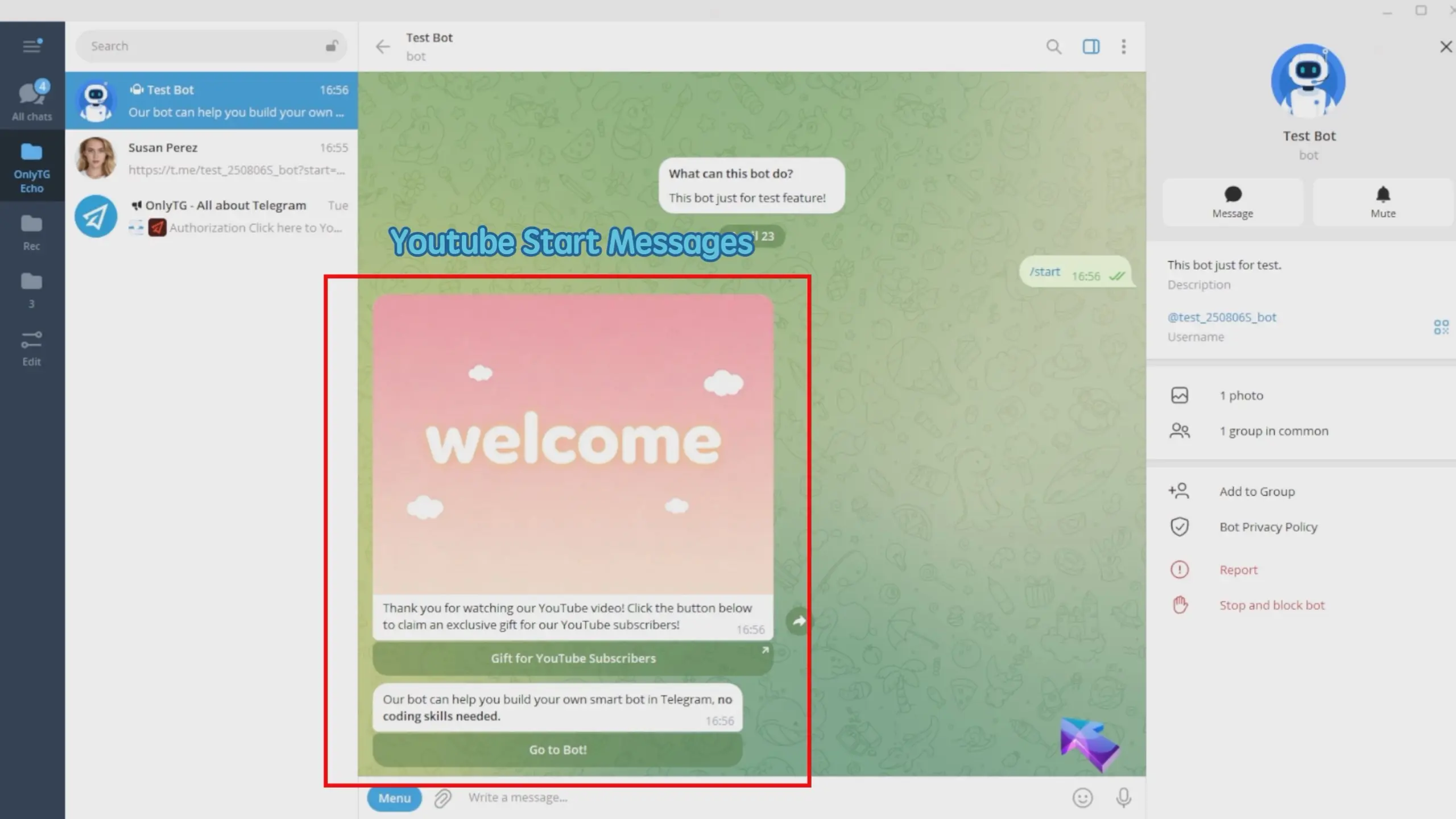
User A who adds the bot via the YouTube tracking link will receive the YouTube start message.
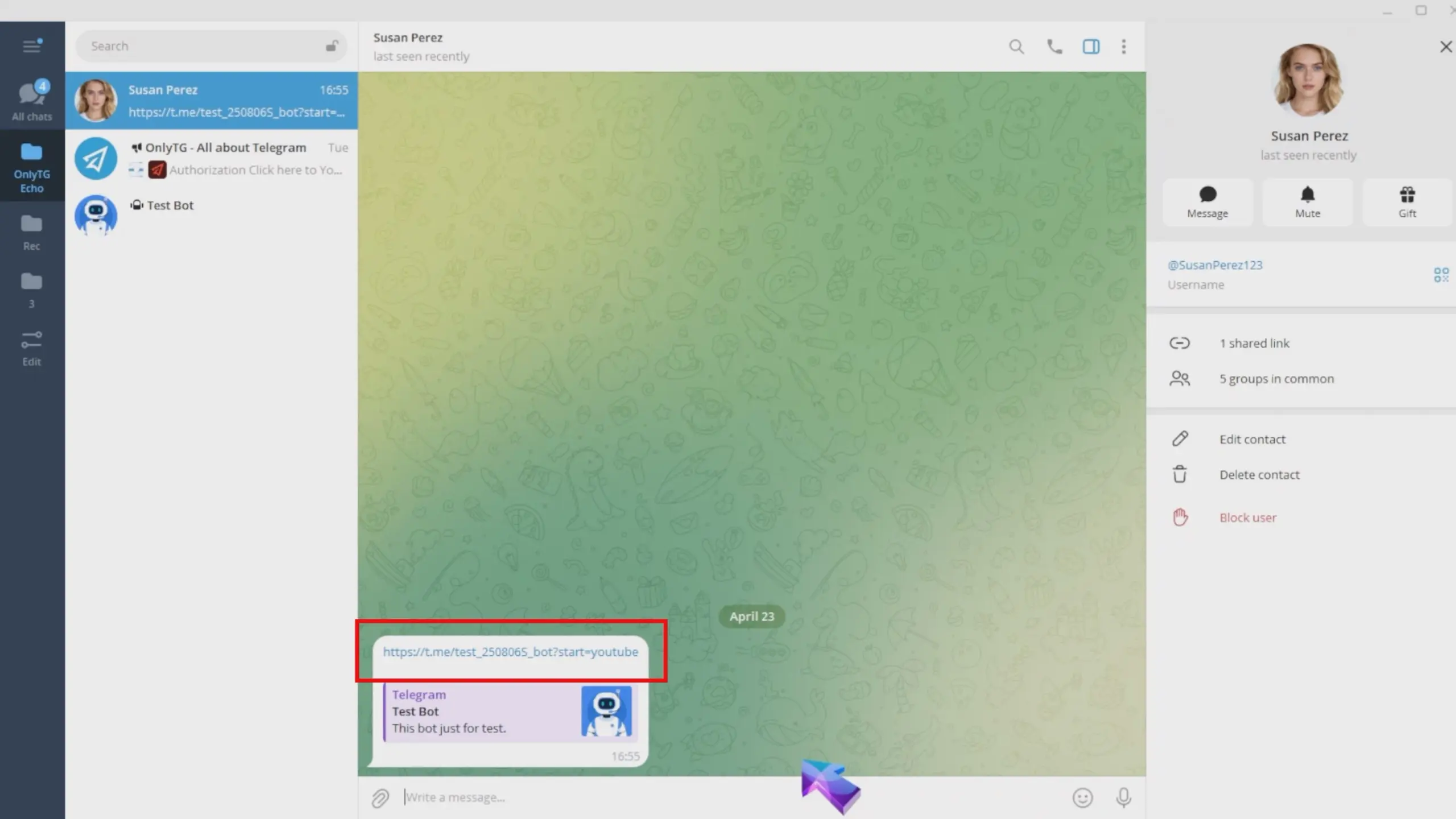
Dynamic Start Message

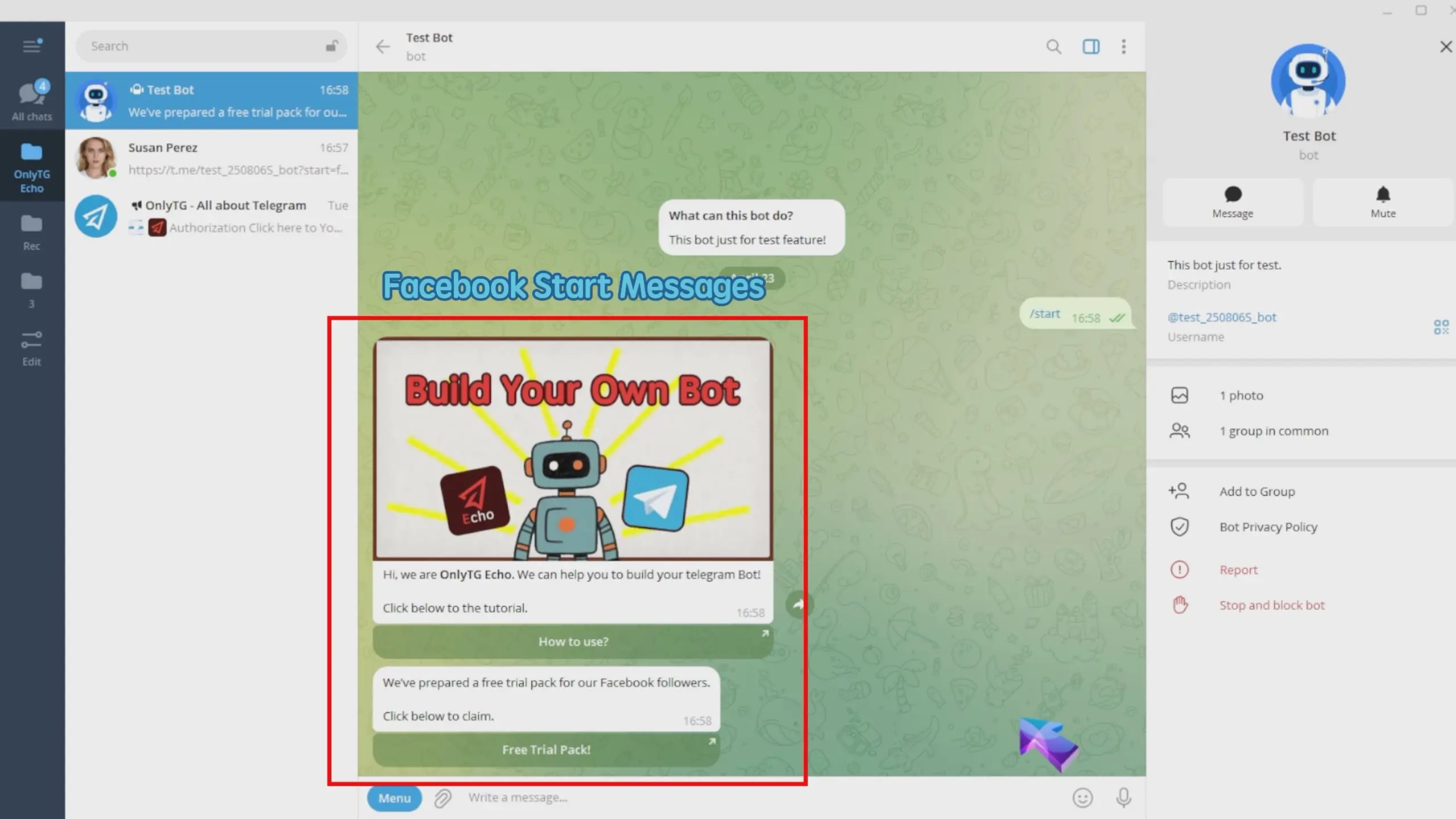
User B coming from the Facebook tracking link will get the Facebook start message.
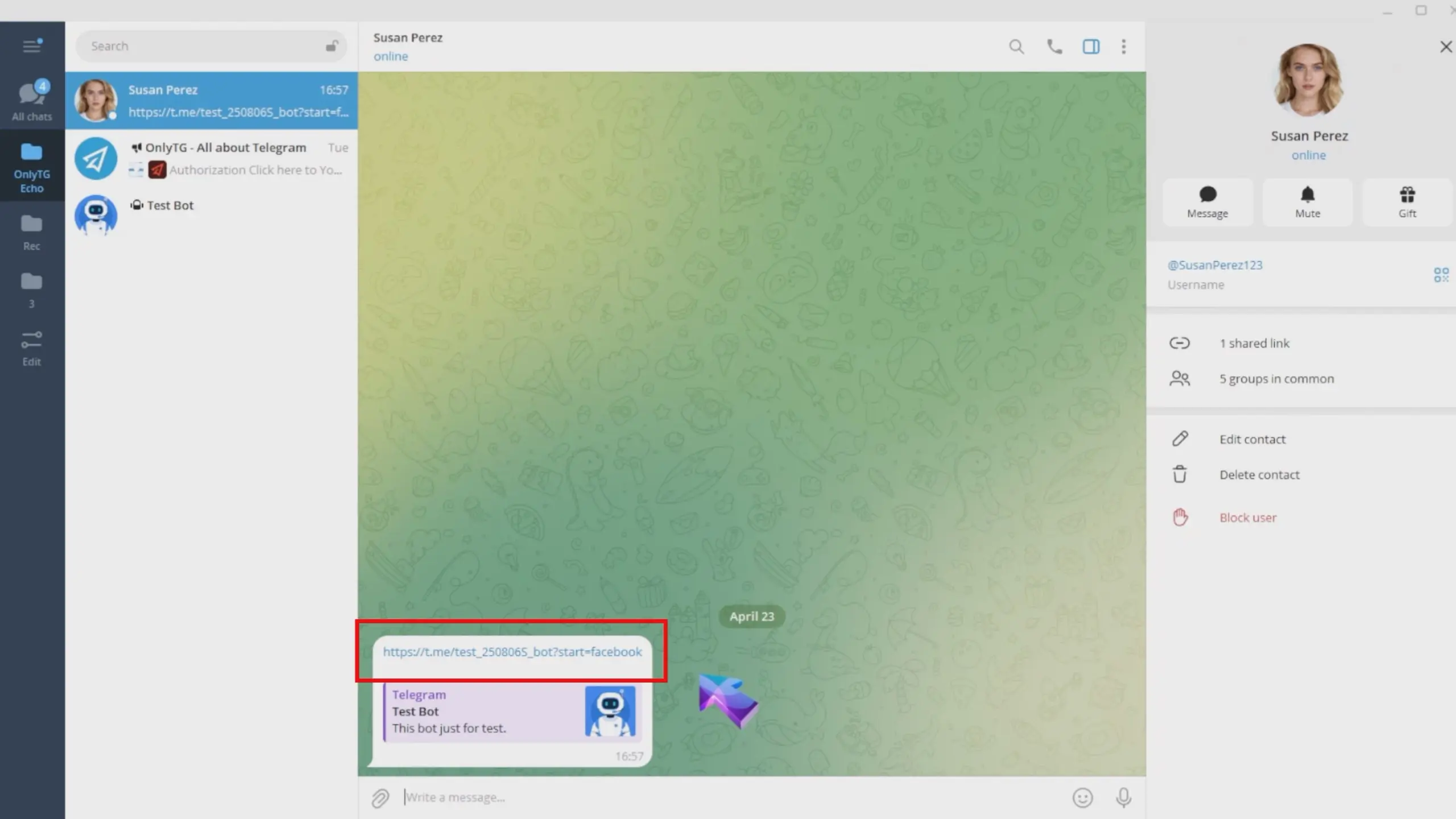
Dynamic Start Message

Share This Article :

  • Facebook
  • X
  • LinkedIn
Set Start MessageSet Auto-reply and keywords-based reply
Table of Contents
  • Video Tutorial
    • step 1
    • step 2
    • step 3
    • step 4
    • Effect
  • Latest Post
  • Echo
  • Recorder
  • Tips
Telegram Tips

Chat via Telegram Bot in 2026: A Practical Telegram Marketing Guide for Sales, Support, and Growth

Learn to set up OnlyTG Echo and chat via Telegram bot with a practical workflow.

Telegram Tips

How to Add Buttons to Chat via Telegram Bot in 2026

Learn how to add buttons to chat via Telegram bot in 2026, compare inline and reply keyboards, avoid common UX mistakes, and build cleaner button-led flows for support, lead capture, and broadcasts.

Telegram Tips

Chat via Telegram Bot for Small Business Store in 2026: A Practical Playbook for Faster Sales and Support

Telegram bot workflows for small stores to speed up sales and support in 2026.

Telegram Tips

How to Avoid Spam When Chat via Telegram Bot in 2026

2026 Telegram bot chat hygiene guide with rate limits, privacy mode, and safe workflows.

Telegram Tips

Difference Between Chat via Telegram Bot and Mini App in 2026: Which One Fits Your Growth?

Learn the difference between chat via Telegram bot and mini app in 2026, when to use each, and how to choose the right Telegram setup for support, automation, and conversions.

Telegram Tips

Paid Service to Manage Chat via Telegram Bot in 2026: A Practical Guide for Marketing Teams and Community Operators

Learn when a paid service to manage chat via Telegram bot makes sense in 2026, what features matter, and how to build a cleaner Telegram workflow without adding complexity.

Telegram Tips

Cheap Way to Chat via Telegram Bot for Business in 2026: A Practical Operator Playbook

A practical 2026 guide to the cheap way to chat via Telegram bot for business, covering costs, workflows, privacy, automation, and FAQs.

Telegram Tips

Chat via Telegram Bot for Marketing Promotion in 2026: Smarter Growth, Safer Automation, and Better Conversions

2026 guide to Telegram bot marketing with safer automation and smarter conversion workflows.

How to Get Unbanned from Telegram in 2026: A Practical Step-by-Step Guide

If your Telegram account or phone number has been restricted, this guide explains how to confirm the ban, appeal to Telegram support, reduce spam flags, and avoid getting blocked again in 2026.

How to create telegram bot in 2026?

Learn how to create a Telegram bot in 2026 using BotFather, with step-by-step coding and no-code methods, plus tips for security, deployment, and choosing the best setup.

How to Loop Post in Channel via Telegram Bot

OnlyTG Echo provides the function to automatically loop posts in your channel. Firstly, you need to create a new bot via @botfather and…

How to Configure Multiple Media when Setting OnlyTG Echo Features

OnlyTG Echo provides the function to configure multiple media to a single message when setting Start Message/Auto Reply/Quick Reply/Broadcast and other features. Firstly, you need…

How to Upgrade Channel to Pro Channel in Telegram

OnlyTG Echo provides the function to upgrade your channel to Pro Channel. This will consume your Pro Communities slots and unlock more advanced features….

How to Edit a Published Post via Telegram Bot

OnlyTG Echo provides the function to Edit Channel Post via your bot. Firstly, you need to create a new bot via @botfather and…

How to Publish Channel Post via Telegram Bot

OnlyTG Echo provides the function to Publish Channel Post via your bot. Firstly, you need to create a new bot via @botfather and…

How to Manage Channel via Telegram Bot

OnlyTG Echo provides the function to Manage Channel via your bot. Firstly, you need to create a new bot via @botfather and send its…

How to Use OnlyTG Recorder?

Welcome to OnlyTG Recorder! Developed by our dedicated bot development team, OnlyTG Recorder is designed to serve as an assistant…

Chat via Telegram Bot in 2026: A Practical Telegram Marketing Guide for Sales, Support, and Growth

Learn to set up OnlyTG Echo and chat via Telegram bot with a practical workflow.

How to Add Buttons to Chat via Telegram Bot in 2026

Learn how to add buttons to chat via Telegram bot in 2026, compare inline and reply keyboards, avoid common UX mistakes, and build cleaner button-led flows for support, lead capture, and broadcasts.

Chat via Telegram Bot for Small Business Store in 2026: A Practical Playbook for Faster Sales and Support

Telegram bot workflows for small stores to speed up sales and support in 2026.

How to Avoid Spam When Chat via Telegram Bot in 2026

2026 Telegram bot chat hygiene guide with rate limits, privacy mode, and safe workflows.

Difference Between Chat via Telegram Bot and Mini App in 2026: Which One Fits Your Growth?

Learn the difference between chat via Telegram bot and mini app in 2026, when to use each, and how to choose the right Telegram setup for support, automation, and conversions.

Paid Service to Manage Chat via Telegram Bot in 2026: A Practical Guide for Marketing Teams and Community Operators

Learn when a paid service to manage chat via Telegram bot makes sense in 2026, what features matter, and how to build a cleaner Telegram workflow without adding complexity.

Cheap Way to Chat via Telegram Bot for Business in 2026: A Practical Operator Playbook

A practical 2026 guide to the cheap way to chat via Telegram bot for business, covering costs, workflows, privacy, automation, and FAQs.

Chat via Telegram Bot for Marketing Promotion in 2026: Smarter Growth, Safer Automation, and Better Conversions

2026 guide to Telegram bot marketing with safer automation and smarter conversion workflows.

  • OnlyTG
  • Echo
  • Recorder
  • Help
  • Blog
  • Echo Pricing
  • Telegram Channel&Bot Finder
OnlyTG EchoTelegram VK YouTube Facebook X Email

© 2026 OnlyTG

Scroll to top
  • Products
    • Echo
    • Recorder
  • Resources
    • Help
    • Blog
    • Telegram Channel&Bot Finder
  • Pricing
    • Echo Pricing
Contact us