
If you use Telegram every day, the right bot can save time, reduce repetitive work, and make your chats more useful. In 2026, Telegram bots are no longer just small add-ons. They can help with automation, moderation, reminders, file handling, AI assistance, and community communication.
This guide focuses on recommended Telegram bots that are practical, easy to understand, and useful for real everyday work.
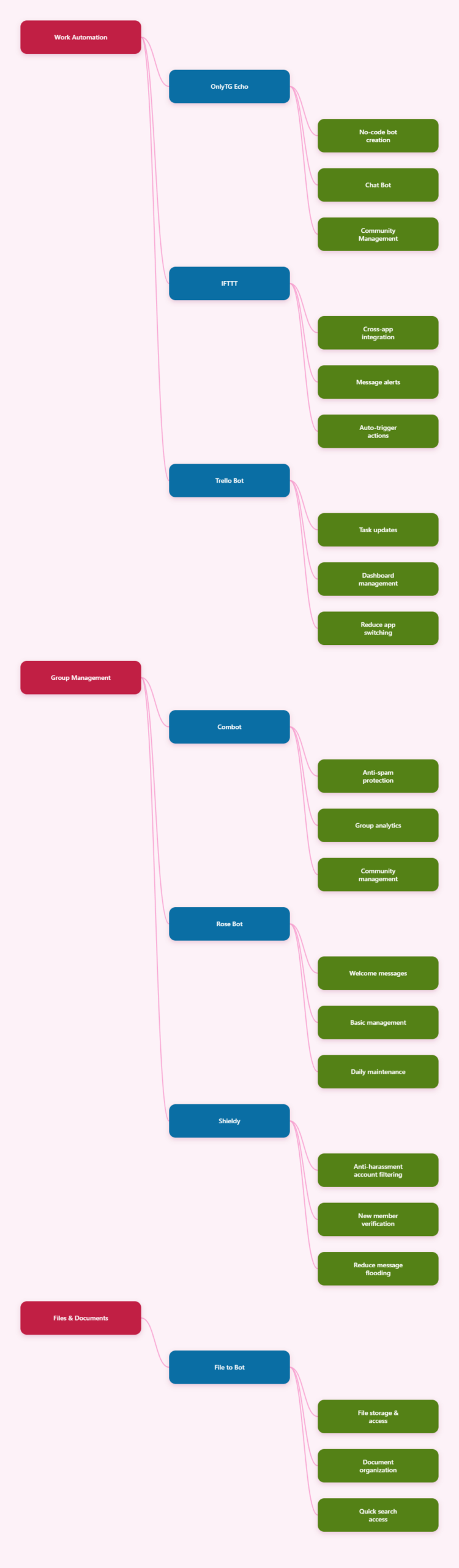
1) OnlyTG Echo (@EchoOnBot): a smart Telegram bot builder for messages, replies, and broadcasting
If you want to build your own Telegram bot quickly, OnlyTG Echo (@EchoOnBot) is one of the most useful options to start with. According to the official OnlyTG materials, it is designed to help users create a smart bot on Telegram without coding skills.
Its main purpose is to let you manage communication more efficiently inside Telegram. The core features referenced in the available documentation and tutorials include:
- Start Message
- Auto Reply
- Quick Reply
- Broadcast
- Bot menu setup
- Message relaying and reply workflows
- Multi-form messages with text, media, and buttons
- Tagging and tracking-related functions in the console
How to get started is straightforward:
- Open @EchoOnBot in Telegram.
- Create or prepare your Telegram bot through BotFather and get the token.
- Bind the token to OnlyTG Echo.
- Configure your start message, reply rules, menu, or broadcast settings.
- Test the bot by sending a message or using /start.
In practice, this means you can use OnlyTG Echo to build a more organized bot experience with only a few setup steps.
Example use case 1:
- A small business can set a Start Message that welcomes new users and shows them product categories, support links, and quick action buttons.
- If a user asks a common question, the Auto Reply function can send a preset answer instantly.
Example use case 2:
- A community admin can use Broadcast to send announcements to contacts through the bot.
- The Auto Reply and menu functions can help guide users toward the right information without manual back-and-forth replies.
For users who want a more structured Telegram workflow, OnlyTG Echo is a strong first recommendation because it combines setup simplicity with useful automation features.
2) Combot (@Combot): a well-known choice for large group management
If your main problem is managing a busy Telegram group, a moderation-focused bot can be more valuable than a general-purpose helper. Combot (@Combot) is widely known in the Telegram community as a bot for group management and analytics.
It is useful when a group needs:
- Anti-spam support
- Moderation tools
- Engagement tracking
- Community management assistance
Recommended use case:
- Large public communities that need to reduce spam and understand member activity.
For group admins, the appeal of this type of bot is simple: it reduces manual moderation work and helps keep conversations readable.
3) Rose Bot (@missrose_bot): a practical moderation helper for Telegram groups
Another common recommendation for Telegram communities is Rose Bot (@missrose_bot). It is often used for moderation tasks and basic group management.
It can be helpful for:
- Welcome messages
- Basic moderation controls
- Automation of simple admin tasks
Recommended use case:
- A small-to-medium group that wants reliable moderation without a complicated setup.
Rose Bot is often a good fit for admins who want essential group tools and a cleaner chat environment.
4) Shieldy (@shieldy_bot): useful for anti-spam protection
If your main concern is spam, bots like Shieldy (@shieldy_bot) are often recommended because they focus on protecting groups from unwanted automated accounts and noisy joins.
Its value is in the basics:
- Spam reduction
- Bot and troll protection
- Simple onboarding challenges for new users
Recommended use case:
- Communities that receive frequent spam joins or repeated promotional messages.
For many group owners, a simple anti-spam layer is enough to improve the experience for everyone.
5) IFTTT (@IFTTT): connect Telegram to other apps and automate workflows
Telegram can also act as a notification hub. IFTTT (@IFTTT) is useful when you want Telegram to connect with other services and trigger actions automatically.
Typical use cases include:
- Receiving alerts from other apps
- Connecting Telegram to external workflows
- Automating simple cross-platform actions
Recommended use case:
- A freelancer or remote worker who wants Telegram alerts for email, calendar, or task updates.
This kind of bot or integration is especially helpful when Telegram is already your main messaging app and you want everything else to arrive there.
6) Trello Bot (@trello_bot): manage tasks without leaving Telegram
For project work, Trello Bot (@trello_bot) is a useful option if you already organize tasks in Trello. It lets you work with boards and cards from inside Telegram instead of constantly switching apps.
Why people use it:
- Quick task updates
- Better workflow convenience
- Less app switching during the day
Recommended use case:
- A small team tracking tasks and project progress while chatting in Telegram.
This is especially practical for people who want task visibility without opening another dashboard every few minutes.
7) File to Bot (@filetobot): store and access files through Telegram
File storage bots are popular because Telegram is already a place where people exchange documents, videos, and other files. File to Bot (@filetobot) is commonly recommended as a way to use Telegram more like a file access layer.
What it can help with:
- Saving files sent to the bot
- Accessing stored files later
- Organizing personal or shared content
Recommended use case:
- A user who wants quick access to important documents from any device.
This type of bot is useful for small file libraries, backups, and reference materials you need to retrieve quickly.
8) Skeddy: a reminder bot for everyday tasks
If you mostly need better personal organization, reminder bots are a strong choice. Skeddy is often recommended as a natural-language reminder bot.
It is helpful for:
- Simple reminders
- Daily task follow-up
- Keeping deadlines visible in chat
Recommended use case:
- A student, freelancer, or manager who wants quick reminders without opening a separate app.
This is one of the easiest bot categories to adopt because the value is immediate and easy to understand.
9) TAN: an AI assistant inside Telegram
For users who want a more assistant-like experience, TAN is positioned as an AI assistant in Telegram. According to the available information, it supports tasks such as email, calendar, maps, media, and content-related workflows through a single Telegram interface.
This kind of bot is useful when you want to:
- Draft text quickly
- Manage basic productivity tasks
- Handle actions without leaving Telegram
Recommended use case:
- A busy professional who prefers to coordinate small daily tasks from chat instead of opening multiple apps.
AI bots are increasingly useful in 2026 because they reduce friction in everyday work.
10) WhatsTask: project management inside Telegram
WhatsTask is another practical option for users who want to manage tasks directly in Telegram. It is described as an AI-powered project management tool that works inside the app.
It can be useful for:
- Creating tasks from chat
- Managing team coordination
- Bridging Telegram with existing project systems
Recommended use case:
- A small team that wants lightweight task coordination in the same place where communication already happens.
This type of bot is especially attractive when you want productivity without adding another platform to your routine.
Tips for using Telegram bots safely and effectively
Before adding any bot to your workflow, it helps to keep a few basic habits in mind:
- Use only bots from official or clearly identifiable sources.
- Check what permissions a bot requests before connecting it.
- Test features with non-critical data first.
- Keep your bot token secure.
- Review settings before sending broadcasts or automated replies to real users.
These small steps can prevent mistakes and make automation more reliable.
Final thoughts
Telegram bots in 2026 are useful because they solve real problems: repetitive messaging, group moderation, reminders, file handling, project tracking, and simple AI assistance.