
Telegram Stars have become a core part of Telegram’s in-app economy. If you use bots, Mini Apps, paid content, gifts, or creator features, you will likely run into Stars sooner rather than later.
In simple terms, Telegram Stars are a virtual item used inside Telegram to pay for digital goods and services. Users can spend them in bots and Mini Apps, support creators, unlock content, send gifts, and use other Telegram features built around the same system.
This guide explains how Telegram Stars work in 2026, what they can be used for, how businesses and creators receive them, and what limits or rules matter most.
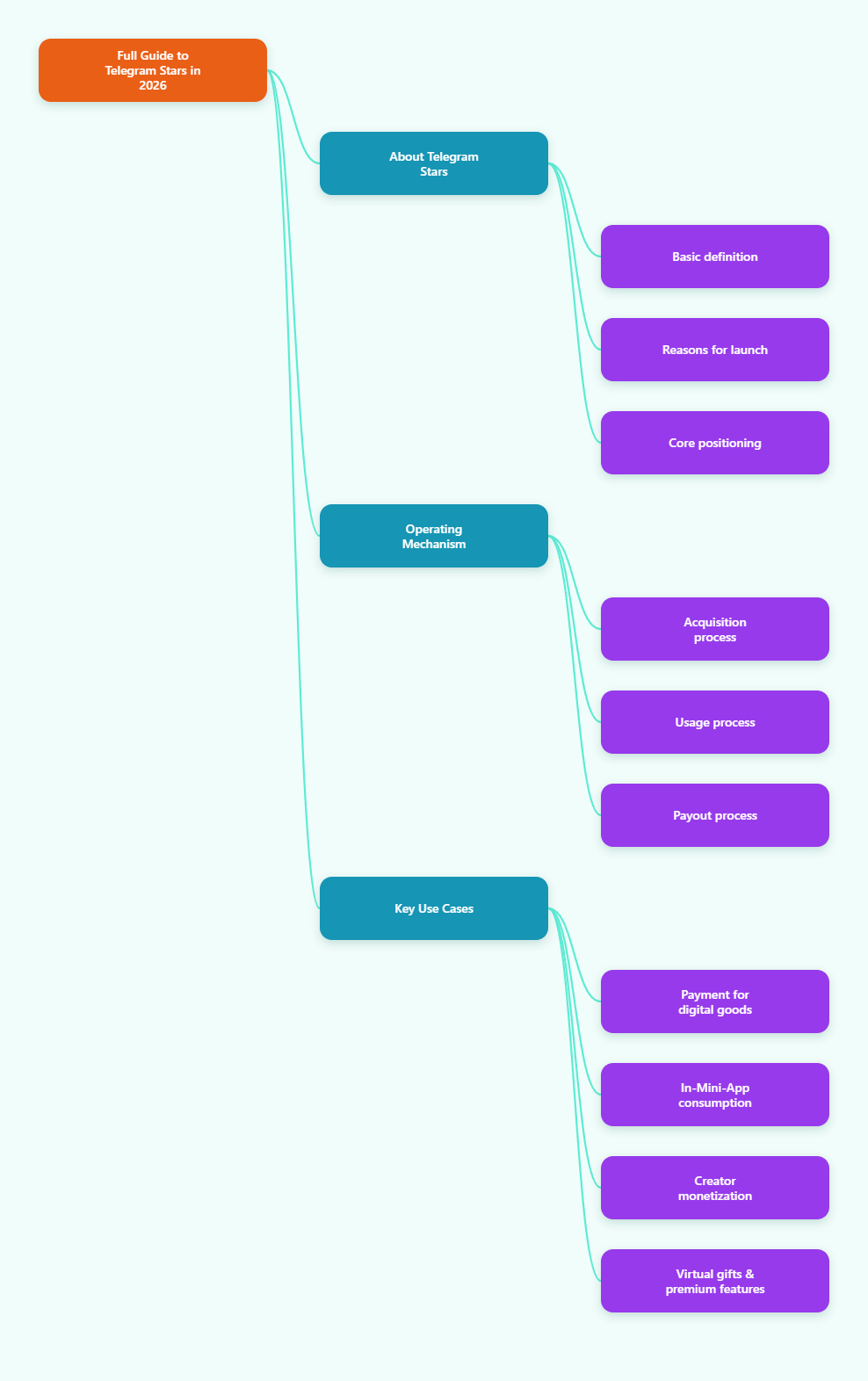
What Are Telegram Stars?
Telegram Stars are Telegram’s in-app virtual currency for digital purchases. Telegram introduced them in 2024 to support payments for digital goods and services inside bots and Mini Apps.
According to Telegram’s official documentation and blog, Stars can be used for things like:
- Buying digital goods from bots
- Paying for services in Mini Apps
- Supporting creators
- Unlocking paid content
- Using subscription features powered by Stars
- Sending gifts in some Telegram features
The key distinction is that Stars are designed for digital goods and services inside the Telegram ecosystem. Telegram’s payment tools for physical goods use a different flow.
Why Telegram Created Stars
Telegram’s official announcement made the reason clear: apps on major mobile platforms must follow platform rules for digital purchases. Telegram Stars provide a built-in payment method that works inside Telegram for digital products offered through bots and Mini Apps.
That means Stars are not just a reward point or cosmetic balance. They are part of Telegram’s payment infrastructure.
How Telegram Stars Work
The basic flow is straightforward:
- Users buy Stars through official Telegram-supported purchase flows.
- They spend those Stars inside Telegram.
- Bots, Mini Apps, creators, or channel owners receive Stars for eligible paid interactions.
- Eligible earned Stars may later be withdrawn through Telegram’s supported withdrawal path, subject to Telegram’s rules.
Telegram’s official Terms for Stars state that Stars can be acquired through in-app purchases on Telegram apps for iOS and Android, as well as through @PremiumBot on the direct version of Telegram for Android and on Telegram Web and Desktop.
What You Can Use Telegram Stars For
By 2026, Telegram Stars are tied to several important Telegram features. Not every feature is available to every user or creator in the same way, but these are the main use cases supported by Telegram’s public documentation and official announcements.
1. Pay for digital goods in bots
Telegram’s Bot Payments API for digital goods allows bots to accept Stars for digital products and services. Examples mentioned in Telegram’s own materials include things like:
- E-books
- Online courses
- Digital game items
- Access to digital services
For digital goods, the relevant currency code is XTR, which Telegram uses for Stars.
2. Pay inside Telegram Mini Apps
Mini Apps are web-based applications that run inside Telegram. Telegram has expanded Mini App capabilities significantly, including support for payments and subscriptions powered by Stars.
That matters because Mini Apps can act like lightweight storefronts, tools, games, membership products, or service interfaces without sending users outside Telegram.
3. Support creators and channels
Telegram rolled out several monetization features for creators that use Stars, including:
- Star Reactions
- Paid content tools
- Star-based subscriptions in some Telegram surfaces
- Star Messages in newer monetization flows
These features let users support channels, public figures, and creators directly inside the app.
4. Buy or send gifts
Telegram later added gifts that can be purchased with Stars. Official Telegram blog posts confirmed that users can send gifts to friends, and recipients may display them on profile pages or turn them into Stars, depending on Telegram’s feature rules.
5. Gift Telegram Premium in supported flows
Telegram has publicly stated that Stars can also be used in some Premium gifting flows. This is a feature connected to Telegram’s broader monetization ecosystem, though Stars and Telegram Premium are still separate products.
6. Use Stars in some wallet-related fee flows
TON Wallet documentation notes that Stars may be used to pay certain TON blockchain fees in supported wallet flows. However, that same help page also makes clear that Telegram Stars themselves cannot simply be swapped inside TON Wallet like a normal token balance.
This is an important distinction: Stars are not the same thing as Toncoin.
Where to Buy Telegram Stars
The safest information comes from Telegram’s own terms and product pages.
Officially documented purchase channels include:
- Telegram on iOS via Apple in-app purchase flows
- Telegram on Android via Google Play billing
- @PremiumBot on Telegram’s direct Android version
- Telegram Web and Desktop through supported purchase options
If you are buying Stars, the most conservative and safest approach is to use Telegram’s official purchase options rather than relying on unofficial marketplaces.
Telegram Stars vs TON: What’s the Difference?
This is one of the most common points of confusion.
Telegram Stars are an in-app virtual item used inside Telegram.
TON or Toncoin is a blockchain-based cryptocurrency used in the TON ecosystem.
They are connected, but they are not interchangeable in the normal sense.
The connection is mainly on the payout side. Telegram’s official documentation and TON’s Fragment documentation explain that eligible earned Stars can be withdrawn through Fragment, where they are converted into Toncoin at the time of withdrawal.
So the practical rule is:
- Users spend Stars inside Telegram.
- Eligible creators and developers may withdraw earned Stars through Fragment.
- The withdrawal is paid out in TON.
Can You Withdraw Telegram Stars?
Yes, but only in specific cases and under specific rules.
According to Telegram and TON’s official documentation, withdrawals are intended for people who earn Stars through supported Telegram monetization features, such as bot developers, creators, channel owners, and similar participants in Telegram’s ecosystem.
Key official conditions referenced in the available materials include:
- Stars can be withdrawn through Fragment
- Stars are converted into Toncoin at withdrawal
- There is a minimum withdrawal threshold of 1,000 Stars
- Newly earned Stars become withdrawable only 21 days after they are earned
- 2FA password is required
- Regional restrictions may apply
Those details appear consistently in Telegram-adjacent official documentation, including TON’s Fragment explanation pages.
If you are just a user who bought Stars to spend, that does not mean you can freely cash them out like a wallet balance. Telegram makes a distinction between purchased Stars and earned Stars in practical usage.
How Telegram Stars Payments Work for Bot Developers
For developers, Telegram provides a payment flow specifically for digital goods and services.
At a high level, the process usually includes:
- Creating a bot
- Generating an invoice for a digital item
- Setting the currency to XTR
- Sending the invoice to the user
- Handling successful payment events
- Delivering the digital item or unlocking access
Telegram’s Bot Payments API documentation for digital goods is the authoritative source here. It describes Stars as the payment method for digital goods and services sold via bots.
Telegram also provides related API methods and documentation for payment forms and subscriptions.
Important distinction: digital vs physical goods
Telegram’s payment documentation separates these cases clearly:
- Digital goods and services: use Telegram Stars
- Physical goods and services: use Telegram’s broader Bot Payments flow with regular currencies and shipping-related options where applicable
This distinction matters for compliance and implementation. A developer should not assume the same setup applies to both.
Telegram Stars for Creators
Creators do not need to be bot developers to benefit from Stars.
Official Telegram updates introduced multiple creator-facing monetization features, including:
- Star Reactions on posts
- Paid media and paid content unlocks
- Channel-related monetization options
- Star Messages in selected scenarios
For creators, this turns Telegram into more than a messaging app. It becomes a direct fan support and paid content platform.
In practical terms, Stars can help creators:
- Monetize exclusive posts
- Earn from audience appreciation
- Offer premium experiences without leaving Telegram
- Potentially convert eligible earnings into TON later
Limits and Restrictions to Know
Telegram Stars are useful, but they come with rules.
Based on official references, these are the most important limitations to keep in mind:
- Stars are primarily for digital goods and services
- Withdrawal applies to earned Stars in supported cases
- Withdrawals go through Fragment, not a generic bank transfer
- Withdrawal has a 1,000-Star minimum
- There is a 21-day waiting period before earned Stars become withdrawable
- Regional availability may affect TON and Fragment access
- Two-factor authentication may be required for withdrawal
Also, because some Star purchases are processed by third-party app stores or processors, Telegram’s Terms note that purchase-related issues may need to be handled through the relevant payment processor.
Are Telegram Stars Safe?
From a platform design standpoint, Telegram Stars are meant to provide a native, standardized payment method inside Telegram.
That said, safety still depends on how you use them.
Best practices include:
- Buy Stars only through official Telegram-supported channels
- Be cautious with unofficial resellers or “discount” offers
- Confirm what you are buying before spending Stars in a bot or Mini App
- Enable two-factor authentication if you are a creator or developer handling withdrawals
- Check whether TON or Fragment is available in your region before planning withdrawals
Common Questions About Telegram Stars
Are Telegram Stars the same as Toncoin?
No. Stars are an in-app Telegram virtual item. Toncoin is a cryptocurrency on the TON blockchain.
Can any user withdraw Stars?
Official materials indicate withdrawals are for eligible earned Stars, such as those received by creators, channel owners, or bot developers through supported monetization features.
Can Stars be used for physical products?
Telegram’s documentation separates digital and physical goods. Stars are for digital goods and services. Physical goods use Telegram’s other payment flow.
What is the currency code for Telegram Stars?
The currency code used in Telegram’s payment and subscription documentation is XTR.
How long do you need to wait before withdrawing earned Stars?
Official documentation referenced in the source material states that earned Stars become withdrawable after 21 days.
What is the minimum withdrawal amount?
The documented minimum is 1,000 Stars.
Final Thoughts
If you use Telegram beyond basic messaging, understanding Telegram Stars is now essential.
They power digital purchases, creator monetization, and in-app experiences across bots, channels, and Mini Apps. And while the system is fairly easy to use on the surface, the details matter, especially when it comes to withdrawals, subscriptions, and the difference between Stars and TON.