
Telegram remains one of the world’s most widely used messaging apps, with large public channels, private chats, bots, file sharing, and community features that make it useful for both everyday communication and large-scale groups. Those same features also make it attractive to scammers.
This guide focuses on practical, evidence-based steps drawn from official Telegram guidance and published security advice from cybersecurity firms and public agencies.
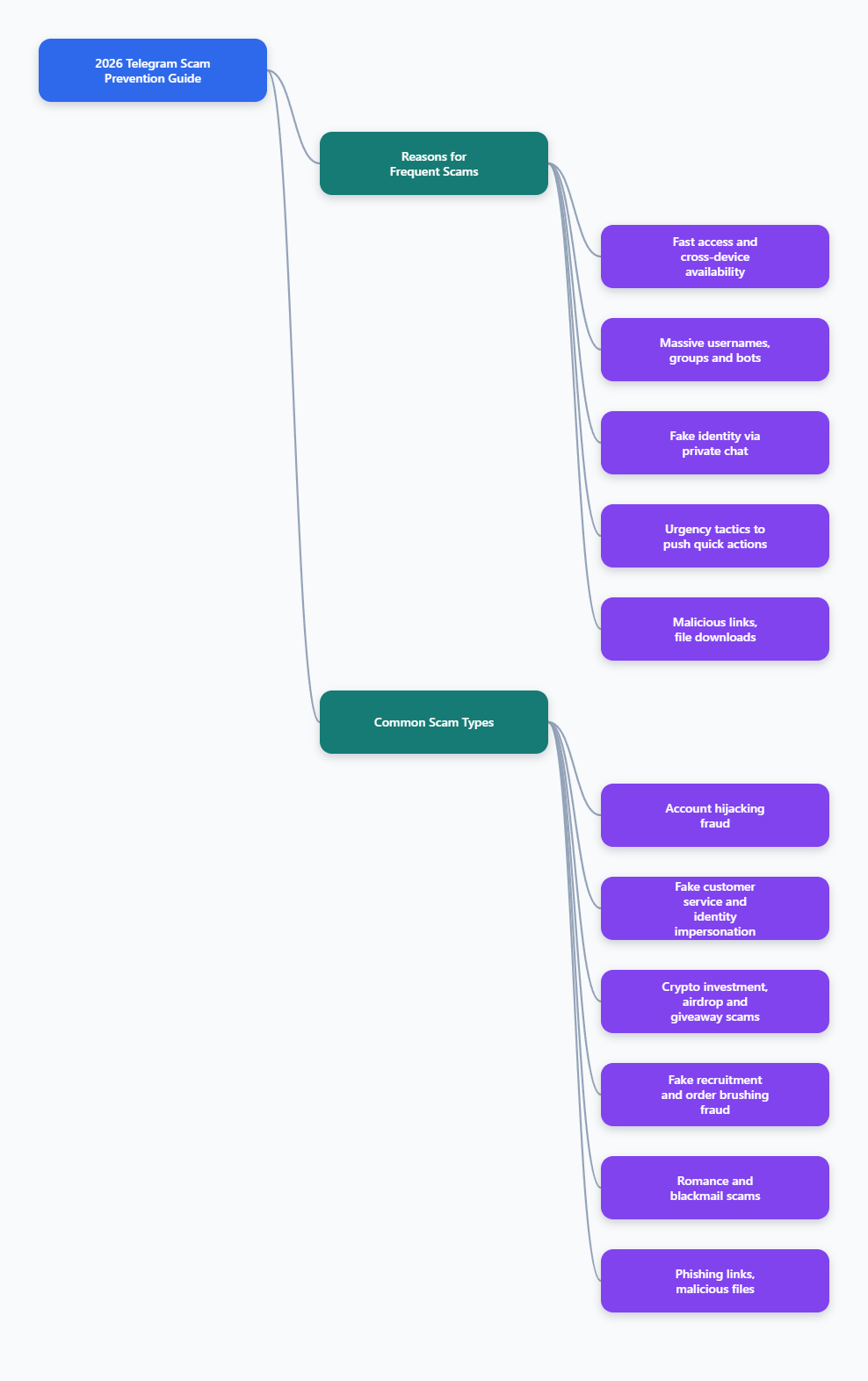
Why Telegram is often used in scams
Scammers use Telegram for the same reasons legitimate users do: it is fast, easy to join, supports usernames, allows large groups and channels, and works across devices. Security researchers and fraud reports have also noted rising scam activity on private messaging platforms, including Telegram.
Several patterns show up repeatedly:
- Fraudsters can contact users directly or add them to groups.
- Impersonators can mimic brands, support staff, recruiters, investors, or even friends.
- Bots, channels, and Mini Apps can be used to deliver phishing pages or push fake offers.
- Victims are often pressured to act fast before they have time to verify details.
The most important point is simple: many Telegram scams are social engineering attacks. The criminal usually wants you to do one of three things:
- Share a login code, password, or personal details
- Send money, cryptocurrency, or gift cards
- Click a malicious link, install a file, or connect a wallet
The most common Telegram scams to know
You do not need to memorize every variation. If you understand the main scam categories, you will recognize most attacks much faster.
1. Account takeover and login code scams
This is one of the most common and most damaging Telegram scams. A criminal pretends to be a friend, support agent, or company representative and asks for your Telegram verification code or one-time password.
Official and security sources are consistent on this point: never share your login code with anyone. If a scammer gets that code, they may be able to access your account. Telegram’s Safety Center also recommends enabling Two-Step Verification so that a password is required when logging in on a new device.
Typical lines used by scammers include:
- “I accidentally sent a code to your number, please forward it.”
- “Your account needs verification.”
- “Telegram Support needs to confirm your identity.”
- “Vote for me or help me recover my account using the code you received.”
Real support staff should not ask for your login code in a normal chat.
2. Fake support and impersonation scams
Scammers frequently impersonate:
- Telegram support
- Crypto exchanges or wallet providers
- Project admins or moderators
- Brands, influencers, or public figures
Impersonators often use copied profile photos, similar usernames, and polished language. In crypto communities, fake support accounts are especially dangerous because they often approach people right after a public help request.
Some references note that users should rely on a verified badge where available, but a badge alone is not enough to establish trust in every case. The safer approach is to navigate to the official contact point from the company’s website or app, instead of trusting an inbound message.
3. Crypto investment, airdrop, and giveaway scams
Telegram is heavily used by crypto communities, so scammers target users with:
- Fake token giveaways
- Fake airdrops
- “Guaranteed return” investment groups
- Pump-and-dump communities
- Wallet connection traps
- Fake KYC or verification bots
Kaspersky and other security researchers have documented Telegram scams involving bots and phishing flows that imitate legitimate crypto projects. In many cases, the victim is told to connect a wallet, approve a transaction, or complete “verification” that steals credentials or funds.
If anyone promises unusually high returns, secret trading access, or easy profits, assume it is high risk until independently verified.
4. Job and task scams
Job scams on Telegram commonly start with an unsolicited message offering flexible remote work, easy commissions, or daily income for simple tasks. Recent reporting and law-enforcement warnings describe a common pattern:
- You are approached by text or chat
- You are moved to Telegram
- You complete small tasks and may even receive a tiny payment
- You are then asked to deposit money or cryptocurrency to unlock higher earnings
- Your withdrawals are delayed, blocked, or made conditional on further payment
Legitimate employers do not usually hire entirely through Telegram chats, skip formal screening, and then require payment from the applicant.
5. Romance, dating, and sextortion scams
Some scammers build emotional trust first, then ask for money, personal details, or intimate images. In worse cases, the criminal records or saves compromising material and demands payment under threat of exposure.
Warning signs include:
- Fast emotional escalation
- Requests to move the conversation off a dating platform quickly
- Pressure to share private photos or videos
- Stories that create urgency, guilt, or secrecy
If intimate content is being used to blackmail you, stop engaging, preserve evidence, report the account, and contact local law enforcement or a trusted cybercrime reporting channel in your country.
6. Phishing links, malicious files, and fake apps
Some Telegram scams are designed to steal data or infect devices. These may involve:
- Links to fake login pages
- APK files or app downloads outside official app stores
- Compressed files, scripts, or “tools” shared in groups
- Malicious bots or Mini Apps that mimic real services
Security reporting in 2025 and 2026 has highlighted rising abuse of Telegram groups, bots, and Mini Apps in crypto-related scams and phishing operations. If you are asked to install software, sideload an app, run a script, or connect a wallet, stop and verify before doing anything.
Telegram scam red flags you should never ignore
Most Telegram scams become easier to spot once you slow down and look for patterns.
Watch for these red flags:
- Unexpected contact from a stranger
- Pressure to act immediately
- Requests for login codes, passwords, or recovery phrases
- Promises of guaranteed profits or free money
- Recruiters offering high pay for little work
- Requests to pay upfront fees or send crypto
- Links to unfamiliar websites
- Files or apps sent by unknown users
- Claims that support needs to contact you privately
- Messages that push secrecy: “Don’t tell anyone”
- Anyone asking you to move money on behalf of others
One red flag may not prove fraud. Several together usually mean you should stop responding and verify independently.
Essential Telegram scam prevention settings
Good habits matter, but Telegram’s built-in privacy and security settings are also important.
Turn on Two-Step Verification
Telegram recommends enabling Two-Step Verification. This adds a password requirement when logging in on a new device. It helps protect your account even if someone gets your SMS code or login code.
Review it in:
- Settings > Privacy and Security
Check Active Sessions or Devices
Telegram allows you to review where your account is logged in. If you see a device or session you do not recognize, terminate it immediately.
This is one of the first things to check if you suspect account access.
Limit who can see your phone number
Official FAQ and privacy guidance indicate you can control who sees information like your phone number. Restricting this reduces exposure to strangers.
A conservative setup is:
- Phone Number: My Contacts or Nobody
Restrict who can add you to groups and channels
Security guidance from multiple sources recommends tightening invitation settings so random users cannot add you freely to unwanted groups or scam channels.
Control profile visibility
Consider limiting:
- Profile photo visibility
- Last seen / online status
- Forwarded message link to your account
Reducing visible information gives scammers less material for profiling and impersonation.
Use official apps and official download sources
Do not install Telegram builds, “security upgrades,” or helper apps from random links in chats. If you need Telegram, update it through the official app store or Telegram’s official website.
How to verify whether a Telegram account or channel is real
Impersonation is common, so verification should become a habit.
Before trusting an account, bot, or channel:
- Check whether the contact was initiated by you or by them
- Compare the exact username with the one listed on the official website
- Do not rely only on profile photos, bios, or subscriber counts
- Be cautious even if the account looks polished
- Use only support links published on an official website or inside the official app
If you searched for support inside Telegram and then got contacted immediately, be especially cautious. Security researchers have repeatedly documented fake support channels and search-based impersonation traps.
Safe habits that prevent most Telegram scams
In practice, Telegram scam prevention comes down to a short list of habits.
- Never share Telegram login codes or one-time passwords
- Never share your Two-Step Verification password
- Do not click unfamiliar links from strangers
- Do not install apps or files sent in chats unless independently verified
- Do not trust investment claims that sound risk-free or secret
- Do not pay money to get a job, unlock earnings, or release winnings
- Do not connect your crypto wallet because a bot or admin told you to
- Verify support, recruiters, and promotions outside Telegram
- Review your privacy settings regularly
- Block and report suspicious users quickly
What to do if you think you were targeted
If you spot a Telegram scam early, quick action can limit damage.
If you only received a suspicious message
- Do not reply further
- Do not click links or download files
- Block the account
- Use Telegram’s in-app report option
Telegram’s FAQ and moderation pages explain that users can report messages and accounts directly in the app. Telegram also provides anti-scam and abuse reporting channels in some cases, including guidance referencing @notoscam for impersonation reports and published abuse contacts in official materials.
If you shared your login code or think your account was accessed
- Open Telegram and check active sessions or devices immediately
- Terminate unknown sessions
- Enable or change your Two-Step Verification password
- Review recent messages sent from your account
- Warn your contacts not to trust unexpected messages from you
If your mobile number may also be at risk, contact your mobile carrier and ask about SIM protection measures, such as a SIM PIN or anti-porting safeguards, where available.
If you sent money or cryptocurrency
- Contact your bank, card issuer, exchange, or payment provider immediately
- Ask whether a transfer can be reversed, frozen, or flagged
- Keep transaction IDs, wallet addresses, usernames, and screenshots
- File a report with local law enforcement or your national cybercrime reporting service
Many security guides stress that speed matters. The earlier you notify your provider, the better your chance of limiting losses.
If you are being blackmailed or sextorted
- Stop responding
- Do not send more money or more images
- Preserve evidence
- Report the account
- Contact law enforcement or a specialist reporting service in your region
If a minor is involved, report immediately to law enforcement and relevant child protection hotlines in your country.
How to report a scam on Telegram
Telegram provides reporting tools inside its apps. Official Telegram FAQ and moderation resources indicate that messages can be reported to moderators directly from the app. Additional published guidance also references:
- In-app Report options on profiles, messages, groups, and channels
- @notoscam for impersonation-related reports
- Spam reporting tools such as @SpamBot referenced in user guidance
- Published abuse email addresses in Telegram documentation
When reporting, include as much useful detail as possible:
- Username and profile link
- Channel or group link
- Screenshots or screen recordings when possible
- Wallet addresses, payment details, or transaction hashes
- Dates and times
Reporting may not recover money, but it can help limit harm to others and improve platform enforcement.
A practical Telegram scam prevention checklist for 2026
If you want a short version, use this checklist:
- Enable Two-Step Verification
- Review active sessions regularly
- Hide your phone number from strangers
- Restrict group invites
- Limit profile visibility where appropriate
- Ignore unsolicited recruiters, investors, and support accounts
- Never share login codes, passwords, or recovery phrases
- Avoid unknown links, bots, files, and app downloads
- Verify every promotion or support contact outside Telegram
- Report and block suspicious accounts immediately
Final thoughts
Telegram scam prevention is mostly about discipline, not technical skill. The most successful scams usually do not break encryption or hack the app directly. They persuade users to trust the wrong person, click the wrong link, or send the wrong payment.
If you remember only three rules, make them these:
- Never share your Telegram login code or security password
- Never send money or crypto because of pressure in a chat
- Always verify identities and offers through official channels outside Telegram