
Losing access to Telegram can be stressful, especially if your chats, groups, channels, and contacts are tied to one phone number. The good news is that account recovery is often possible. The bad news is that Telegram’s recovery rules are strict, and in some cases there is no shortcut.
This guide explains what actually works for Telegram account recovery in 2026 based on Telegram’s official FAQ, support pages, technical documentation, and well-established reporting from reputable security sources. It also covers what to do if your account was hacked, if you lost your phone number, or if you forgot your two-step verification password.
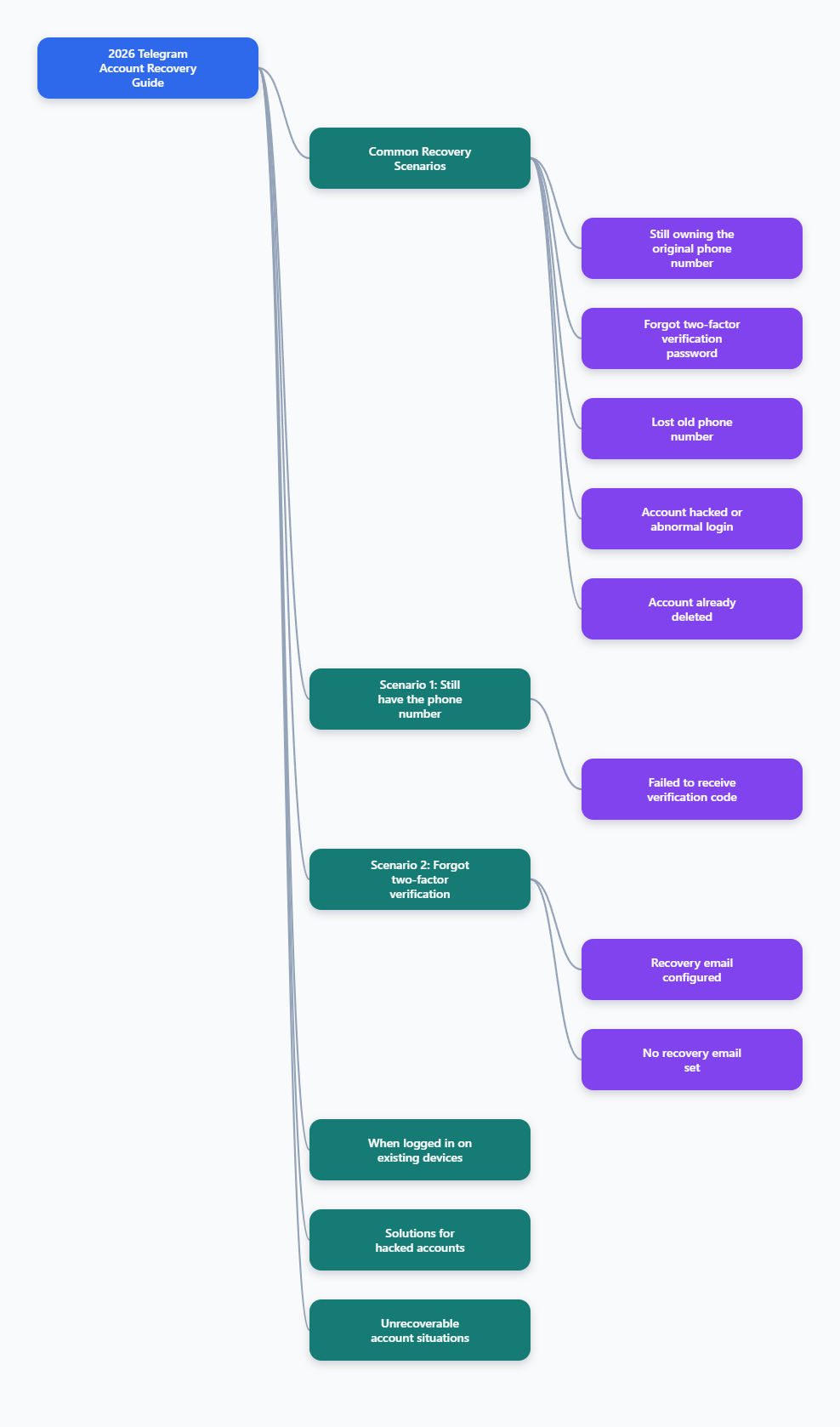
How Telegram account recovery works
Telegram accounts are primarily tied to phone numbers. According to Telegram’s official FAQ, the phone number is the main way Telegram identifies a user. Telegram also states that it does not collect enough additional identity data to manually verify account ownership in the way some other platforms do.
That has an important consequence:
- If you still control the phone number, recovery is usually straightforward.
- If you no longer control the phone number, recovery becomes much harder.
- If you are still logged in on one device, you may still be able to save the account by changing the number or security settings from inside the app.
In practice, Telegram recovery usually falls into one of these scenarios:
- You lost access to the app, but still have the SIM and can receive the login code.
- You forgot your two-step verification password.
- You lost access to the old phone number.
- Your account was hijacked or someone logged in without permission.
- Your account was deleted.
Scenario 1: Recover a Telegram account when you still have the phone number
This is the easiest case. If you still control the number linked to the account, you can normally sign back in by requesting a login code.
What to do
- Open the official Telegram app on your device.
- Enter the phone number associated with the account.
- Wait for the login code.
- If prompted, enter your two-step verification password as well.
Telegram may send the code in different ways:
- To another active Telegram session first
- By SMS
- By phone call in some cases
Some reports and issue discussions show that users do not always receive SMS immediately, especially if Telegram tries to deliver the code to an already logged-in device first. On official apps, the “Didn’t get the code?” path may reveal other options such as SMS or call, depending on your account status and region.
If the login code does not arrive
- Make sure you are using the official Telegram app.
- Check whether the code was sent to another logged-in device.
- Wait a few minutes and try the in-app retry options.
- Confirm that your SIM can receive regular SMS and calls.
- Check whether your carrier is blocking international or automated messages.
If you still cannot receive the code, contact Telegram through the official support page at telegram.org/support. Do not trust third-party “recovery services” that ask for money or session files.
Scenario 2: Recover Telegram after forgetting the two-step verification password
Telegram’s two-step verification adds a password on top of the login code. This protects the account if someone gains access to your SMS or SIM, but it also means recovery is stricter if you forget the password.
If you set a recovery email
This is the best-case outcome. Telegram’s technical documentation confirms that password recovery can be requested only for accounts with a configured recovery email.
In this situation:
- Start the normal login process with your phone number.
- Enter the code sent by Telegram.
- When asked for the two-step verification password, choose the password recovery option such as “Forgot password?”
- Check the linked email inbox, including spam or junk folders.
- Use the recovery code or link to reset the password.
Telegram documentation and reputable Telegram-focused guides consistently note that this method works only if recovery email was previously configured.
If you did not set a recovery email
This is where many users run into trouble. If there is no recovery email, there is usually no immediate way to reset the two-step verification password.
Depending on the account state, Telegram may offer a password reset process with a waiting period. Telegram-related documentation and reporting indicate that this can involve a cooldown period before the old password is removed. During that period, active sessions may receive notifications about the reset request.
Important points:
- If you are still logged in on at least one device, you may be able to change or remove the two-step verification settings from inside the account.
- If you are completely locked out and there is no recovery email, your options are limited.
- Some older community advice suggests deleting and recreating the account, but that means losing the existing account history and should be treated as a last resort.
Best move if you are still logged in somewhere
If you still have Telegram open on a phone, tablet, or desktop session:
- Go to Settings
- Open Privacy and Security
- Open Two-Step Verification
- Update the password while you still have account access
- Add or verify a recovery email immediately
This is one of the most effective ways to avoid permanent lockout.
Scenario 3: Telegram account recovery without the old phone number
This is one of the most searched cases, and it is also one of the most misunderstood.
Telegram’s official FAQ is clear that the phone number is central to account ownership. If you lost access to the number, Telegram generally cannot simply hand the account back based on a support request alone.
What actually works
There are only a few realistic routes:
- You recover the number through your mobile carrier.
- You are still logged in on an existing Telegram session and change the account to a new number from inside the app.
- You use whatever official recovery options are available if your account has a configured recovery method for a specific lockout case.
Option 1: Recover or reissue the old number
This is often the most practical solution. Many carriers can reissue a lost number or replace a damaged SIM if you can prove ownership. Once the number works again, you can receive the Telegram login code and sign in.
Ask your carrier about:
- SIM replacement
- Number reactivation
- Port-in or reissue options
If the number has already been permanently reassigned, recovery may no longer be possible through this route.
Option 2: Change your Telegram number from an active session
If you are still logged in on any device, Telegram allows you to change the number attached to the account. Telegram’s official materials and API documentation confirm that account phone numbers can be changed without losing cloud chats, groups, contacts, or username.
Typical path:
- Open Telegram while still logged in.
- Go to Settings.
- Tap your phone number.
- Choose Change Number.
- Verify the new number with the code Telegram sends.
This is extremely important if you moved countries, lost your old SIM, or are about to give up a number. If you still have access to the account now, change the number before you lose the old line for good.
What does not reliably work
- Asking Telegram support to manually transfer the account to a new number without verification
- Using only your username to prove ownership
- Using only old screenshots, profile data, or contact names
Telegram does not treat those as substitutes for phone-based ownership.
Scenario 4: Recover a hacked Telegram account
If your Telegram account was taken over, speed matters. Security researchers and Telegram-focused security articles consistently recommend acting in the first available active session before the attacker fully locks you out.
Signs your account may be hacked
- You see unknown devices in active sessions.
- Your profile name, username, or photo changed unexpectedly.
- Contacts report strange messages from you.
- You were added to unfamiliar groups or channels.
- Your two-step verification settings changed without your knowledge.
What to do immediately if you still have access
- Open Settings and go to Devices or Active Sessions.
- Review every logged-in device.
- Terminate unknown sessions, or use Terminate All Other Sessions if needed.
- Enable or change your two-step verification password.
- Make sure a recovery email is added and secured.
- Change the password of the email account linked to Telegram.
- Secure your mobile carrier account and SIM to reduce SIM-swap risk.
Telegram has long supported active session management, and official materials confirm you can remotely terminate other sessions from the app.
If you already lost access
If the attacker logged you out of all sessions, recovery usually depends on whether you still control the phone number. If you do, try to log back in with the number and code. If two-step verification was enabled and changed by the attacker, recovery becomes much more difficult.
In parallel, use Telegram’s official support form and explain:
- Your phone number in international format
- That the account was hijacked
- When you lost access
- Whether you still control the number and email
Kaspersky’s guidance on hacked Telegram accounts also recommends contacting Telegram support through official channels and securing all related services, especially your mobile number and email.
Important warning
If an attacker has both:
- Your phone number access, and
- Your two-step verification credentials or recovery path
the chance of easy recovery drops sharply. In that case, prioritize securing the carrier account, email account, and any other services that share the same credentials.
Scenario 5: Can a deleted Telegram account be recovered?
Usually, no. If a Telegram account was permanently deleted, it generally cannot be restored with its old chats and cloud data.
This applies to:
- Accounts deleted manually
- Accounts deleted through inactivity settings after a long unused period
Telegram’s system may allow you to register again with the same phone number, but that creates a new account rather than restoring the old one.
If you are unsure whether the account is truly deleted or you are just locked out, test recovery in this order:
- Try logging in with the original number.
- Check whether you are prompted for code or password rather than a fresh registration flow.
- If the app treats it as a new signup, the old account may already be gone.
Be cautious with websites claiming they can recover permanently deleted Telegram data. There is no reliable public method to restore Telegram cloud chats after permanent account deletion.
How to contact official Telegram support
If self-service recovery fails, the official support page is your next step:
telegram.org/support
When contacting support, include only relevant, verifiable details:
- Your phone number with country code
- A clear summary of the issue
- The date or approximate time access was lost
- Whether you still have access to the number
- Whether you still have any active Telegram sessions
Keep expectations realistic. Telegram support is not designed like a bank-style identity recovery desk, and response times can vary.
Common Telegram recovery mistakes to avoid
1. Waiting too long after a hack
If you still have one active session, use it immediately. Delay gives the attacker time to change settings and end your sessions.
2. Ignoring the linked email account
If you use a recovery email for Telegram, that email becomes part of your security perimeter. Protect it with a strong password and its own two-factor authentication.
3. Keeping an outdated phone number on the account
If you still have access to Telegram but your old number is about to expire, change it now inside the app.
4. Using unofficial apps or tools for recovery
Unofficial clients and random scripts can cause login issues and increase risk. Use Telegram’s official apps and support channels.
5. Paying strangers for “recovery help”
Scammers often ask for:
- Session files
- Login codes
- SIM details
- Email access
- Upfront fees
Anyone who asks for those items can take over the account completely.
How to prevent Telegram account loss in the future
The best Telegram account recovery strategy is making recovery easier before anything goes wrong.
Use this checklist
- Enable two-step verification.
- Add a recovery email you actively use.
- Secure that email with strong authentication.
- Keep your phone number current in Telegram.
- Review active sessions regularly.
- Do not share login codes with anyone.
- Be careful with phishing pages and fake Telegram support accounts.
- Protect your mobile carrier account against SIM-swap fraud if your carrier offers that feature.
If you use Telegram for work, admin access, or channel ownership, these steps are even more important. Losing access to a personal chat is bad enough. Losing access to a business channel or team account can be much worse.
Frequently asked questions
Can I recover a Telegram account without a phone number?
Usually not, unless you are still logged in on another device or can restore the phone number through your carrier. Telegram primarily uses the phone number to verify ownership.
Can I recover Telegram with email only?
Not as a general rule. Email can help with two-step verification recovery only if you previously set a recovery email. It does not replace the phone number as the main account identifier.
Will changing my Telegram number delete my chats?
No, Telegram’s official guidance indicates that changing your number keeps your cloud chats, contacts, groups, channels, and username tied to the same account.
Can Telegram support manually give my account back?
Support may help in limited cases, especially for compromised accounts, but Telegram does not generally restore access without the normal verification methods tied to the account.
Can a permanently deleted Telegram account be restored?
In most cases, no. You may be able to sign up again with the same phone number, but that creates a new account rather than restoring the deleted one.
Final thoughts
Telegram account recovery in 2026 is possible in many cases, but only if you still control at least one critical recovery asset: your phone number, a trusted logged-in session, or a configured recovery email for two-step verification.