
If you want to create free Telegram community space that people actually use, the setup matters more than the size. Telegram is one of the easiest platforms for launching a community with no software cost, and its official docs make the key difference clear: groups are built for conversation, while channels are built for broadcasting.
In this guide, you will learn how to set up the community, control spam, organize discussions with topics, and choose the right free and paid tools only when you need them. The goal is simple: build a clean, useful space that feels active from day one.
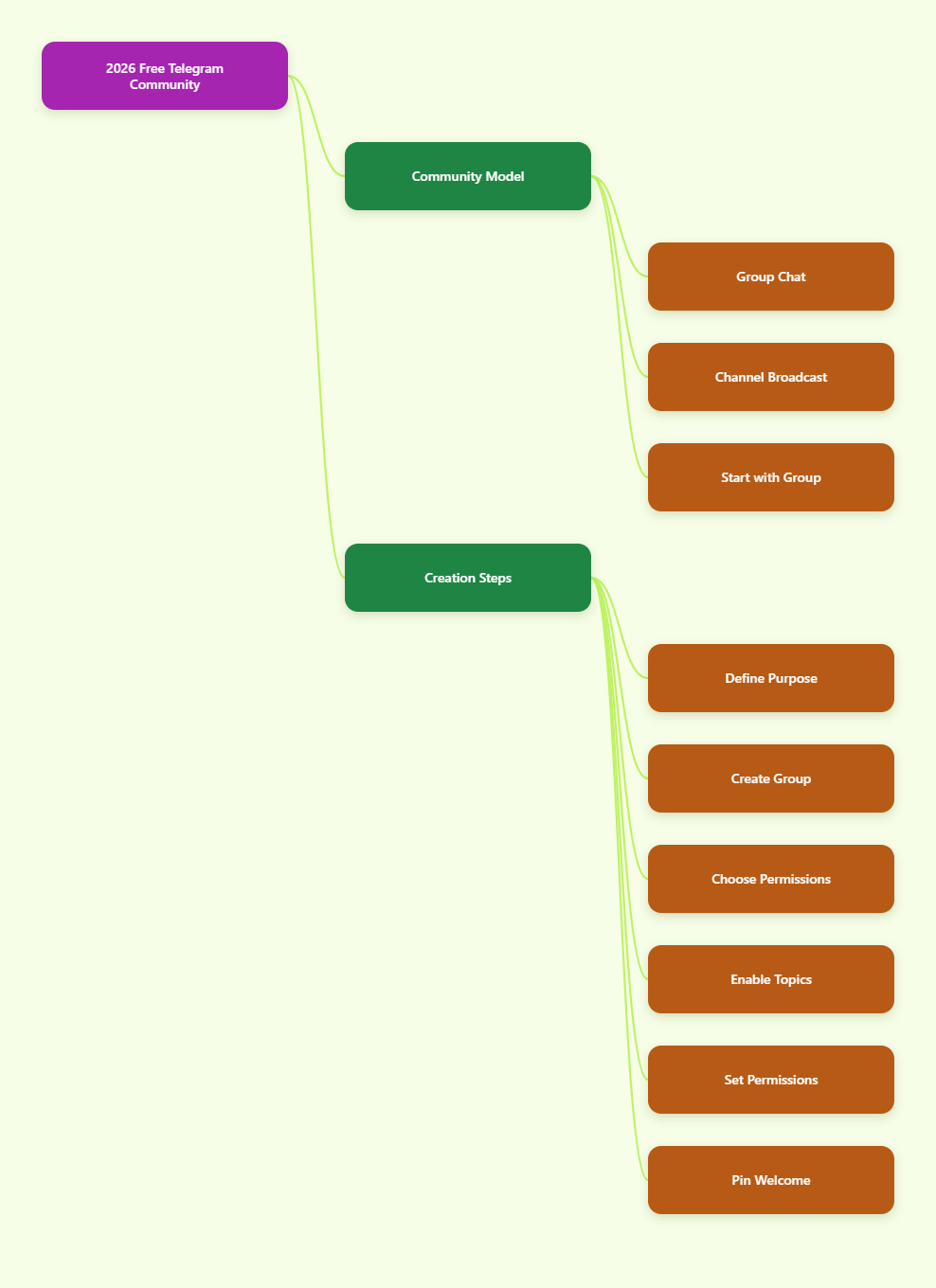
Start With the Right Community Model
Before you tap Create, decide what kind of community you are building. If you want members to talk to each other, ask questions, and share updates, a group is the right format. If you want to publish announcements and let people react or discuss elsewhere, use a channel plus a linked group.
For most creators, brands, coaches, and niche communities, the free Telegram community should begin as a group. Telegram groups can be private or public, and that choice affects discoverability, moderation, and how fast the room fills up.
Private groups are invite-only and are not searchable inside Telegram. Public groups can be found by username, which helps growth later, but they also attract more cold traffic and more spam if you are not ready.
How to Create a Free Telegram Community Step by Step
-
Define the purpose in one sentence. Write down why people should join. A community for local founders, a course group, or a customer support room all need different rules, tone, and onboarding.
This one sentence becomes your group description, welcome message, and moderation standard. If you cannot explain the purpose clearly, members will not know why they should stay active.
-
Create the group in Telegram. Open Telegram, start a new group, add at least one contact, and give the group a name and photo. Use a name that tells people what the community is about instead of a vague brand-only label.
If the community is tied to a product, use the product name plus the benefit. If it is niche-based, include the topic so searchers instantly understand the value.
-
Choose private or public access. For a new community, private is usually safer because you can control quality. You can later switch to a public username when the rules, content, and moderation are working smoothly.
Telegram invite links can also be configured with join requests, time limits, and usage limits. That makes it easier to test growth channels without opening the doors too wide too early.
-
Turn on Topics if the room will grow. Telegram lets groups enable Topics, which split one big conversation into separate spaces. This is especially useful once your group starts covering different subjects such as introductions, questions, resources, and announcements.
Each topic keeps its own message history and media. That makes the group easier to read and reduces the feeling of chaos that usually kills engagement in larger chats.
-
Set permissions before you invite people. Go to Group Settings and review member rights carefully. Decide whether members can send links, stickers, GIFs, polls, media, or voice messages on day one.
For many communities, the safest starting point is to allow text and photos, but restrict links until people earn trust. If messages start moving too quickly, use slow mode so members have time to read before posting again.
-
Add a moderation bot only after the basics are set. Telegram supports bots, but bots in privacy mode do not always see everything unless they have the right permissions. If you want a bot to moderate spam or auto-check newcomers, add it as an admin with only the rights it actually needs.
For simple spam protection, Shieldy is a common free choice. For larger groups that need analytics and deeper moderation, Combot is a known paid option with a free tier, but you should always check the current plan details before relying on it.
-
Launch with a pinned welcome post. Your first message should explain the purpose, the rules, and what new members should do next. Pin that post so every new member can find it without asking again.
A strong welcome post usually includes three things: why the group exists, what behavior is not allowed, and where members should introduce themselves or ask their first question.
A Simple Launch Checklist That Keeps the Community Clean
Most new Telegram communities fail because the founder assumes members will figure things out. In reality, people need a clear first path. If the room feels confusing, quiet, or full of spam, they leave fast.
- Write a short group description. Keep it specific and useful.
- Pin one welcome message. Make the first action obvious.
- Set join requests if quality matters. This adds a manual checkpoint before strangers enter.
- Test the experience with a second account. Check what a new member actually sees.
- Create 3 to 5 starter conversations. Seed the group with real prompts so the room does not feel empty.
- Review spam risk daily in week one. The earliest members define the culture.
Telegram groups can scale very fast, but that does not mean your moderation should be reactive. It is much easier to shape the room before growth starts than to clean it after the spam arrives.
Free vs Paid Tools for a Telegram Community
You can create a strong Telegram community for free with Telegram’s own settings alone. Paid tools are only worth it when your group needs more automation, analytics, or support at scale.
Here is a practical comparison of the tools that make sense for most community owners.
| Tool | Free or Paid | Best For | Pros | Trade-Offs |
|---|---|---|---|---|
| Telegram built-in tools | Free | Launching, permissions, invite links, topics | No extra cost, native setup, join requests, permissions, public or private groups | Manual moderation still takes time |
| Shieldy | Free | Simple anti-spam onboarding | Easy captcha-style entry gate, lightweight, good for basic spam blocking | Focused on entry protection more than full analytics |
| Combot Free tier | Free tier | Basic moderation and community stats | Known for moderation, anti-spam, and analytics features | Advanced features are limited on the free tier |
| Combot Pro | Paid | Growing communities that need more data | Deeper analytics and stronger management tools | Recent public comparisons show paid plans starting around $5 per group per month; verify current pricing |
If you are early, start with Telegram built-ins plus one free moderation bot. That combination is enough for a surprising number of communities. Move to paid tools only when the time you save is worth more than the subscription.
How to Organize a Free Community So It Stays Active
A free Telegram community does not need expensive software, but it does need structure. The best groups feel easy to join, easy to understand, and easy to contribute to.
Use Topics to separate the most common types of messages. A simple starter structure could be Announcements, Introductions, Questions, Resources, and Off-Topic Chat. That setup works because members do not have to scroll through unrelated posts just to find what matters to them.
Also think about your posting rhythm. A community without regular prompts often goes silent, and a silent group quickly feels abandoned. Post a question, a checklist, a poll, or a quick resource every few days so people have a reason to reply.
If you are building a brand community, link the group to a channel only if you need one-way updates. The channel can carry official announcements, while the group handles conversation. That keeps the discussion space readable and gives members a clear place to speak.
Spam Control and Safety Basics You Should Not Skip
Telegram gives admins useful controls, but they only work if you configure them early. Go through permissions, invite links, and moderation settings before your first wave of members arrives.
Join requests are especially useful when you want quality over raw numbers. You can create links that require approval, which gives you a lightweight filter without paying for a separate gateway tool.
For public communities, keep an eye on links, scams, and repeated promotional posts. Telegram’s own admin tools can help, but a simple house rule about no unsolicited promotion can reduce a lot of noise.
If you use a bot, make sure it is doing one clear job. A bot that welcomes people, another that checks spam, and a third that handles stats can work. Too many bots usually create confusion instead of control.
Common Mistakes When You Try to Create Free Telegram Community Spaces
- Using a channel when you really need discussion. Channels are for broadcast, not community conversation.
- Leaving permissions wide open. New members should not always be able to post links immediately.
- Skipping the welcome post. A blank room feels cold and unfinished.
- Ignoring Topics once the group grows. One chat thread becomes hard to follow very quickly.
- Adding too many tools at once. Start simple and add complexity only when the group needs it.
- Chasing members instead of retention. A smaller active group is better than a large silent one.
The biggest mistake is treating growth as the goal instead of engagement. Telegram makes it easy to add people, but the real win is keeping them involved long enough to create a useful space.
When to Upgrade From Free to Paid
You do not need paid tools on day one. In fact, many communities should stay free for as long as possible because the native setup already covers the basics.
Consider paid moderation or analytics only when one of these is true: you are spending too much time cleaning spam, you cannot track what members care about, or you need more automation than simple rules can provide. That is when tools like Combot start to make business sense.
If your community is small, fast, and personal, free tools are usually enough. If your group is large, public, or tied to customer support, better reporting and moderation can save real time.
FAQ
Can I create a Telegram community for free?
Yes. Telegram groups, topics, invite links, and permissions are free to use. You can build a fully functional community without paying for third-party software.
Should I use a group or a channel for a community?
Use a group if you want members to talk to each other. Use a channel if you want to broadcast updates, then add a linked group only if you want discussion.
How many members can a Telegram group have?
Telegram groups can grow very large, and official references state that groups can support up to 200,000 members. Basic groups start smaller and can auto-upgrade into supergroups as they grow.
Should my Telegram community be public or private?
Start private if you want control and cleaner onboarding. Switch to public later when your rules, moderation, and content flow are already working.
Do I need a bot to run a free Telegram community?
No, but a bot can help with spam and onboarding. If you add one, give it only the permissions it needs and test it before inviting a lot of members.
Can I add Topics to any group?
Telegram supports Topics in groups to organize conversations into separate sections. That makes them especially useful once the room starts covering multiple subjects at once.
Final Thoughts
The best way to create free Telegram community spaces is to keep the setup simple, the purpose clear, and the moderation active. Start with the right group type, lock down basic permissions, add Topics when discussion expands, and use free tools before paying for anything.
If you do those things well, Telegram gives you a surprisingly strong community platform without startup cost. Build the structure first, invite the right people second, and let engagement grow from there.