
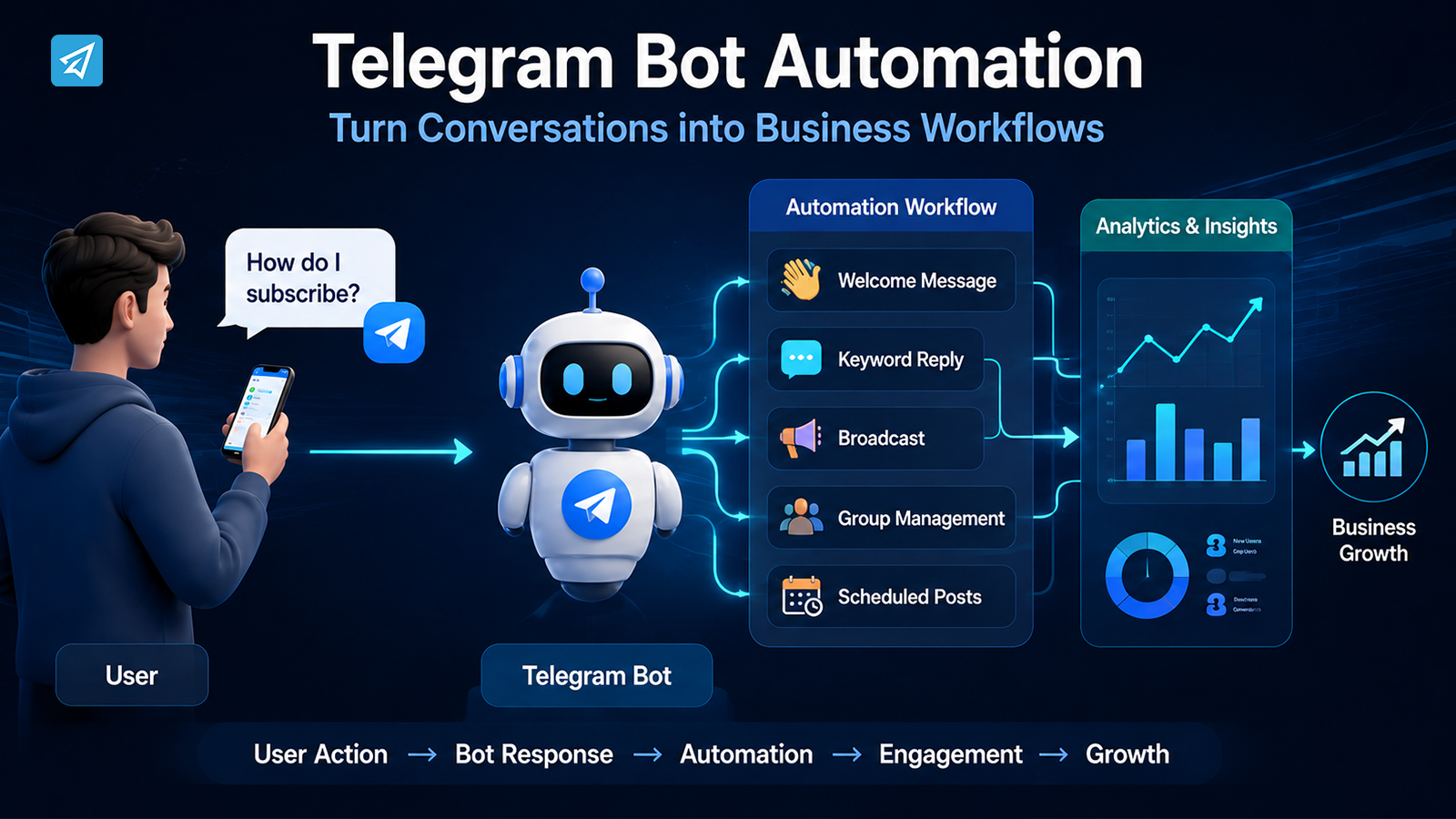
A customer opens Telegram and sends a simple question: “How can I subscribe?” Ten minutes later, another customer asks exactly the same thing. Your team answers both manually. Then another message arrives, followed by another, while someone also needs to publish a community update.
This is where learning to create a Telegram bot becomes more useful than simply adding another chat account. The real opportunity is to turn repeated Telegram interactions into a workflow: the user takes an action, the business responds automatically, the next step is triggered, and the team can focus on tasks that actually require human attention.
It Starts With One Simple User Action
Every Telegram business workflow begins with a user doing something.
They might:
- Open a bot and press Start
- Send a question
- Join a Telegram group
- Follow a channel
- Respond to a promotional message
- Click a link shared by your business
Consider a simple customer-support scenario.
A customer discovers your Telegram bot and sends:
“How do I subscribe?”
If the process is completely manual, the message becomes a task for someone on your team. The employee needs to notice it, understand the question, find the correct information, write a response, and send it back.
That process works when message volume is low. But the same workflow becomes inefficient when dozens or hundreds of users ask similar questions.
The first question, therefore, should not only be “How do I create a Telegram bot?”
It should be:
“What should happen automatically after someone interacts with my bot?”
That change in perspective is what turns a Telegram bot from a simple communication tool into part of a business workflow.
What Happens When the Process Is Manual?
Imagine a business receiving the same five questions every day.
The workflow looks like this:
User asks → Staff checks message → Staff finds answer → Staff writes reply → User waits
Now multiply that process across many users.
The problem is not necessarily that each individual question takes a long time. The problem is repetition.
Your team may spend time:
- Answering the same FAQs
- Sending the same links
- Repeating basic instructions
- Welcoming new community members
- Publishing routine updates
- Monitoring group activity
- Preparing recurring promotional messages
Manual communication can also create inconsistency. One employee may provide a short answer, while another sends a longer explanation. A message may be answered immediately during working hours but remain unanswered later.
Eventually, the team is managing a communication queue instead of improving the customer experience.
This is where Telegram automation becomes valuable.
Now Add Automation to the Workflow
The fundamental change is simple.
Before
User → Staff → Reply
After
User → Telegram Bot → Automation Rule → Response / Action
The bot does not need to replace every human interaction. Instead, it can take care of predictable parts of the workflow.
For example:
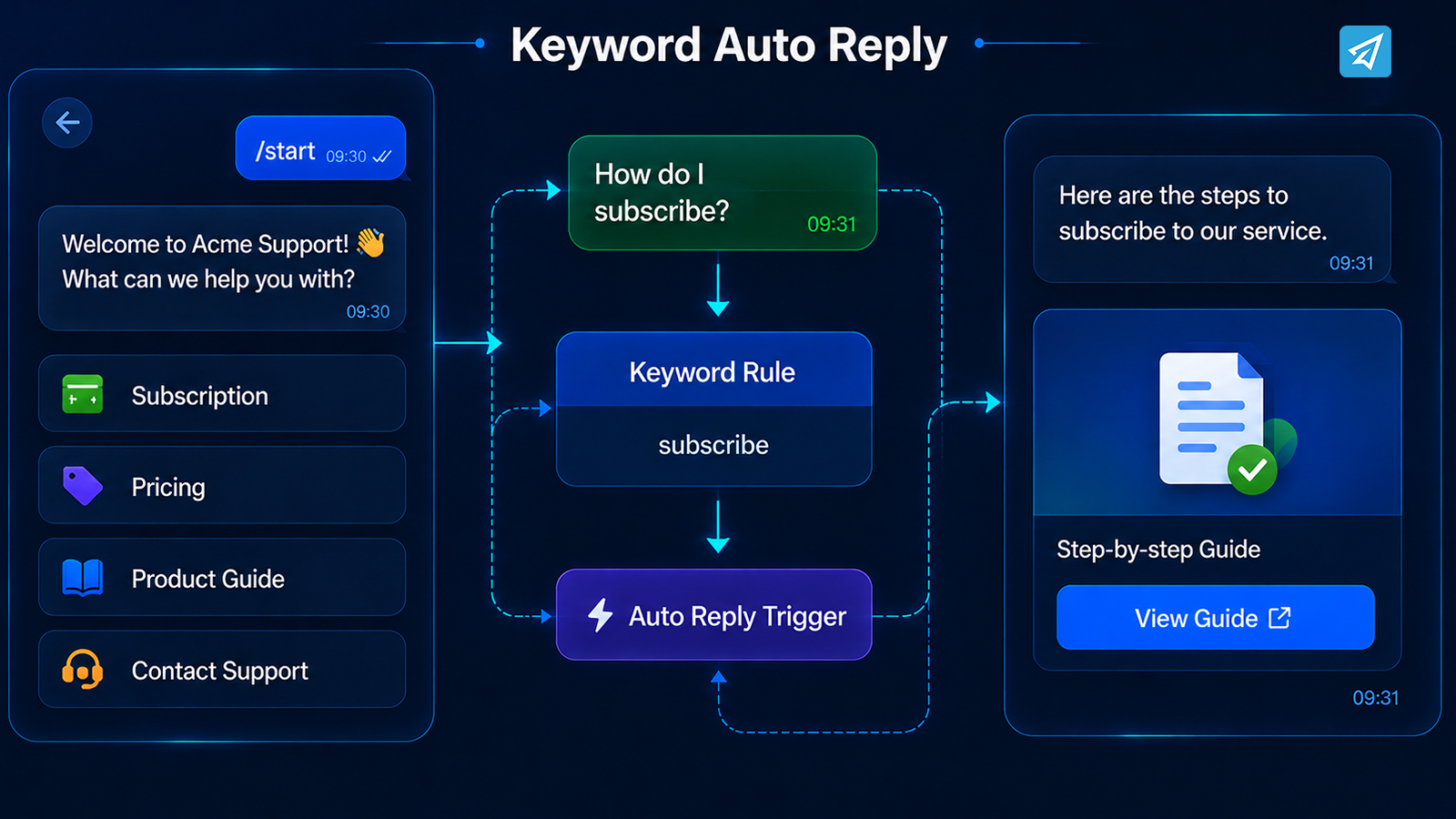
User: “How do I subscribe?”
Bot: Automatically detects “subscribe” and sends the predefined subscription instructions.
The employee does not need to write the same response again.
OnlyTG Echo supports this type of workflow through Start Message, Auto-reply, Keyword Reply, Quick Reply, Broadcast, and other Telegram automation features.
The important idea is that automation begins with a specific business rule.
When this happens → do that.
Once several useful rules are connected, the business has something more valuable than an individual bot: a repeatable Telegram workflow.
Step 1: Handle the First Interaction
The first interaction determines what users see when they arrive.
When a user opens a bot or uses the /start command, a business can provide a welcome message explaining what the bot can do. OnlyTG Echo’s Start Message supports text, media, and buttons.
For example:
Welcome to Acme Support.
What can we help you with?
- Subscription
- Pricing
- Product Guide
- Contact Support
Instead of making the user guess what to type, the business immediately provides direction.
This small change can reduce unnecessary back-and-forth because users understand what the bot is designed to handle.
The first message can therefore act as the entry point to the larger workflow.
User opens bot → Welcome message → User chooses a topic
That is much easier to manage than starting every conversation from an empty chat window.
Step 2: Recognize What the User Needs
Once the user starts communicating, the next challenge is identifying what kind of response is required.
A business may have common intent patterns such as:
- “How do I subscribe?”
- “Where can I find the guide?”
- “What are the product rules?”
- “How do I contact support?”
- “When is the next update?”
For predictable questions, keyword-based automation can be enough.
OnlyTG Echo allows businesses to configure keywords and corresponding preset responses. When a user’s message contains a configured keyword, the relevant response can be sent automatically. An auto-reply can contain text, media, buttons, or configured modules.
For example:
User: “Where can I find the product guide?”
Trigger: guide
Automated response: “Here is our product guide: [button/link]”
The business has converted a repeated question into a predefined workflow.
Quick Replies can serve a similar purpose when teams need to send complex preset messages through simple commands.
The result is not simply faster communication. It is more consistent communication.
Step 3: Move Beyond Simple Replies
A Telegram bot becomes more useful when it supports the surrounding workflow rather than only answering questions.
Suppose your business publishes updates every week.
The manual process may look like:
Prepare content → Find the right audience → Send message → Repeat next week
With Telegram automation, recurring communication can become a planned process.
For direct bot contacts, OnlyTG Echo provides Broadcast functionality for sending prepared content to contacts. Broadcast content can include text, media, and buttons through content modules.
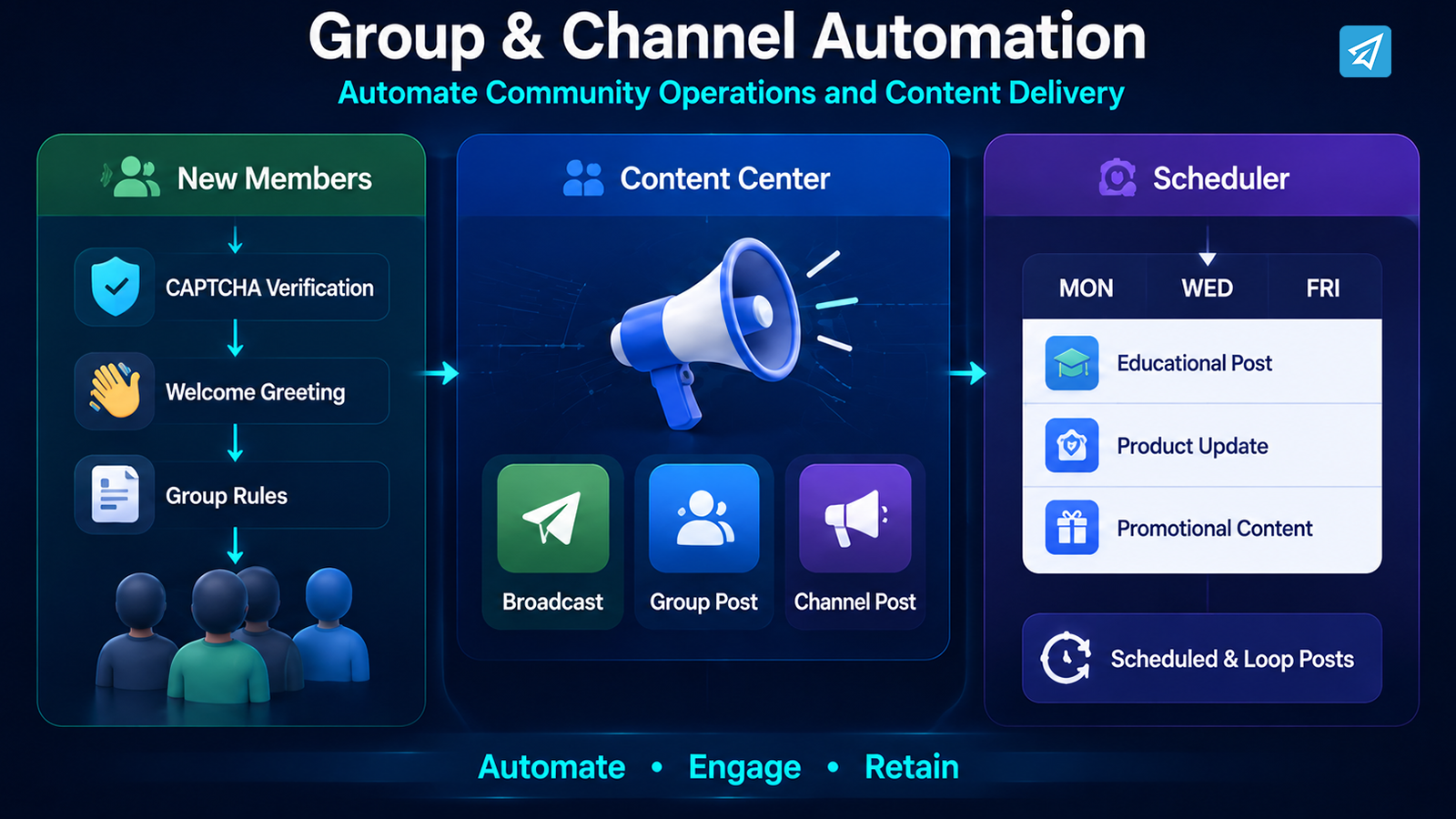
For Telegram groups and channels, the workflow can go further.
A community may need:
- CAPTCHA verification for new members
- Automatic greetings
- Group rules
- Keyword replies
- Scheduled or looping posts
- Channel posts
- Scheduled channel publishing
OnlyTG Echo provides these group and channel-oriented capabilities, allowing the same automation approach to extend beyond one-to-one bot conversations.
So the workflow changes from:
Answer individual messages
to:
Manage recurring communication and community operations
That is a much more meaningful business use of a Telegram bot.
Step 4: Keep the Workflow Running Automatically
The biggest advantage of a workflow is continuity.
A business does not want automation to work only when someone remembers to start it.
A better operating model is:
Prepare content → Schedule or configure automation → Telegram delivers it → Users interact → Business reviews the result
For example, a channel may have a weekly content schedule.
Monday: educational post
Wednesday: product update
Friday: promotional content
Instead of manually publishing every post at the exact moment, scheduled publishing can be configured in advance. OnlyTG Echo supports scheduled posts for channels, as well as looping posts for groups and channels.
This allows the team to separate content preparation from content delivery.
The same principle applies to community operations.
New members can receive greetings, group rules can be configured, and keyword-based responses can handle recurring questions.
Automation becomes an operating layer that keeps routine communication moving.
Step 5: Measure What Is Happening
Automation answers one problem: what can happen automatically?
Analytics answers another:
What is actually happening?
Without measurement, a business may know that it has created a Telegram bot but not understand how users interact with it.
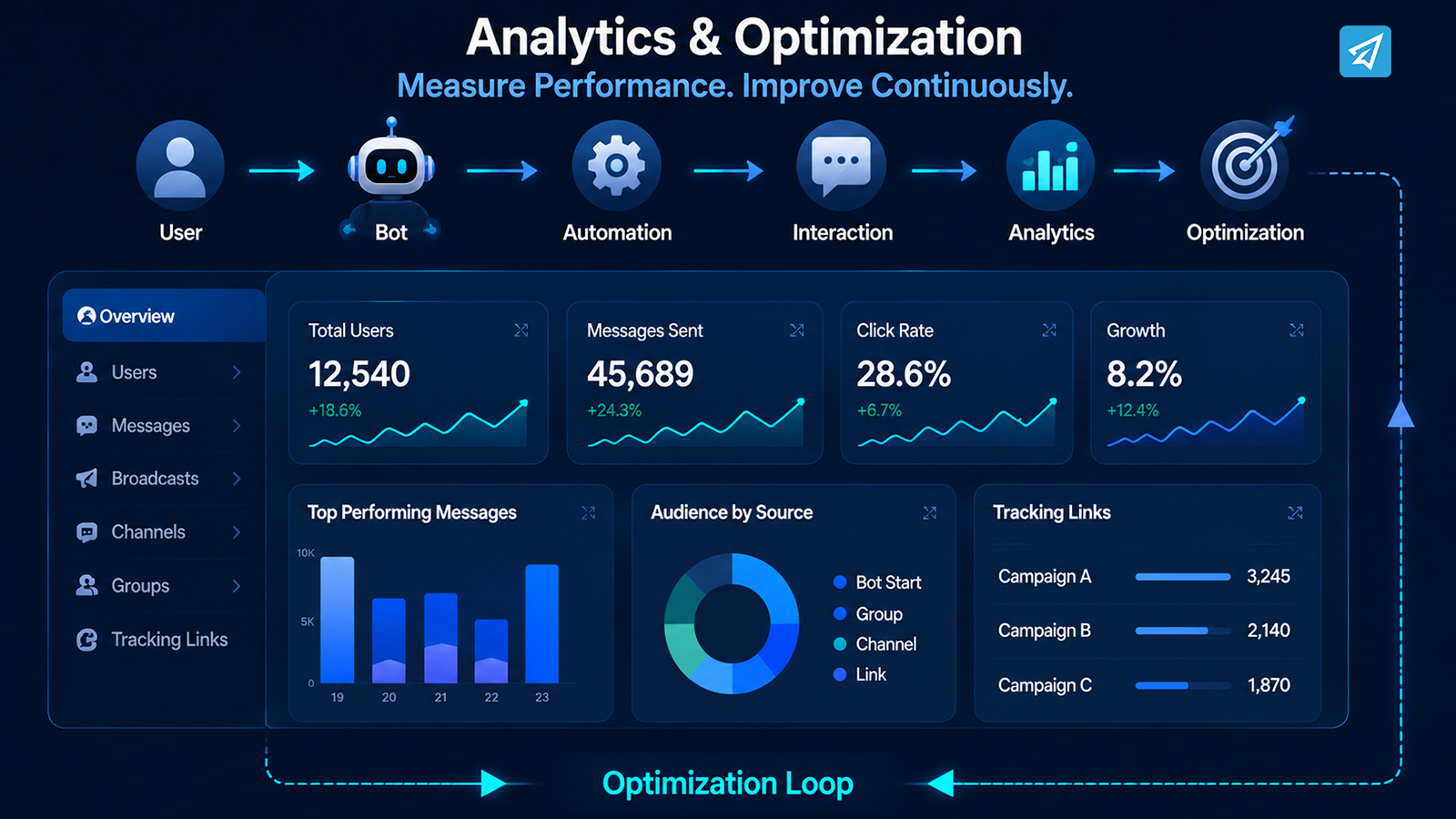
OnlyTG Echo provides analytics for users who interact with bots, as well as analytics for groups and channels.
For example, a business can use analytics to understand its Telegram audience and support decisions about future communication.
Tracking links can also help connect Telegram activities with specific links or campaigns. OnlyTG Echo lists Tracking Links among its capabilities.
The workflow therefore becomes:
Automation → Interaction → Measurement → Optimization
This is where a basic Telegram bot starts becoming part of an ongoing business process.
One Workflow, Two Operating Models
| Workflow Stage | Manual Process | Automated Process |
|---|---|---|
| First interaction | Staff responds manually | Start Message provides an automatic introduction |
| FAQ | Staff answers repeated questions | Keyword-based Auto-reply provides preset responses |
| Common responses | Employee rewrites messages | Quick Reply sends preset content |
| Broadcast | Staff prepares and sends updates manually | Broadcast task distributes prepared content |
| Group management | Administrators handle routine actions manually | CAPTCHA, greetings, rules, and keyword replies automate recurring tasks |
| Content publishing | Staff publishes posts one by one | Scheduled or loop posts support recurring publishing |
| Tracking | Team reviews activity manually | Analytics and Tracking Links provide additional data |
Where OnlyTG Echo Fits
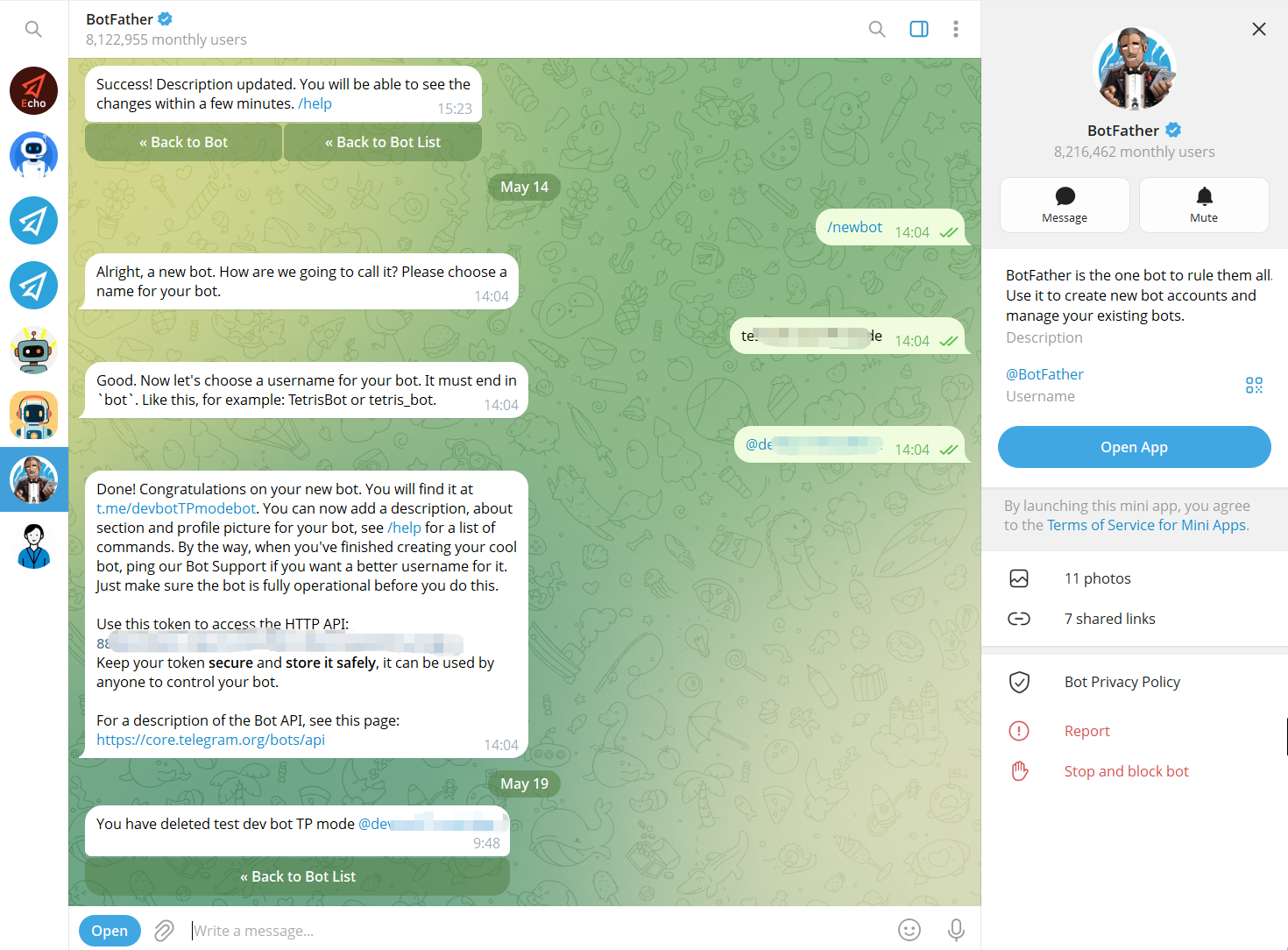
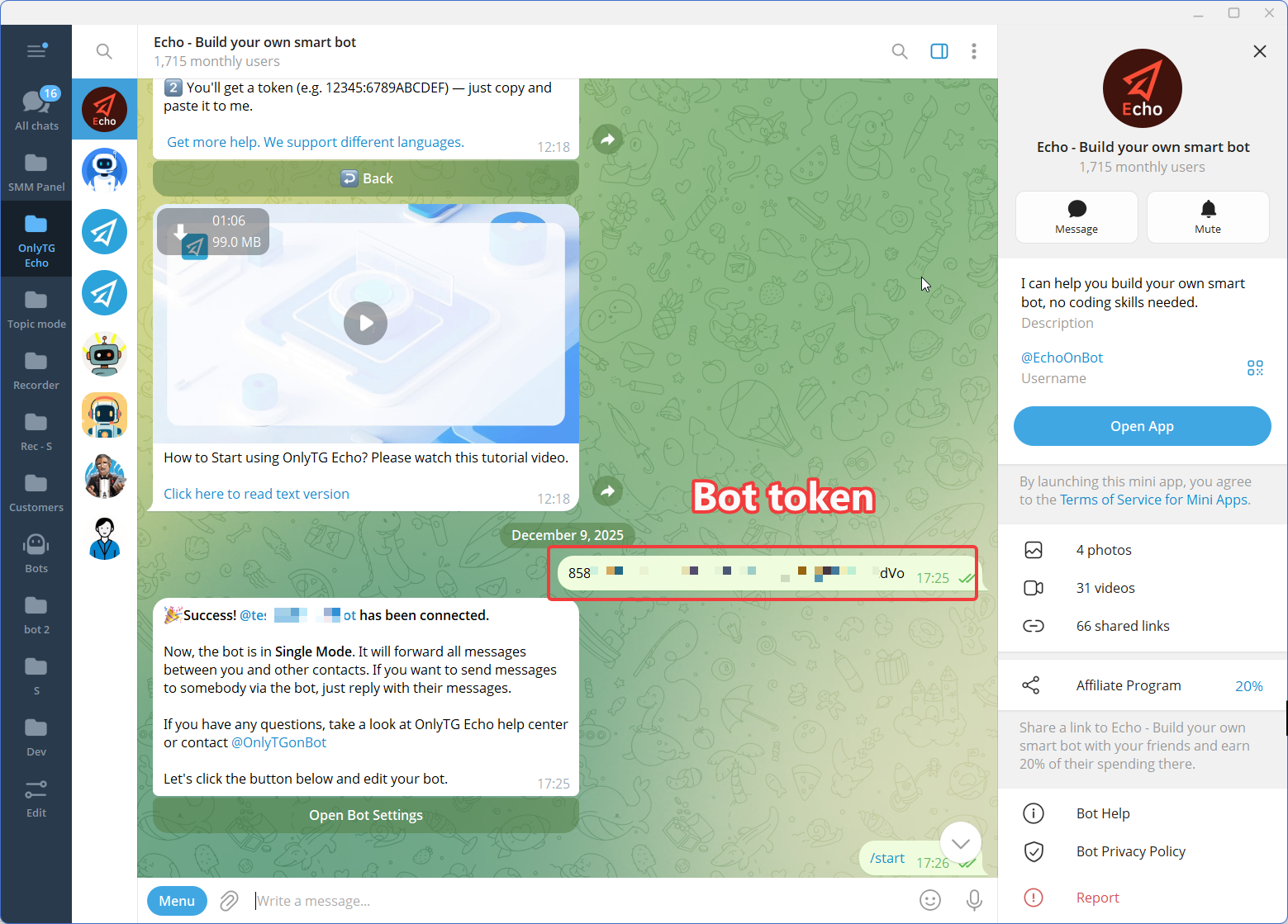
If your goal is simply to create a Telegram bot identity, Telegram’s BotFather handles the initial bot creation. OnlyTG Echo then provides a no-code environment for configuring and operating that bot.
Step 1 — Create a Telegram Bot
Step 2 — Connect the Bot to OnlyTG Echo
Step 3 — Configure the Features
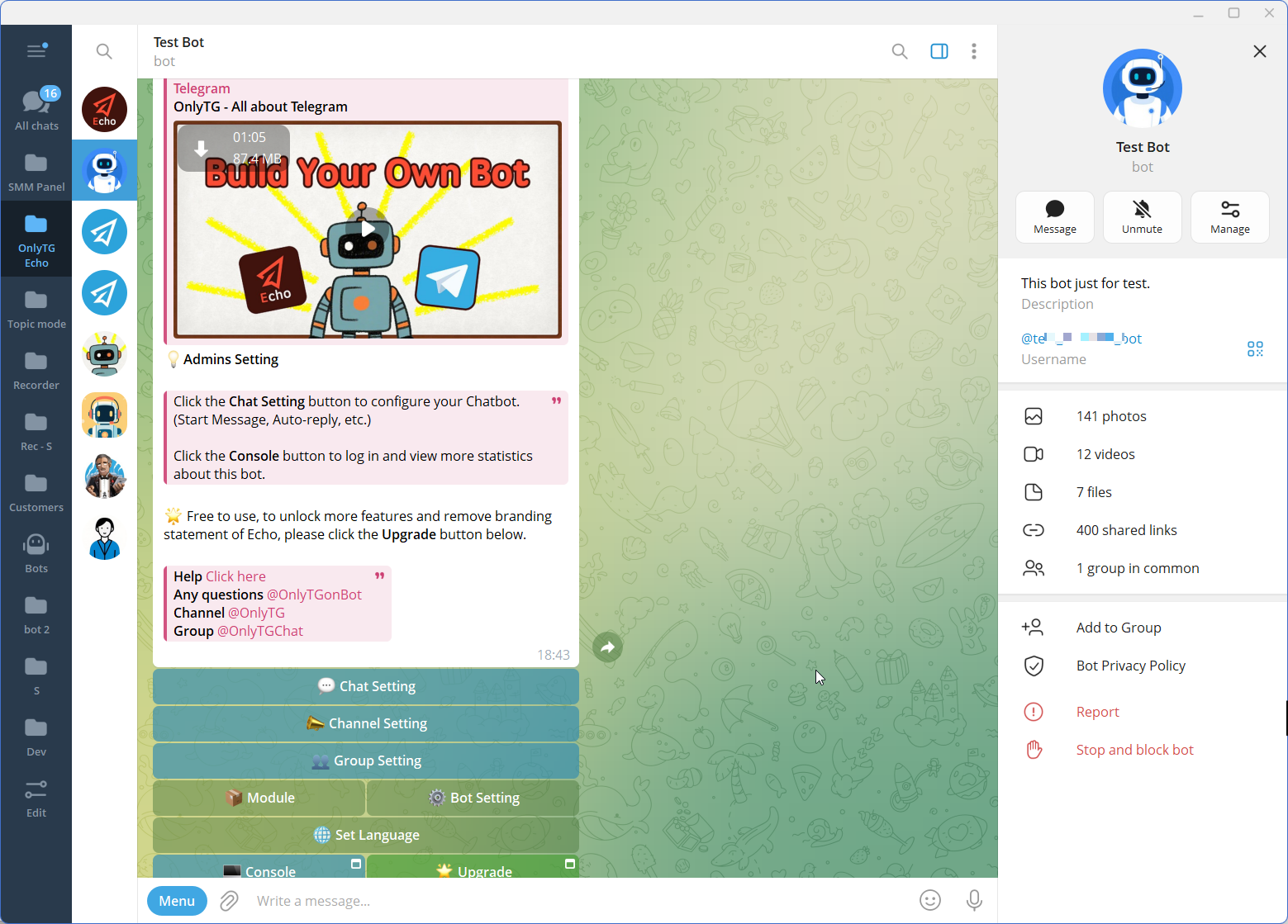
From there, the workflow can be built around the business’s actual needs.
For customer-facing bots, relevant capabilities include:
- Start Message
- Auto-reply
- Keyword-based replies
- Quick Reply
- Multi-form Messages
- Broadcast
- Analytics
For communities and channels, relevant capabilities include:
- Group CAPTCHA
- Group Greeting
- Group Rules
- Group Keyword Reply
- Group Post and Loop Post
- Channel Post
- Scheduled Posts
- Channel Analytics
The key advantage is the no-code approach: instead of building every automation rule from scratch, businesses can configure the communication process around their Telegram operations.
FAQ
Do I need coding knowledge to create a Telegram bot?
Not necessarily. Creating the bot itself starts with Telegram’s BotFather, while platforms such as OnlyTG Echo provide no-code tools for configuring automated messages and other workflows.
Can a Telegram bot automatically answer customer questions?
Yes, for predictable questions. Keyword-based Auto-reply can detect configured keywords and send predefined responses, including text, media, and buttons. This works particularly well for FAQs and other repetitive requests.
When should a business start automating Telegram communication?
A practical starting point is when the same interactions happen repeatedly. If your team regularly answers identical questions, sends recurring updates, welcomes community members, or publishes routine content, those activities are good candidates for automation.
Conclusion: Turn a Telegram Bot Into a Business Workflow
Creating a Telegram bot is only the beginning.
The real value appears when the bot becomes part of a repeatable process:
Manual interaction → Automated response → Continuous workflow → Measurable activity
Instead of asking employees to repeat the same actions throughout the day, businesses can configure the predictable parts once and let automation handle them consistently.
If you are ready to create a Telegram bot for customer communication, community management, or recurring content operations, OnlyTG Echo provides a no-code way to configure the workflow around your Telegram presence.