Skip to content
OnlyTG Icon
  • ProductsExpand
    • Echo
    • Recorder
  • ResourcesExpand
    • Help
    • Blog
    • Channel & Bot Finder
    • SMM Panel
  • PricingExpand
    • Echo Pricing
  • EnglishExpand
    • 中文 (中国)
    • Русский
    • English
Contact us
OnlyTG Echo

Configure Telegram Bot Menu by OnlyTG Echo

Home » Blog » OnlyTG Echo » Configure Telegram Bot Menu by OnlyTG Echo

In the Telegram ecosystem, Telegram Bots have become an indispensable component. When operating your own bot, have you ever encountered these issues:

  • Users send inquiries during your offline hours, and delayed responses lead to losing the customer;
  • Users struggle to understand bot commands, forcing you to repeatedly explain instructions.

These problems can be effectively resolved by configuring telegram bot menu buttons.

How to configure telegram bot menu buttons

We recommend using OnlyTG Echo for this setup – simple, efficient, secure, stable, and packed with extended functionalities.

Prerequisite: Create your bot and bind it to OnlyTG Echo

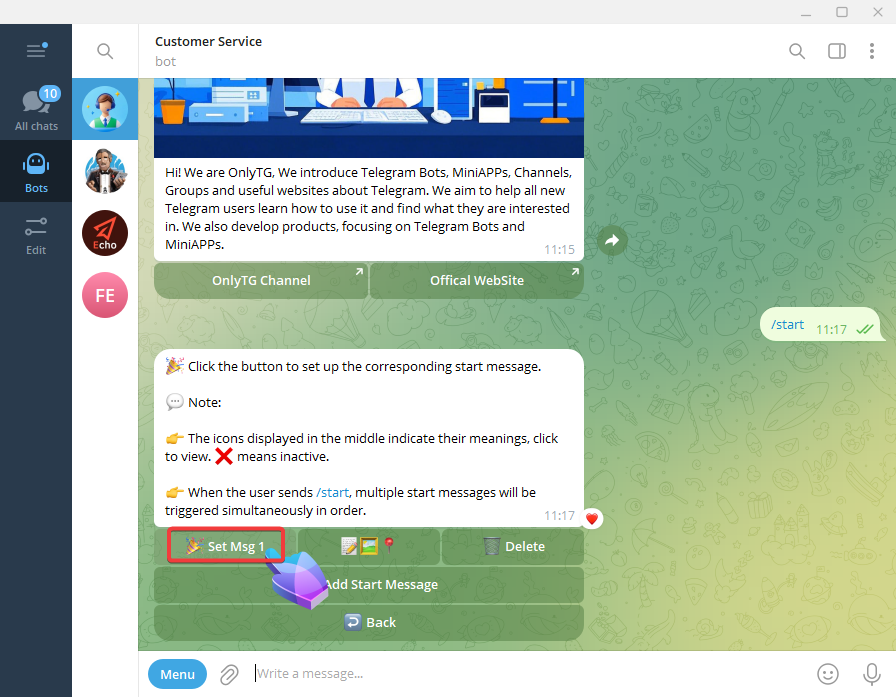
  1. Set Start Message:
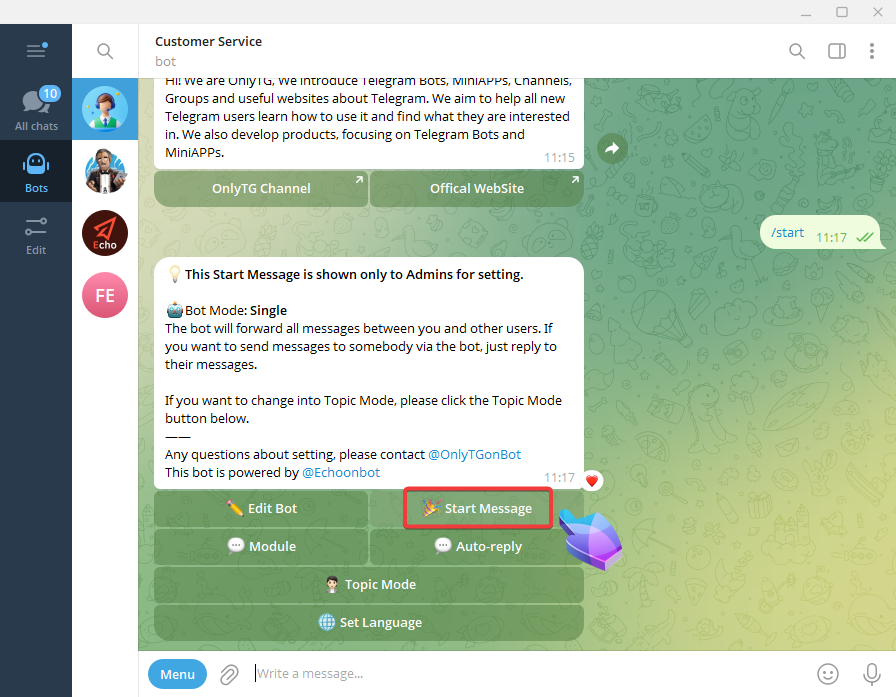
telegram bot menu
Configure Telegram Bot Menu by OnlyTG Echo

We can configure text, media files and buttons for start message.
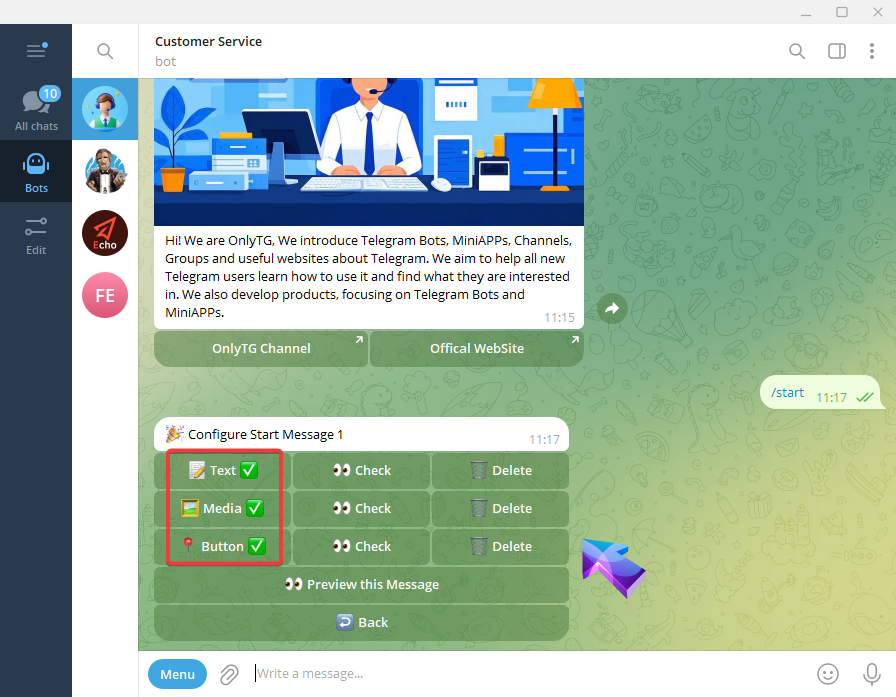
Configure Telegram Bot Menu by OnlyTG Echo

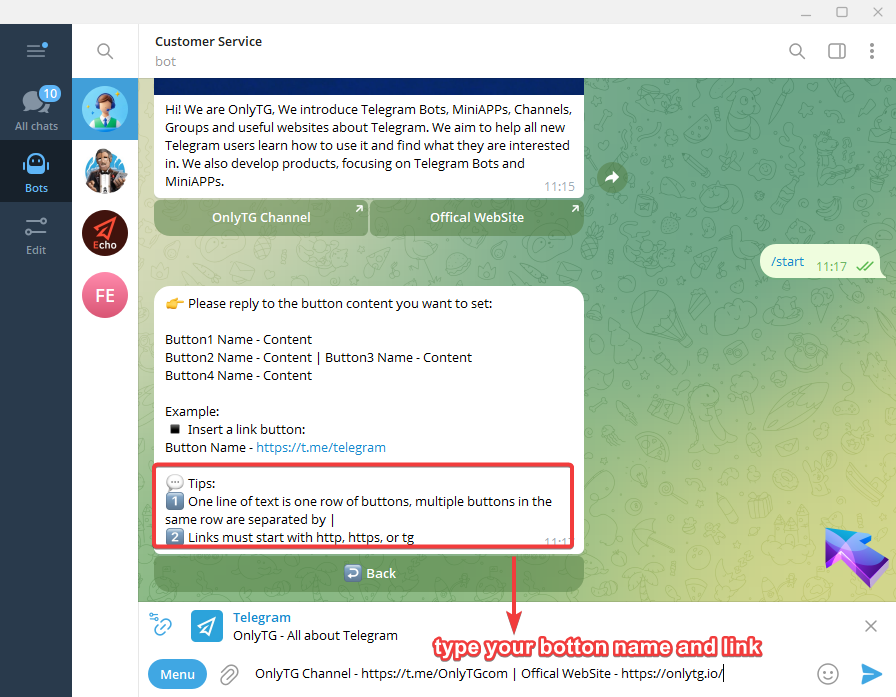
2. Configure Menu Buttons:

telegram bot menu

Usage Effectiveness Demonstration

Now, Your bot upgrade is complete. Let’s preview the results: When users send /start to the bot, they’ll receive the start  messages with menu buttons. These buttons directly guide users to help center page or the official website for more information.
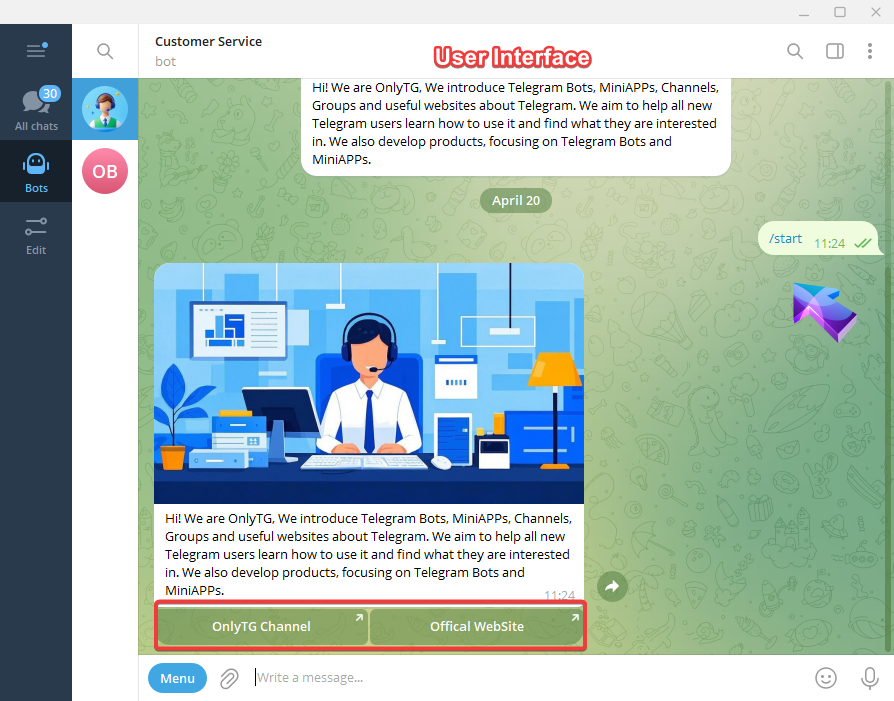
Configure Telegram Bot Menu by OnlyTG Echo

OnlyTG Echo is a comprehensive bot solution offering multiple features beyond menu buttons:

  • Edit bot information
  • View bot statistics
  • Message anonymization message forward
  • Auto reply

All your telegram bot operational needs can be fulfilled with a single OnlyTG Echo bot!

You can click the following link to quickly use OnlyTG Echo and learn more about OnlyTG.

OnlyTG Echo Bot: https://t.me/echoonbot

Official Telegram Channel: https://t.me/onlytg

Source: https://onlytg.io/onlytg/configure-telegram-bot-menu-by-onlytg-echo.html

Post Tags: #bot#Telegram

Post navigation

NextContinue
Set up Telegram Bot Welcome Messages using OnlyTG Echo
Table of Contents
  • How to configure telegram bot menu buttons
  • Usage Effectiveness Demonstration
Echo Sidebar
  • Latest Post
  • Echo
  • Recorder
  • Tips
Telegram Tips

How to Create a Telegram Account Safely and Fast in 2026

Learn how to create telegram account in 2026 with safe signup steps, privacy settings, and business-ready tips for marketers, sellers, and affiliates.

Telegram Tips

How to Create Telegram Account Safely in 2026: A Practical Step-by-Step Guide

Learn how to create Telegram account in 2026 using official apps, a phone number or Fragment anonymous number, privacy settings, two-step verification, and fixes for verification code issues.

Telegram Tips

How to Create Telegram Account for Business Marketing in 2026 Without Costly Setup Mistakes

A practical 2026 guide to creating, securing, and using a Telegram account for business marketing with channels, groups, bots, privacy settings, and launch workflows.

Telegram Tips

How to Create Telegram Account Without Phone Number in 2026: What Actually Works

A practical 2026 guide to creating a Telegram account without exposing your personal phone number, including Fragment numbers, virtual numbers, eSIM options, privacy settings, risks, and safer setup steps.

Telegram Tips

How to Create Multiple Telegram Accounts in 2026 Without Risking Your Privacy or Access

A practical 2026 guide to create multiple Telegram accounts safely, understand Telegram’s account limits, choose phone numbers wisely, secure every profile, and avoid spam restrictions.

Telegram Tips

Free Way Create Telegram Business Account in 2026: Practical Setup Guide for Small Businesses

Learn the safest free way create Telegram Business account in 2026, including setup steps, features, privacy settings, bots, channels, groups, and common mistakes to avoid.

Telegram Tips

How to Create Telegram Account for Freelance Sales in 2026: A Practical Privacy-First Guide

Learn how to create Telegram account for freelance sales in 2026, set up privacy controls, build a professional profile, use links and QR codes, and start client conversations safely.

Telegram Tips

How to Create Telegram Account for E-Commerce Leads in 2026: A Practical Setup Guide

Learn how to create Telegram account for e-commerce leads in 2026, set up privacy, business features, channels, groups, bots, and lead capture workflows without risky shortcuts.

How to Get Unbanned from Telegram in 2026: A Practical Step-by-Step Guide

If your Telegram account or phone number has been restricted, this guide explains how to confirm the ban, appeal to Telegram support, reduce spam flags, and avoid getting blocked again in 2026.

How to create telegram bot in 2026?

Learn how to create a Telegram bot in 2026 using BotFather, with step-by-step coding and no-code methods, plus tips for security, deployment, and choosing the best setup.

How to Loop Post in Channel via Telegram Bot

OnlyTG Echo provides the function to automatically loop posts in your channel. Firstly, you need to create a new bot via @botfather and…

How to Configure Multiple Media when Setting OnlyTG Echo Features

OnlyTG Echo provides the function to configure multiple media to a single message when setting Start Message/Auto Reply/Quick Reply/Broadcast and other features. Firstly, you need…

How to Upgrade Channel to Pro Channel in Telegram

OnlyTG Echo provides the function to upgrade your channel to Pro Channel. This will consume your Pro Communities slots and unlock more advanced features….

How to Edit a Published Post via Telegram Bot

OnlyTG Echo provides the function to Edit Channel Post via your bot. Firstly, you need to create a new bot via @botfather and…

How to Publish Channel Post via Telegram Bot

OnlyTG Echo provides the function to Publish Channel Post via your bot. Firstly, you need to create a new bot via @botfather and…

How to Manage Channel via Telegram Bot

OnlyTG Echo provides the function to Manage Channel via your bot. Firstly, you need to create a new bot via @botfather and send its…

How to Use OnlyTG Recorder?

Welcome to OnlyTG Recorder! Developed by our dedicated bot development team, OnlyTG Recorder is designed to serve as an assistant…

How to Create a Telegram Account Safely and Fast in 2026

Learn how to create telegram account in 2026 with safe signup steps, privacy settings, and business-ready tips for marketers, sellers, and affiliates.

How to Create Telegram Account Safely in 2026: A Practical Step-by-Step Guide

Learn how to create Telegram account in 2026 using official apps, a phone number or Fragment anonymous number, privacy settings, two-step verification, and fixes for verification code issues.

How to Create Telegram Account for Business Marketing in 2026 Without Costly Setup Mistakes

A practical 2026 guide to creating, securing, and using a Telegram account for business marketing with channels, groups, bots, privacy settings, and launch workflows.

How to Create Telegram Account Without Phone Number in 2026: What Actually Works

A practical 2026 guide to creating a Telegram account without exposing your personal phone number, including Fragment numbers, virtual numbers, eSIM options, privacy settings, risks, and safer setup steps.

How to Create Multiple Telegram Accounts in 2026 Without Risking Your Privacy or Access

A practical 2026 guide to create multiple Telegram accounts safely, understand Telegram’s account limits, choose phone numbers wisely, secure every profile, and avoid spam restrictions.

Free Way Create Telegram Business Account in 2026: Practical Setup Guide for Small Businesses

Learn the safest free way create Telegram Business account in 2026, including setup steps, features, privacy settings, bots, channels, groups, and common mistakes to avoid.

How to Create Telegram Account for Freelance Sales in 2026: A Practical Privacy-First Guide

Learn how to create Telegram account for freelance sales in 2026, set up privacy controls, build a professional profile, use links and QR codes, and start client conversations safely.

How to Create Telegram Account for E-Commerce Leads in 2026: A Practical Setup Guide

Learn how to create Telegram account for e-commerce leads in 2026, set up privacy, business features, channels, groups, bots, and lead capture workflows without risky shortcuts.

  • OnlyTG
  • Echo
  • Recorder
  • Help
  • Blog
  • Echo Pricing
  • Channel & Bot Finder
  • SMM Panel
OnlyTG EchoTelegram VK YouTube Facebook X Email

© 2026 OnlyTG

Scroll to top
  • Products
    • Echo
    • Recorder
  • Resources
    • Help
    • Blog
    • Channel & Bot Finder
    • SMM Panel
  • Pricing
    • Echo Pricing
Contact us