Skip to content
OnlyTG Icon
  • ProductsExpand
    • Echo
    • Recorder
  • ResourcesExpand
    • Help
    • Blog
  • PricingExpand
    • Echo Pricing
  • EnglishExpand
    • 中文 (中国)
    • Русский
    • English
Contact us
Telegram Tips

How to Automatically Greet New Customers on Telegram in 2026

Home » Blog » Telegram Tips » How to Automatically Greet New Customers on Telegram in 2026

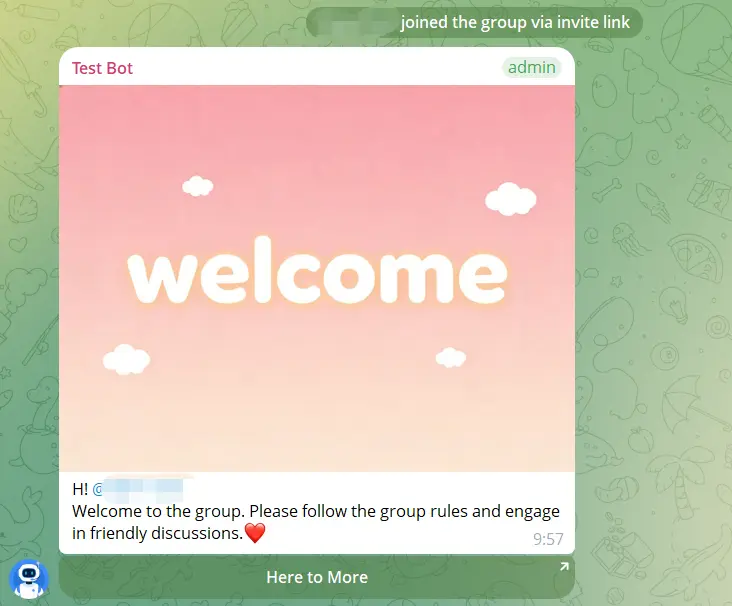
If your business or community uses Telegram, the first interaction matters. A new customer who joins your group or opens your bot expects a fast, helpful response. If nothing happens, the experience feels cold and easy to miss. That is why Welcome messages have become one of the simplest ways to improve onboarding, reduce friction, and set expectations from the start.

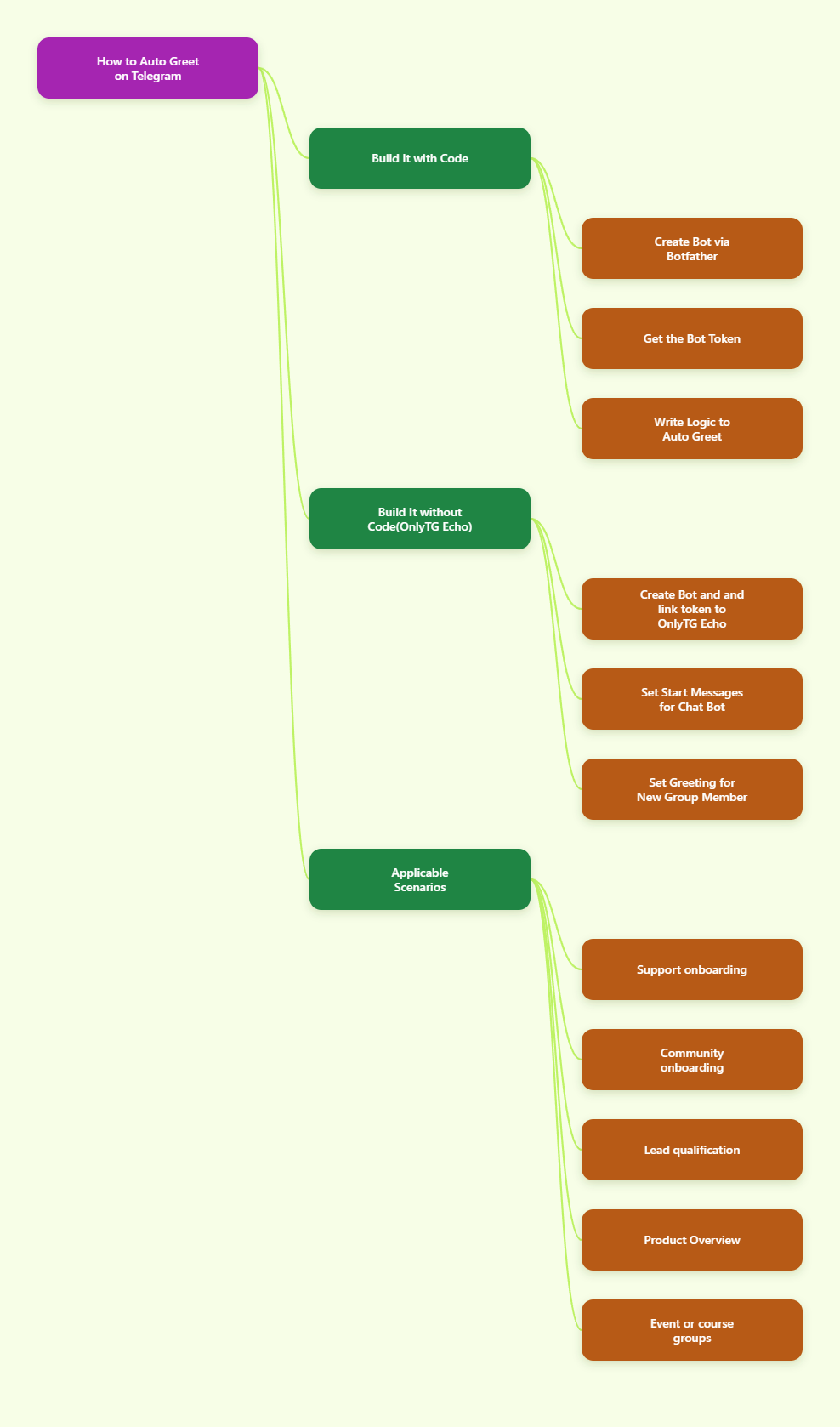
This guide shows two reliable ways to do it in 2026. The first is the code-based approach, which gives you full control if you want to build your own flow. The second is the no-code approach using a Telegram bot workflow, which is faster for teams that want to launch without engineering effort. 
Telegram guide

Two Ways to Automatically Greet New Customers on Telegram

There are two common ways to automate greetings in Telegram:

  • 1) Build it with code. This is the most flexible route. You create a Telegram bot with @BotFather, get the bot token, and then write logic that detects a new user or handles the /start command. Telegram’s bot tutorial confirms that each bot gets a unique token from BotFather, and the Bot API supports developer workflows for creating chat and group experiences.
  • 2) Use a no-code Telegram bot platform. This is the quicker route for non-developers. You still create a bot in @BotFather, then connect that token to a bot builder or automation tool. From there you configure welcome text, buttons, and group greeting rules through a visual interface instead of code.

Step by Step Guide

Here we will walk you through the no‑code method in detail.

No-code Telegram bot builders usually follow the same core steps:

  1. Create the bot in @BotFather.
  2. Copy the token.
  3. Connect the token to the bot builder.
  4. Configure the welcome message feature.

Telegram’s own platform supports bots in private chats, groups, and channels, and many no-code tools build on that foundation by giving you a visual editor for welcome flows. The main benefit is speed: you can create a usable greeting experience without deploying code or maintaining infrastructure.

Tool Recommendation: Build It with OnlyTG Echo

If you want a practical no-code way to create an auto-greeting Telegram bot, OnlyTG Echo(@EchoOnBot) is a strong option. It can either automatically send a welcome message when a user enables the bot, or have the bot send a welcome message to new members who join the group. 

Preparation:

  1. Create the bot in @BotFather.
  2. Copy the token.
  3. Send the token to the @Echoonbot.

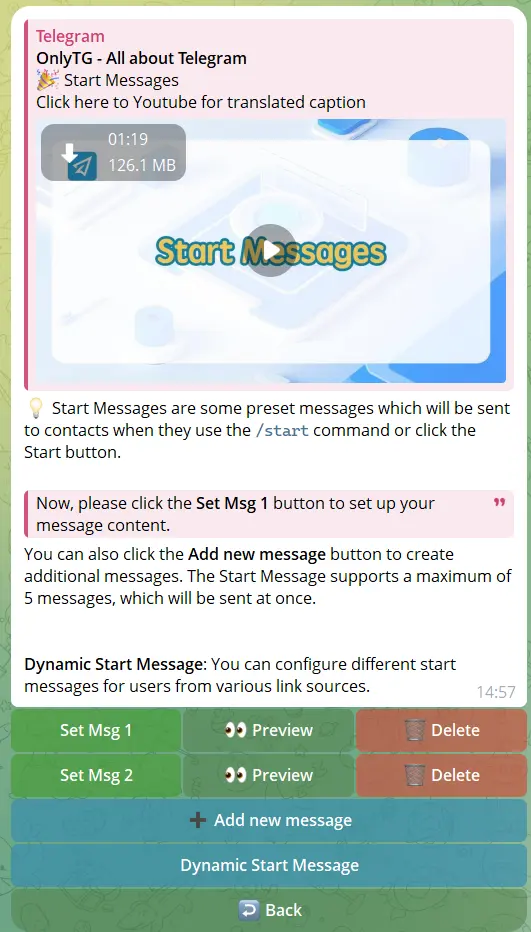
Set up a welcome message for enabled bots

  1. Send /start command to your bot.
  2. Click Chat Setting in the menu.
  3. Click Start Messages and click Add new message.
  4. You can configure text/media/button for the messages.
  5. You can configure multiple start messages at the same time, they will be sent in sequence.

In addition: You can also select Dynamic Start Message. This feature can configure different start messages for users from various link sources.
Start Message

Start Message

Set up greeting message for New Member Joining Group

  1. Send /start command to your bot.
  2. Click Group Setting in the menu.
  3. Follow the prompts to add your group to the management list.
  4. Select your group and click Greeting.
  5. Enable this feature and configure the message content, including text, media, and buttons.
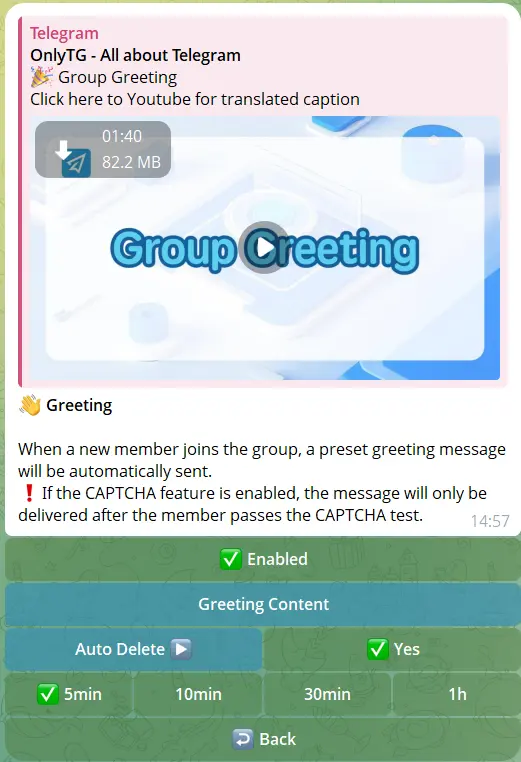
In addition: You can set an automatic deletion time for these greeting messages to ensure they don’t interfere with normal communication in the group.
Greeting Message

Greeting Message

The highlight of OnlyTG Echo is that it requires zero coding with user‑friendly operations. It also delivers comprehensive features. Beyond auto‑welcome messages, it includes practical tools such as auto‑replies, quick replies and user data analytics, making it perfectly adaptable to various scenarios.

What should a welcome message include?

A strong greeting usually includes three pieces: who you are, what the bot can do, and what the customer should do next. For example:

  • Welcome: “Thanks for joining.”
  • Value: “I can help with account setup and support.”
  • Action: “Tap the button below to see the FAQ.”

Tips for Better Results

  • Keep the first message short. Long introductions are easy to skip.
  • Use one primary CTA. Too many buttons can confuse new customers.
  • Match the greeting to the context. Private support chats and public groups need different tones.

Real-World Use Cases

Automatic greetings are useful in more than one Telegram workflow. Here are some common customer-facing scenarios:

  • Support onboarding: A new customer opens your bot and gets a welcome message with links to FAQ, live support hours, or troubleshooting steps.
  • Community onboarding: A new member joins a brand group and receives a greeting that explains the rules, discussion topics, and next steps.
  • Lead qualification: The bot welcomes the user and points them to a menu that asks what they need, such as pricing, demo, or sales contact.
  • Product Overview: The greeting introduces core features, helping users move from curiosity to activation.
  • Event or course groups: The bot greets attendees, shares the schedule, and links to materials or announcements.

FAQ

1. Do I need coding skills to set up a welcome bot?
No. You can use a no-code Telegram bot tool such as OnlyTG Echo to configure greeting messages, buttons, and onboarding flows without writing code.

2. What do I need before I can build a Telegram greeting bot?
You need to create a bot in @BotFather and get the token. That token is then connected to your bot software or no-code platform.

3. Can I send buttons or links in the welcome message?
Yes. Telegram bot workflows support interactive bot interfaces, OnlyTG Echo support for messages with text, media, and buttons.

4. What is the best welcome message style for customers?
Keep it short, friendly, and action-based. Mention what the bot does and give one clear next step, such as opening help, reading rules, or choosing a service category.

Conclusion

Automatically greeting new customers on Telegram is one of the easiest ways to improve onboarding and make your brand feel responsive. If you want full control, build it with code. If you want speed and simplicity, use a no-code workflow.

For most teams, OnlyTG Echo is a practical way to launch a polished Telegram greeting bot quickly.

Post Tags: #bot#Telegram

Post navigation

Previous Previous
How to Track the Source of Telegram Bot Users in 2026
Table of Contents
  • Two Ways to Automatically Greet New Customers on Telegram
  • Step by Step Guide
  • Tool Recommendation: Build It with OnlyTG Echo
  • Tips for Better Results
  • Real-World Use Cases
  • FAQ
  • Conclusion
Echo Sidebar
  • Latest Post
  • Echo
  • Recorder
  • Tips
Telegram Tips

How to Track the Source of Telegram Bot Users in 2026

Learn how to track where Telegram bot users come from in 2026 using Telegram deep links, UTM-style parameters, and tracking tools like OnlyTG Echo. This guide covers setup, source attribution methods, use cases, FAQ, and practical steps to measure which channels actually drive bot starts.

Telegram Tips

Telegram Bot Builders Guide in 2026

Telegram Bot Builders in 2026: features, examples, and top no-code tools

Telegram Tips

How to Create a Group in Telegram in 2026: A Step-by-Step Guide

Learn how to create a group in Telegram in 2026 with step-by-step instructions for Android, iPhone, and desktop, plus setup tips, management best practices, use cases, FAQs, and tools for handling groups and channels more efficiently.

Telegram Tips

Telegram Business Guide in 2026

A practical guide to Telegram Business, covering what it is, how businesses can use it, how to set it up, and common mistakes to avoid.

OnlyTG Echo

How to Get Unbanned from Telegram in 2026: A Practical Step-by-Step Guide

If your Telegram account or phone number has been restricted, this guide explains how to confirm the ban, appeal to Telegram support, reduce spam flags, and avoid getting blocked again in 2026.

Uncategorized

How to Create a Channel in Telegram in 2026: A Practical Step-by-Step Guide

Learn how to create a channel in Telegram in 2026 with a clear step-by-step guide for Android, iPhone, and desktop. This article also covers public vs. private channels, common mistakes, and best practices for managing a channel professionally.

OnlyTG Echo

How to create telegram bot in 2026?

Learn how to create a Telegram bot in 2026 using BotFather, with step-by-step coding and no-code methods, plus tips for security, deployment, and choosing the best setup.

Telegram Tips

How to buy a Telegram virtual number

A virtual phone number for Telegram is an internet-based number that allows you to register and verify Telegram accounts without…

How to Get Unbanned from Telegram in 2026: A Practical Step-by-Step Guide

If your Telegram account or phone number has been restricted, this guide explains how to confirm the ban, appeal to Telegram support, reduce spam flags, and avoid getting blocked again in 2026.

How to create telegram bot in 2026?

Learn how to create a Telegram bot in 2026 using BotFather, with step-by-step coding and no-code methods, plus tips for security, deployment, and choosing the best setup.

How to Loop Post in Channel via Telegram Bot

OnlyTG Echo provides the function to automatically loop posts in your channel. Firstly, you need to create a new bot via @botfather and…

How to Configure Multiple Media when Setting OnlyTG Echo Features

OnlyTG Echo provides the function to configure multiple media to a single message when setting Start Message/Auto Reply/Quick Reply/Broadcast and other features. Firstly, you need…

How to Upgrade Channel to Pro Channel in Telegram

OnlyTG Echo provides the function to upgrade your channel to Pro Channel. This will consume your Pro Communities slots and unlock more advanced features….

How to Edit a Published Post via Telegram Bot

OnlyTG Echo provides the function to Edit Channel Post via your bot. Firstly, you need to create a new bot via @botfather and…

How to Publish Channel Post via Telegram Bot

OnlyTG Echo provides the function to Publish Channel Post via your bot. Firstly, you need to create a new bot via @botfather and…

How to Manage Channel via Telegram Bot

OnlyTG Echo provides the function to Manage Channel via your bot. Firstly, you need to create a new bot via @botfather and send its…

How to Use OnlyTG Recorder?

Welcome to OnlyTG Recorder! Developed by our dedicated bot development team, OnlyTG Recorder is designed to serve as an assistant…

How to Track the Source of Telegram Bot Users in 2026

Learn how to track where Telegram bot users come from in 2026 using Telegram deep links, UTM-style parameters, and tracking tools like OnlyTG Echo. This guide covers setup, source attribution methods, use cases, FAQ, and practical steps to measure which channels actually drive bot starts.

Telegram Bot Builders Guide in 2026

Telegram Bot Builders in 2026: features, examples, and top no-code tools

How to Create a Group in Telegram in 2026: A Step-by-Step Guide

Learn how to create a group in Telegram in 2026 with step-by-step instructions for Android, iPhone, and desktop, plus setup tips, management best practices, use cases, FAQs, and tools for handling groups and channels more efficiently.

Telegram Business Guide in 2026

A practical guide to Telegram Business, covering what it is, how businesses can use it, how to set it up, and common mistakes to avoid.

How to buy a Telegram virtual number

A virtual phone number for Telegram is an internet-based number that allows you to register and verify Telegram accounts without…

How to purchase Telegram username?

A Telegram username is a unique public identifier that you can set for your Telegram account, channel or group. Others…

How to find similar Telegram groups and channels via related recommendations

There are many public channels and groups on Telegram. Each channel or group usually focuses on a specific topic, and…

How to Advertise on Telegram

There are mainly three ways to advertise on Telegram: official ad direct placement, third-party cooperative ads, and promotion within your…

  • OnlyTG
  • Echo
  • Recorder
  • Help
  • Blog
  • Echo Pricing
OnlyTG EchoTelegram VK YouTube Facebook X Email

© 2026 OnlyTG

Scroll to top
  • Products
    • Echo
    • Recorder
  • Resources
    • Help
    • Blog
  • Pricing
    • Echo Pricing
Contact us