
Multi account Telegram group channel operation in 2026 is no longer a simple question of creating more accounts and sending more messages. Teams that run cross-border communities, affiliate funnels, private traffic groups, customer support channels, and creator monetization projects now face tighter spam review, stronger user reporting, public channel scrutiny, and higher expectations around consent.
This guide gives businesses a practical, policy-aware operating model. It focuses on compliant Telegram marketing workflows, group and channel governance, account separation, browser environment hygiene, and repeatable team processes that reduce ban risk without relying on fake limits or unsafe shortcuts.
Why Multi Account Telegram Group Channel Operation Matters in 2026
Telegram has become a serious business channel for global teams because it combines private messaging, public channels, large communities, bots, business profiles, and direct user relationships. For affiliate marketers, SaaS teams, independent sellers, Web3 projects, education brands, and local service exporters, Telegram often sits between public discovery and high-intent conversion.
Multi account Telegram group channel operation matters because one account rarely fits every job. A founder profile, a support identity, a channel publisher, a community moderator, and a campaign operator all carry different risk levels and user expectations. Mixing them creates messy audit trails and makes it harder to identify which activity caused reports or restrictions.
Telegram’s official rules prohibit spam, scams, commercial harassment, illegal goods, impersonation, and abusive behavior. Its spam FAQ also makes clear that users can report unwanted messages, and moderators may limit accounts that send unwanted messages to strangers or spam groups. That means the safest commercial strategy is not volume first. It is permission first.
- Use channels for broadcast content where subscribers opt in.
- Use groups for moderated discussion, customer communities, or partner programs.
- Use business accounts for response workflows, quick replies, opening hours, and structured support.
- Use bots only where automation improves service and respects user intent.
- Use separate accounts only when roles, permissions, and accountability are clearly defined.
The commercial benefit is control. When accounts are mapped to functions, teams can isolate operational mistakes, protect high-value channels, train staff faster, and avoid turning every marketing experiment into a platform risk.
Build a Compliant Account Architecture Before Scaling
A strong Telegram multi-account strategy starts with role design. Each account should have a legitimate business purpose, consistent identity, controlled access, and a known owner inside your team. The goal is not to hide abuse. The goal is to prevent internal confusion, excessive permissions, and behavior that looks like unsolicited mass messaging.
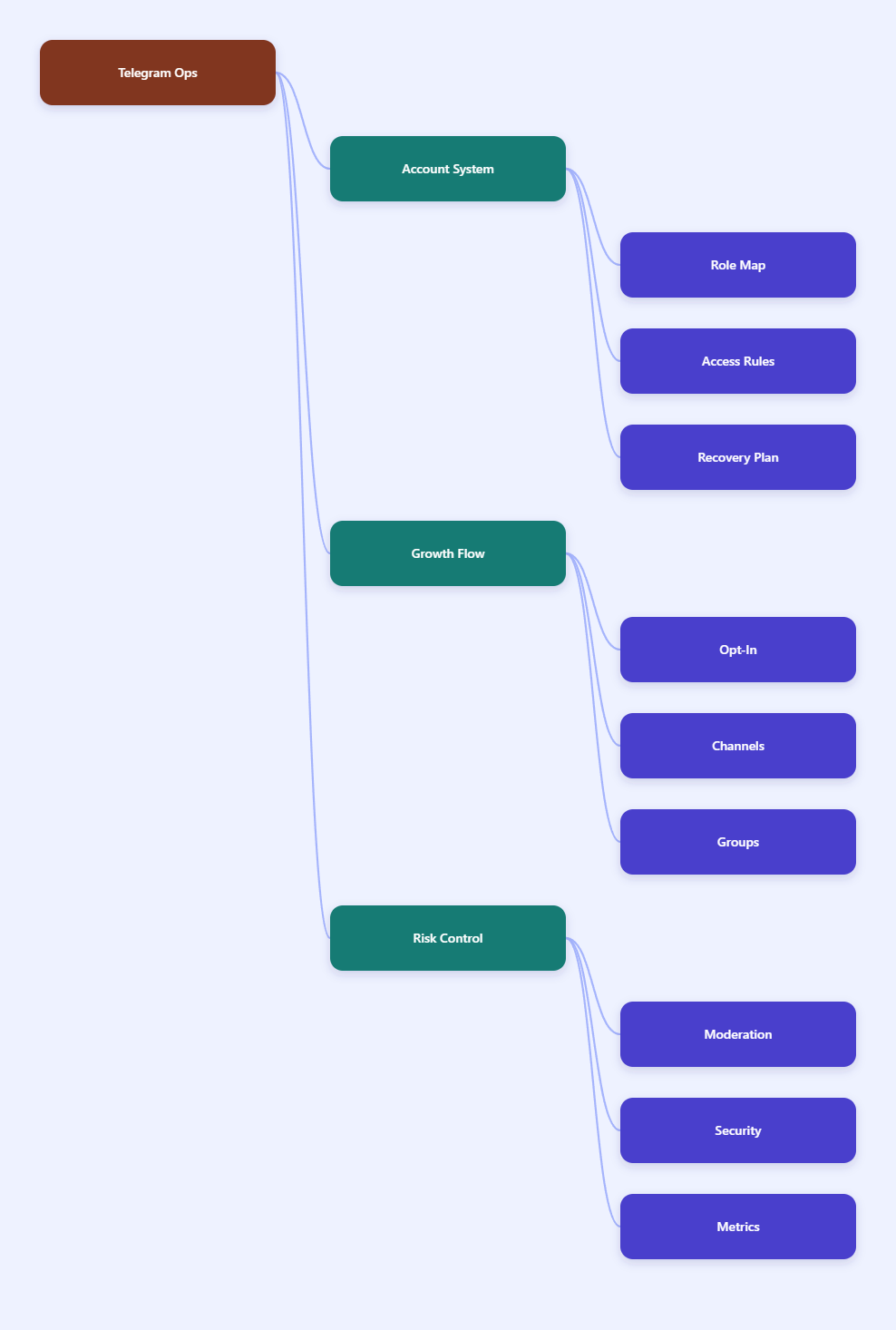
Start with a simple account map. Define which accounts publish public content, which moderate groups, which answer support requests, which manage paid members, and which test bot or mini app flows. Avoid giving every operator full admin rights across every asset. Telegram supports granular admin permissions in channels and supergroups, so use them.
For commercial teams, the cleanest structure usually has four layers:
- Brand owner account: keeps ownership and recovery control, with minimal daily activity.
- Publishing account: posts to public channels and manages content calendars.
- Community accounts: moderate groups, approve join requests, remove spam, and answer visible questions.
- Support or business accounts: handle one-to-one conversations, quick replies, and qualified inbound leads.
This structure supports Telegram account isolation for business teams without creating an unmanageable network of identities. Keep records of account purpose, admin rights, linked phone number ownership, two-step verification status, recovery email, bot connections, and assigned staff.
Do not buy random aged accounts or rotate identities to evade enforcement. That creates security, ownership, compliance, and reputation problems. It may also expose the business to stolen-account supply chains. A sustainable operation is built on accounts your organization can verify, secure, recover, and explain.
Telegram Groups vs Channels: Use the Right Asset for the Job
Many teams fail because they treat Telegram groups and channels as interchangeable. They are different assets with different business uses. Channels are broadcast tools. Groups are community tools. A channel can have unlimited subscribers according to Telegram’s channel FAQ, while supergroups are designed for large discussions and support up to 200,000 members according to Telegram’s developer documentation.
A public channel is useful for announcements, product drops, affiliate content, newsletter-style updates, creator posts, market alerts, and gated content teasers. Posts are signed by the channel, not by the personal account. That protects the brand voice and keeps the user experience consistent.
A group is better when users need to talk back, ask questions, share results, or interact with moderators. Groups require stronger permission settings, anti-spam tools, and moderation coverage because any member activity can affect perceived quality. Large groups should use default permissions carefully and enable available anti-spam protections where supported.
| Asset | Best Use | Main Risk | Control Method |
|---|---|---|---|
| Public Channel | Broadcast content, offers, updates | Overposting or misleading promotions | Editorial calendar and content review |
| Private Channel | Paid content or segmented audiences | Invite leakage and access disputes | Invite link management and member audits |
| Supergroup | Community, support, partner discussion | Spam, scams, hostile members | Permissions, admins, anti-spam tools |
| Business Account | Inbound sales and service workflows | Untracked operator replies | Quick replies, labels, ownership rules |
For multi account Telegram group channel operation, the winning approach is to connect these assets into a funnel. Use external traffic, content, or paid ads to drive opt-in joins. Use channels to educate. Use groups to build trust. Use support accounts for qualified conversations.
Safe Outreach Rules for Telegram Marketing Workflows
Direct outreach is the highest-risk part of Telegram marketing. Telegram does not publish a universal numeric message-per-hour threshold that businesses can safely exploit. The visible rule is simpler: do not send spam, scams, or unwanted commercial messages, and respect user reports.
In practice, safer outreach begins before the first message. Build consent through forms, landing pages, partner referrals, community events, public usernames, QR codes, bot starts, and invite links. When a user clearly requests contact, your message is less likely to be perceived as harassment.
Use these operating rules for Telegram anti-ban workflow planning:
- Do not scrape random users from groups and send cold promotions.
- Do not repeat the same pitch across large numbers of strangers.
- Do not use deceptive display names, fake staff identities, or impersonation.
- Do not pressure users after they ignore or reject a message.
- Do not mix high-volume prospecting with account ownership of critical channels.
- Do keep opt-in source, campaign, and operator notes in your CRM.
Good commercial messaging is specific and contextual. A user who joined a product waitlist should receive a different message from a user who asked for support, downloaded an affiliate checklist, or entered a paid group. Keep templates short, identify the brand, explain why you are contacting them, and provide an easy way to stop receiving messages.
For affiliate and cross-border sales teams, this may reduce raw volume, but it improves account durability and conversion quality. A smaller number of consent-based conversations is more valuable than a large list that generates reports.
Browser Environment and Device Hygiene for Operators
Telegram is a messaging platform, not a browser-only tool, but many teams still manage web sessions, admin dashboards, ad accounts, CRM systems, landing pages, payment tools, and affiliate panels alongside Telegram operations. This is where browser environment hygiene becomes relevant.
A privacy browser for Telegram operations should not be used to bypass platform rules. It should be used to separate workspaces, reduce accidental cross-login, protect client projects, and keep operator environments consistent. For agencies managing multiple markets, identity confusion is a real operational risk.
Set up workspaces by project, market, or client. Keep related assets together: Telegram Web session, CRM, analytics, landing page builder, affiliate dashboard, support mailbox, and documentation. Do not let one operator randomly log into several unrelated client environments from the same unmanaged browser profile.
A practical environment checklist includes:
- Create a dedicated browser profile for each client or business unit.
- Use password managers and role-based access instead of shared spreadsheets.
- Keep two-step verification enabled on important Telegram accounts.
- Review active sessions regularly and revoke unknown devices.
- Document which staff member controls each account and recovery method.
- Separate testing environments from live customer or subscriber channels.
This discipline is especially important for agencies, affiliate media buyers, and outsourcing teams. The business value is not only ban prevention. It also reduces leaks, mistaken posts, unauthorized access, and client trust issues.
Group Moderation, Admin Rights, and Risk Control
A Telegram group can become a growth engine or a liability depending on moderation design. Public or large groups attract spam, impersonators, fake support profiles, phishing links, low-quality promotions, and angry customers. Good moderation turns the group into a business asset with predictable standards.
Start with permissions. Limit who can send links, media, stickers, polls, or forwarded content if the group is new, sensitive, or tied to financial offers. Add trusted admins with specific permissions instead of giving full control to everyone. Remove inactive admins and require two-step verification for anyone with meaningful rights.
Then define visible rules. Keep them short and operational: no unsolicited ads, no impersonation, no illegal offers, no phishing links, no harassment, and no off-topic promotion. Pin the rules and enforce them consistently. Inconsistent enforcement invites conflict and weakens user trust.
For commercial communities, run a weekly or monthly group health review:
- Check admin list and remove unnecessary privileges.
- Review recent bans and confirm they match group rules.
- Audit invite links and disable links used in spam campaigns.
- Search for impersonation attempts using your brand name.
- Review support response quality and unresolved complaints.
- Check whether bots still serve a useful purpose.
Use bots carefully. Telegram bots can support onboarding, FAQs, payment routing, content delivery, and service automation. They should not trick users, harvest unnecessary data, or blast unwanted messages. For business accounts, Telegram also supports features such as quick replies, automated greetings, away messages, custom start pages, and connected business bots, which can improve response quality when configured responsibly.
Measurement, Recovery, and Scaling Decisions
Scaling Telegram operations without measurement leads to guesswork. Instead of asking how many accounts you can run, ask which accounts create qualified conversations, retained members, paid conversions, and low complaint rates. This shifts the team from account volume to business performance.
Track metrics by asset and operator. For channels, monitor subscriber growth, post views, click quality, unsubscribe patterns, and offer response. For groups, monitor active members, moderator workload, spam incidents, support questions, complaint themes, and conversion paths. For one-to-one support, track response time, resolution rate, opt-out requests, and sales handoff quality.
When an account is limited, do not immediately replace it and repeat the same behavior. Review the account’s recent activity, message sources, user complaints, group posts, bot actions, and operator notes. Telegram’s spam FAQ indicates that spam limitations can happen after reports and moderator review, so operational evidence matters.
A sensible recovery workflow looks like this:
- Pause the campaign connected to the restricted account.
- Identify whether messages were opt-in, cold, repetitive, or misleading.
- Check whether operators contacted strangers or posted in unrelated groups.
- Remove risky templates, links, or automation rules.
- Appeal only with accurate facts and avoid false claims.
- Restart with lower-risk, consent-based workflows after review.
Scale only when the current layer is stable. Add moderators before opening a large public group. Add content review before increasing channel frequency. Add CRM notes before expanding outreach. Add account separation before hiring external operators.
FAQ: Multi Account Telegram Group Channel Operation in 2026
Is multi account Telegram group channel operation allowed?
Telegram users can use multiple accounts and manage groups or channels, but the activity must comply with Telegram’s terms, spam rules, and applicable laws. The risk comes from abuse, impersonation, spam, scams, or unwanted commercial harassment, not from legitimate team role separation itself.
Can I use Telegram accounts for cold outreach?
Cold outreach to strangers is risky because users can report unwanted messages. Safer Telegram marketing workflows rely on opt-in sources such as forms, groups, channels, bot starts, referrals, or customer requests.
What is the safest way to run several Telegram channels?
Use a clear owner account, separate publishing roles, content review, stable branding, and documented admin rights. Avoid giving every operator full control over every channel.
How many members can a Telegram group have?
Telegram supergroups support up to 200,000 members according to Telegram developer documentation. Channels are built for broadcasting and can have unlimited subscribers according to Telegram’s channel FAQ.
Do privacy browsers prevent Telegram bans?
No tool can guarantee ban prevention. A privacy browser can help separate business environments and reduce account confusion, but compliance depends on message quality, consent, moderation, identity integrity, and user trust.
Should affiliate marketers use groups or channels?
Use channels for controlled content distribution and groups for moderated discussion. Many affiliate teams use both: a channel for updates and a group for questions, proof, support, and community trust.
What should I do if a Telegram account is restricted?
Pause the related workflow, review recent messages and reports, remove risky templates, and appeal honestly if you believe the restriction was incorrect. Do not simply duplicate the same behavior on another account.
Conclusion
Multi account Telegram group channel operation in 2026 works best when it is treated as a business system, not a volume trick. The three priorities are clear: separate accounts by real roles, build consent-based communication paths, and manage groups and channels with documented permissions, moderation, and measurement.
For cross-border sellers, affiliate teams, agencies, and private traffic operators, the durable advantage is operational discipline. Use Telegram’s native channel, group, bot, and business features in ways users expect. Protect key assets with limited admin rights and two-step verification. Scale only after your current workflow proves it can grow without complaints, confusion, or preventable restrictions.