
Skip to content
OnlyTG Icon
  • ProductsExpand
    • Echo
    • Recorder
  • ResourcesExpand
    • Help
    • Blog
  • PricingExpand
    • Echo Pricing
  • EnglishExpand
    • 中文 (中国)
    • Русский
    • English
Contact us
OnlyTG Echo

Build Telegram Message Replying Bot using OnlyTG Echo

Home » Blog » OnlyTG Echo » Build Telegram Message Replying Bot using OnlyTG Echo

With over 1 billion monthly active users, Telegram stands as the most popular instant messaging platform in Europe, Asia, and parts of Africa. Have you ever encountered these scenarios when trying to connect with users:

  1. Communicating with large groups, such as for promotional marketing.
  2. Discussing sensitive topics requiring anonymity.
  3. Needing more convenient chat features like auto-replies for customer service.

Advantages of Message Replying Bot

In such scenarios, creating a message reply bot becomes crucial.
​​Advantages of using telegram bot to reply to messages.​​

  1. Unlimited chats with zero-cost promotional marketing channels.
  2. Complete anonymity – users only see your bot’s information.
  3. Automatic message replies even when unattended.

Create Message Replying Bot

So how do you create a message reply chatbot?​​ We recommend OnlyTG Echo, which offers more practical features beyond message reply:

1. View statistic, including the number of bot users, message quantities, and other statistics;
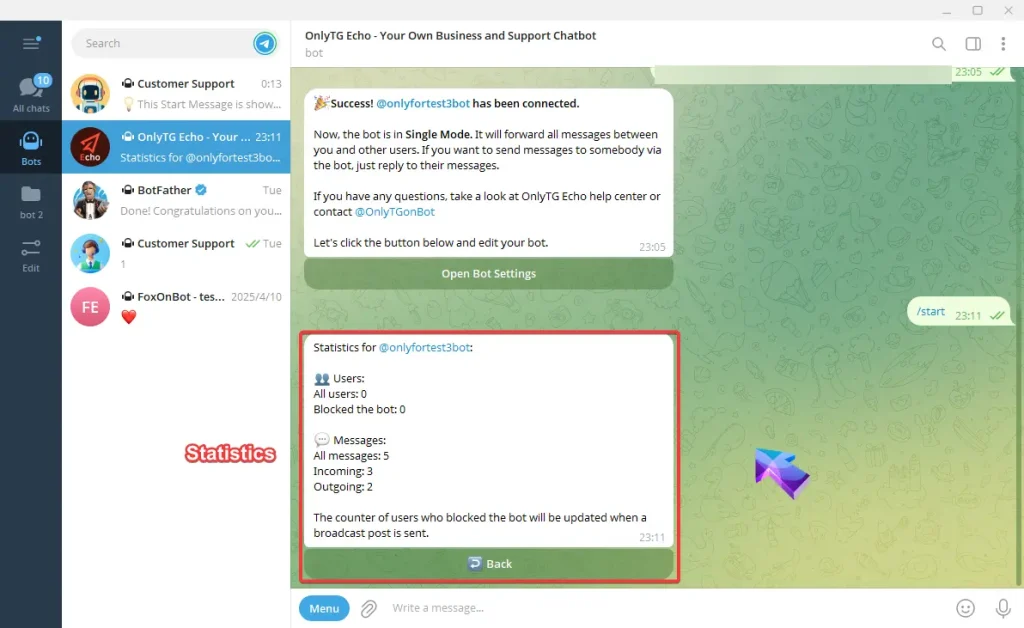
Message Reply using OnlyTG Echo

2. Auto-Reply, the bot can respond automatically during your rest periods;
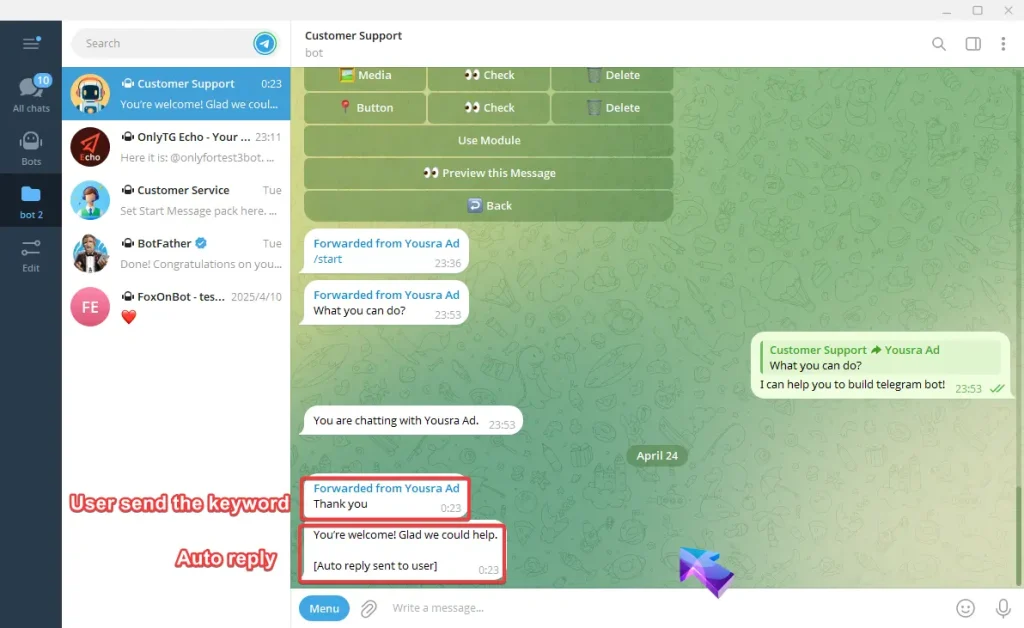
Message Reply using OnlyTG Echo

3. Edit bot, you can edit bot information without botfather.
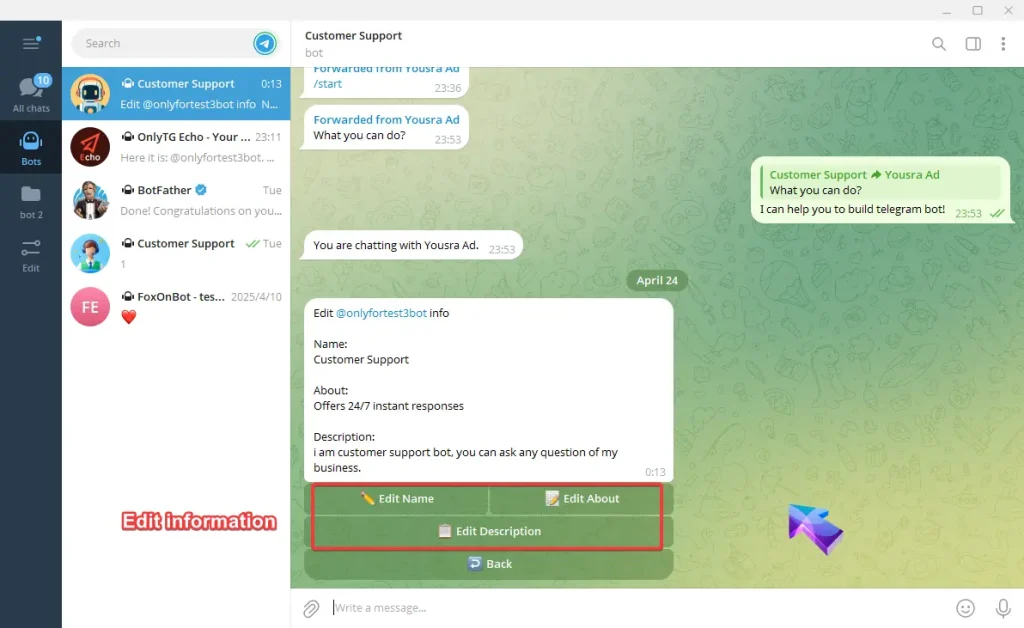
Message Reply using OnlyTG Echo

Creating a message reply chatbot with OnlyTG Echo takes just three simple steps. No coding required – even tech novices can quickly build their own message reply bot.

Step 1: Create a bot via botfather and retrieve your token.

Step 2: Enable OnlyTG Echo and bind your token.

Step 3: Add the bot to the group and switch to topic mode

Ready to reply to messages.

When a user sends messages to your bot, it will automatically create a new topic in your group and forward messages to you. All group members can chat with this user in the topic. Your team can switch to different topics to chat with different users.
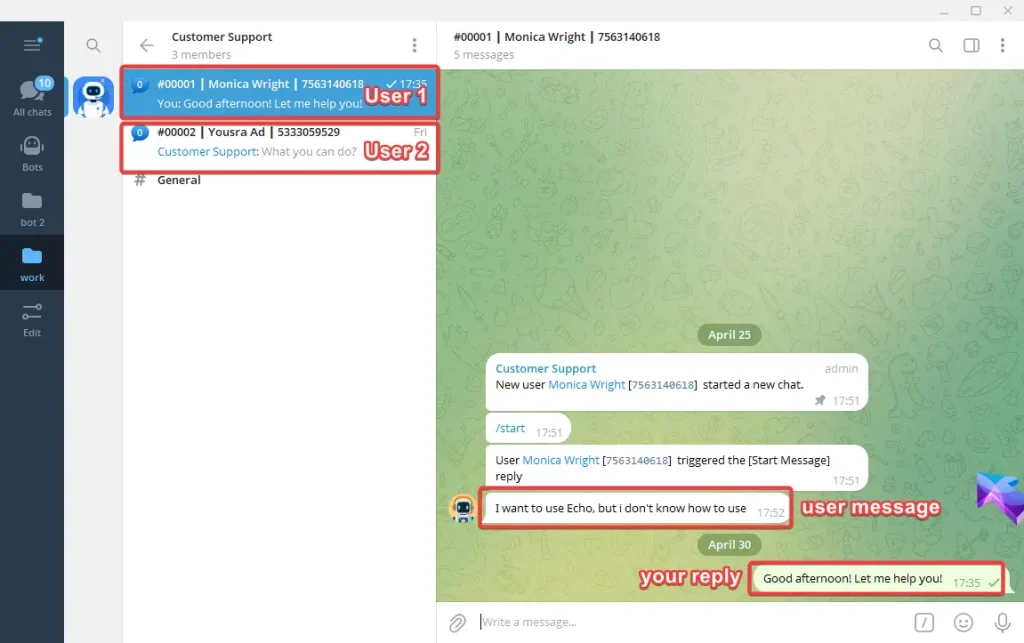
Message Reply using OnlyTG Echo

OnlyTG Echo’s features go far beyond this. It is a comprehensive and extremely easy-to-use bot. We recommend using OnlyTG Echo to enhance your Telegram experience!

OnlyTG Echo Bot: https://t.me/echoonbot

Official Telegram Channel: https://t.me/onlytg

Source: https://onlytg.io/onlytg/message-reply-using-onlytg-echo.html

Post Tags: #bot#Telegram

Post navigation

Previous Previous
Set up Telegram Bot Welcome Messages using OnlyTG Echo
NextContinue
How to Set up Telegram Bot Auto-reply Messages?
Table of Contents
  • Advantages of Message Replying Bot
  • Create Message Replying Bot
  • Ready to reply to messages.
Echo Sidebar
  • Latest Post
  • Echo
  • Recorder
  • Tips
Telegram Tips

How to find similar Telegram groups and channels via related recommendations

There are many public channels and groups on Telegram. Each channel or group usually focuses on a specific topic, and…

Telegram Tips

How to Advertise on Telegram

There are mainly three ways to advertise on Telegram: official ad direct placement, third-party cooperative ads, and promotion within your…

Telegram Tips

How to Buy Cryptocurrency/USDT

The first step in buying cryptocurrencies is usually to purchase USDT, then exchange USDT for other coins like BTC, ETH,…

Telegram Tips

How to Buy Telegram Stars

Stars is a virtual currency officially launched by Telegram for purchasing paid content within Telegram. Stars is not classified as…

Telegram Tips

What is the purpose of Telegram group and channel levels? How to boost?

In Telegram, Levels act like an “experience bar” for public groups and channels. As a community reaches higher levels, it…

Telegram Tips

What are the actual benefits of a Telegram Premium subscription, and how to purchase it?

Telegram Premium is a subscription service that unlocks enhanced limits and exclusive features while supporting the app’s independent development. What…

Telegram Tips

How to change the display language in Telegram

To change the language on Telegram, you can head into the settings. Telegram supports dozens of languages, and many are…

Telegram Tips

What exactly is the difference between Telegram channels and groups?

The main difference is the direction of communication: Groups are for chatting with others (two-way), while Channels are for broadcasting…

How to Loop Post in Channel via Telegram Bot

OnlyTG Echo provides the function to automatically loop posts in your channel. Firstly, you need to create a new bot via @botfather and…

How to Configure Multiple Media when Setting OnlyTG Echo Features

OnlyTG Echo provides the function to configure multiple media to a single message when setting Start Message/Auto Reply/Quick Reply/Broadcast and other features. Firstly, you need…

How to Upgrade Channel to Pro Channel in Telegram

OnlyTG Echo provides the function to upgrade your channel to Pro Channel. This will consume your Pro Communities slots and unlock more advanced features….

How to Edit a Published Post via Telegram Bot

OnlyTG Echo provides the function to Edit Channel Post via your bot. Firstly, you need to create a new bot via @botfather and…

How to Publish Channel Post via Telegram Bot

OnlyTG Echo provides the function to Publish Channel Post via your bot. Firstly, you need to create a new bot via @botfather and…

How to Manage Channel via Telegram Bot

OnlyTG Echo provides the function to Manage Channel via your bot. Firstly, you need to create a new bot via @botfather and send its…

How to Send Group Greeting via Telegram Bot

OnlyTG Echo provides the function to send the Greeting Message to new members joining the group. Firstly, you need to create a new…

How to Set Group CAPTCHA via Telegram Bot

OnlyTG Echo provides the function to send the CAPTCHA test to new members joining the group. Firstly, you need to create a new bot…

How to Use OnlyTG Recorder?

Welcome to OnlyTG Recorder! Developed by our dedicated bot development team, OnlyTG Recorder is designed to serve as an assistant…

How to find similar Telegram groups and channels via related recommendations

There are many public channels and groups on Telegram. Each channel or group usually focuses on a specific topic, and…

How to Advertise on Telegram

There are mainly three ways to advertise on Telegram: official ad direct placement, third-party cooperative ads, and promotion within your…

How to Buy Cryptocurrency/USDT

The first step in buying cryptocurrencies is usually to purchase USDT, then exchange USDT for other coins like BTC, ETH,…

How to Buy Telegram Stars

Stars is a virtual currency officially launched by Telegram for purchasing paid content within Telegram. Stars is not classified as…

What is the purpose of Telegram group and channel levels? How to boost?

In Telegram, Levels act like an “experience bar” for public groups and channels. As a community reaches higher levels, it…

What are the actual benefits of a Telegram Premium subscription, and how to purchase it?

Telegram Premium is a subscription service that unlocks enhanced limits and exclusive features while supporting the app’s independent development. What…

How to change the display language in Telegram

To change the language on Telegram, you can head into the settings. Telegram supports dozens of languages, and many are…

What exactly is the difference between Telegram channels and groups?

The main difference is the direction of communication: Groups are for chatting with others (two-way), while Channels are for broadcasting…

  • OnlyTG
  • Echo
  • Recorder
  • Help
  • Blog
  • Echo Pricing
OnlyTG EchoTelegram VK YouTube Facebook X Email

© 2026 OnlyTG

Scroll to top
  • Products
    • Echo
    • Recorder
  • Resources
    • Help
    • Blog
  • Pricing
    • Echo Pricing
Contact us