

If you want to automate chat in Telegram, the goal is usually straightforward: respond to common questions faster, reduce repetitive work, and keep conversations moving even when nobody is available to answer manually.
The challenge is that ordinary Telegram chats quickly become difficult to manage when the same questions, links, instructions, or greetings need to be sent again and again. A Telegram bot can handle many of these predictable interactions automatically.
This guide explains what you need, how to set up a practical no-code automation workflow, what you can automate, and how to avoid common mistakes.
Why Is It Difficult to Automate Chat Manually?
Manual Telegram communication works well when message volume is low. As conversations increase, however, several problems become difficult to ignore.
1. Repetitive tasks consume time
Businesses and community managers often answer the same questions repeatedly: pricing, product information, opening hours, links, instructions, or basic support questions. Copying and pasting these answers may take only a few seconds each time, but the accumulated workload can become substantial.
Automation allows predictable questions to trigger predefined responses instead of requiring a person to repeat the same action.
2. Response time depends on availability
A manual response can only happen when someone is watching the chat. If a customer sends a message outside working hours or a community manager is handling several conversations at once, the response may be delayed.
A bot can send a configured response when a relevant message or keyword is detected, helping users receive basic information without waiting for a human operator.
3. Scaling creates management problems
A workflow that is manageable with ten conversations may become difficult with hundreds of messages. More conversations mean more repetitive replies, more opportunities for inconsistent information, and more administrative work.
Telegram chat automation does not eliminate the need for people. Instead, it is most useful for moving predictable tasks away from manual handling so people can focus on conversations that actually require judgment.
What Do You Need Before Getting Started?
For a basic no-code Telegram automation setup, you do not need to start by building a custom application.
You generally need:
- A Telegram account
- A Telegram bot created through BotFather
- The bot token provided by BotFather
- A clear automation goal
- The messages, keywords, or rules you want to configure
- A tool for managing the bot’s automation
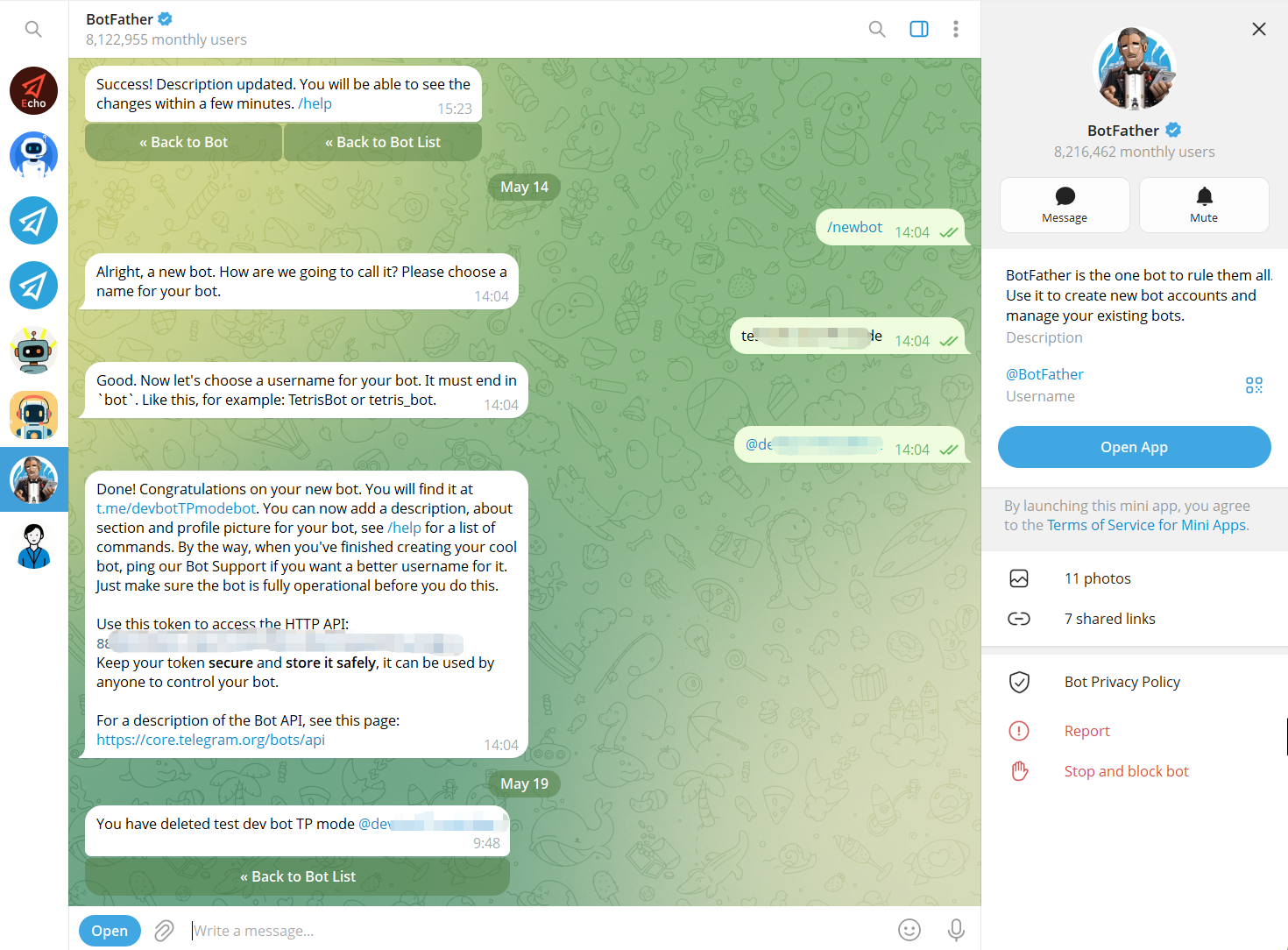
Telegram’s official BotFather workflow requires you to create a bot and receive an API token. The token is required when connecting the bot to OnlyTG Echo and should be kept confidential. OnlyTG’s setup documentation confirms that Echo works by connecting a personal Telegram bot through its bot token.
The most important preparation is not technical. It is deciding what should happen automatically.
For example:
- When someone starts the bot → send a welcome message.
- When someone asks about pricing → send the relevant information.
- When someone uses a common keyword → send a predefined answer.
- When a new member joins a group → send a greeting.
- When a channel needs recurring content → schedule or loop a post.
A clear automation goal makes the configuration much easier.
How to Automate Chat in Telegram
A simple workflow can be summarized as:
BotFather → Bot Token → OnlyTG Echo → Configure Automation → Test → Monitor
Step 1 — Create a Telegram Bot
Step 2 — Connect the Bot to OnlyTG Echo
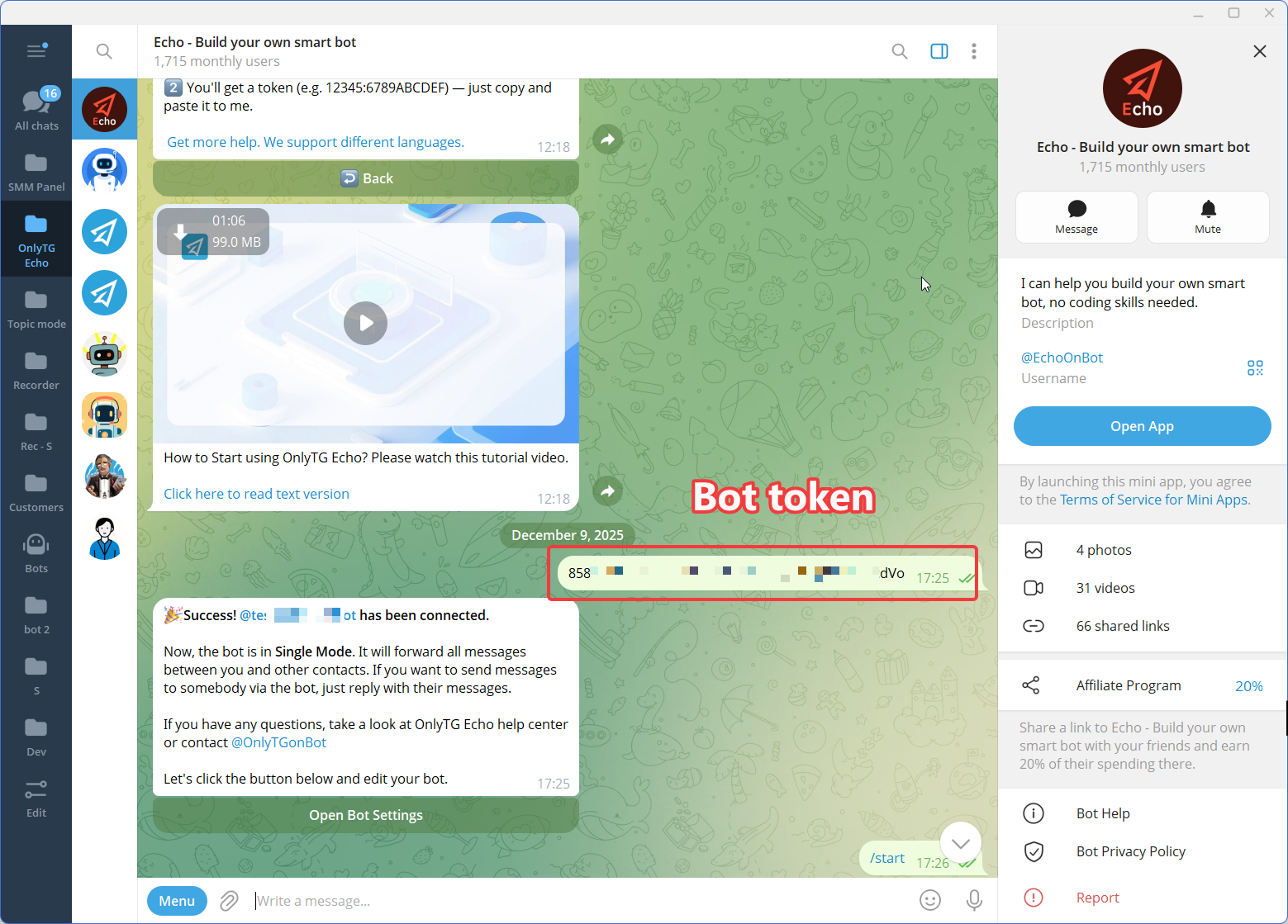
Open OnlyTG Echo and use the bot-adding workflow to connect the bot you created.
OnlyTG’s official setup instructions specify that users can open @EchoOnBot, send /start, select Add Bot, and paste the token received from BotFather. Once the token is validated, the bot is bound to Echo and can be managed through the platform.
This approach avoids writing a custom bot program just to implement common automation scenarios.
Step 3 — Configure a Start Message
The first interaction is an important part of the user experience.
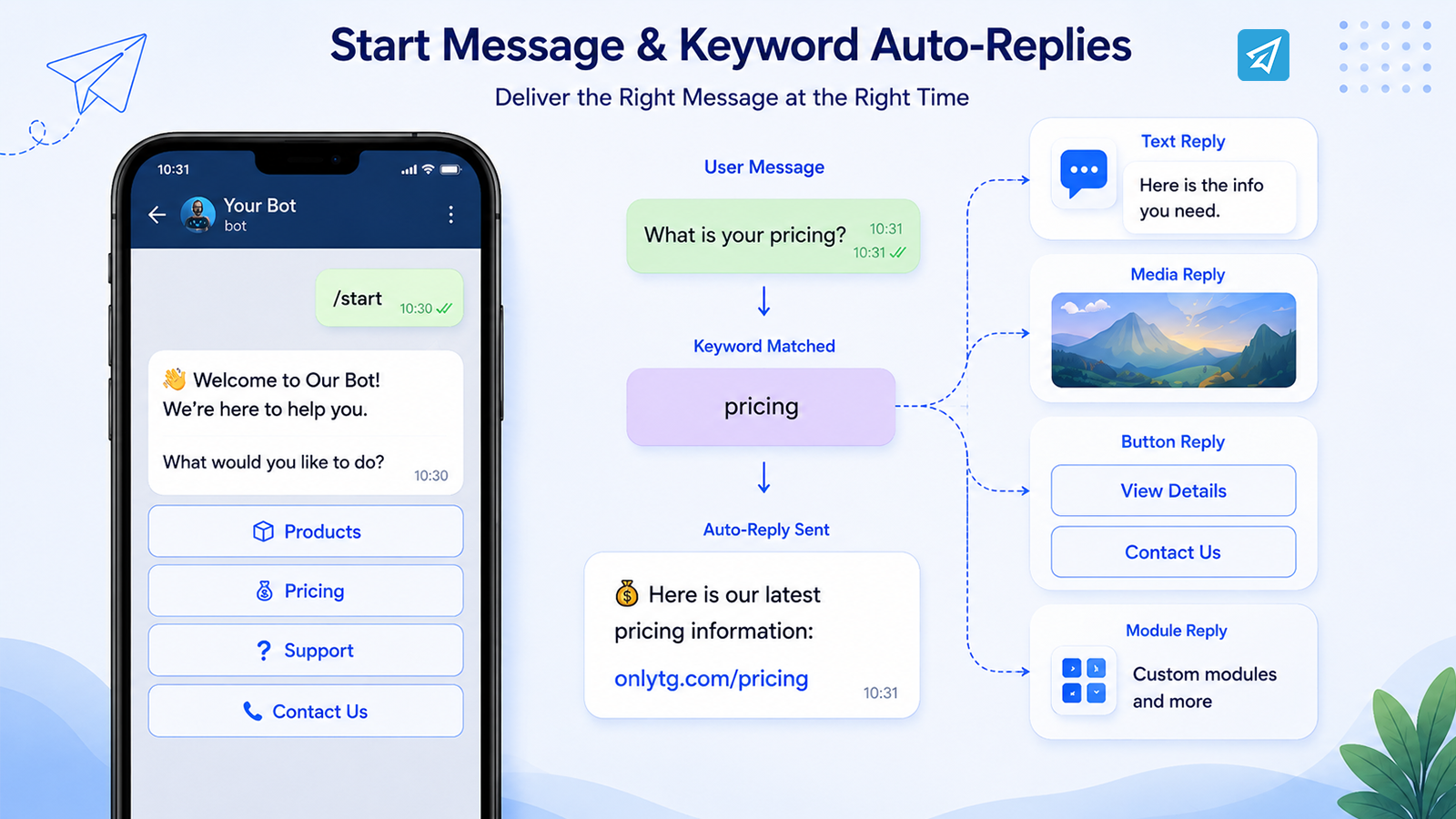
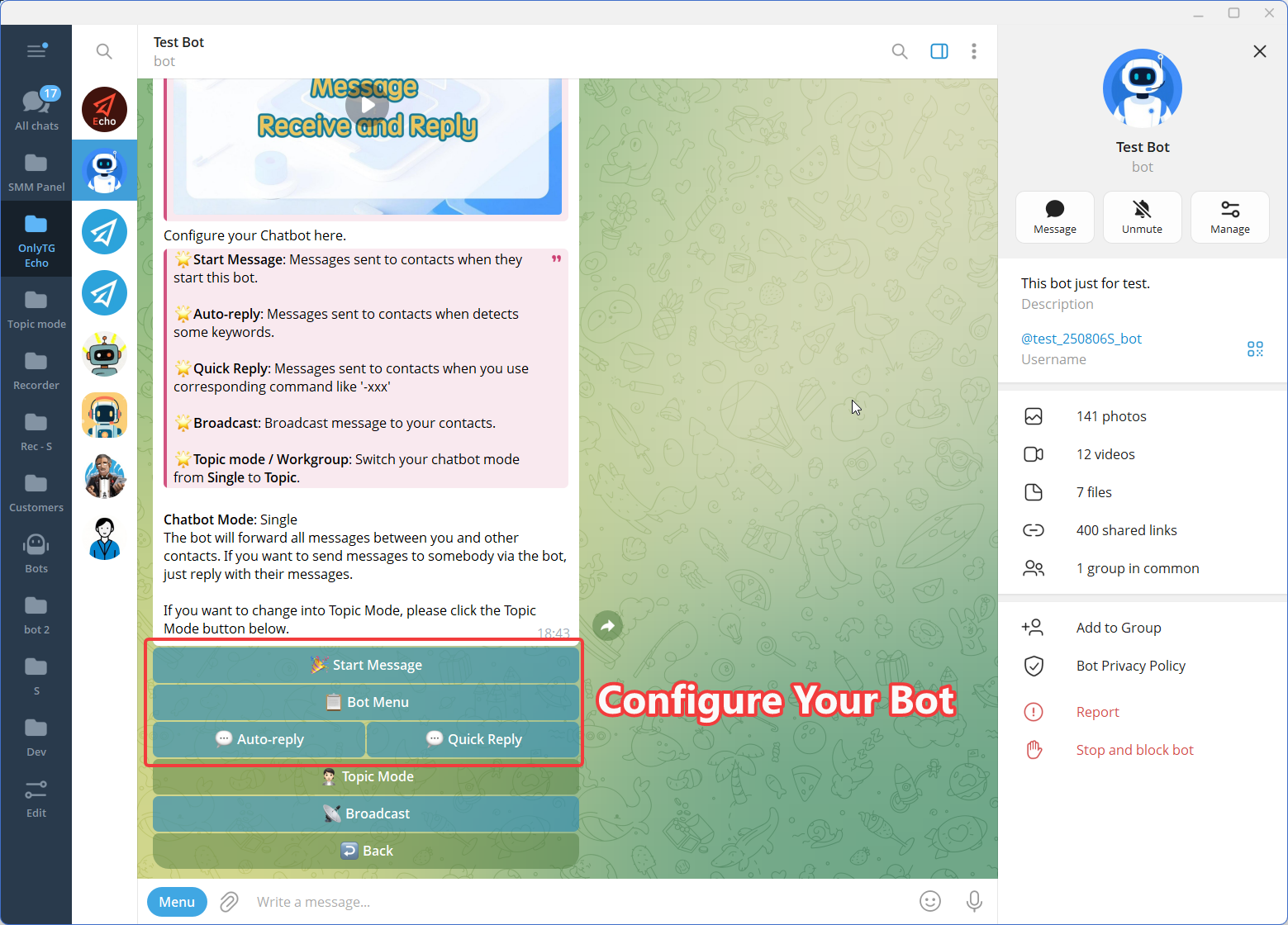
A Start Message can automatically appear when someone first opens the bot or uses the /start command. OnlyTG Echo supports text, media, and buttons within Start Messages.
A useful start message should answer three questions quickly:
- What is this bot for?
- What can the user do next?
- Where should the user go if they need additional help?
Keep the first interaction concise. The purpose is to guide the user rather than overwhelm them with information.
Step 4 — Configure Auto-Replies and Keyword Replies
This is where Telegram chat automation becomes particularly useful.
In OnlyTG Echo, you can configure an auto-reply with specific keywords and corresponding messages. When a user’s message contains a configured keyword, the bot can automatically send the associated response. If no keyword is configured for an auto-reply, it can instead respond whenever the user sends a message, according to the configured rule.
For example:
Keyword: price, pricing, cost
Response:
“Here is our latest pricing information: [link]. If you have questions about a specific plan, reply with the plan name.”
You can also configure message content using text, media, buttons, or modules supported by Echo.
The key is to create rules around real, repeated questions rather than trying to automate every possible conversation.
What Can You Automate With This Approach?
Telegram automation becomes more valuable when it is connected to specific operational tasks.
1. Frequently Asked Questions
Task: Users repeatedly ask about pricing, products, services, or basic instructions.
Automation: Configure keywords and predefined replies.
Benefit: Users receive consistent basic information without requiring someone to answer every repeated question.
2. New User Onboarding
Task: New users need basic instructions immediately after opening the bot.
Automation: Use a Start Message containing text, media, and buttons.
Benefit: Users can understand the bot’s purpose and next steps without waiting for support.
3. Telegram Group Management
Task: Community managers spend time welcoming members, explaining rules, and handling repetitive group questions.
Automation: Use group greetings, group rules, CAPTCHA, and keyword replies where appropriate.
Benefit: Routine community-management tasks can be handled automatically while administrators focus on moderation and member engagement.
OnlyTG Echo officially lists Group CAPTCHA, Group Greeting, Group Rules, and Keywords Reply among its group-management features.
4. Recurring Group or Channel Content
Task: A community or channel needs recurring posts.
Automation: Configure scheduled or looping posts where appropriate.
Benefit: Routine publishing can follow a predefined schedule instead of requiring the operator to manually publish each occurrence.
OnlyTG Echo supports post and loop functionality for groups and channels, with scheduling capabilities documented by OnlyTG.
5. Broadcast and Engagement Workflows
Task: You need to distribute updates to contacts who should receive them.
Automation: Use the Broadcast feature to arrange messages for your contacts.
Benefit: Recurring announcements can be organized as a workflow instead of being sent individually.
The appropriate audience and messaging frequency should always be considered before sending broadcasts.

Common Mistakes to Avoid
1. Automating everything at once
A common mistake is trying to create dozens of rules before understanding actual user behavior.
Start with the most repetitive tasks. Once those work reliably, expand the workflow.
2. Using overly broad keywords
A keyword such as “help” can appear in many unrelated messages. If the trigger is too broad, users may receive irrelevant replies.
Use specific keywords and test them against realistic conversations.
3. Writing robotic responses
Automation does not require every message to sound mechanical.
Keep responses concise, useful, and conversational. Give users a clear next action whenever possible.
4. Skipping testing and monitoring
A rule that works in one example may fail in another. Check your automation regularly and adjust it as user questions change.
The best automation is not the automation with the most rules. It is the automation that handles the right repetitive tasks reliably.
Manual Approach vs. Automated Approach
| Criteria | Manual Telegram Management | Automated Telegram Workflow |
|---|---|---|
| Repetitive questions | Answered individually | Predefined replies can handle recurring questions |
| Response availability | Depends on a human being available | Configured rules can respond automatically |
| Onboarding | Manually explain the same information | Start Messages can provide standard guidance |
| Group management | Administrators handle routine tasks | Supported group automation can handle selected tasks |
| Scaling | Workload increases with message volume | Routine interactions can be handled by configured automation |
| Maintenance | Continuous manual effort | Requires initial setup plus ongoing review |
| Flexibility | Human can adapt immediately | Best suited to predictable, repeatable scenarios |
| Best use | Complex or sensitive conversations | Repetitive, rule-based interactions |
Automation is therefore not a replacement for every human conversation. It is a way to separate predictable interactions from conversations that genuinely need human attention.
Who Is This Best For?
Telegram chat automation is particularly useful for:
- Small businesses that repeatedly answer customer questions
- Marketing teams managing Telegram campaigns and interactions
- Customer support teams handling predictable first-line questions
- Community managers managing active Telegram groups
- Telegram channel owners publishing recurring content
- Content creators who need structured onboarding and responses
- Operations teams looking to reduce repetitive Telegram administration
If the majority of your conversations are unique and require complex judgment, automation should remain focused on the routine parts of the workflow.
FAQ
Can I automate chat in Telegram without coding?
Yes. A Telegram bot can be connected to a no-code automation tool so you can configure common workflows without writing a custom bot application. OnlyTG Echo provides a no-code setup for connecting a Telegram bot and configuring features such as Start Messages, Auto-replies, and keyword-based replies.
How do Telegram auto-replies work?
A Telegram auto-reply can use predefined rules to determine when a response should be sent. With OnlyTG Echo, you can associate keywords with preset messages, including supported text, media, buttons, or modules. When the configured condition is met, the corresponding response is sent automatically.
What is the easiest way to automate Telegram conversations?
For common rule-based interactions, a practical starting point is to create a bot with BotFather, connect it to a no-code tool such as OnlyTG Echo, configure a Start Message and a small set of keyword-based auto-replies, then test and monitor the workflow. This keeps the initial setup focused and avoids unnecessary technical complexity.
Conclusion: Start With the Repetitive Work
If you want to automate chat in Telegram, you do not need to automate every conversation. Start with the tasks that consume time but follow predictable patterns: greetings, FAQs, keyword-triggered responses, group onboarding, and recurring posts.
A simple workflow—BotFather → bot token → OnlyTG Echo → automation rules → testing → monitoring—can turn repetitive Telegram communication into a more manageable process. OnlyTG Echo provides a no-code environment for configuring these workflows and expanding into group, channel, broadcast, and analytics features as your needs grow.
If repetitive Telegram messages are taking too much of your team’s time, explore OnlyTG Echo and start building a more structured Telegram automation workflow.