
If you run Telegram for sales, affiliate marketing, customer support, or community growth, the real problem is not simply adding more accounts. The real problem is keeping a multi-account workflow useful without drifting into spam, commercial harassment, or behavior that can trigger limits. That is why avoid ban multi account Telegram tips matter in 2026: the platform still supports legitimate multi-account use, but it also reacts fast when activity looks repetitive, unsolicited, or abuse-driven.
This guide focuses on a safer, practical approach. You will learn how to structure multiple Telegram accounts around real business functions, what behaviors to avoid, how to use bots within official limits, and what to do if an account gets restricted. The goal is simple: keep your Telegram setup efficient, compliant, and stable enough to support long-term growth.
What Telegram Actually Allows in 2026
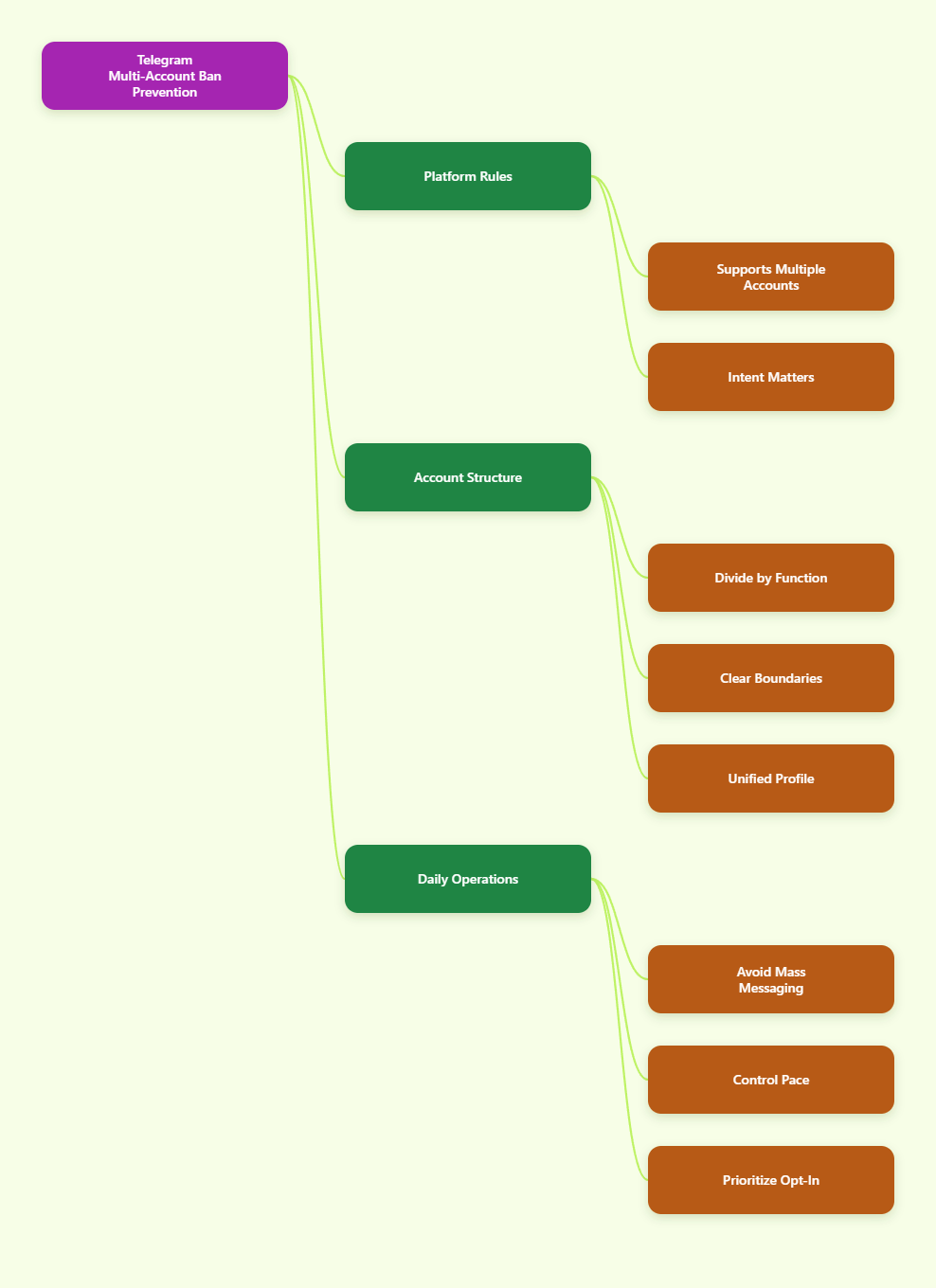
Telegram’s core rule is straightforward: each account is tied to a unique phone number, and users can sign in to multiple accounts within the app. That makes Telegram different from tools that only allow one identity per device. In practice, this is why agencies, sellers, and affiliate teams can separate support, lead gen, and private coordination into different accounts without breaking the platform’s basic account model.
The important part is intent. Telegram allows multiple accounts for legitimate use, but it does not treat volume, repetitive outreach, or unsolicited promotion as harmless just because they come from different profiles. If your workflow looks like a coordinated attempt to spam, the number of accounts does not protect you. It can actually create a larger blast radius if every account uses the same script, same timing, and same audience pattern.
For business planning, think in terms of function rather than quantity. A main brand account can handle public-facing communication, a support account can manage customer questions, and a partner or affiliate account can handle outreach to warm contacts. That structure is easier to manage, easier to audit, and easier to explain if a moderation review happens.
Why this matters for business teams
Teams that separate roles usually make fewer mistakes. A support inbox is less likely to send promotional copy. A partnership account is less likely to answer product issues in a rushed, copy-paste style. That separation reduces both user complaints and internal confusion.
- Use one account per business function, not one account per shortcut.
- Keep personal, support, and outreach conversations separated.
- Do not assume multiple accounts make low-quality messaging safer.
- Treat every account as a customer-facing asset with its own reputation.
Build a Safe Multi Account Structure
The safest multi-account setup starts before the first message goes out. Decide what each account is for, who owns it, what audience it serves, and what type of message it should never send. That sounds basic, but most account problems start when the team has no written boundary between support, promotions, and community management.
A strong structure also makes handoffs cleaner. If one person leaves the team, another operator can step in without changing the account’s tone, purpose, or activity pattern overnight. That stability matters because abrupt changes in behavior often create confusion for both users and platform systems.
Keep the profile details aligned with the account’s purpose. Use a consistent name, recognizable branding, and a clear bio so people know why they are talking to that account. When you message existing customers, explain the relationship clearly. When you reach out to new leads, only do so when you have a legitimate reason and a relevant offer.
Set up role-based accounts
A role-based structure is usually the easiest to maintain. It also makes reporting and access control much simpler when a team grows.
- Main brand account for public trust and announcements.
- Support account for service replies and troubleshooting.
- Partner or affiliate account for approved outreach and follow-up.
- Community moderation account for groups and channel operations.
Use the same logic for working habits. Keep notes on what each account is allowed to say, who can send first messages, and which links or offers are approved. This reduces copy-paste spam, inconsistent branding, and accidental policy violations.
Avoid Ban Triggers in Daily Outreach
Most Telegram restrictions are not random. They are often connected to user reports, spam patterns, or behavior that looks like unsolicited commercial messaging. Telegram’s terms and spam guidance are clear that spam, unwanted advertising, commercial harassment, and abusive behavior are not acceptable. So the most effective avoid ban multi account Telegram tips are less about hiding activity and more about changing how the activity is done.
If you reach out to strangers, do it carefully and only when the contact is relevant. Do not send the same opening line to large batches of users. Do not mass-add people into groups without context. Do not push repeated invite links, repeated offers, or repeated reminders to people who have not shown interest. Those behaviors are exactly the kind that lead to reports.
Another common mistake is speed. A human business workflow should look human. That does not mean pretending to be someone else; it means avoiding mechanical bursts that make every account behave identically. Replies, follow-ups, and onboarding messages should reflect the real pace of a working team.
Use opt-in flows instead of cold bursts
Opt-in communication is far safer than cold blasting. If someone has joined your channel, asked for a quote, replied to a form, or requested support, you have a clear reason to contact them. If they have not opted in, your message should be much more restrained and relevant.
| Risk pattern | Safer alternative | Why it helps |
|---|---|---|
| Sending the same pitch to strangers | Message only relevant, opted-in contacts | Reduces spam reports and complaint risk |
| Adding users to groups without context | Invite people after a clear request or explanation | Protects trust and lowers friction |
| Copy-paste replies across all accounts | Use tailored replies for each use case | Looks more natural and more useful |
| Pushing links repeatedly in public chats | Share links only when they answer the question | Avoids looking like automated promotion |
Use Bots and Automation the Right Way
Bots can be useful for support routing, FAQ delivery, lead qualification, and community moderation. They are not a license to ignore Telegram’s rules. Telegram’s Bot API documentation and bot FAQ set clear limits, including limits on message frequency. In a single chat, a bot should not send more than one message per second. In groups, the limit is much tighter, and broadcast behavior also has boundaries.
For business operators, the main takeaway is simple: automation should remove repetitive work, not create a spam engine. A bot can help people choose a department, collect a request, or send a helpful reminder. It should not be used to flood chats, push unsolicited promotions, or imitate human conversation at scale.
Good bot design also improves customer experience. When a user interacts with a bot, they should understand why the bot exists, what information it collects, and how it connects to the rest of your operation. That transparency matters because Telegram’s platform and API terms expect legitimate, visible, and responsible use.
Test with small volumes first
Before you roll a bot or automation flow across several accounts, test it on a small audience and review the actual response. Watch for complaint signals, blocked replies, repetitive outputs, and unclear handoffs to a human operator. If the bot only works when volume is low, the problem is usually the workflow, not the limit.
- Use bots for support, routing, reminders, and approved updates.
- Avoid bot-driven mass DM behavior.
- Keep message frequency conservative and purposeful.
- Make sure users understand they are interacting with a bot.
What to Do When an Account Gets Limited
Even careful teams can run into restrictions. If that happens, the first move is to stop the behavior that triggered it. Do not keep retrying the same login, the same message, or the same campaign. That usually makes the situation worse. Telegram’s public guidance shows that restrictions can happen after spam reports or unwanted activity, and some account functions may be limited temporarily.
The next move is to identify whether the issue is a messaging limit, a login problem, or a broader account restriction. If you are dealing with spam-related limits, check Telegram’s in-app appeal paths and use the official spam support flow, including @SpamBot where appropriate. If you are dealing with a login issue or repeated attempts, slow down and wait instead of hammering the code request flow.
For teams, the goal is not just recovery. It is root-cause correction. If one account gets limited because of bulk outreach, the other accounts should not continue the same sequence with the same copy, same audience, and same timing. That would turn a single incident into a repeatable pattern.
Fix the pattern, not just the account
Write down what happened: which account was used, what message was sent, who received it, and what changed right before the problem started. Then remove the risky step from the process. This is the fastest way to turn a one-time problem into a stable operating rule.
- Pause outreach and stop automation temporarily.
- Check the restriction reason through Telegram’s official tools.
- Appeal only through official support or in-app paths.
- Correct the underlying workflow before resuming activity.
Scale Multi Account Telegram Workflows Without Noise
Scaling on Telegram is less about adding more accounts and more about making each account easier to manage. If your team cannot explain why an account exists, who owns it, and what messages it should send, then the setup is already too loose. A clean multi-account workflow should reduce confusion, not create it.
Think in terms of customer journey. One account may welcome a new subscriber. Another may answer product questions. A third may handle affiliate partner communication. When those paths are distinct, each account can stay more relevant and less noisy.
Tracking also matters. Keep a light internal log of outreach dates, group joins, campaign themes, and support incidents. You do not need a heavy system, but you do need enough visibility to spot a pattern before the platform or users do. This is especially important for agencies and sellers managing several regions or brands at once.
Weekly checks that prevent trouble
- Review recent messages for repeated wording or accidental spam.
- Check whether any account is sending too many first messages.
- Confirm that each account still matches its intended business role.
- Verify that bots, channels, and groups are still aligned with user expectations.
- Remove stale automation and old links that no longer serve a clear purpose.
When teams do this consistently, the account setup becomes much more stable. That is the real advantage of a disciplined multi-account system: lower operational noise, fewer user complaints, and fewer surprise limitations.
Quick Preflight Checklist
Before you launch or expand a Telegram workflow, run a simple compliance check. This takes minutes and can save days of recovery work later. The goal is to make sure every account has a business reason to exist and every automation step has a user-facing purpose.
- Each account has one clear role.
- Every account uses a unique phone number.
- Outreach is tied to opt-in, relevance, or an existing relationship.
- Bots stay within official Telegram limits and serve a real function.
- Profiles, bios, and messages match the brand or use case.
- The team knows what to do if an account is restricted.
If any item feels shaky, fix it before scaling. A smaller but cleaner setup usually performs better than a larger system that looks busy but creates reports.
FAQ
Can I use multiple Telegram accounts on one phone?
Yes. Telegram supports multiple accounts on the same app, and each account needs its own phone number. The key is to keep the use case legitimate and organized.
Will multiple accounts automatically get me banned?
No, multiple accounts alone are not the problem. The risk comes from spam, unwanted messages, repeated promotion, or behavior that triggers reports.
What is the safest way to message new leads on Telegram?
Use opt-in or clearly relevant outreach. Keep the first message specific, useful, and connected to the person’s interest or request.
Does Telegram allow bots for business workflows?
Yes, bots are supported and useful for many business tasks. Just follow the official bot rules and keep message frequency within the documented limits.
What should I do if Telegram limits one of my accounts?
Stop the activity, check the official reason, and use Telegram’s support or spam appeal flow. Then fix the underlying behavior before resuming.
Can I reuse the same script across all my accounts?
It is better not to. Repeated wording across many accounts can look robotic and raise complaint risk, especially in outreach-heavy workflows.
How do I keep support and marketing separate?
Assign different accounts to different functions, use different message templates, and make sure the team understands which account is allowed to do what.