
Running a multi account Telegram e-commerce store admin workflow in 2026 is no longer just about adding several team members to a group and hoping messages get answered. Store operators now depend on Telegram for order questions, product drops, creator campaigns, private customer communities, and fast post-purchase support. The problem is that speed can create risk: wrong admin rights, shared logins, rushed broadcasts, weak bot governance, and unsolicited outreach can all damage trust or trigger restrictions.
This guide shows how to structure Telegram store administration for cross-border sellers, affiliate teams, and social commerce operators without turning operations into a compliance blind spot.
Why Multi Account Telegram E-Commerce Store Admin Workflows Matter in 2026
Telegram has become more than a chat app for many online sellers. Stores use it as a support inbox, VIP community, announcement channel, influencer coordination space, and lightweight commerce layer. That makes admin design a revenue issue, not just an internal operations topic.
A single owner account cannot handle every timezone, product question, refund concern, supplier update, and campaign alert. At the same time, giving every teammate full control over channels, groups, bots, and customer conversations creates avoidable exposure. One mistaken post, deleted message history, leaked bot token, or unreviewed broadcast can affect the whole store.
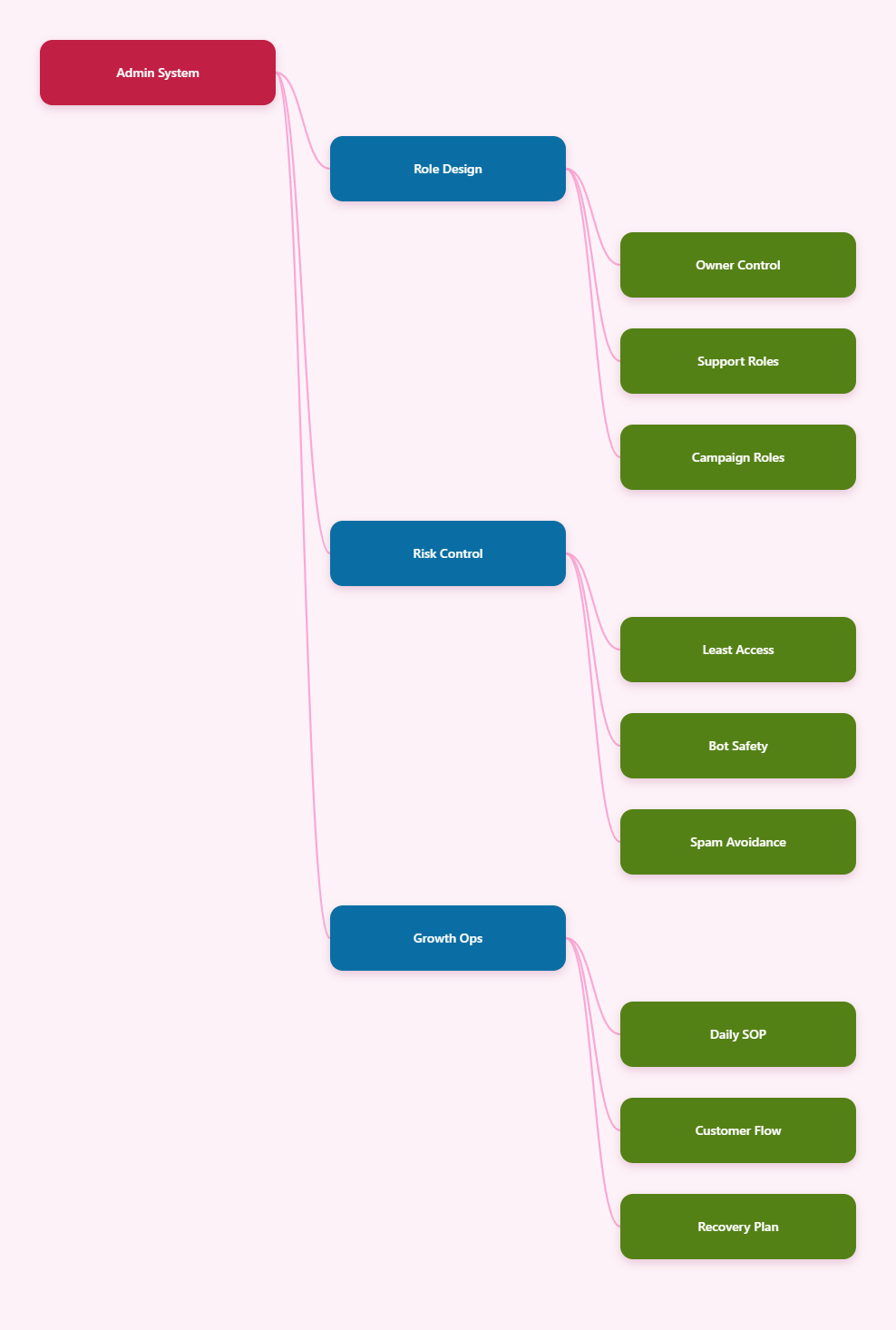
A mature Telegram store setup usually separates three functions:
- Brand broadcast: channels for product launches, stock alerts, and official updates.
- Customer conversation: groups, business chats, or bots for support, order questions, and pre-sales replies.
- Internal control: private admin groups, CRM notes, escalation logs, and campaign calendars.
The goal of a multi account Telegram e-commerce store admin model is not to hide identity or evade platform rules. It is to keep work organized across brands, regions, teams, and permissions. Each account should have a legitimate role, a unique phone number where required, and a defined operational boundary.
This is especially important for international stores. A seller may run separate Telegram communities for English-speaking buyers, Spanish-speaking buyers, wholesale partners, and affiliate publishers. Each audience needs different messaging, support timing, and moderation rules. Without structure, admins start forwarding messages manually, replying from personal accounts, or using the wrong channel for sensitive customer issues.
Telegram Rules Store Admins Must Respect
Before adding tools or scaling accounts, sellers need a policy baseline. Telegram’s Terms of Service prohibit using the service to send spam or scam users, promote violence in public channels or bots, post illegal sexual content in public areas, or engage in activity that is illegal in most countries. For a store, this means commercial activity must stay permission-based, transparent, and lawful.
Telegram’s spam FAQ also explains that users can report unwanted messages. If moderators find those reports justified, an account may become temporarily limited, especially around messaging strangers or posting in groups. This matters because many e-commerce teams make their biggest mistakes during outreach campaigns.
Safe admin behavior starts with these principles:
- Do not send unsolicited bulk messages to random non-contacts.
- Do not scrape group members and push offers into private chats.
- Do not impersonate support, payment providers, shipping partners, or customers.
- Do not use bots to simulate fake engagement, fake purchases, or fake impressions.
- Do not promote restricted, illegal, counterfeit, or misleading products.
Telegram allows channels, groups, bots, and business features, but permission does not mean unlimited commercial pressure. For example, a customer who joins a product announcement channel has not automatically agreed to one-to-one sales messages from every admin. A member asking about delivery in a group has not consented to being added to unrelated promotional communities.
For Telegram store admin permissions, use the least privilege rule. Admins who only answer questions should not be able to add new admins, change group information, delete the channel, or control bot integrations. Campaign managers may need posting rights, but not ownership transfer access. Support agents may need message management rights, but not payment configuration rights.
When in doubt, document the business reason for every account and every permission. If no one can explain why an admin needs a right, remove it.
Build the Right Store Admin Architecture
A reliable multi-account setup begins with mapping the store’s workflow. Do not start by creating extra accounts. Start by listing the customer journeys Telegram must support: discovery, product questions, order placement, delivery updates, returns, VIP drops, affiliate recruitment, and after-sales support.
From there, assign each Telegram asset a single purpose. A public channel can publish product updates. A private customer group can host buyer discussions. A bot can collect order numbers and route questions. A business account can display hours, location, quick replies, and automated greetings where relevant. A private admin group can coordinate shifts and escalations.
Use this practical structure for most e-commerce operations:
- Owner account: controls ownership, final permissions, recovery settings, and critical changes.
- Operations admin: manages channels, pinned messages, group settings, and content calendar.
- Support admins: answer customer questions, collect order details, and escalate sensitive cases.
- Campaign admins: coordinate launches, affiliate posts, creator drops, and promotional timing.
- Bot operator: maintains flows, bot token security, integrations, and fallback routing.
Each person should use their own account instead of a shared login. Shared admin accounts make audit trails weak, complicate recovery, and increase the chance that a departed contractor still has access. If a store manages several brands, create separate channels and groups for each brand rather than mixing customers in one crowded community.
For multiple Telegram accounts for business, remember that each Telegram account is tied to a phone number. Do not rely on disposable numbers you cannot recover. If you lose access to the number, future login and account recovery can become difficult. For long-term store operations, use numbers controlled by the company, with ownership recorded in an internal access register.
The architecture should also include off-platform backups for business-critical information. Telegram is useful for conversation, but order records, refunds, tax documents, and customer consent logs should live in your CRM, help desk, store backend, or accounting system.
Permission and Risk Matrix for Store Teams
Granular rights are one of the most important tools for reducing Telegram store risk. Telegram groups, supergroups, and channels support different admin powers, and official API documentation describes admin rights as granular rather than all-or-nothing for channels and supergroups. Store owners should use that flexibility deliberately.
The table below shows a practical risk comparison for e-commerce admin roles. Adapt it to your own team size, product category, and support volume.
| Role | Recommended Access | Avoid Granting | Main Risk |
|---|---|---|---|
| Owner | Full control, recovery, final approvals | Daily routine replies | Single point of failure |
| Support Admin | Reply, moderate messages, collect order IDs | Add admins, change channel identity | Privacy or refund mistakes |
| Campaign Admin | Post approved promos, pin messages | Bot token access, owner rights | Unapproved broadcasts |
| Bot Operator | Bot settings, flow testing, integrations | Payment decisions alone | Broken automation |
| Affiliate Manager | Partner group posting, creator coordination | Customer data export | Offer leakage |
Review rights monthly and immediately after staff changes. A small store can do this manually in a spreadsheet. A larger operation should connect Telegram tasks to an access management checklist covering onboarding, role change, suspension, and offboarding.
For a Telegram admin risk management routine, keep four records: who owns each asset, who has admin rights, which bots are connected, and which external tools receive customer data. This record does not need to be complex, but it must be current.
Use Bots Without Turning Automation Into Spam
Telegram bots can be powerful for e-commerce. They can answer common questions, collect order numbers, route support tickets, send invoices through supported payment flows, and connect to internal systems. Telegram Business also supports features such as quick replies, automated messages, start pages, and chatbot support, making it easier for stores to standardize responses.
The safest bot strategy starts with real customer questions, not imagined automation. Export or review recent support conversations, identify repeated questions, and turn only the stable answers into bot flows. Good first candidates include shipping timelines, return instructions, size guides, stock status, warranty steps, and order tracking collection.
Use bots for structured tasks:
- Ask for order number, email, or delivery region before routing to a human.
- Show product categories or support topics with clear buttons.
- Send store policy links that match the website and checkout page.
- Escalate refunds, damaged goods, fraud concerns, and payment disputes to staff.
- Log unresolved questions for weekly improvement.
Avoid using bots to push unsolicited messages, imitate customers, create artificial engagement, or bypass consent. Telegram’s content creator and bot-related terms address invalid or non-genuine activity in monetization contexts, and the general platform policy prohibits spam and abuse. Treat automation as a service layer, not a growth hack.
Bot security deserves special attention. Store bot tokens should be restricted to responsible technical operators, stored in a secure environment, and rotated if a contractor leaves or a repository is exposed. Test every bot change in a private environment before applying it to a live customer group.
For Telegram bot for e-commerce support, design a human handoff from day one. Customers should not be trapped in a loop when they ask about refunds, high-value orders, account problems, or complaints. The best automation reduces repetitive typing while keeping sensitive decisions with accountable staff.
Daily Operating SOP for Safer Admin Work
Once structure and permissions are in place, daily execution decides whether the system works. A Telegram store admin team needs repeatable routines for shifts, posting, escalation, moderation, and incident response. Without routines, even well-designed permissions become messy during launches.
Start each day with a short admin check. Confirm who is on support duty, which promotions are scheduled, whether any bot flow changed, and whether unresolved customer issues need escalation. For stores selling across timezones, use a handover message between shifts so customers are not asked the same questions repeatedly.
A simple daily SOP can look like this:
- Check pinned admin notes, active promotions, and stock changes.
- Review unread customer questions by urgency and order value.
- Escalate refunds, chargebacks, delivery disputes, and fraud signals.
- Approve or reject scheduled channel posts before publication.
- Review bot failure logs, repeated unknown questions, and angry replies.
- Record major incidents in the CRM or operations tracker.
Posting controls are just as important as support controls. Every promotional message should have an owner, approved copy, target channel, planned send time, and link destination. Cross-border stores should verify currency, shipping regions, local restrictions, and product claims before broadcasting.
Moderation should be firm but transparent. Remove obvious spam, scams, impersonation attempts, and harmful links quickly. For ordinary complaints, do not delete criticism simply because it is uncomfortable. A better approach is to acknowledge the issue, move personal order details to private support, and leave a short public note showing that the store responded.
For cross-border Telegram store operations, align working hours and language coverage with customer expectations. If your channel attracts buyers from different regions, set clear support windows and route language-specific questions to the right admin instead of forcing one overloaded person to improvise.
Account Isolation, Privacy, and Recovery Planning
Admin safety is not only about platform restrictions. It also includes privacy, device hygiene, login recovery, and business continuity. A store that loses its owner account, bot token, or primary phone number can lose control of its customer channel at the worst possible time.
Use separate work and personal boundaries. Admins should avoid mixing personal chats, supplier negotiations, customer complaints, and campaign control in the same unmanaged environment. Where teams use browser-based dashboards, CRM tools, or multiple brand accounts, keep sessions organized and avoid giving contractors broad access to unrelated stores.
Recovery planning should cover these points:
- Company-controlled phone numbers for long-term operational accounts.
- Two-step verification where available and properly stored recovery details.
- Clear ownership records for channels, groups, bots, and payment integrations.
- Offboarding checklists for staff, agencies, and freelance moderators.
- Emergency contacts for technical, support, and legal escalation.
Be careful with unofficial claims about exact ban triggers or secret scoring systems. Telegram does not publish every abuse-detection detail, and third-party articles may overstate certainty. What is reliable is the public rule set: do not spam, scam, abuse, impersonate, or violate laws; respect reports and moderation; and keep customer communication consent-based.
Privacy also affects customer trust. Support admins should collect only the data needed to solve the issue. A bot may need an order number, but it usually does not need full payment card details. A group moderator may need to remove a scam link, but they should not ask customers to post private order information publicly.
For teams using anti-detect browsers or profile isolation tools to manage overseas workflows, keep the purpose operational: separating brand workspaces, reducing accidental session mixing, and protecting account access. Do not use isolation tools to evade platform enforcement, mass-message strangers, or disguise abusive behavior.
FAQ: Multi Account Telegram E-Commerce Store Admin
Can one store use multiple Telegram accounts?
Yes, a store can involve multiple Telegram accounts when each account has a legitimate role and its own required phone number. The safer model is role-based administration, not shared logins or disposable accounts.
Is a Telegram channel better than a group for e-commerce?
A channel is better for official broadcasts because posts come from the channel identity and can reach large audiences. A group is better for discussion, feedback, and community support, but it needs stronger moderation.
What admin rights should support staff have?
Support staff usually need reply, moderation, and message management rights. They normally do not need permission to add admins, change channel identity, manage ownership, or control critical bot settings.
Can Telegram bots handle store payments?
Telegram’s official bot payment documentation supports payment workflows through bots for goods and services, with specific documentation for physical and digital goods. Stores should implement payments only through supported providers and keep tax, refund, and compliance records outside chat.
How do I reduce Telegram account restriction risk?
Avoid unsolicited messaging, scraping members, fake engagement, misleading offers, and aggressive automation. Use opt-in channels, clear support flows, accurate product claims, and human review for sensitive customer issues.
Should admins reply from personal accounts?
For small teams, this may happen, but it is cleaner to define work accounts and admin roles. Personal replies make audits, handovers, and offboarding harder, especially when customer data or refund disputes are involved.
How often should Telegram admin permissions be reviewed?
Review permissions at least monthly and immediately after a staff change, agency change, security incident, or major campaign. Keep a simple access register so ownership and responsibilities are visible.
Conclusion
A strong multi account Telegram e-commerce store admin setup in 2026 is built on three actions. First, separate channels, groups, bots, and admin accounts by business purpose. Second, apply least-privilege permissions so every teammate has only the rights needed for their role. Third, keep automation consent-based, documented, and ready for human escalation.
Telegram can support fast commerce, loyal communities, and efficient customer service, but only when store teams treat admin operations as real infrastructure. Build the workflow before scaling the accounts, and your team will move faster with less avoidable risk.