Skip to content
OnlyTG Icon
  • ProductsExpand
    • Echo
    • Recorder
  • ResourcesExpand
    • Help
    • Blog
    • Channel & Bot Finder
    • SMM Panel
  • PricingExpand
    • Echo Pricing
  • EnglishExpand
    • 中文 (中国)
    • Русский
    • English
Contact us
OnlyTG Echo

How to Set up Telegram Bot Auto-reply Messages?

Home » Blog » OnlyTG Echo » How to Set up Telegram Bot Auto-reply Messages?

With over ‌1 billion monthly active users‌ and a robust bot ecosystem, Telegram has become a strategic platform for businesses to deploy chatbots for marketing, customer support, and service delivery.

However, a challenge arises: when user traffic surges or developers are offline, how can we improve operational efficiency and provide users with a good experience? The solution lies in leveraging telegram auto reply message—mastering how to configure auto-reply functionality on Telegram ensures seamless communication even during peak periods or absences.

How to Set up Telegram Bot Auto-reply Messages?

We use OnlyTG Echo to make a telegram bot auto-reply message example.

Step 1

Create your bot via BotFather, and bind it to OnlyTG Echo.

https://onlytg.io/help/how-to-create-my-own-bot-in-telegram.htm

Step 2

Send the /start command to your bot, and click the Auto-reply button.
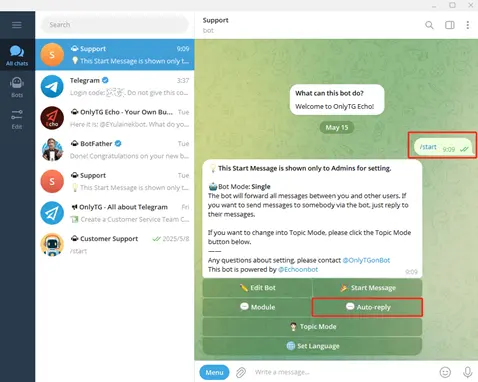
Telegram Bot Auto-reply

Step 3

Click the Add new Auto-reply button.
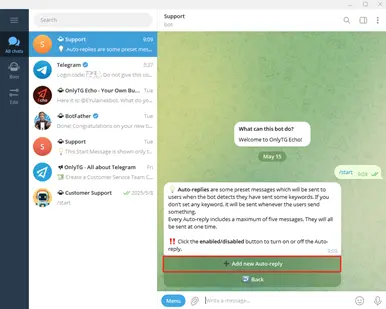
Telegram Bot Auto-reply

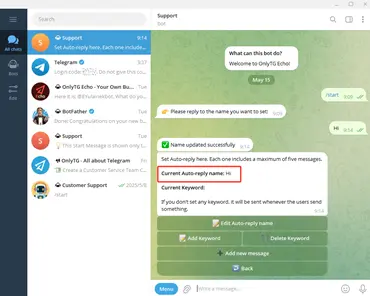
Reply the name you want to set for the Auto-reply.
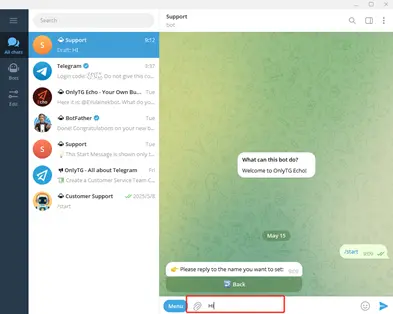
Telegram Bot Auto-reply

Step 4

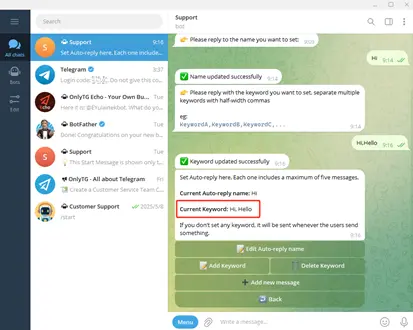
Click the Add Keyword button, and you can add multiple keywords.
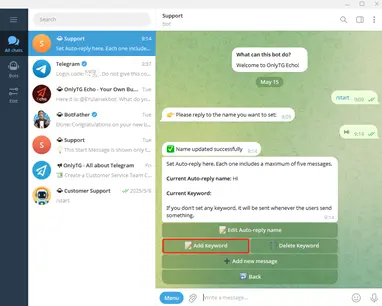
Telegram Bot Auto-reply

Step 5

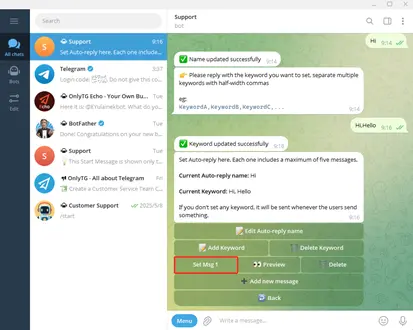
Click the Add new message button to add autoresponders based on these keywords.
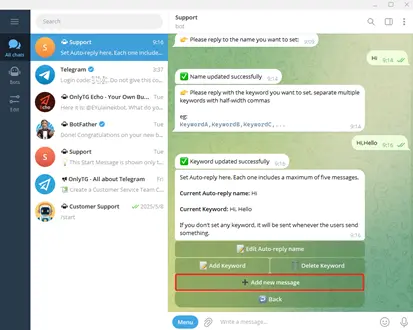
Telegram Bot Auto-reply

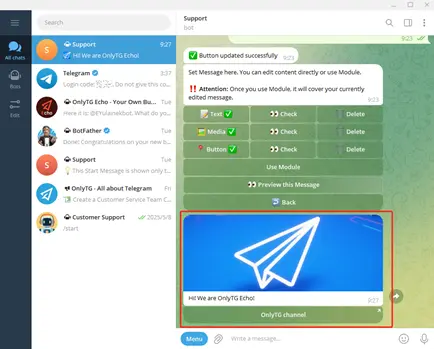
Click the Set Msg 1 button, you can add Text, Media, Button or use the Module.
Telegram Bot Auto-reply

Step 6

After setting up the automatic reply, we can preview the effect first.
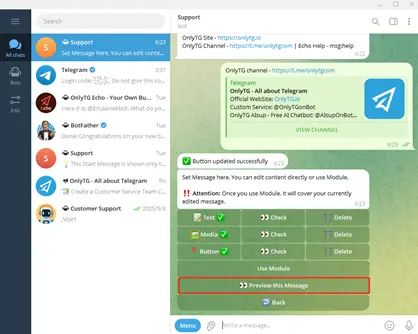
Telegram Bot Auto-reply

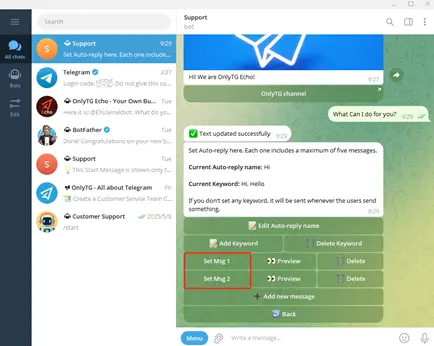
Of course, you can also click the Back button to go back to step 5 and add a new message. Every Auto-reply includes a maximum of five messages. They will all be sent at one time.
Telegram Bot Auto-reply

User Example

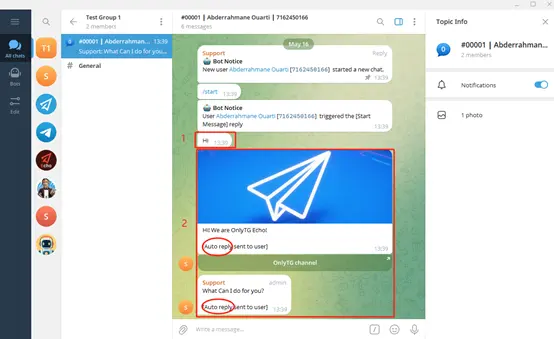
When a user’s message contains any of these keywords, the bot will automatically send the corresponding reply.
Telegram Bot Auto-reply

1.User’s message;   2.Auto-reply

After setting up automatic replies based on keywords, when there is a surge in users or employees are not online, the bot can automatically reply to reduce customer waiting time and provide better service to customers.

If OnlyTG Echo is helpful to you, feel free to visit OnlyTG’s channel and website for more details. Besides auto-reply messages, it offers various features like statistics tracking, welcome messages, anonymous message forwarding, and more. We continuously work on adding and updating new features to enhance your experience.

OnlyTG Echo Bot: https://t.me/echoonbot

Official Telegram Channel: https://t.me/onlytg

Source: https://onlytg.io/onlytg/how-to-implement-telegram-auto-reply-messages.html

Post Tags: #bot#Telegram

Post navigation

Previous Previous
Build Telegram Message Replying Bot using OnlyTG Echo
NextContinue
Trigger Keywords and Auto-reply, Telegram Smart Bot Building  
Table of Contents
  • How to Set up Telegram Bot Auto-reply Messages?
    • Step 1
    • Step 2
    • Step 3
    • Step 4
    • Step 5
    • Step 6
  • User Example
Echo Sidebar
  • Latest Post
  • Echo
  • Recorder
  • Tips
Telegram Tips

Social Media Marketing Strategy: A Real-World Growth Workflow

A real-world social media marketing strategy workflow for audience growth and engagement.

Telegram Tips

How to Increase Social Media Engagement and Build a More Active Audience

Learn how to increase social media engagement and grow an active audience with proven strategies

Telegram Tips

Telegram Audience Growth: How to Diagnose What Is Holding Your Channel Back

Learn how to diagnose Telegram audience growth bottlenecks and fix channel performance.

Telegram Tips

Social Media Metrics: How to Diagnose Growth Problems and Improve Your Strategy

Learn to use social media metrics to diagnose growth bottlenecks and improve strategy.

Telegram Tips

How to Boost Social Media Growth: A Practical Strategy for More Visibility, Engagement, and Audience Growth

Learn practical social media growth strategies for visibility, engagement, followers, and more.

Telegram Tips

Create a Telegram Bot: Build an Automated Customer Workflow

Create a no-code Telegram bot workflow to automate replies, broadcasts, groups, and analytics.

Telegram Tips

Button in Telegram Bot: How Businesses Can Build Better Automated Workflows

Learn how Telegram bot buttons streamline support, marketing, onboarding, and automation.

Telegram Tips

Automate Chat in Telegram: How to Set Up Automation

Learn how to automate Telegram chats with no-code bots, auto-replies, FAQs, and workflows.

How to Get Unbanned from Telegram in 2026: A Practical Step-by-Step Guide

If your Telegram account or phone number has been restricted, this guide explains how to confirm the ban, appeal to Telegram support, reduce spam flags, and avoid getting blocked again in 2026.

How to create telegram bot in 2026?

Learn how to create a Telegram bot in 2026 using BotFather, with step-by-step coding and no-code methods, plus tips for security, deployment, and choosing the best setup.

How to Loop Post in Channel via Telegram Bot

OnlyTG Echo provides the function to automatically loop posts in your channel. Firstly, you need to create a new bot via @botfather and…

How to Configure Multiple Media when Setting OnlyTG Echo Features

OnlyTG Echo provides the function to configure multiple media to a single message when setting Start Message/Auto Reply/Quick Reply/Broadcast and other features. Firstly, you need…

How to Upgrade Channel to Pro Channel in Telegram

OnlyTG Echo provides the function to upgrade your channel to Pro Channel. This will consume your Pro Communities slots and unlock more advanced features….

How to Edit a Published Post via Telegram Bot

OnlyTG Echo provides the function to Edit Channel Post via your bot. Firstly, you need to create a new bot via @botfather and…

How to Publish Channel Post via Telegram Bot

OnlyTG Echo provides the function to Publish Channel Post via your bot. Firstly, you need to create a new bot via @botfather and…

How to Manage Channel via Telegram Bot

OnlyTG Echo provides the function to Manage Channel via your bot. Firstly, you need to create a new bot via @botfather and send its…

How to Use OnlyTG Recorder?

Welcome to OnlyTG Recorder! Developed by our dedicated bot development team, OnlyTG Recorder is designed to serve as an assistant…

Social Media Marketing Strategy: A Real-World Growth Workflow

A real-world social media marketing strategy workflow for audience growth and engagement.

How to Increase Social Media Engagement and Build a More Active Audience

Learn how to increase social media engagement and grow an active audience with proven strategies

Telegram Audience Growth: How to Diagnose What Is Holding Your Channel Back

Learn how to diagnose Telegram audience growth bottlenecks and fix channel performance.

Social Media Metrics: How to Diagnose Growth Problems and Improve Your Strategy

Learn to use social media metrics to diagnose growth bottlenecks and improve strategy.

How to Boost Social Media Growth: A Practical Strategy for More Visibility, Engagement, and Audience Growth

Learn practical social media growth strategies for visibility, engagement, followers, and more.

Create a Telegram Bot: Build an Automated Customer Workflow

Create a no-code Telegram bot workflow to automate replies, broadcasts, groups, and analytics.

Button in Telegram Bot: How Businesses Can Build Better Automated Workflows

Learn how Telegram bot buttons streamline support, marketing, onboarding, and automation.

Automate Chat in Telegram: How to Set Up Automation

Learn how to automate Telegram chats with no-code bots, auto-replies, FAQs, and workflows.

  • OnlyTG
  • Echo
  • Recorder
  • Help
  • Blog
  • Echo Pricing
  • Channel & Bot Finder
  • SMM Panel
OnlyTG EchoTelegram VK YouTube Facebook X Email

© 2026 OnlyTG

Scroll to top
  • Products
    • Echo
    • Recorder
  • Resources
    • Help
    • Blog
    • Channel & Bot Finder
    • SMM Panel
  • Pricing
    • Echo Pricing
Contact us