
If you are trying to add Telegram contacts to channel in 2026, the first thing to know is simple: Telegram does not let you force-add unlimited people to a channel. According to Telegram’s official Channels FAQ, a channel owner can manually add subscribers only for the first 200 people. After that, growth has to come from invite links, public discovery, QR codes, cross-promotion, ads, or communities that choose to join.
That limit is not a bug, and no “unlimited adder” tool can safely bypass it. In this guide, you will learn the compliant way to add your first contacts, convert the rest through invite links, avoid spam restrictions, and build a channel growth system that works without risking your account.
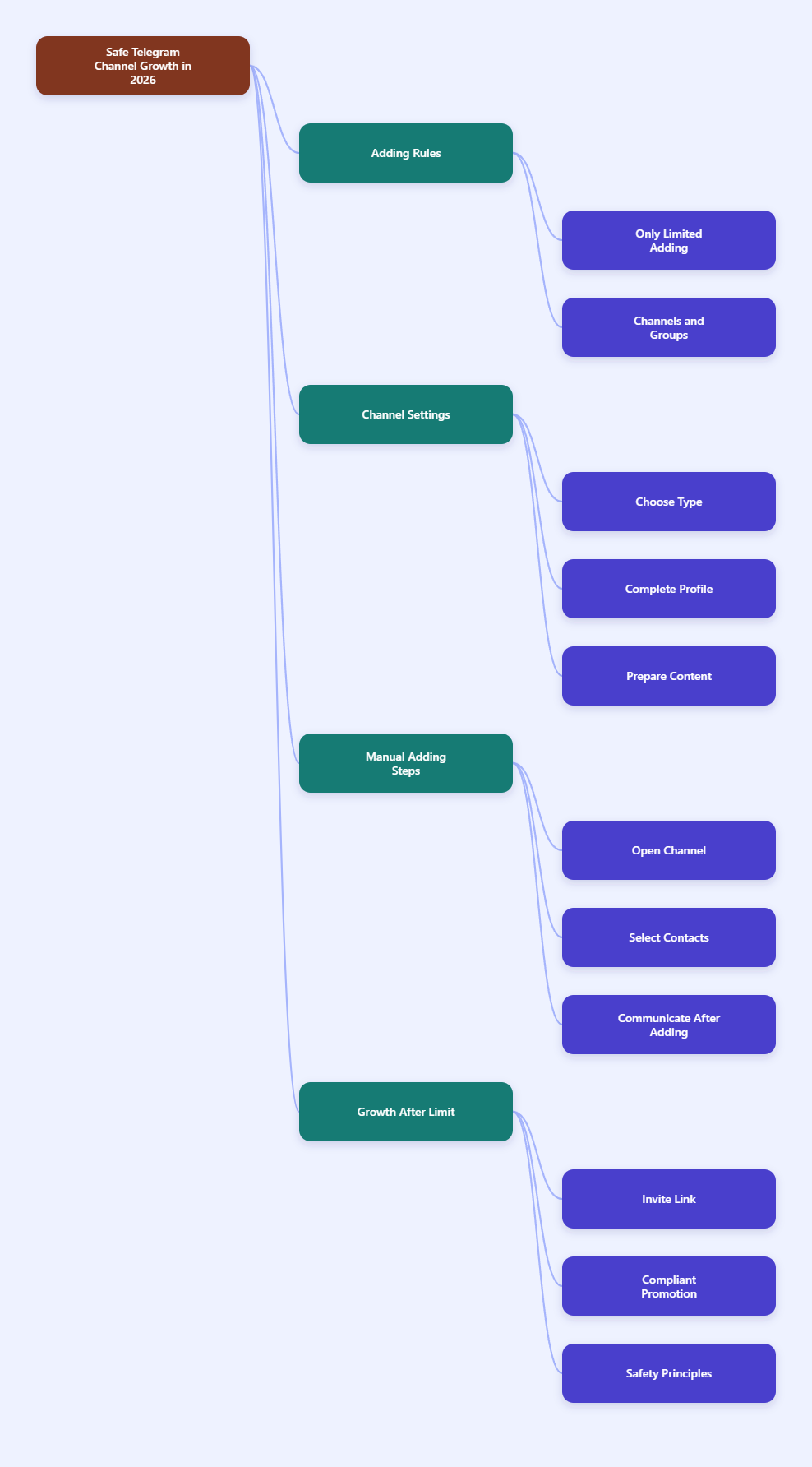
Quick Answer: Can You Add Telegram Contacts to a Channel?
Yes, but only in a limited way. Telegram allows the owner of a channel to add the first 200 subscribers directly, usually from contacts. Once the channel reaches that threshold, people need to join by themselves through a public username, private invite link, join request, QR code, or shared channel link.
This matters because many users confuse Telegram channels with Telegram groups. Channels are broadcast tools for one-way publishing and can have unlimited subscribers. Groups are discussion spaces and can support large communities, but Telegram lists group capacity separately from channel subscribers.
| Feature | Telegram Channel | Telegram Group |
|---|---|---|
| Main use | Broadcast updates to an audience | Host discussions between members |
| Audience size | Unlimited subscribers | Up to 200,000 members according to Telegram’s group documentation |
| Manual adding | Owner can add the first 200 subscribers | Admins may invite or add users depending on permissions and Telegram limits |
| Best for | Newsletters, alerts, product updates, creator content | Communities, support chats, member discussion |
Before You Start: Set Up the Channel Correctly
A clean setup improves join rates and reduces reports. Before inviting anyone, make sure the channel looks trustworthy, especially if your contacts do not already know why they are being added.
Choose Public or Private
A public channel has a username such as t.me/YourChannelName. Anyone can search for it on Telegram, open the link, preview the content, and join. This is usually better for brands, creators, newsletters, public communities, and content discovery.
A private channel uses an invite link instead of a searchable username. It works better for paid memberships, internal teams, private updates, course communities, or closed customer groups. Telegram’s FAQ notes that private channels are invite-only, although publicly shared invite links can make them function more like public channels in practice.
Prepare a Join-Friendly Profile
Before you invite people, complete these basics:
- Add a clear channel name that explains the topic in a few words.
- Upload a recognizable logo, profile image, or creator photo.
- Write a short description explaining who the channel is for.
- Publish 5 to 10 useful posts before sending invitations.
- Pin a welcome post with the channel promise and posting schedule.
People are more likely to stay when the first screen answers three questions: What is this channel? Why was I invited? What will I receive if I stay?
How to Add Telegram Contacts to Channel: Step-by-Step
Use this process if you are starting a new channel and want to invite your first contacts without triggering spam complaints.
- Create or open your Telegram channel. In Telegram, open the channel you own. You must be the owner or have the right admin permissions to invite users.
- Open the channel profile. Tap or click the channel name or photo at the top of the screen to access settings.
- Select Add Subscribers or Add Members. Telegram wording can vary slightly by app version and device, but the action appears in the channel management area.
- Choose people from your contacts. Select only contacts who reasonably expect your invitation, such as customers, team members, newsletter subscribers, or community members who opted in elsewhere.
- Confirm the addition. Telegram will add the selected people until you reach the direct-add limit. Avoid adding random or cold contacts.
- Send a short welcome message. Explain why they were invited, what the channel covers, and how often you post. Make it easy for them to leave if the content is not relevant.
- Stop direct adding near the 200-subscriber limit. Telegram’s official guidance says the owner can add subscribers for the first 200 only. After that, switch to links and opt-in growth methods.
The safest approach is not to add all 200 people blindly. Add a smaller first batch, watch unsubscribes and reactions, improve the welcome post, then invite the next batch.
What to Do After the 200-Subscriber Limit
Once you can no longer directly add Telegram contacts to channel, your job changes from “adding people” to “getting people to join willingly.” This is better for retention, engagement, and account safety.
1. Create a Public Channel Link
If the channel is public, claim a username in channel settings. Your link will look like https://t.me/YourChannelName. Choose a name that is short, readable, and close to your brand or topic.
Use this link in:
- Your website header or footer
- Email newsletter footers
- YouTube descriptions
- X, LinkedIn, Instagram, and TikTok bios
- Blog posts related to the channel topic
2. Generate a Private Invite Link
For private channels, create an invite link from the channel settings. Private invite links often use a t.me/+… format. You can revoke and replace them if they get shared in the wrong place.
Use separate invite links for different sources when possible. For example, create one link for your email list and another for a partner campaign. This makes it easier to understand where new subscribers come from.
3. Use Join Requests for Quality Control
If you run a private or sensitive channel, enable join requests when available. This lets admins approve people before they enter. It is useful for paid communities, professional groups, internal updates, or niche communities where spam would damage trust.
4. Turn the Link Into a QR Code
A QR code is useful when your audience meets you offline. Add it to event slides, product packaging, flyers, restaurant menus, trade show booths, classroom materials, or printed receipts.
For public channels, encode the public t.me link. For private channels, consider using a dynamic short link that redirects to your current Telegram invite link. That way, if you revoke the Telegram invite, you can update the destination without reprinting everything.
Safe Growth Workflow for 2026
Here is a practical workflow that works for most creators, marketers, founders, and community managers.
- Define the channel promise. Write one sentence: “Join this channel to get ___ every ___.” A clear promise beats a vague “follow us on Telegram.”
- Publish starter content. Add helpful posts before promotion. New visitors should see proof that the channel is active.
- Add only warm contacts first. Use the direct-add option for people who already know you or opted into your updates.
- Create source-specific invite links. Use different links for email, website, partners, paid ads, and offline QR codes.
- Promote the link where intent is high. Place it after useful content, not in random comment sections or cold DMs.
- Track subscriber changes weekly. Telegram channel stats, public analytics tools, and manual link tracking can show which sources bring quality subscribers.
- Improve retention before scaling. If many people leave after joining, fix content quality, posting frequency, or audience targeting before buying ads.
Compliance and Spam Risks You Should Avoid
Telegram’s spam guidance is clear: people usually report unwanted messages, unsolicited contact, and annoying invitations. If moderators find that reports are valid, an account can become temporarily limited.
Avoid these risky behaviors:
- Mass-adding people who never asked for your updates.
- Sending the same invite link to strangers in private messages.
- Scraping members from other groups and trying to contact them.
- Using “member adder” tools that promise unlimited forced subscribers.
- Posting repetitive promotional links in public groups.
The safest rule is simple: invite people who have a real reason to expect the invitation. If you would not send the same invitation by email or SMS, do not send it through Telegram.
Free and Paid Tools That Actually Help
No legitimate tool can override Telegram’s subscriber rules. Good tools help you create links, analyze performance, manage paid access, or understand public channel growth.
| Tool | Free or Paid | Best Use Case | Pros | Limits |
|---|---|---|---|---|
| Telegram Native Invite Links | Free | Creating public links, private invite links, and basic channel access | Official, safe, built into Telegram | Does not provide advanced marketing attribution by itself |
| Telegram Channel Statistics | Free where available | Checking views, growth, and post performance inside Telegram | Native data from your own channel | Availability and depth can depend on channel size and app interface |
| TGStat | Free with restrictions; paid features may vary | Researching public channels, rankings, growth, and content trends | Useful for competitive research and public channel analysis | Focuses on public Telegram data, not private channel internals |
| Telemetr.io | Free and paid options may vary by feature | Analyzing public channel growth, views, engagement, and ad activity | Helpful for channel research and ad planning | Not a tool for forcibly adding subscribers |
| InviteMember | Paid | Managing paid access to private Telegram channels | Built for subscription communities and access control workflows | Requires setup and is only relevant if you sell access |
| QR Code Generators | Free and paid depending on provider | Turning Telegram links into scannable offline entry points | Great for events, stores, packaging, and print campaigns | Static QR codes break if a private invite link is revoked |
Best Practices for Higher Join Rates
Getting someone to click is only half the job. The channel preview, first posts, and welcome message decide whether they join and stay.
Write a Better Invite Message
Use a short, honest message instead of hype. Here is a simple structure:
- Context: “I’m moving product updates to Telegram.”
- Value: “You’ll get short alerts, launch notes, and useful tips.”
- Frequency: “I post 2 to 3 times per week.”
- Choice: “Join if it is useful; no pressure.”
This reduces complaints because it respects the user’s attention. It also attracts people who actually want the content.
Post Content People Expect
If the channel promises “daily crypto alerts” but posts unrelated affiliate links, people will leave or report it. Keep the content aligned with the reason people joined.
Reliable channel formats include:
- Weekly expert tips
- Product release notes
- Breaking news alerts
- Private community announcements
- Curated links with short commentary
- Exclusive discounts or early access updates
Use a Group Only When Discussion Matters
If your audience needs to ask questions, help each other, or discuss posts, connect a group to your channel or run a separate group. If you only need to broadcast updates, a channel is cleaner and less noisy.
Common Mistakes When Adding Contacts
Many channel owners hurt growth by treating Telegram like a bulk upload tool. It is not. Telegram users are sensitive to unwanted invitations, and the platform gives them easy reporting options.
- Mistake 1: Chasing fake numbers. A channel with 5,000 uninterested subscribers can perform worse than one with 500 real readers.
- Mistake 2: Trusting unlimited adder claims. These tools may violate platform rules, fail quickly, or put accounts at risk.
- Mistake 3: Ignoring the welcome post. New subscribers need immediate confirmation that they joined the right place.
- Mistake 4: Using one link everywhere. Separate links help you identify which traffic sources work.
- Mistake 5: Promoting before content exists. Empty channels rarely convert well.
FAQ
Can I add more than 200 contacts to a Telegram channel?
Not by direct manual adding. Telegram’s official Channels FAQ says the owner can add subscribers for the first 200 only. After that, people need to join through a public link, invite link, QR code, search, or another opt-in path.
Can Telegram channels have unlimited subscribers?
Yes. Telegram describes channels as broadcast tools that can have unlimited subscribers. The limit applies to manually adding the first subscribers, not to how many people can voluntarily join the channel.
Why can’t I add a specific contact to my channel?
Several things can prevent it. The user may have privacy settings that block additions, the channel may already be past the direct-add stage, your account may be limited, or Telegram may restrict the action to prevent spam-like behavior.
Is it safe to use a Telegram member adder tool?
Be very cautious. Tools that promise unlimited forced subscribers are not aligned with Telegram’s documented channel behavior. Safer tools focus on invite links, analytics, QR codes, or paid access management rather than bypassing limits.
Should I use a public or private channel?
Use a public channel if you want discovery, easy sharing, and a clean t.me username. Use a private channel if access should be controlled, such as paid content, internal updates, or invite-only communities.
How do I grow after adding my first contacts?
Create a clear invite link, publish useful posts consistently, promote the channel on owned channels like your website and email list, use QR codes offline, and track which sources bring engaged subscribers. Focus on opt-in growth, not forced additions.
Final Takeaway
The right way to add Telegram contacts to channel in 2026 is to use direct adding only for your first warm contacts, then switch to invite-based growth. Telegram allows channels to scale to unlimited subscribers, but the platform is designed around voluntary joining, not mass forced additions.