
Telegram Business is Telegram’s business-focused feature set that helps accounts present more professional profiles, automate routine replies, and manage customer conversations more efficiently.
This guide explains what Telegram Business is, how to set it up and how businesses can use it to support growth.
What is Telegram Business
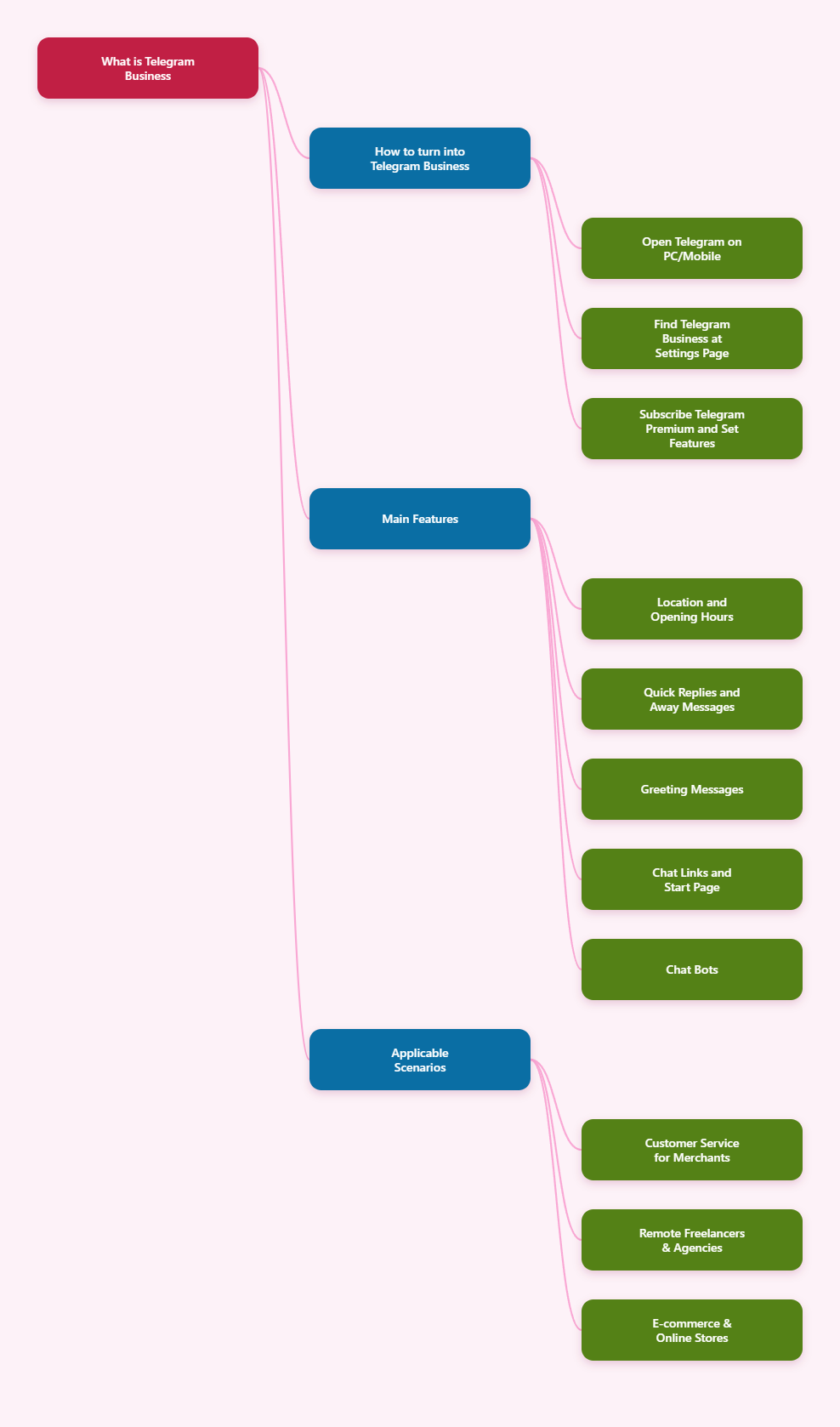
Telegram Business is a set of features that turns a regular Telegram account into a business account. These features include opening hours, location, quick replies, automated messages, etc. Users can access business features without coding skills.
In practice, Telegram Business helps a company or creator make communication easier and more organized. It can be used to show useful business information, reduce repetitive manual replies, and create a smoother first contact experience for customers.
How to Turn a Telegram Account into Telegram Business
1. Open Telegram
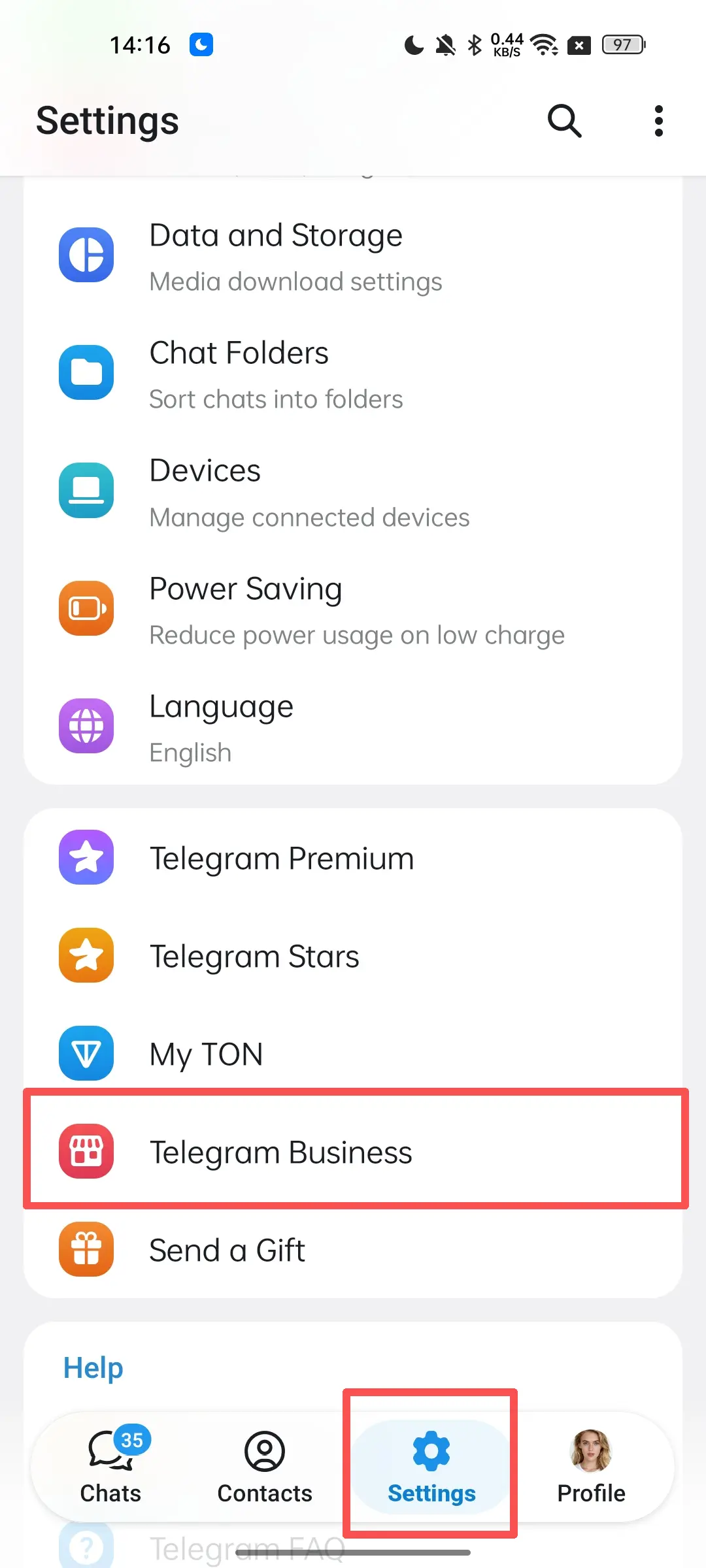
2. Go to the Settings page
3. Locate the Telegram Business option at the bottom
4. If your Telegram account is subscribed to Telegram Premium, you can proceed to the next step. If not, subscribe to Telegram Premium first.
5. You can now view all Telegram Business features and configure them according to your needs.
Core Features of Telegram Business
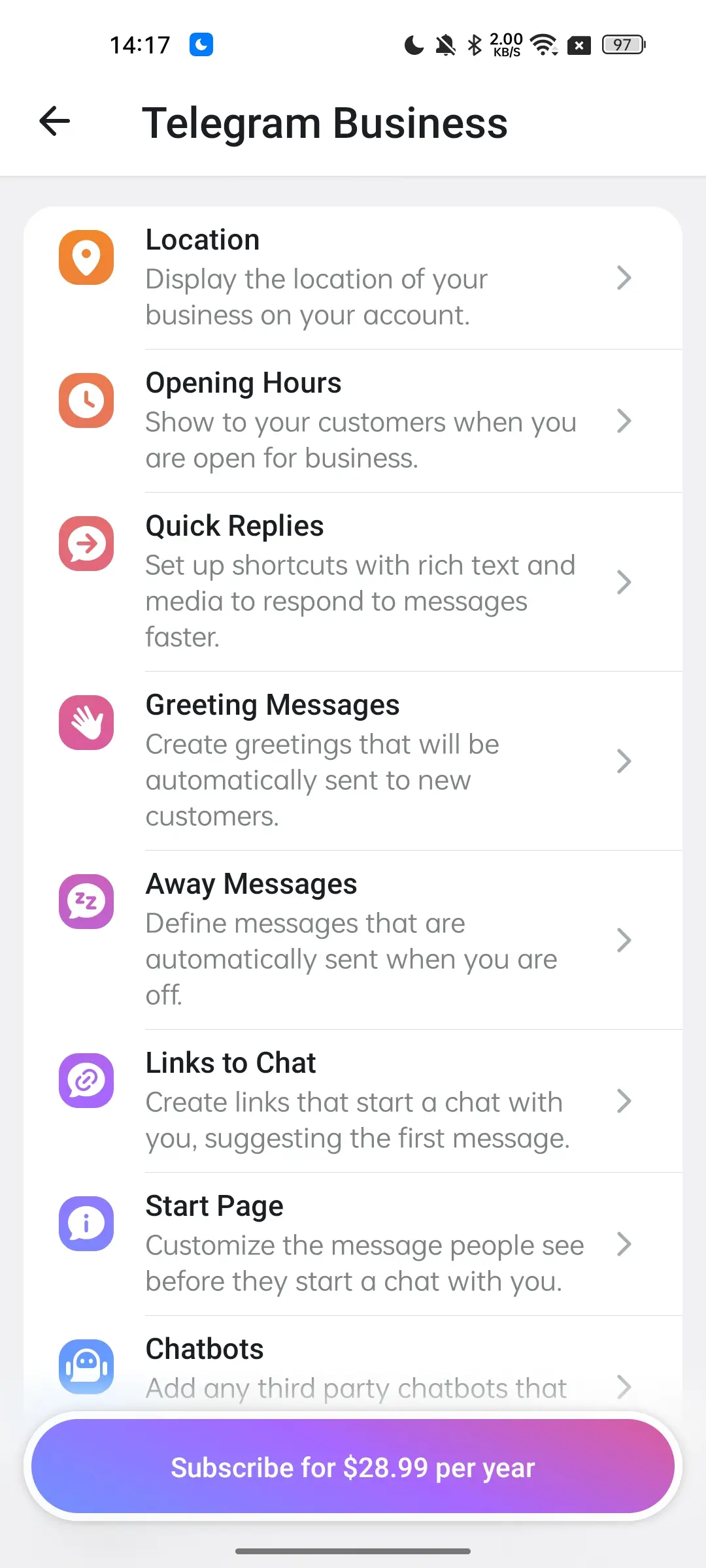
1. Location
: Share your business’s physical location on your Telegram profile.
2. Opening Hours: Inform customers of your business operating and service hours.
3. Quick Replies: Set up shortcuts with rich text and media to respond to messages faster.
4. Greeting Messages: Create auto‑sent greetings for new customers.
5. Away Messages: Set up auto‑sent messages for customers when you’re offline.
6. Chat Links: Create links that start chats with preset opening messages.
7. Start Page: Customize the message users see before starting a chat with you.
8. Chat Bots: Add third‑party chatbots to handle customer interactions.
Application Scenarios for Telegram Business
1. Customer Service for Small Merchants
Local businesses such as restaurants, barbershops, repair stores and service providers can use Telegram Business to centrally manage reservations, price inquiries, delivery status checks and more.
2. Remote Freelancers & Small Agencies
Freelancers including copywriters, designers, developers and consultants can use it as their primary contact channel. Paired with working hours, quotation templates and auto‑replies, it helps build a more professional image.
3. E‑commerce & Online Stores
E‑commerce sellers and online shops can combine Telegram Business with bots. Use bots to display product catalogs, order processes and order updates, and leverage channels or groups for promotional campaigns.
How to Earn Money with Telegram Business Features
Telegram Business itself is not a money‑making tool on its own, but it helps merchants serve customers more efficiently, boost conversion rates, and turn private‑domain traffic into sustainable revenue.
1. Boost Deal Closure with Fast Responses
Its core features are ideal for customer service and sales support. Pre‑set quick replies for common questions like pricing, shipping methods, booking procedures and after‑sales policies enable instant replies to reduce customer churn. Greeting and away messages auto‑respond to first‑time inquiries or offline periods, maintaining a professional image and avoiding unread messages.
2. Build Automated Funnels for Service‑Based Businesses
For service‑oriented businesses such as consulting, education, design, agency operations, travel and catering, Telegram Business works perfectly as a lead intake channel. You can build credibility with business hours and locations, use chatbots for basic Q&A, and organize customer demands with quick replies. The key value lies in shortening the path from inquiry to conversion and increasing revenue efficiency per traffic source.
3. Cut Labor Costs with Automation
Auto‑replies, quick replies and other features allow one manager to serve more customers without compromising service quality, covering wider working hours and scopes, thus lowering labor expenses.
More comprehensive tools for business: OnlyTG Echo
Even though Telegram Business comes with a wide range of features, it still lacks full‑scale functionality. If you need a tool with more advanced automation capabilities, we recommend OnlyTG Echo (@EchoOnBot). It enables you to build your own intelligent bots for various business scenarios including customer support, lead generation, and user data management.
Core Features of OnlyTG Echo
Directly communicate with customers via your bot.
Start Message: Automatically send greeting messages to new customers.
Quick Reply: Instantly respond with pre‑configured content.
Auto Reply: Let the bot reply to customers automatically when unattended.
Broadcast: Send customized messages to users in bulk with one click.
Channel Management: Manage your channels through the bot, including auto‑cycling posts and more.
Group Management: Manage your groups with features such as join verification, group rules, and auto welcome messages.
OnlyTG Echo includes all functions of Telegram Business plus more advanced practical features. It is fully no‑code and supported by complete tutorial videos to help you get started quickly. Start building your own intelligent bot today.

FAQ
Q: Is Telegram Business the same as a normal Telegram account?
A: No. It adds business-focused features such as quick replies, automated messages, opening hours, and chatbot support.
Q: Do I need coding skills to use Telegram Business?
A: No. Telegram says the business features can be used without coding skills, although developers can also use the API for more advanced setups.
Q: Does Telegram Business automatically bring customers?
A: No. It helps you communicate better, but it does not replace marketing, product quality, or customer service.
Q: Should I use automation for every message?
A: No. Automation is best for routine tasks. Important or complex questions should still reach a person.
Q: Can outdated business hours cause problems?
A: Yes. If hours, location, or contact details are wrong, customers may lose trust or stop contacting you.
Q: Is Telegram Business only for large companies?
A: No. It can also help small businesses, creators, and service providers who want faster and more organized communication.
Conclusion
Telegram Business is a practical set of features for businesses that want to improve communication, reduce repetitive work, and present a more professional presence on Telegram. When it is configured well and used with clear workflows, it can support sales, service, and customer engagement in a simple and flexible way.