
Telegram groups are designed for multi-user conversations, and the setup process is simple on Android, iPhone, and desktop.
What You Will Know in This Guide
Step 1: Open Telegram and Start a New Group
Summary: Open Telegram, start a new chat, select New Group, and add at least one contact to begin.
The exact taps vary slightly by device, but the basic flow is consistent. Telegram’s group setup is designed to be quick: you open the app, start a new message or compose action, choose New Group, add members, and create the group.
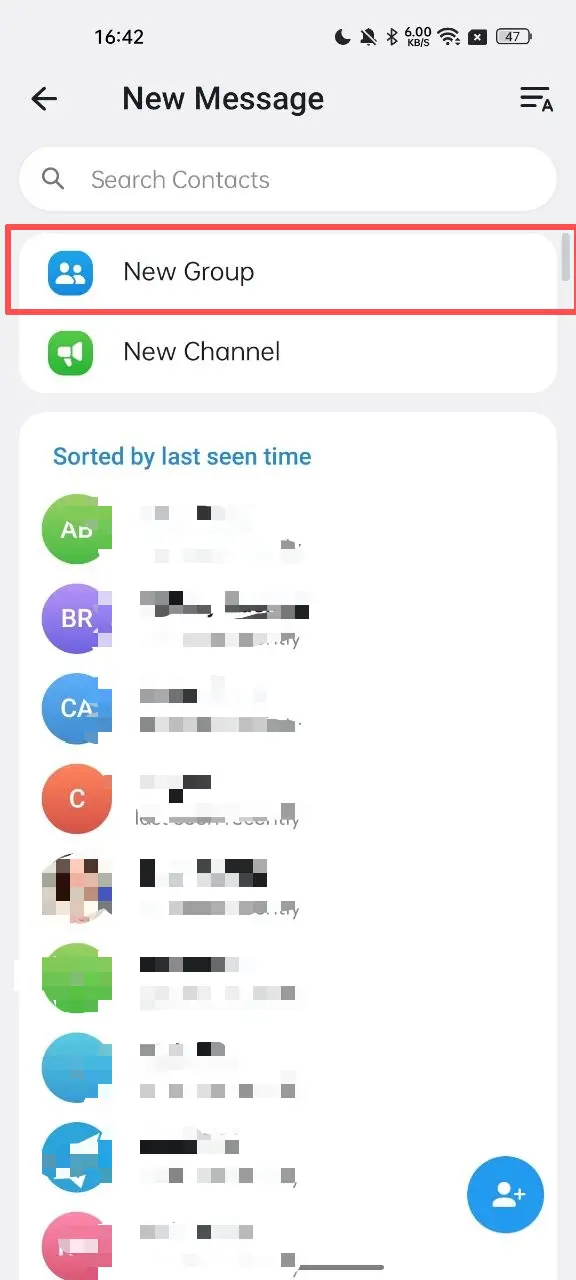
On Android/iPhone/iPad
- Open the Telegram app.
- Tap the “+” icon in the lower-right corner.
- Select New Group.
- Choose at least one contact to add.
- Enter the group name.
- Tap “√” button.
On Desktop
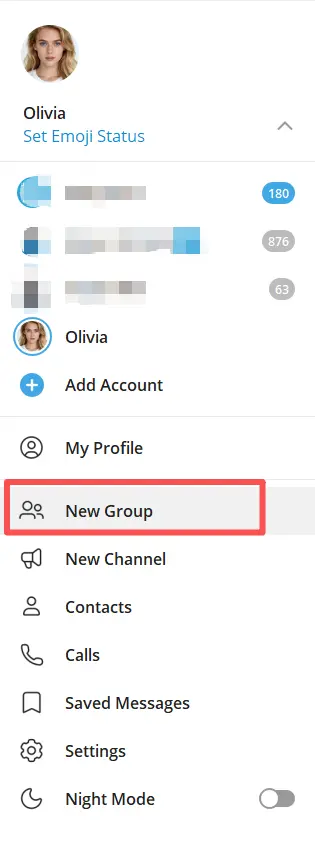
- Open Telegram Desktop.
- Click the menu or compose option.
- Select New Group.
- Enter the group name and tap Next button.
- Choose at least one contact to add.
- Click the Create button.
Desktop setup is convenient when you want to type a longer group description or manage the chat immediately after creating it.
Step 2: Name the Group and Add a Photo
A good group name should be easy to remember and directly reflect the purpose of the chat. For example, a project team might use a name like Q3 Product Launch Team, while a hobby community might use Weekend Hiking Club.
The photo matters too. A logo, team icon, or simple visual can make the group easier to identify in busy chat lists. If the group is public-facing, consistency between the group name and visual identity helps people recognize it faster.
A clear name and photo are especially useful when you manage multiple communities or when members join from search, invites, or shared links.
Step 3: Choose Between a Private and Public Group
Summary: Decide whether the group should be open to anyone with a link or limited to invited members.
Telegram groups can be set up for different levels of access. A private group is invitation-based and is usually better for internal teams, close communities, or premium audiences. A public group can be discoverable and joined more openly, which is helpful for larger communities and topic-based discussions.
The right choice depends on your goal:
- Private group: best for confidential conversations, internal coordination, or exclusive communities.
- Public group: best for outreach, discoverability, and broader participation.
If your goal is to keep discussions controlled, start private. If you want growth and visibility, a public group may be the better fit.
Step 4: Set Permissions and Member Roles
Summary: Control who can post, invite, pin, and manage the group so the chat stays organized.
After creation, the most important job is configuring permissions. Telegram group management typically includes options for who can send messages, add members, change group info, or pin content. These controls help reduce spam and make the group easier to moderate.
Useful permission settings often include:
- Who can send messages
- Who can add new members
- Who can edit group info
- Who can pin messages
- Who can approve join requests, if used
If your group has multiple administrators, assign roles carefully. Give full control only to people you trust. For smaller groups, one or two admins may be enough. For larger communities, distribute responsibilities so moderation does not depend on one person.
Step 5: Use Topic and Pinned Messages
Summary: Organize conversations with topics, highlight important updates with pinned messages, and set expectations early.
As a group grows, a single chat stream can become hard to follow. Telegram supports tools that help structure discussions, including topics in groups that have them enabled. Topics let members discuss separate subjects without mixing every message into one long thread.
Pinned messages are another essential tool. They are useful for:
- Posting rules
- Sharing welcome instructions
- Announcing deadlines
- Linking to resources
A strong pinned message can prevent repetitive questions and keep the group focused. For example, a study group may pin the weekly schedule, while a community group may pin rules and a FAQ link.
Where Telegram Groups Are Useful
Telegram groups are used in many different ways because they combine fast messaging with flexible moderation. They work well for:
- Study groups: classmates can share notes, reminders, and exam prep
- Work teams: colleagues can coordinate tasks and updates
- Communities: people with shared interests can discuss topics in real time
- Customer support: businesses can manage conversations and announcements
- Creator communities: creators can keep followers engaged in one place
Telegram groups are especially useful when a conversation needs to be interactive rather than one-way. If you need a space where members can reply, collaborate, and exchange ideas quickly, a group is often the right format.
Tool Recommendation: OnlyTG Echo for Group Management
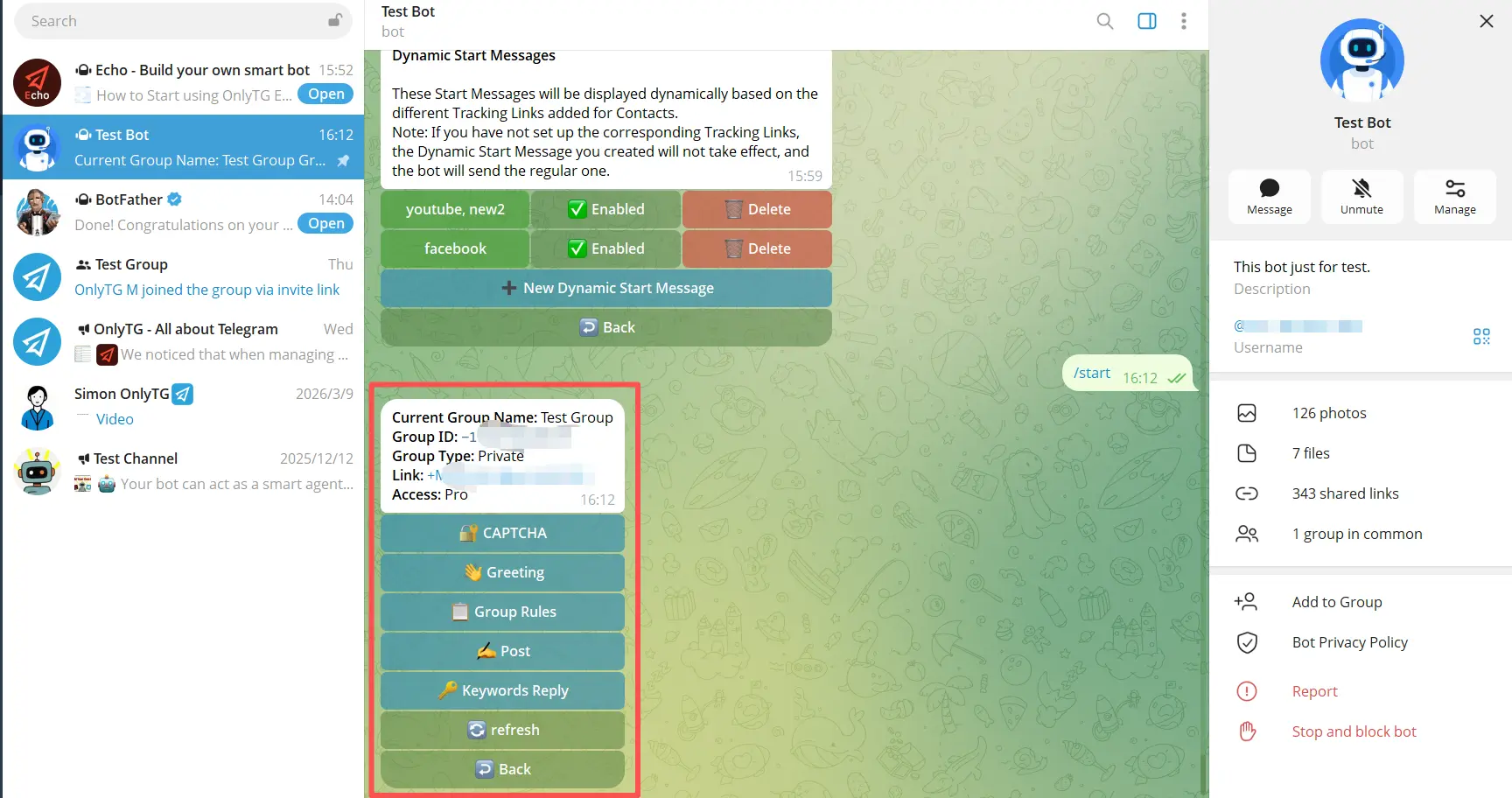
If you manage multiple communities or need better control over your Telegram operations, OnlyTG Echo(@EchoOnBot) is worth considering for group management.
Its group management features include the following:
- Send the CAPTCHA test to new members joining the group.
- Send the Greeting Message to new members joining the group.
- Set rules for group such as no spamming or advertising.
- Keyword-based Auto-Replies.
- Automatically loop posts in a group.
OnlyTG Echo can also be used for channel management and to set up a chatbot for customer support or lead generation.
For creators, marketers, and admins, the main value is simple: fewer repetitive tasks and a more organized workflow. If your Telegram presence is growing, that can matter a lot.
FAQ: How to Create a Group in Telegram
1. How do I create a group in Telegram?
Open Telegram, tap the compose or new chat option, choose New Group, name the group and set a photo. Add at least one contact, and confirm.
2. Can I create a Telegram group without adding people?
Telegram’s creation flow requires you to add at least one contact to start the group. After that, you can invite more members later.
3. What is the difference between a Telegram group and a channel?
A group is designed for two-way conversation among members. A channel is mainly for broadcasting messages to subscribers.
4. Should I make my Telegram group public or private?
Use a private group if you want limited access and more control. Use a public group if you want visibility and easier discovery.
Conclusion
Creating a Telegram group in 2026 is quick, but managing it well takes a little planning. Start with a clear name, choose the right privacy setting, configure permissions, and use moderation tools that fit your goal. If your community grows, tools like topics, pinned messages, and supergroup features can help keep everything organized.