
Skip to content
OnlyTG Icon
  • ProductsExpand
    • Echo
    • Recorder
  • ResourcesExpand
    • Help
    • Blog
  • PricingExpand
    • Echo Pricing
  • EnglishExpand
    • 中文 (中国)
    • Русский
    • English
Contact us
Telegram Tips

Details About the Public Post Search in Telegram’s Latest Update

Home » Blog » Telegram Tips » Details About the Public Post Search in Telegram’s Latest Update

Telegram has recently rolled out the Public Post Search feature, and from this update, we see potential for further SEO efforts. Below are some key details uncovered by OnlyTG regarding this latest update:

How to Use It

Click on “Search”, pull the text bar at the top, select “Posts”, enter your search keywords, and then click the “Search” button.

Public Post Search

Available Only to Telegram Premium

Currently, this feature is exclusively available to Premium users. Regular users will only see Premium-related advertisements when clicking “Search Post”.

Public Post Search

Premium Users Also Have a Limit

Each Premium user has a daily limit of only 10 free searches. The good news is that re-searching a keyword you’ve already looked up won’t consume your daily quota.

Public Post Search

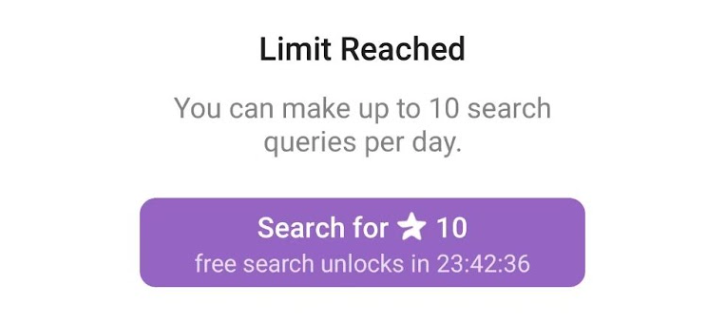
10 Stars per Search When Exceeding the Limit

Once you go over the daily limit, each subsequent search will cost 10 Stars.
Public Post Search

Subscriber and View Count Aren’t Key Factors for Index

Based on OnlyTG’s observations, the criteria for appearing in search results are not yet clear. However, it’s certain that they aren’t solely related to a channel’s subscriber count or the number of views a single post gets. In our multiple searches, many results showed posts with only double-digit views or subscriber counts. For this reason, we believe there’s significant room for SEO in the current Public Post Search. You can post content related to specific keywords in your Public Channel, and it might be easily indexed in the search results.

Besides, if you’re just an ordinary user, this update is still highly helpful. It enables you to better search for public content on Telegram—just remember to use it legally!

For more insights into Telegram-related updates, follow OnlyTG. We’ll share relevant news from time to time.

OnlyTG Echo Bot: https://t.me/echoonbot

Official Telegram Channel: https://t.me/onlytg

Post Tags: #Telegram

Post navigation

Previous Previous
Telegram Bot’s Quick Reply, Efficient Feature of Customer Service
NextContinue
4 Ways to Broadcast Messages on Telegram
Table of Contents
  • How to Use It
  • Available Only to Telegram Premium
  • Premium Users Also Have a Limit
  • 10 Stars per Search When Exceeding the Limit
  • Subscriber and View Count Aren't Key Factors for Index
Echo Sidebar
  • Latest Post
  • Echo
  • Recorder
  • Tips
Telegram Tips

Telegram Business Guide in 2026: What It Is, How It Works, and How to Use It Effectively

A practical guide to Telegram Business, covering what it is, how businesses can use it, how to set it up, and common mistakes to avoid.

OnlyTG Echo

How to Get Unbanned from Telegram in 2026: A Practical Step-by-Step Guide

If your Telegram account or phone number has been restricted, this guide explains how to confirm the ban, appeal to Telegram support, reduce spam flags, and avoid getting blocked again in 2026.

Uncategorized

How to Create a Channel in Telegram in 2026: A Practical Step-by-Step Guide

Learn how to create a channel in Telegram in 2026 with a clear step-by-step guide for Android, iPhone, and desktop. This article also covers public vs. private channels, common mistakes, and best practices for managing a channel professionally.

OnlyTG Echo

How to create telegram bot in 2026?

Learn how to create a Telegram bot in 2026 using BotFather, with step-by-step coding and no-code methods, plus tips for security, deployment, and choosing the best setup.

Telegram Tips

How to buy a Telegram virtual number

A virtual phone number for Telegram is an internet-based number that allows you to register and verify Telegram accounts without…

Telegram Tips

How to purchase Telegram username?

A Telegram username is a unique public identifier that you can set for your Telegram account, channel or group. Others…

Telegram Tips

How to find similar Telegram groups and channels via related recommendations

There are many public channels and groups on Telegram. Each channel or group usually focuses on a specific topic, and…

Telegram Tips

How to Advertise on Telegram

There are mainly three ways to advertise on Telegram: official ad direct placement, third-party cooperative ads, and promotion within your…

How to Get Unbanned from Telegram in 2026: A Practical Step-by-Step Guide

If your Telegram account or phone number has been restricted, this guide explains how to confirm the ban, appeal to Telegram support, reduce spam flags, and avoid getting blocked again in 2026.

How to create telegram bot in 2026?

Learn how to create a Telegram bot in 2026 using BotFather, with step-by-step coding and no-code methods, plus tips for security, deployment, and choosing the best setup.

How to Loop Post in Channel via Telegram Bot

OnlyTG Echo provides the function to automatically loop posts in your channel. Firstly, you need to create a new bot via @botfather and…

How to Configure Multiple Media when Setting OnlyTG Echo Features

OnlyTG Echo provides the function to configure multiple media to a single message when setting Start Message/Auto Reply/Quick Reply/Broadcast and other features. Firstly, you need…

How to Upgrade Channel to Pro Channel in Telegram

OnlyTG Echo provides the function to upgrade your channel to Pro Channel. This will consume your Pro Communities slots and unlock more advanced features….

How to Edit a Published Post via Telegram Bot

OnlyTG Echo provides the function to Edit Channel Post via your bot. Firstly, you need to create a new bot via @botfather and…

How to Publish Channel Post via Telegram Bot

OnlyTG Echo provides the function to Publish Channel Post via your bot. Firstly, you need to create a new bot via @botfather and…

How to Manage Channel via Telegram Bot

OnlyTG Echo provides the function to Manage Channel via your bot. Firstly, you need to create a new bot via @botfather and send its…

How to Use OnlyTG Recorder?

Welcome to OnlyTG Recorder! Developed by our dedicated bot development team, OnlyTG Recorder is designed to serve as an assistant…

Telegram Business Guide in 2026: What It Is, How It Works, and How to Use It Effectively

A practical guide to Telegram Business, covering what it is, how businesses can use it, how to set it up, and common mistakes to avoid.

How to buy a Telegram virtual number

A virtual phone number for Telegram is an internet-based number that allows you to register and verify Telegram accounts without…

How to purchase Telegram username?

A Telegram username is a unique public identifier that you can set for your Telegram account, channel or group. Others…

How to find similar Telegram groups and channels via related recommendations

There are many public channels and groups on Telegram. Each channel or group usually focuses on a specific topic, and…

How to Advertise on Telegram

There are mainly three ways to advertise on Telegram: official ad direct placement, third-party cooperative ads, and promotion within your…

How to Buy Cryptocurrency/USDT

The first step in buying cryptocurrencies is usually to purchase USDT, then exchange USDT for other coins like BTC, ETH,…

How to Buy Telegram Stars

Stars is a virtual currency officially launched by Telegram for purchasing paid content within Telegram. Stars is not classified as…

What is the purpose of Telegram group and channel levels? How to boost?

In Telegram, Levels act like an “experience bar” for public groups and channels. As a community reaches higher levels, it…

  • OnlyTG
  • Echo
  • Recorder
  • Help
  • Blog
  • Echo Pricing
OnlyTG EchoTelegram VK YouTube Facebook X Email

© 2026 OnlyTG

Scroll to top
  • Products
    • Echo
    • Recorder
  • Resources
    • Help
    • Blog
  • Pricing
    • Echo Pricing
Contact us