

Managing a Telegram group is easy when the community is small. As membership grows, however, the same responsibilities start consuming more time: welcoming new members, explaining rules, answering repeated questions, dealing with unwanted activity, and publishing recurring updates.
The challenge is not simply keeping the group active. It is creating a management process that remains consistent without requiring an admin to monitor every message. A practical approach is to separate tasks that need human judgment from repetitive tasks that can be automated.
Why Is the Existing Approach Not Good Enough?
Many Telegram group admins start with a completely manual workflow. That can work at the beginning, but it becomes increasingly inefficient as the community grows.
1. Repetitive Questions Consume Admin Time
Members often ask the same questions about pricing, rules, schedules, resources, support, or how to access something.
Answering each question individually may take only a minute or two. The problem is repetition. When the same questions appear throughout the day, admins become the communication layer for information that could have been delivered automatically.
The business impact is significant: response time becomes inconsistent, routine support takes attention away from higher-value work, and members may wait for an answer that could otherwise be immediate.
2. Manual Onboarding Creates an Inconsistent Experience
New members need context. They should understand what the group is for, where to find important information, and what behavior is expected.
If every new member receives a different level of attention—or no welcome message at all—the onboarding experience depends too heavily on whoever happens to be online.
This creates unnecessary friction and makes it harder to establish consistent community standards.
3. Growing Groups Create Operational Complexity
A small Telegram group can often be managed by checking messages manually. A larger community introduces more conversations, more recurring announcements, more potential rule violations, and more members who need answers.
At that point, the issue is no longer whether an admin can manage the group manually. The question is whether manual management is the best use of the admin’s time.
Automation can handle predictable tasks while people remain responsible for decisions that require context, judgment, and relationship-building.
What Is Telegram Group Management?

Telegram group management is the process of organizing, moderating, communicating with, and maintaining a Telegram community so members can participate in a structured and useful environment.
For businesses, it can include onboarding new members, communicating group rules, answering common questions, maintaining discussions, publishing announcements, and reducing unwanted activity.
Definition
Effective Telegram group management is more than deleting spam.
A useful management system typically covers four areas:
- Onboarding: Help new members understand the community quickly.
- Communication: Deliver recurring information and answer common questions.
- Moderation: Apply rules consistently and reduce unwanted behavior.
- Operations: Maintain recurring posts, workflows, and administrative processes.
The objective is not to automate every interaction. It is to make predictable interactions predictable.
Traditional Process
A typical manual workflow looks like this:
Member joins → Admin notices → Admin sends welcome message → Member asks a question → Admin responds → Admin monitors messages → Admin publishes updates manually
This process works when activity is low. As volume increases, every additional member creates more opportunities for repetitive work.
Automated Process
A more scalable workflow separates routine tasks from human decisions:
Member joins → Automated verification → Automated greeting → Automated answers → Automated rule enforcement → Scheduled community content → Human intervention when judgment is required
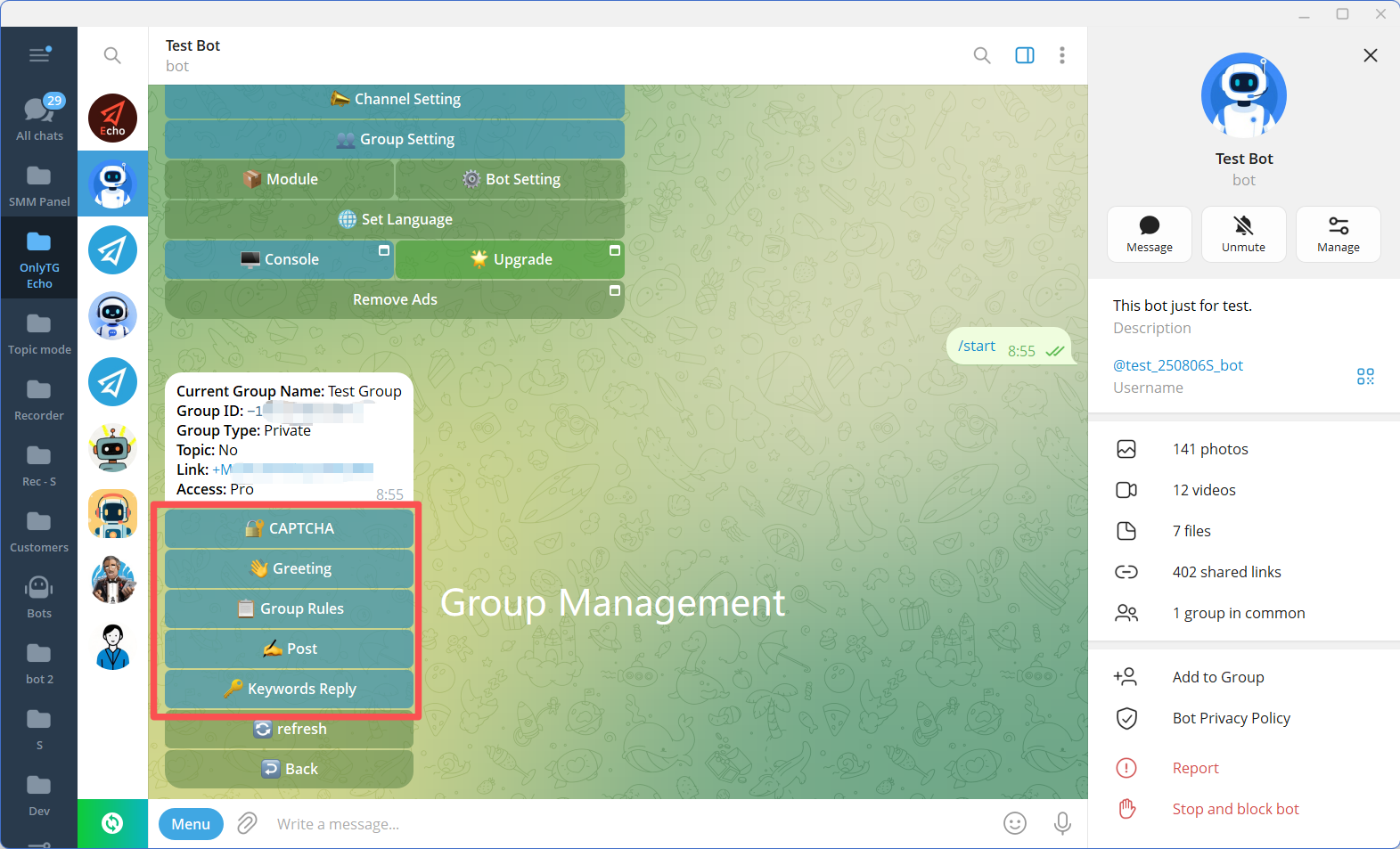
OnlyTG Echo supports several of these group-level workflows, including CAPTCHA verification, group greetings, group rules, keyword replies, and scheduled or looping group posts.
The difference is simple: instead of asking admins to repeatedly perform the same action, the system performs predefined actions according to rules configured in advance.
What Value Can Telegram Group Automation Bring?
Automation becomes useful when it solves a recurring operational problem rather than simply adding more technology.
1. Create a More Consistent New-Member Experience
Situation: New members join at different times, including when admins are unavailable.
Problem: Important information may not reach everyone consistently.
Solution: Configure an automated group greeting containing the information new members need.
With OnlyTG Echo, admins can configure greeting content using text, media, and buttons. If CAPTCHA is enabled, the greeting can be sent after a new member passes the configured verification process.
Business value: Every new member receives the same basic introduction without requiring an admin to send it manually.
2. Reduce Repetitive Questions with Keyword Replies
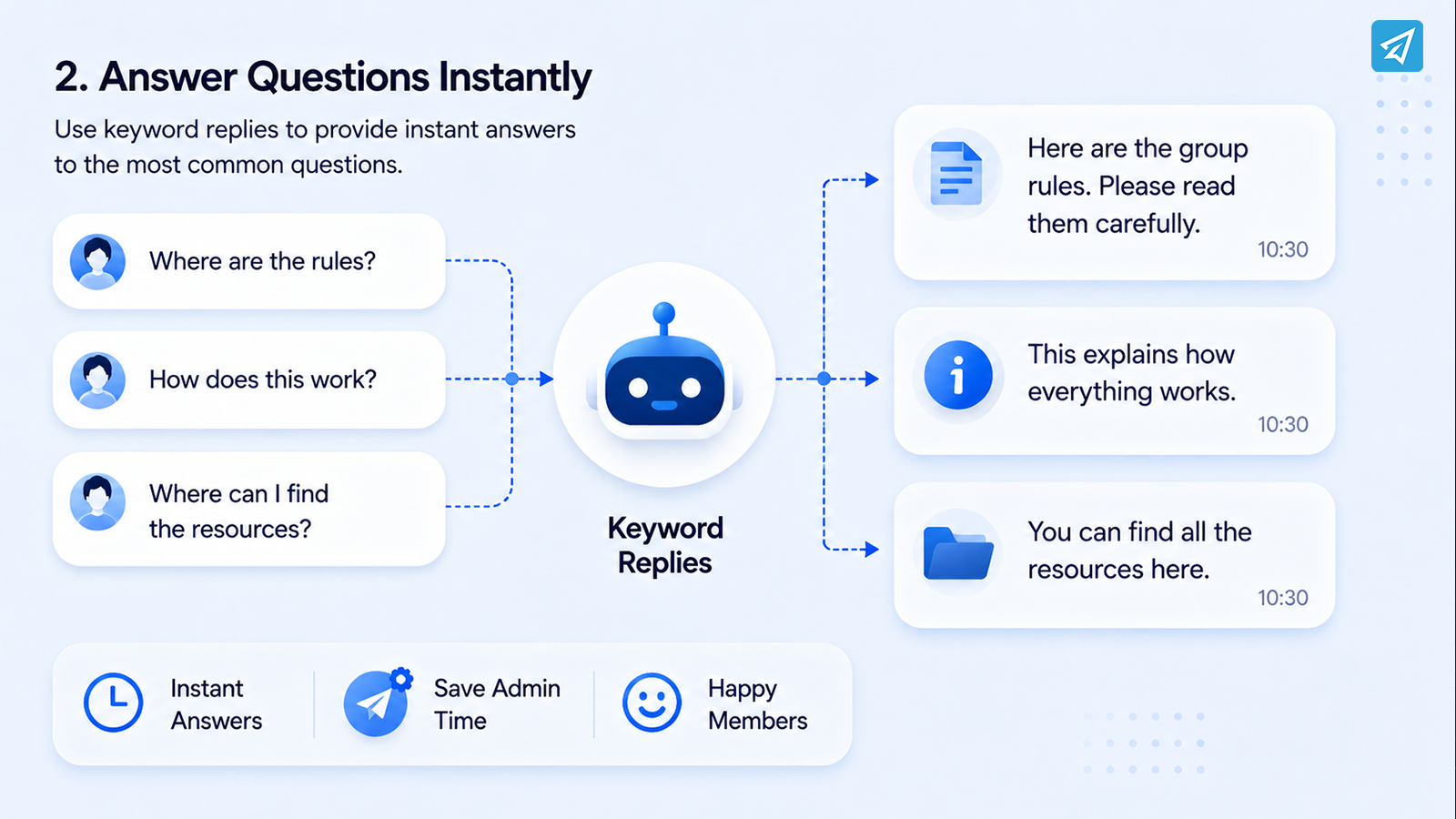
Situation: Members repeatedly ask questions such as “Where are the rules?”, “How does this work?”, or “Where can I find the resources?”
Problem: Admins repeatedly type or paste essentially the same answer.
Solution: Create keyword-based replies that automatically return predefined information.
OnlyTG Echo allows group administrators to configure multiple keywords and corresponding messages. A keyword reply can include text, media, or buttons, and multiple messages can be sent in sequence. A trigger interval can also be configured to prevent the same reply from firing repeatedly within the selected period.
Business value: Members get faster answers while admins spend less time on repetitive communication.
3. Establish Clearer Group Rules
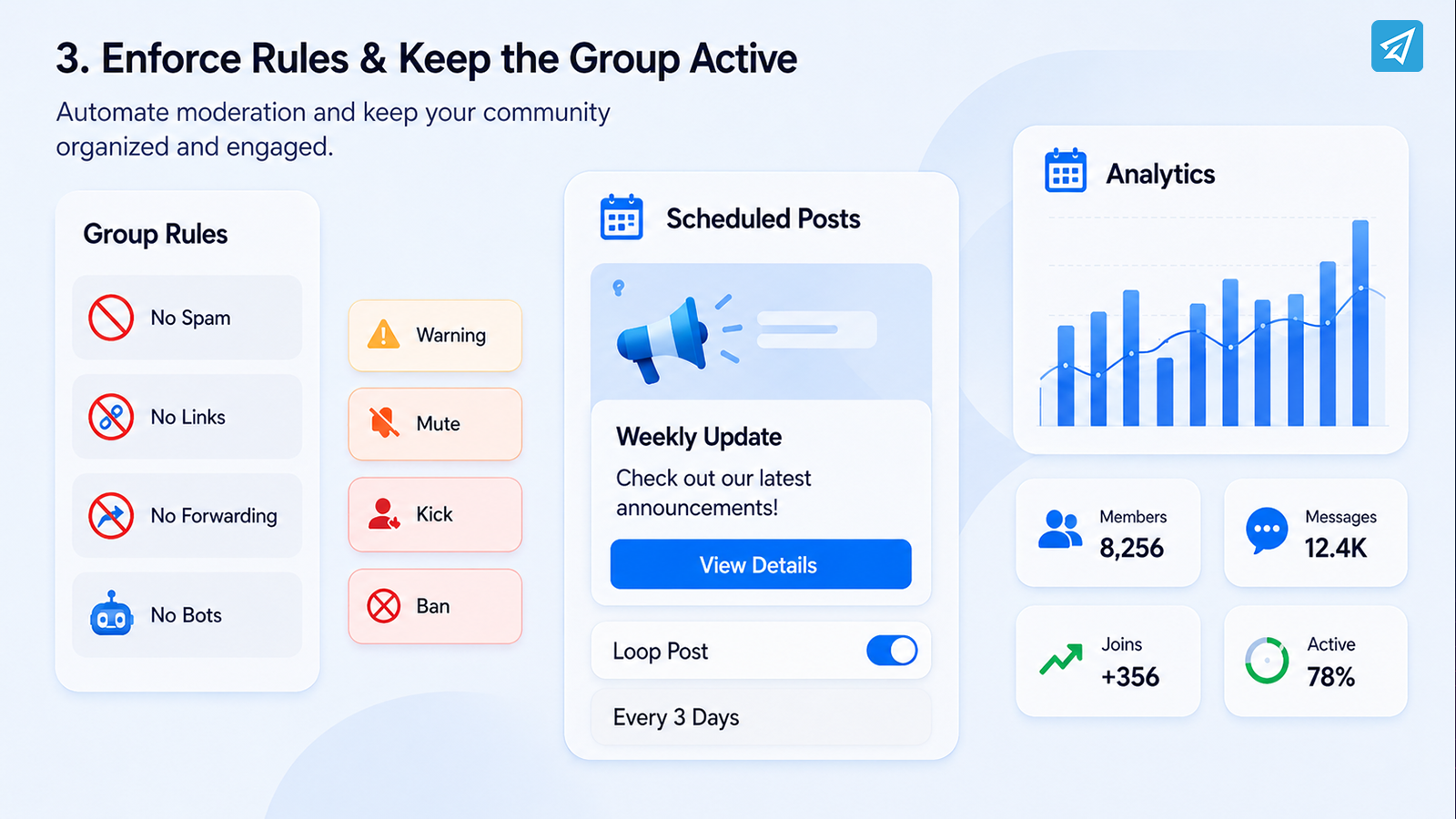
Situation: A growing community receives more messages and different types of user behavior.
Problem: Manual moderation becomes inconsistent, especially when admins are unavailable.
Solution: Define specific group rules for common problems and configure appropriate penalties.
OnlyTG Echo’s Group Rules functionality supports message rules, anti-spam, and anti-bot controls. Rules can cover areas such as prohibited words, links, forwarded messages, and other message conditions, with configurable actions such as warnings, muting, kicking, or blocking.
Business value: Routine rule enforcement becomes more systematic, while admins can focus on situations that genuinely require human judgment.
4. Verify New Members Before They Participate
Situation: Open or growing communities may attract unwanted accounts.
Problem: Allowing every new member to participate immediately can increase moderation pressure.
Solution: Add a verification step before normal participation.
OnlyTG Echo provides Click, Math, and Join CAPTCHA methods. With the Click or Math methods, new members must complete the configured test within the allowed period. The Join method can require members to join specified channels, groups, or bots before they can participate normally.
Business value: Verification adds an automated gate before members become fully active in the community.
5. Maintain a Consistent Publishing Schedule
Situation: A business needs to share recurring announcements, reminders, educational content, or community prompts.
Problem: Someone must remember to publish each post at the right time.
Solution: Prepare recurring content in advance and use scheduled or looping group posts.
OnlyTG Echo supports group posts with buttons as well as scheduling and looping posts at configured intervals.
Business value: The group can maintain a predictable publishing rhythm without requiring an admin to manually initiate every recurring post.
How Does Telegram Group Automation Work?
A practical setup does not need to begin with a complicated technical project. The basic process is to create a Telegram bot, connect it to Echo, configure the workflows your group actually needs, and then test the result.
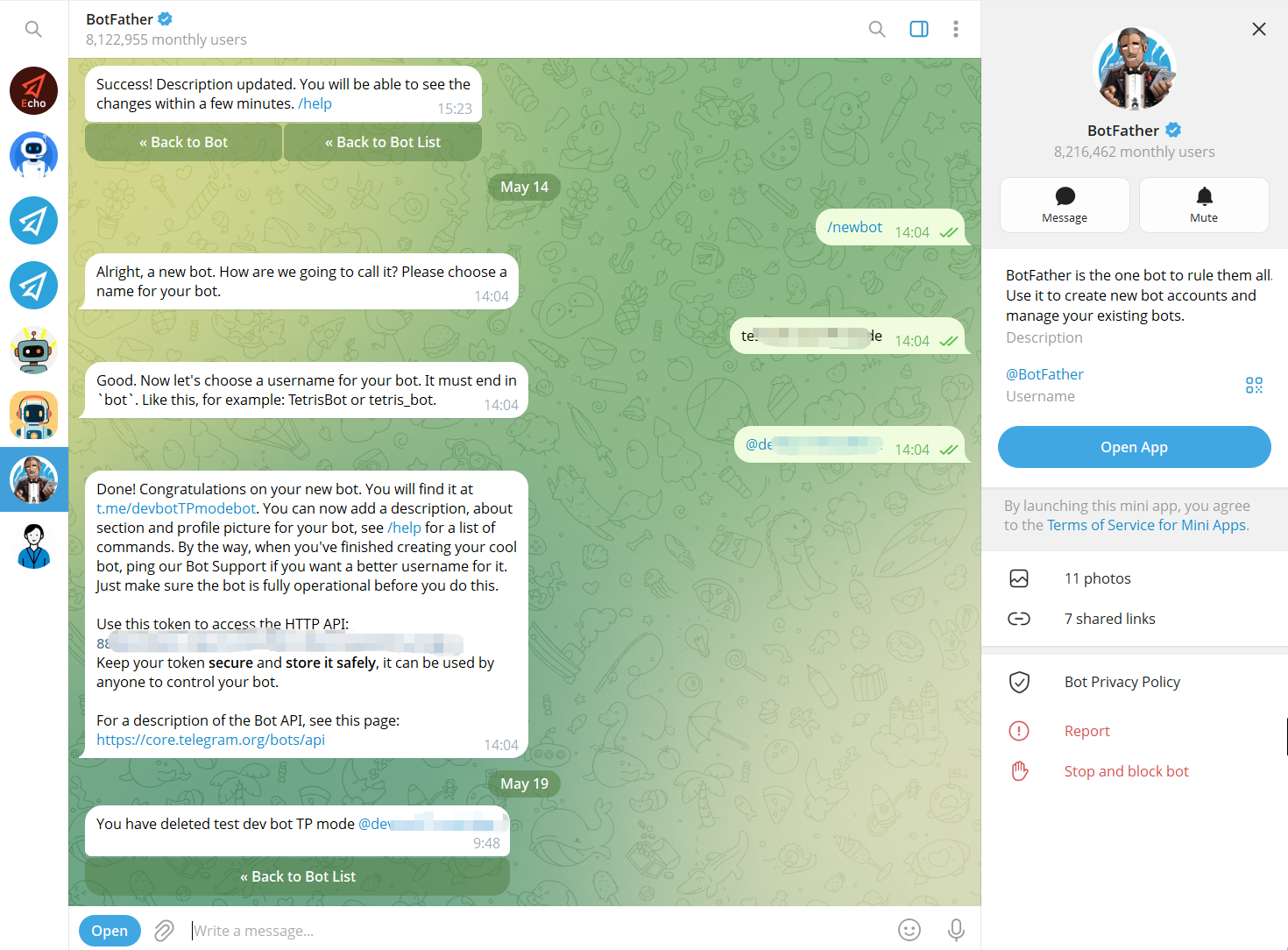
Step 1: Create a Telegram Bot with BotFather
Open Telegram’s official BotFather account and use the /newbot command. Follow the prompts to create the bot and obtain its API token.
Keep the token confidential because it is required to connect the bot to Echo.
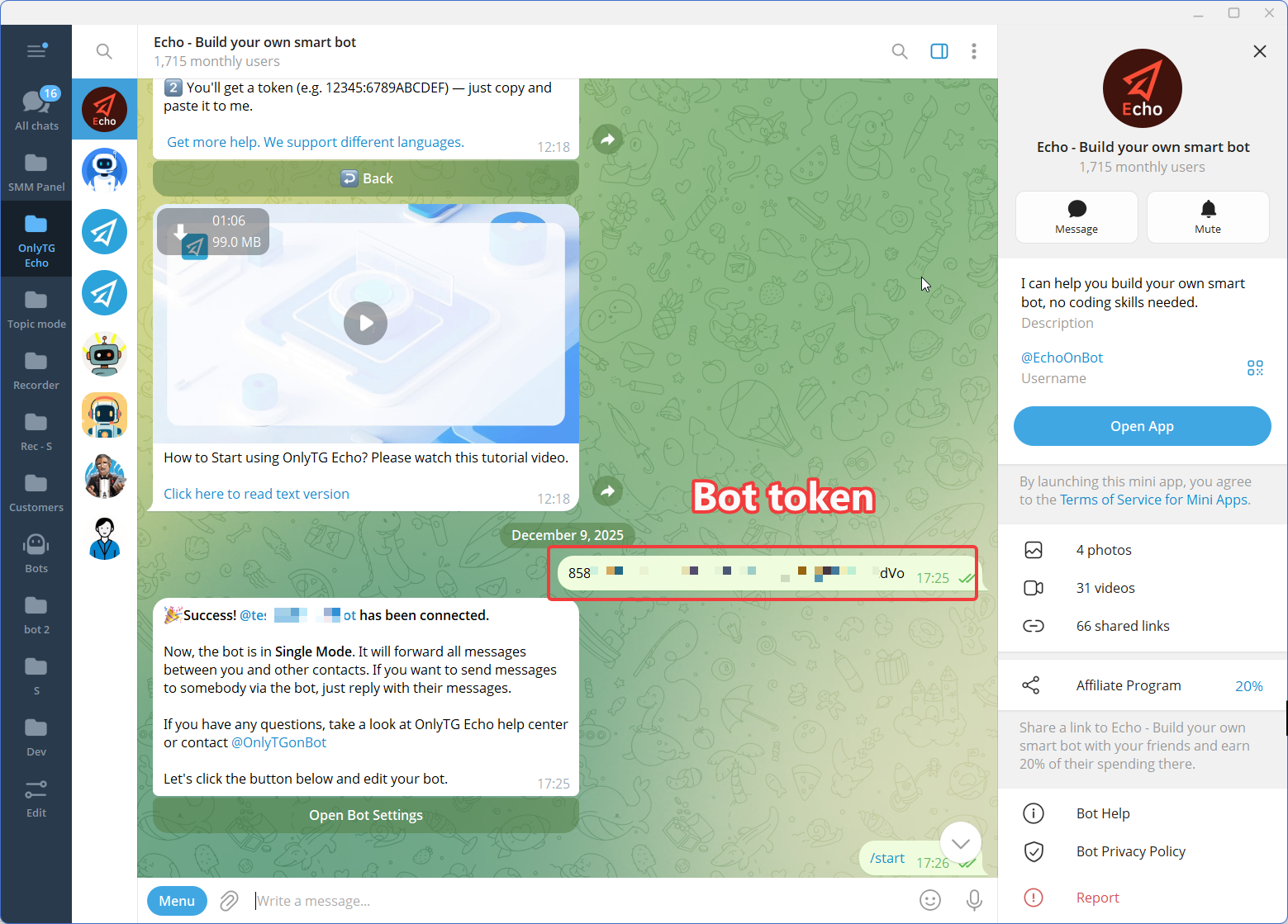
Step 2: Connect the Bot to OnlyTG Echo
Open OnlyTG Echo and use the Add Bot option. Paste the API token generated by BotFather.
Once the token is validated, the bot can be used with Echo’s supported functionality.
Step 3: Configure the Required Group Workflows
Start with the problems that consume the most administrative time.
For example:
- Enable CAPTCHA if new-member verification is needed.
- Configure a Group Greeting for onboarding.
- Add Group Rules for recurring moderation issues.
- Create Keyword Replies for frequently asked questions.
- Configure scheduled or loop posts for recurring content.
Avoid automating everything at once. A focused setup is easier to test and maintain.
Manual Management vs. OnlyTG Echo
Automation should complement human management rather than eliminate it. The following comparison focuses on the routine capabilities relevant to Telegram group operations.
| Capability | Traditional Manual Approach | OnlyTG Echo |
|---|---|---|
| New-member greeting | Admin sends messages manually | Automated Group Greeting |
| Member verification | Admin handles verification manually | CAPTCHA verification |
| FAQ responses | Admin answers repeated questions | Keyword-based replies |
| Group rules | Admin monitors and responds manually | Configurable Group Rules |
| Anti-bot controls | Manual intervention | Anti-bot functionality |
| Recurring group posts | Admin publishes manually | Scheduled and loop posts |
| Message formats | Depends on what admin sends each time | Supports configured text, media, and buttons where applicable |
| Analytics | Requires manual observation or separate processes | Group analytics available in Echo |
| Human judgment | Required for individual decisions | Remains with admins |
OnlyTG Echo’s official documentation confirms the listed group functions, including CAPTCHA, greetings, rules, keyword replies, posts/loop posts, and group analytics.
Who Should Use Telegram Group Automation?
Telegram group automation is most useful for teams and operators dealing with recurring community activity.
Small Businesses
A small business may not have a dedicated community manager. Automating greetings, common questions, rules, and recurring posts can reduce routine administrative work.
Marketing Teams
Marketing teams can use automated group communication to maintain consistent community messaging while spending more time on campaigns, content, and audience engagement.
Customer Support Teams
If customers repeatedly ask the same questions inside a Telegram community, keyword replies can provide predefined information without requiring support staff to answer every basic query manually.
Community Managers
Community managers can use automation for repetitive operations while keeping human attention available for conversations, conflicts, feedback, and community development.
Telegram Group Owners and Creators
Creators and community owners who publish recurring updates can use scheduled and looping posts to maintain a consistent publishing rhythm without being online for every post.
The key principle is simple: automate predictable operations, but keep meaningful community interactions human.
FAQ
1. How do you manage a Telegram group efficiently?
Start by defining clear rules and deciding which tasks are repetitive. Automate new-member greetings, common FAQ responses, verification, recurring moderation actions, and scheduled posts where appropriate. Keep sensitive moderation decisions and important member conversations under human control.
2. Can I automate a Telegram group without coding?
Yes. Telegram bots can be connected to no-code management platforms. With OnlyTG Echo, you create a bot through BotFather, connect the bot to Echo, and configure supported group functions such as greetings, CAPTCHA, rules, keyword replies, and group posts.
3. What should I automate in a Telegram group?
Prioritize tasks that are repetitive, predictable, and rule-based. Good candidates include welcome messages, member verification, frequently asked questions, recurring rule enforcement, and scheduled community posts. Avoid automating situations where context, empathy, or human judgment is essential.
Conclusion: Build a Telegram Group Management System That Scales
To manage Telegram groups effectively, the goal is not to make admins work faster. It is to reduce the amount of repetitive work they need to do in the first place.
Manual greetings, repeated FAQ answers, routine moderation, member verification, and recurring posts can become increasingly difficult as a community grows. A structured automation workflow allows these predictable tasks to run according to predefined rules while admins remain focused on conversations, decisions, and community strategy.
OnlyTG Echo provides a practical way to introduce this approach with Telegram group CAPTCHA, greetings, rules, keyword replies, scheduled or loop posts, and analytics.
If your Telegram group is already generating more routine work than your team wants to handle manually, explore OnlyTG Echo and start building a more manageable group workflow.