Skip to content
OnlyTG Icon
  • ProductsExpand
    • Echo
    • Recorder
  • ResourcesExpand
    • Help
    • Blog
    • Channel & Bot Finder
    • SMM Panel
  • PricingExpand
    • Echo Pricing
  • EnglishExpand
    • 中文 (中国)
    • Русский
    • English
Contact us
OnlyTG Echo

How to Upgrade Channel to Pro Channel in Telegram

Home » Blog » OnlyTG Echo » How to Upgrade Channel to Pro Channel in Telegram

OnlyTG Echo provides the function to upgrade your channel to Pro Channel. This will consume your Pro Communities slots and unlock more advanced features. Firstly, you need to create a new bot via @botfather and send its token to the OnlyTG Echo. After that, you will get a chatbot that can relay messages between you and your contacts. Here is the link on how to build a new bot: https://onlytg.com/how-to-create-a-new-bot-on-telegram-without-code-skills/

Video Tutorial

step 1

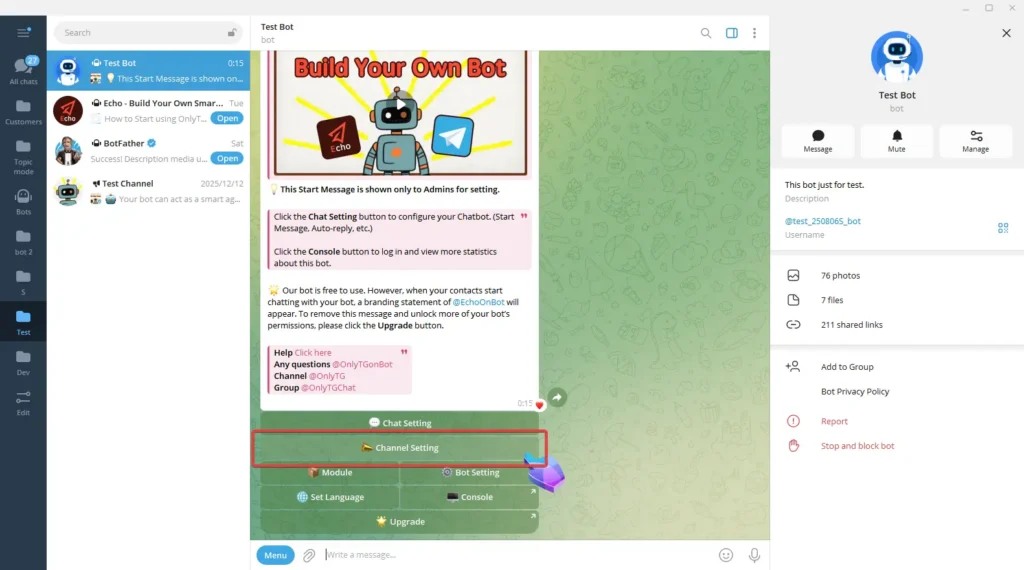
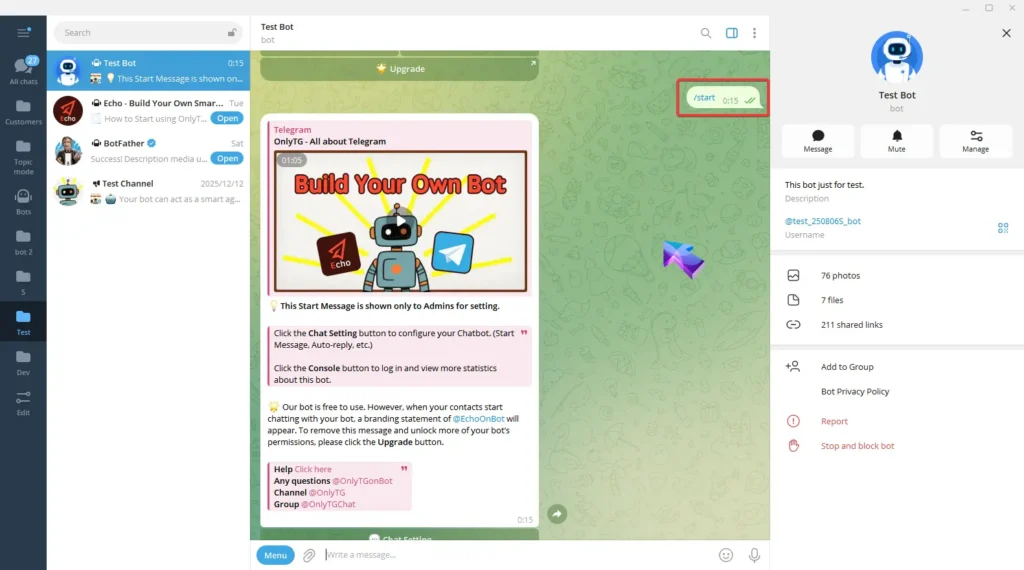
Send the /start command to your Bot, then click Channel Setting.
Pro Communities – Channel

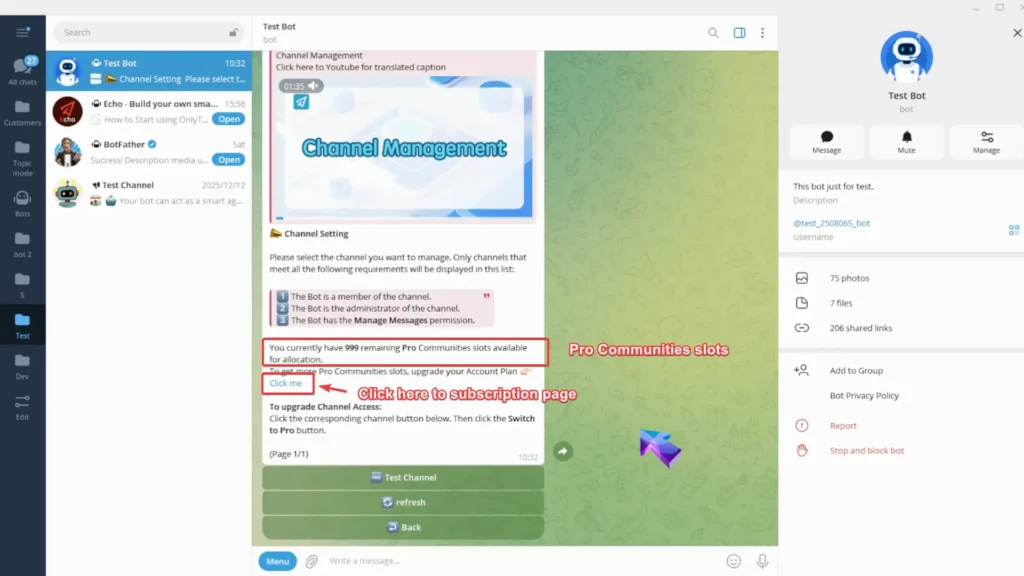
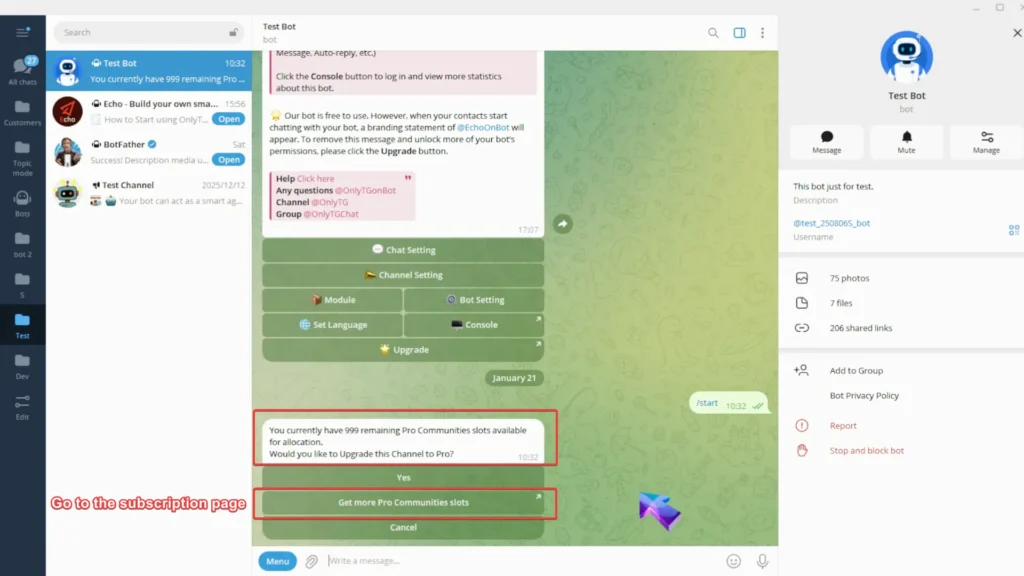
Here you can see how many Pro Communities slots you have available to allocate. If you don’t have enough slots, click here to head to the subscription page and upgrade your account plan.
Pro Communities – Channel

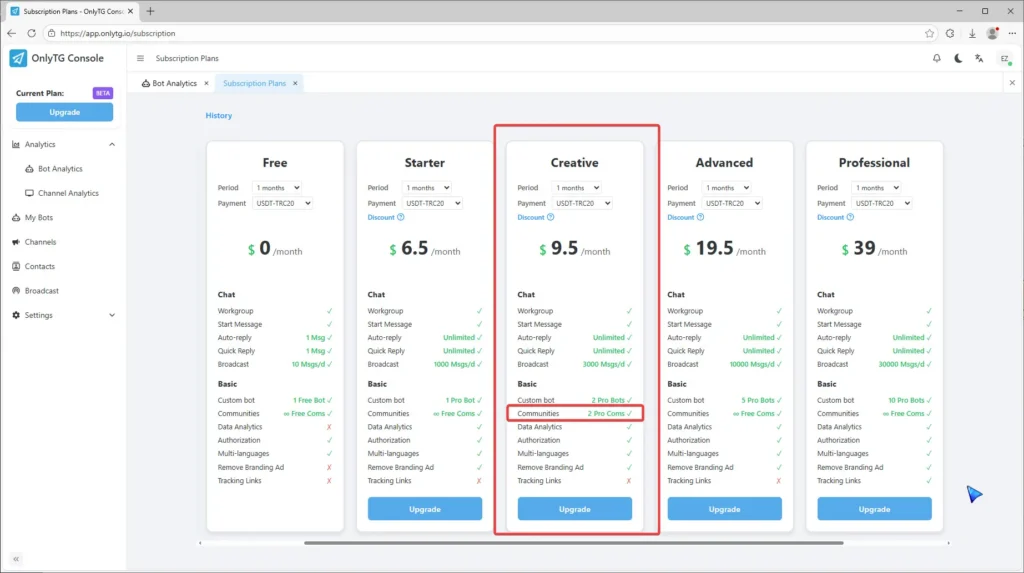
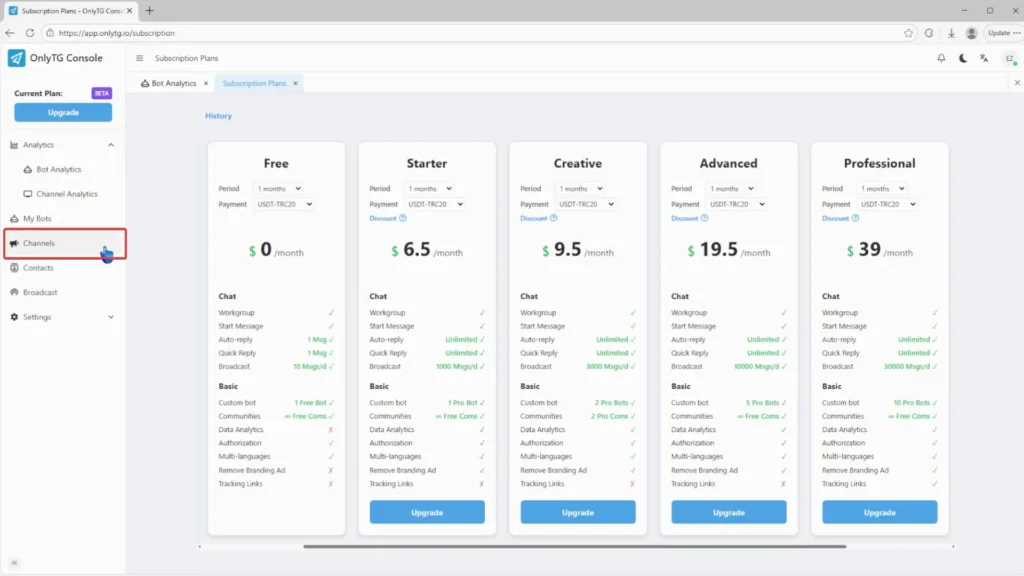
On the subscription page, any plans with Pro Com in the Communities section will increase your slot.
Pro Communities – Channel


step 2

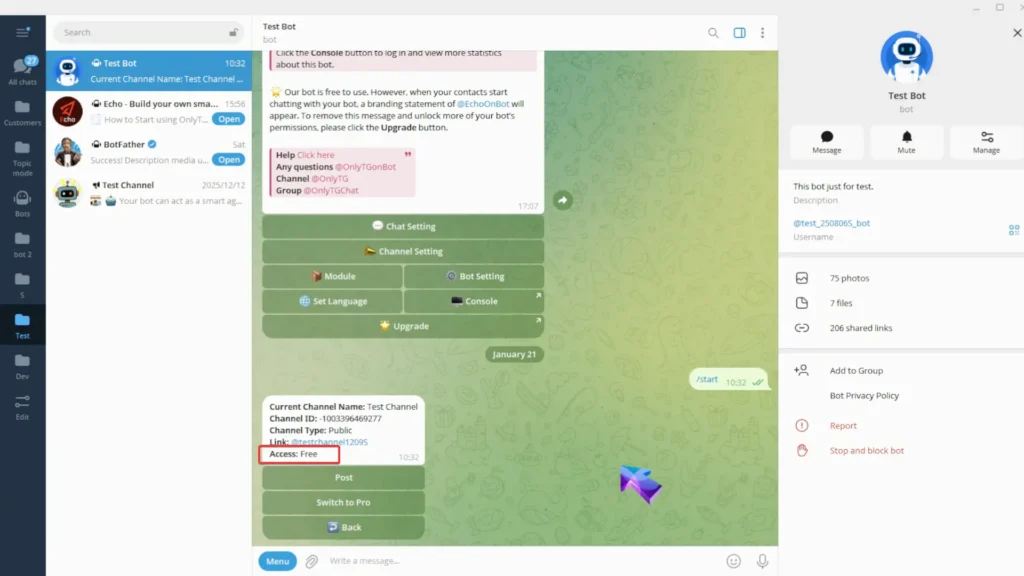
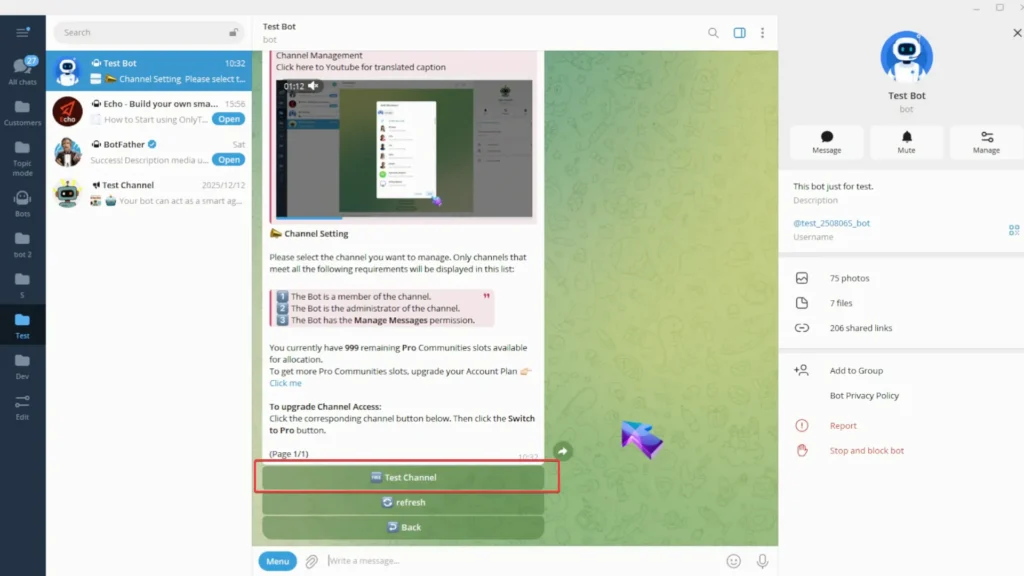
Select your channel. This channel access is Free.
Pro Communities – Channel

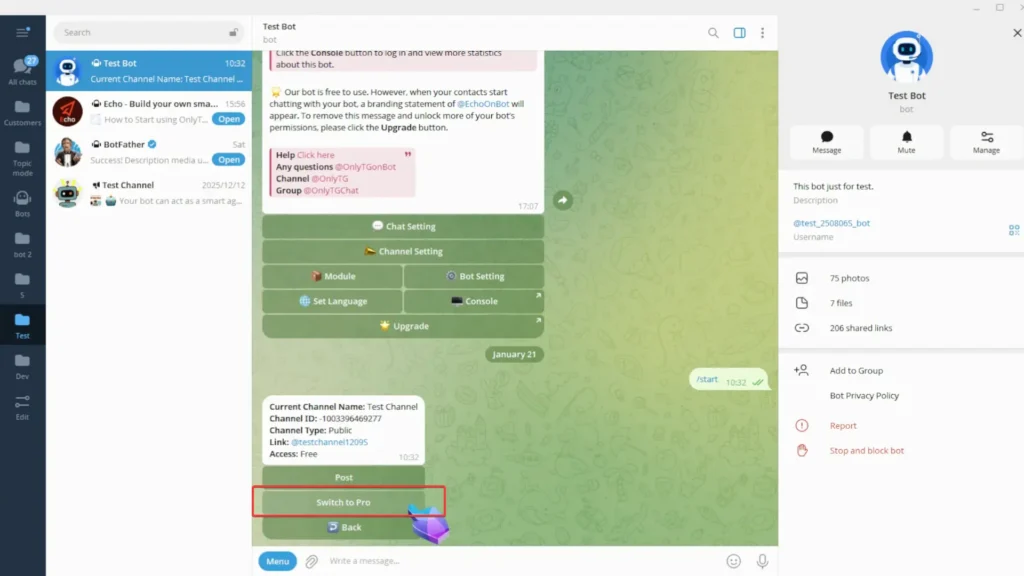
Click Switch to Pro.

Pro Communities – Channel

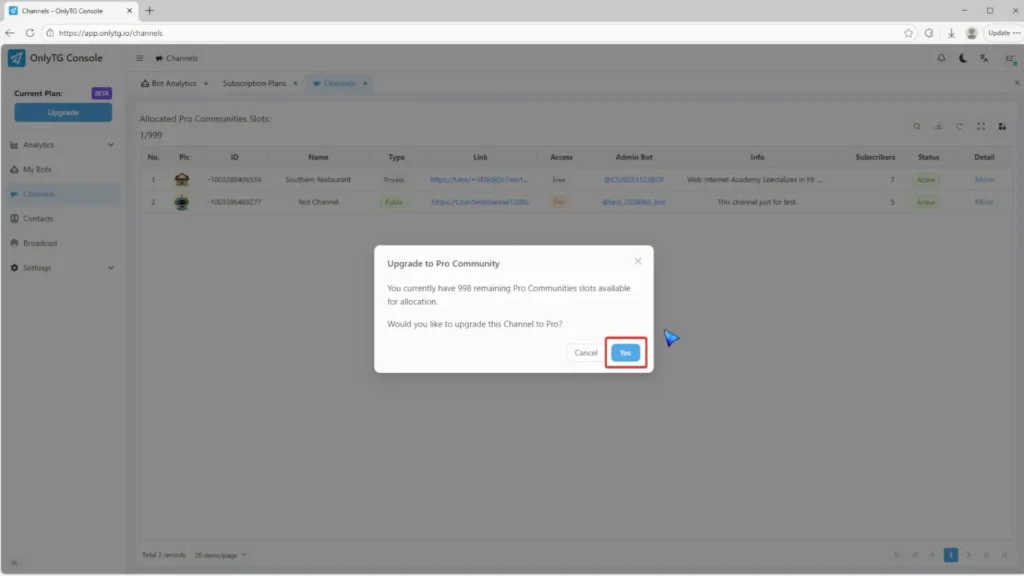
You’ll get a reminder of your remaining Pro Communities slots here, and you can also click the button to quickly go to the subscription page.
Pro Communities – Channel

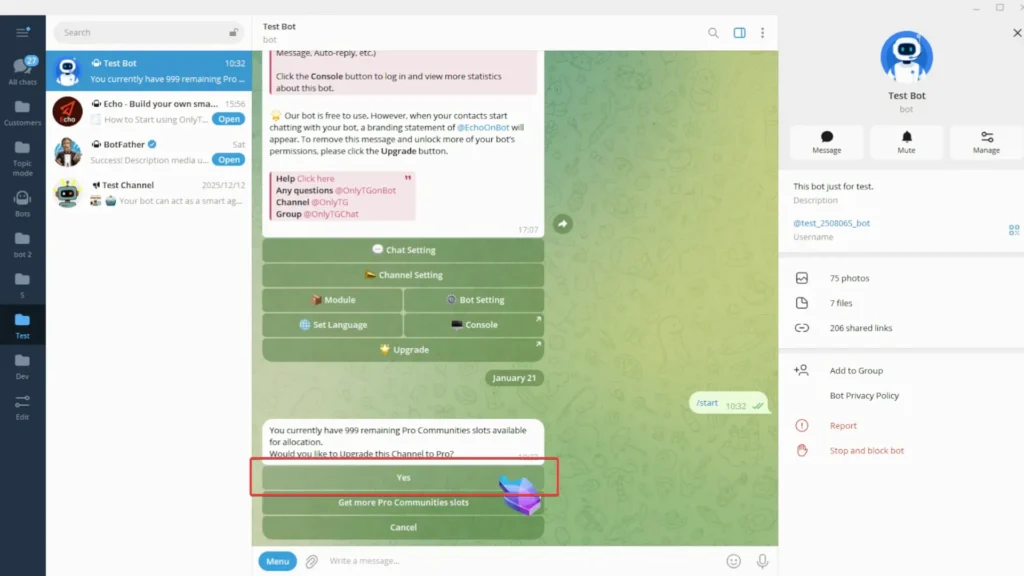
When you have enough Pro Communities slots, just click Yes.
Pro Communities – Channel

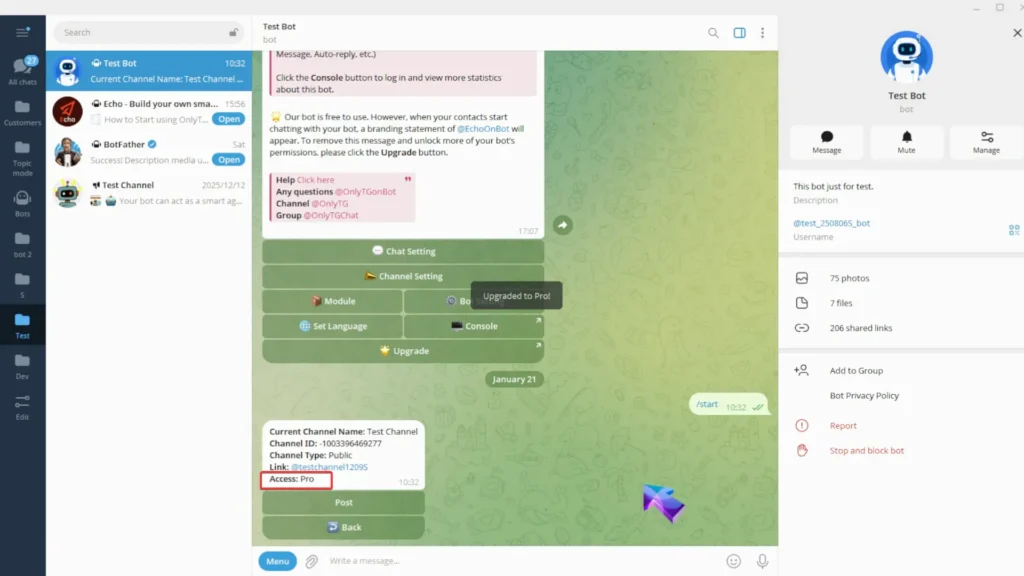
Your channel is now successfully upgraded access to Pro.
Pro Communities – Channel

Additionally, you can upgrade your channel in OnlyTG Console. (app.onlytg.io)

Click Channel in the OnlyTG Console.
Pro Communities – Channel

Check the Allocated Pro Community Slots.
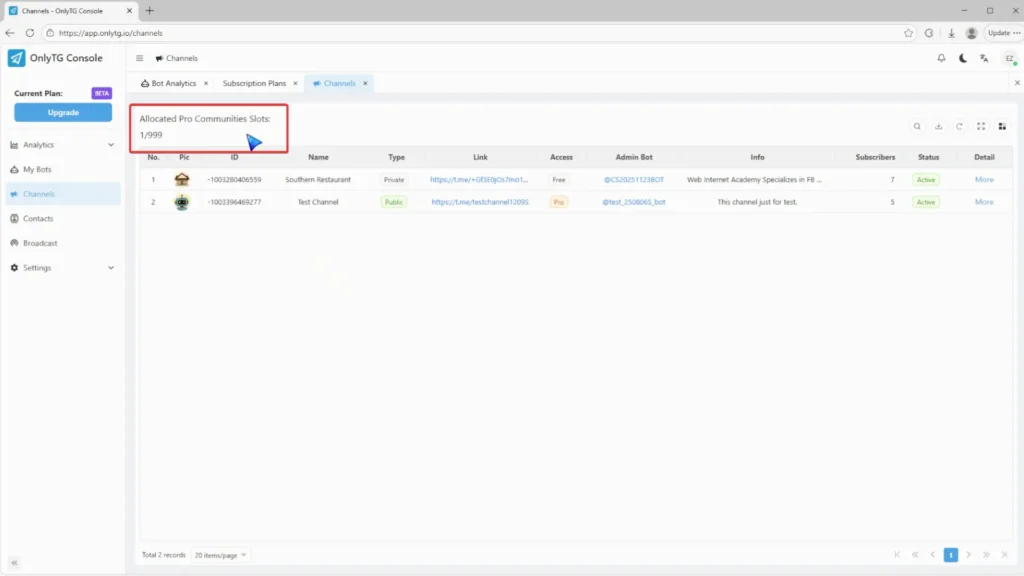
Pro Communities – Channel

Click Switch to Pro from the More menu.
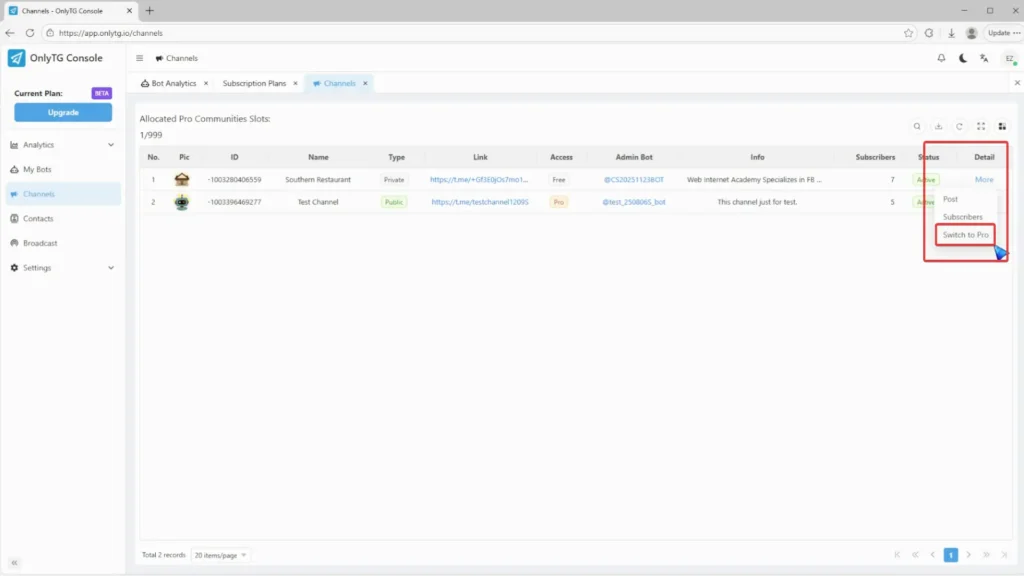
Pro Communities – Channel

Click Yes.

Pro Communities – Channel

Your channel has successfully upgraded to a Pro channel.
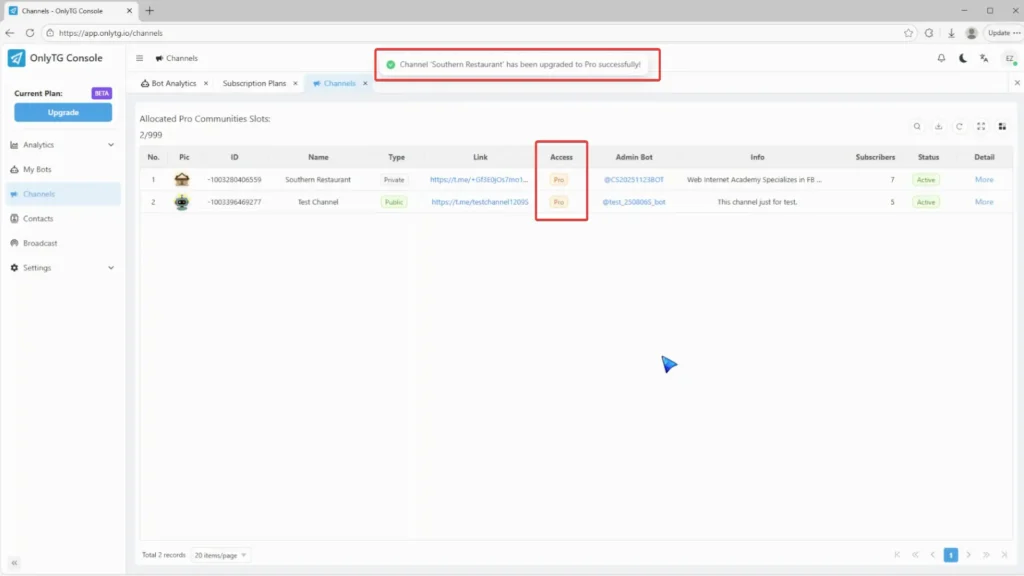
Pro Communities – Channel

Create Your Own Telegram Bot with OnlyTG Echo!

OnlyTG Echo helps you build your own Telegram bot. Power up your connection on Telegram with strong features!

OnlyTG Echo Bot: https://t.me/echoonbot

Official Telegram Channel: https://t.me/onlytg

Post Tags: #bot#Telegram

Post navigation

Previous Previous
How to Edit a Published Post via Telegram Bot
NextContinue
How to Configure Multiple Media when Setting OnlyTG Echo Features
Table of Contents
  • Video Tutorial
  • step 1
  • step 2
Echo Sidebar
  • Latest Post
  • Echo
  • Recorder
  • Tips
  • Telegram Tips

    Increase Social Media Interactions: A Practical Growth Workflow

    Learn how to increase social media interactions with better content and audience feedback.

  • Telegram Tips

    Auto Welcome on Telegram: How Businesses Can Improve Member Onboarding

    Telegram auto welcome messages improve onboarding, guide members, and reduce admin work.

  • Telegram Tips

    How to Optimize Social Media Content for Better Growth

    Learn how to optimize social media content with goals, audience insights, formats, and metrics.

  • Telegram Tips

    Set Prohibited Words for Telegram Groups: A Practical Moderation Workflow

    Learn to set prohibited words in Telegram groups and automate moderation with OnlyTG Echo.

  • Telegram Tips

    How to Improve Social Media Post Performance: A Practical Growth Workflow

    Learn how to improve social media post performance with audience insights, testing, and analytics.

  • Telegram Tips

    Track Source of Telegram Leads: How Businesses Can Build a More Measurable Lead Workflow

    Learn how to track Telegram lead sources with links, automation, and analytics.

  • Telegram Tips

    How to Build a Social Media Audience From Scratch

    Learn how to build a social media audience with targeted content, discovery, engagement, and data.

  • Telegram Tips

    Telegram Leads: Turn More Chats Into Qualified Customers

    Turn Telegram chats into qualified leads with automated replies, onboarding, and follow-up.

  • How to Get Unbanned from Telegram in 2026: A Practical Step-by-Step Guide

    If your Telegram account or phone number has been restricted, this guide explains how to confirm the ban, appeal to Telegram support, reduce spam flags, and avoid getting blocked again in 2026.

  • How to create telegram bot in 2026?

    Learn how to create a Telegram bot in 2026 using BotFather, with step-by-step coding and no-code methods, plus tips for security, deployment, and choosing the best setup.

  • How to Loop Post in Channel via Telegram Bot

    OnlyTG Echo provides the function to automatically loop posts in your channel. Firstly, you need to create a new bot via @botfather and…

  • How to Configure Multiple Media when Setting OnlyTG Echo Features

    OnlyTG Echo provides the function to configure multiple media to a single message when setting Start Message/Auto Reply/Quick Reply/Broadcast and other features. Firstly, you need…

  • How to Edit a Published Post via Telegram Bot

    OnlyTG Echo provides the function to Edit Channel Post via your bot. Firstly, you need to create a new bot via @botfather and…

  • How to Publish Channel Post via Telegram Bot

    OnlyTG Echo provides the function to Publish Channel Post via your bot. Firstly, you need to create a new bot via @botfather and…

  • How to Manage Channel via Telegram Bot

    OnlyTG Echo provides the function to Manage Channel via your bot. Firstly, you need to create a new bot via @botfather and send its…

  • How to Send Group Greeting via Telegram Bot

    OnlyTG Echo provides the function to send the Greeting Message to new members joining the group. Firstly, you need to create a new…

  • How to Use OnlyTG Recorder?

    Welcome to OnlyTG Recorder! Developed by our dedicated bot development team, OnlyTG Recorder is designed to serve as an assistant…

  • Increase Social Media Interactions: A Practical Growth Workflow

    Learn how to increase social media interactions with better content and audience feedback.

  • Auto Welcome on Telegram: How Businesses Can Improve Member Onboarding

    Telegram auto welcome messages improve onboarding, guide members, and reduce admin work.

  • How to Optimize Social Media Content for Better Growth

    Learn how to optimize social media content with goals, audience insights, formats, and metrics.

  • Set Prohibited Words for Telegram Groups: A Practical Moderation Workflow

    Learn to set prohibited words in Telegram groups and automate moderation with OnlyTG Echo.

  • How to Improve Social Media Post Performance: A Practical Growth Workflow

    Learn how to improve social media post performance with audience insights, testing, and analytics.

  • Track Source of Telegram Leads: How Businesses Can Build a More Measurable Lead Workflow

    Learn how to track Telegram lead sources with links, automation, and analytics.

  • How to Build a Social Media Audience From Scratch

    Learn how to build a social media audience with targeted content, discovery, engagement, and data.

  • Telegram Leads: Turn More Chats Into Qualified Customers

    Turn Telegram chats into qualified leads with automated replies, onboarding, and follow-up.

  • OnlyTG
  • Echo
  • Recorder
  • Help
  • Blog
  • Echo Pricing
  • Channel & Bot Finder
  • SMM Panel
  • Partner Links
OnlyTG EchoTelegram VK YouTube Facebook X Email
Scroll to top
  • Products
    • Echo
    • Recorder
  • Resources
    • Help
    • Blog
    • Channel & Bot Finder
    • SMM Panel
  • Pricing
    • Echo Pricing
Contact us