
Skip to content
OnlyTG Icon
  • ProductsExpand
    • Echo
    • Recorder
  • ResourcesExpand
    • Help
    • Blog
  • PricingExpand
    • Echo Pricing
  • EnglishExpand
    • 中文 (中国)
    • Русский
    • English
Contact us
OnlyTG Echo

How to Set Auto-reply on Telegram

Home » Blog » OnlyTG Echo » How to Set Auto-reply on Telegram

OnlyTG Echo provides features to set up Auto-replies for your Telegram bot. Firstly, you need to create a new bot via @botfather and send its token to the OnlyTG Echo. After that, you will get a chatbot that can relay messages between you and your contacts. Here is the link on how to build a new bot: https://onlytg.com/how-to-create-a-new-bot-on-telegram-without-code-skills/

Video Tutorial

step 1

Send the /start command to your bot, and click the Auto-reply button.
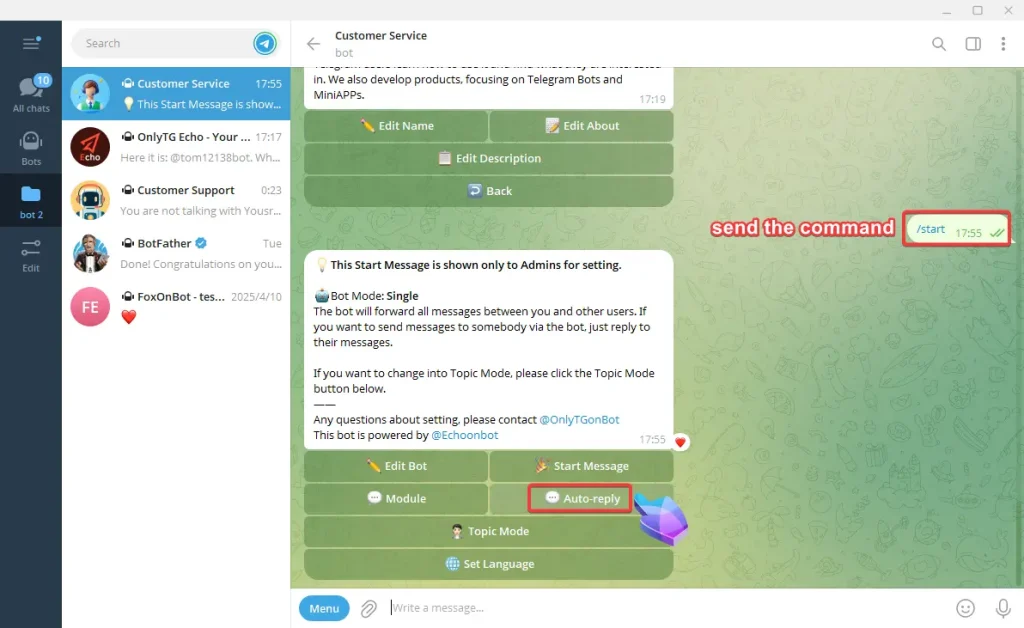
Set Auto-reply and keywords-based reply

step 2

A. Click the Add new Auto-reply button. Every Auto-reply includes a maximum of five messages. They will all be sent at one time.

B. You can add multiple keywords, and when user’s message contains any of these keywords, the bot will automatically send the corresponding reply.

Set Auto-reply and keywords-based reply

C. Click the Add new message button, a new one will be created.

D. Click the set Msg 1 button. You can add Text, Media, Button or use the Module.
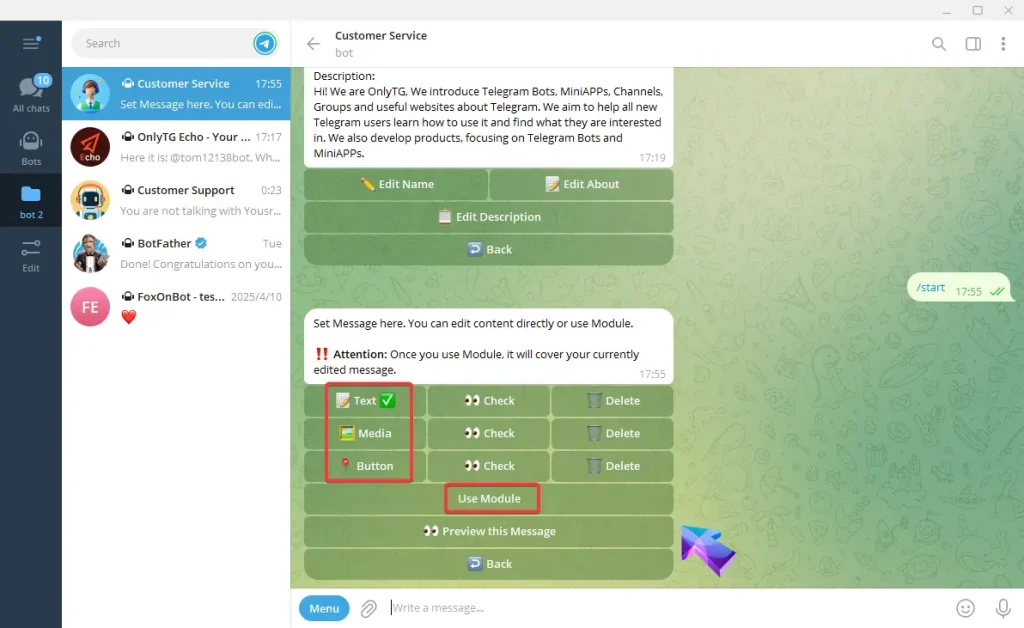
Set Auto-reply and keywords-based reply

Add Text, type your text and send, Once the update success message pops up, it means the process is complete. 
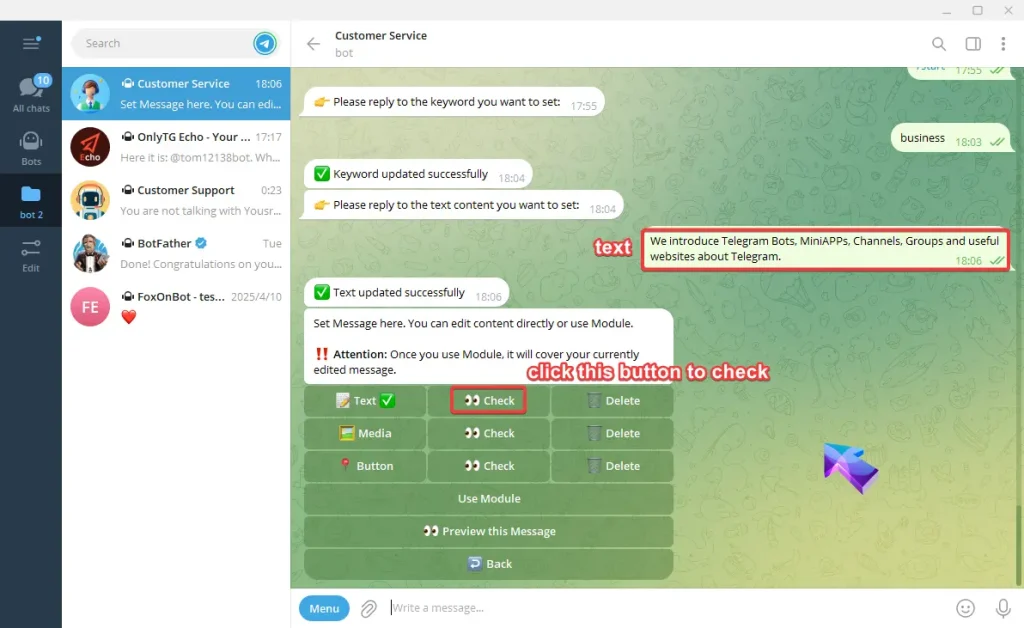
Set Auto-reply and keywords-based reply

Add Media, select a media file to upload, can be pictures, videos or other media files. Once the update success message pops up, it means the process is complete.  
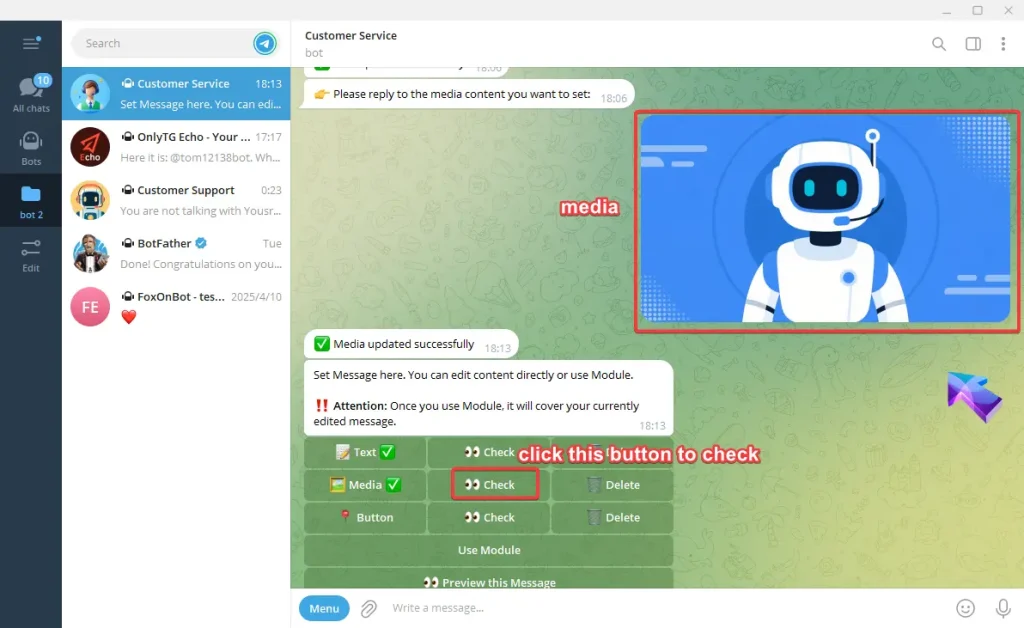
Set Auto-reply and keywords-based reply

Add Button, type button’s name and the content but only link or Module is accepted in Content. 

Note:

One line of text is one row of buttons, multiple buttons in the same row are separated by ‘ | ’  .

Links must start with http, https.

Module must be in format like: msg:modulename.
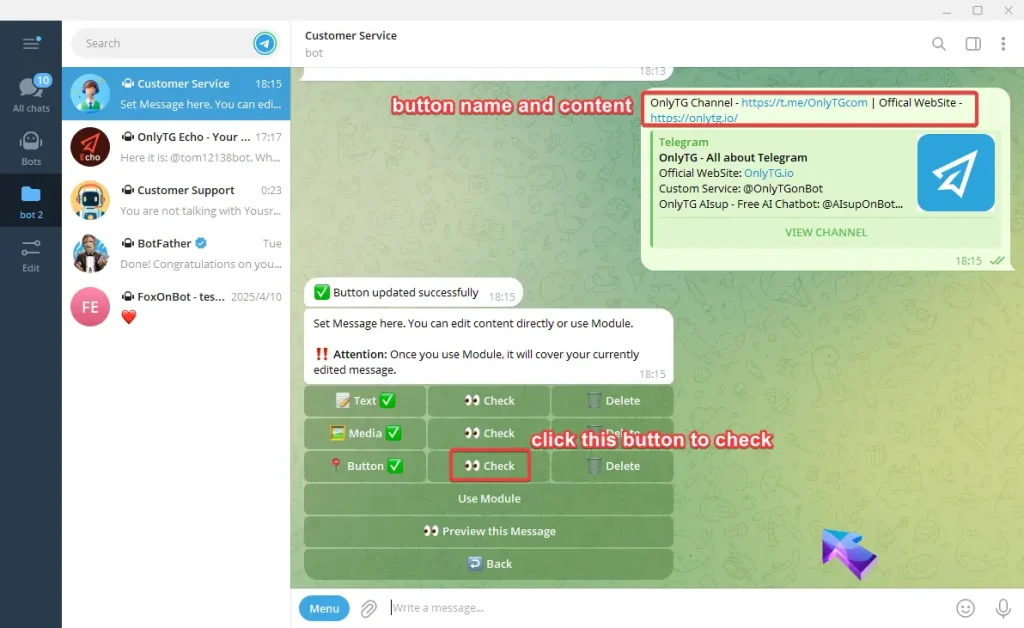
Set Auto-reply and keywords-based reply

F. Click the Preview this message button can check this auto-reply message. 
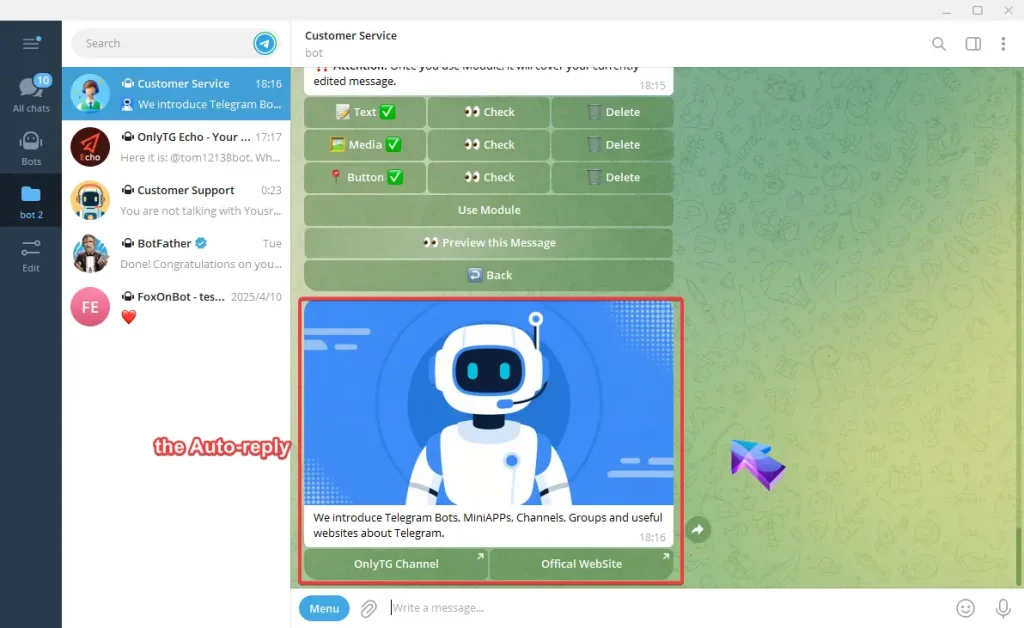
Set Auto-reply and keywords-based reply

When contacts send the keyword, multiple pre-configured Auto-reply can be triggered in sequence. 

If you don’t set any keyword, it will be sent whenever the contacts send something.
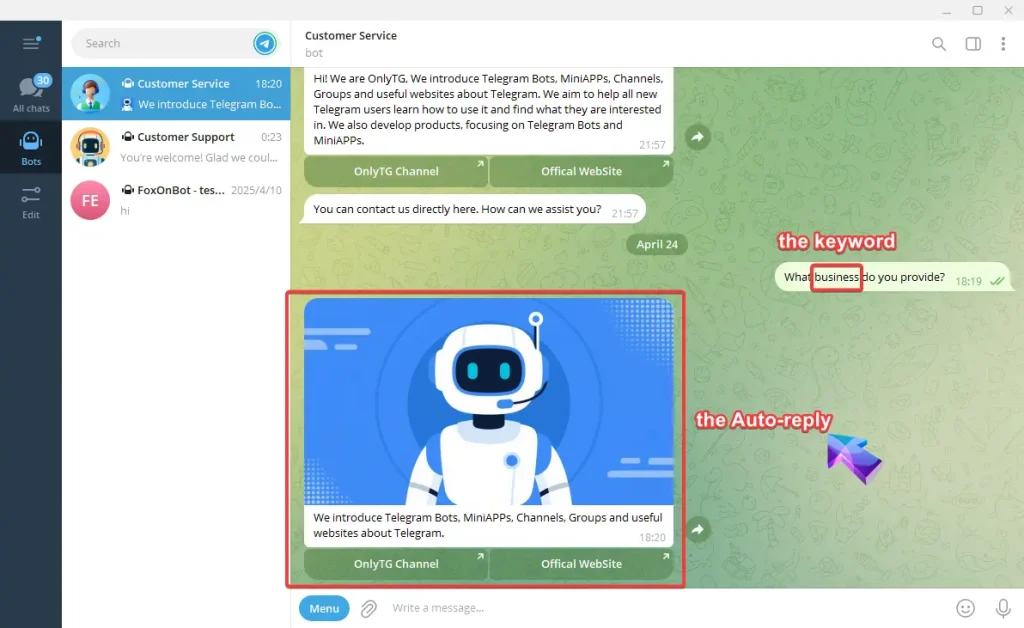
Set Auto-reply and keywords-based reply

Create Your Own Telegram Bot with OnlyTG Echo!

OnlyTG Echo helps you build your own Telegram bot. Power up your connection on Telegram with strong features!

OnlyTG Echo Bot: https://t.me/echoonbot

Official Telegram Channel: https://t.me/onlytg

Post Tags: #bot#Telegram

Post navigation

Previous Previous
How to Set Auto-Greeting on Telegram Bot
NextContinue
How to Broadcast Messages to Contacts via Telegram Bot
Table of Contents
  • Video Tutorial
    • step 1
    • step 2
  • Create Your Own Telegram Bot with OnlyTG Echo!
Echo Sidebar
  • Latest Post
  • Echo
  • Recorder
  • Tips
Telegram Tips

Telegram Bot Automation Guide in 2026

Learn how Telegram bot automation works in 2026, including setup, Bot API basics, webhooks vs long polling, business bots, Mini Apps, rate limits, and practical deployment tips.

Telegram Tips

Telegram Scam Prevention Guide in 2026

Learn practical Telegram scam prevention steps in 2026, including the most common scam tactics, red flags to watch for, privacy settings to review, and what to do immediately if your account or money is at risk.

Telegram Tips

How to Protect Your Telegram Account in 2026

Learn how to protect your Telegram account in 2026 with practical steps that reduce takeover risks, including two-step verification, session checks, passcode lock, phishing awareness, and recovery planning.

Telegram Tips

How to Monetize a Telegram Channel in 2026

Learn how to monetize a Telegram channel in 2026 with practical, proven methods such as ad revenue sharing, sponsored posts, subscriptions, affiliate offers, digital products, bots, and Mini Apps.

Telegram Tips

Telegram Community Guide in 2026

Learn how to build and manage a Telegram community in 2026, including channels vs groups, moderation, onboarding, engagement, analytics, security basics, and practical tools for daily operations.

Telegram Tips

Telegram Channel Discovery Guide in 2026

Learn practical, reliable ways to discover Telegram channels in 2026 using Telegram search, public usernames, directories, hashtags, and web search—plus how to verify quality and avoid bad links.

Telegram Tips

How to Create Telegram Polls Fast in 2026

Learn how Telegram polls work in 2026, including anonymous polls, visible votes, multiple answers, quiz mode, and Quiz Bot. This guide covers setup steps, practical use cases, limits, and common mistakes on mobile and desktop.

Telegram Tips

Telegram Growth Hacks That Still Work in 2026

Learn practical Telegram growth hacks in 2026, including channels vs groups, comments, bots, Mini Apps, invite links, analytics, and ads—using real platform features to grow an engaged audience.

How to Get Unbanned from Telegram in 2026: A Practical Step-by-Step Guide

If your Telegram account or phone number has been restricted, this guide explains how to confirm the ban, appeal to Telegram support, reduce spam flags, and avoid getting blocked again in 2026.

How to create telegram bot in 2026?

Learn how to create a Telegram bot in 2026 using BotFather, with step-by-step coding and no-code methods, plus tips for security, deployment, and choosing the best setup.

How to Loop Post in Channel via Telegram Bot

OnlyTG Echo provides the function to automatically loop posts in your channel. Firstly, you need to create a new bot via @botfather and…

How to Configure Multiple Media when Setting OnlyTG Echo Features

OnlyTG Echo provides the function to configure multiple media to a single message when setting Start Message/Auto Reply/Quick Reply/Broadcast and other features. Firstly, you need…

How to Upgrade Channel to Pro Channel in Telegram

OnlyTG Echo provides the function to upgrade your channel to Pro Channel. This will consume your Pro Communities slots and unlock more advanced features….

How to Edit a Published Post via Telegram Bot

OnlyTG Echo provides the function to Edit Channel Post via your bot. Firstly, you need to create a new bot via @botfather and…

How to Publish Channel Post via Telegram Bot

OnlyTG Echo provides the function to Publish Channel Post via your bot. Firstly, you need to create a new bot via @botfather and…

How to Manage Channel via Telegram Bot

OnlyTG Echo provides the function to Manage Channel via your bot. Firstly, you need to create a new bot via @botfather and send its…

How to Use OnlyTG Recorder?

Welcome to OnlyTG Recorder! Developed by our dedicated bot development team, OnlyTG Recorder is designed to serve as an assistant…

Telegram Bot Automation Guide in 2026

Learn how Telegram bot automation works in 2026, including setup, Bot API basics, webhooks vs long polling, business bots, Mini Apps, rate limits, and practical deployment tips.

Telegram Scam Prevention Guide in 2026

Learn practical Telegram scam prevention steps in 2026, including the most common scam tactics, red flags to watch for, privacy settings to review, and what to do immediately if your account or money is at risk.

How to Protect Your Telegram Account in 2026

Learn how to protect your Telegram account in 2026 with practical steps that reduce takeover risks, including two-step verification, session checks, passcode lock, phishing awareness, and recovery planning.

How to Monetize a Telegram Channel in 2026

Learn how to monetize a Telegram channel in 2026 with practical, proven methods such as ad revenue sharing, sponsored posts, subscriptions, affiliate offers, digital products, bots, and Mini Apps.

Telegram Community Guide in 2026

Learn how to build and manage a Telegram community in 2026, including channels vs groups, moderation, onboarding, engagement, analytics, security basics, and practical tools for daily operations.

Telegram Channel Discovery Guide in 2026

Learn practical, reliable ways to discover Telegram channels in 2026 using Telegram search, public usernames, directories, hashtags, and web search—plus how to verify quality and avoid bad links.

How to Create Telegram Polls Fast in 2026

Learn how Telegram polls work in 2026, including anonymous polls, visible votes, multiple answers, quiz mode, and Quiz Bot. This guide covers setup steps, practical use cases, limits, and common mistakes on mobile and desktop.

Telegram Growth Hacks That Still Work in 2026

Learn practical Telegram growth hacks in 2026, including channels vs groups, comments, bots, Mini Apps, invite links, analytics, and ads—using real platform features to grow an engaged audience.

  • OnlyTG
  • Echo
  • Recorder
  • Help
  • Blog
  • Echo Pricing
OnlyTG EchoTelegram VK YouTube Facebook X Email

© 2026 OnlyTG

Scroll to top
  • Products
    • Echo
    • Recorder
  • Resources
    • Help
    • Blog
  • Pricing
    • Echo Pricing
Contact us