
If you want to create telegram account track business messages workflows in 2026, the real challenge is not just signing up. The bigger goal is building a Telegram setup that customers can trust, your team can manage, and your business can measure without losing conversations in a crowded inbox.
This guide walks through the full process: account creation, privacy settings, Telegram Business setup, chat organization, bot support, and practical message tracking. It is written for small businesses, creators, agencies, local service providers, ecommerce teams, and support teams that want a clean Telegram presence without overcomplicating the stack.
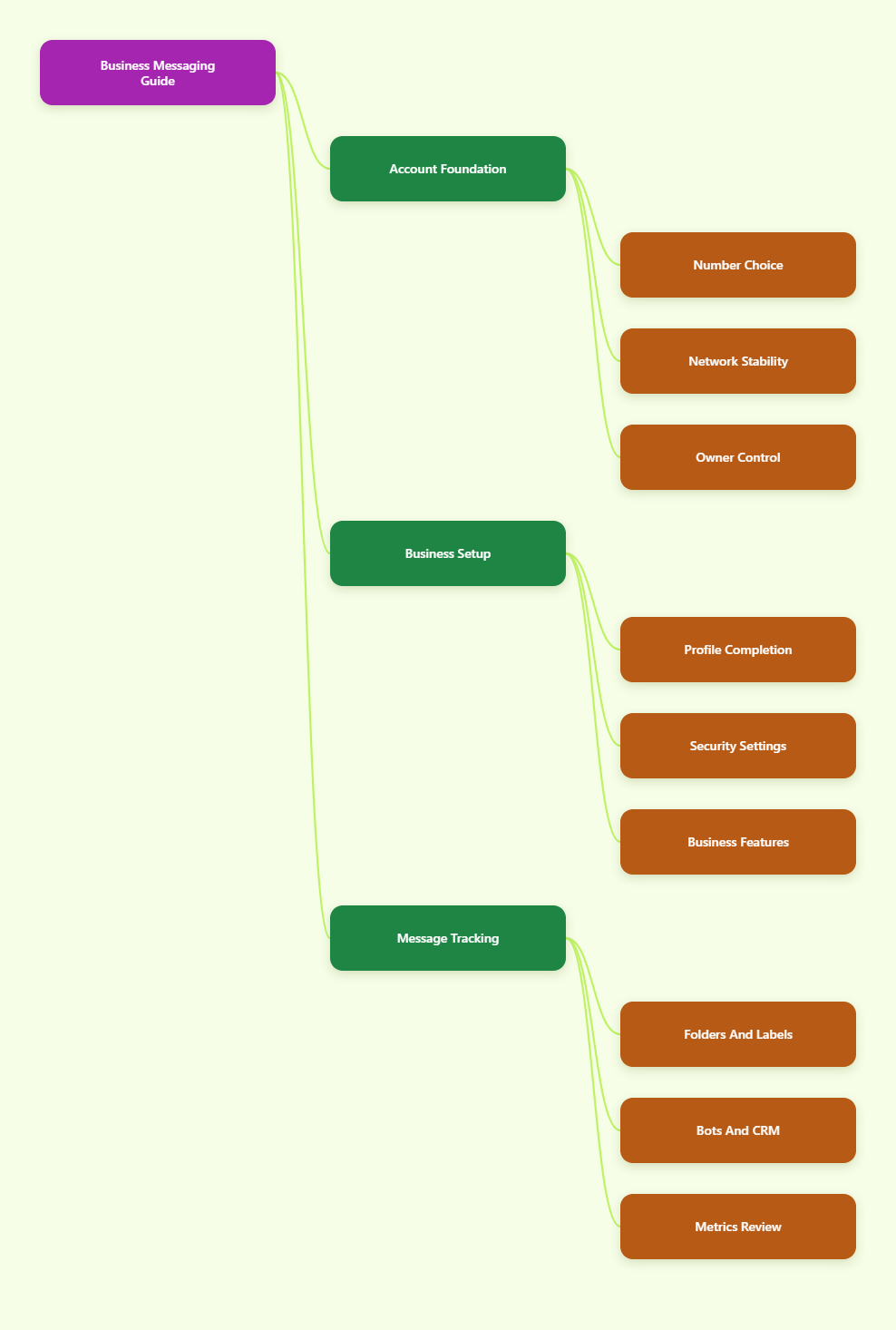
What You Need Before Creating a Telegram Business Account
Before you download the app or enter a verification code, prepare the basics. Most failed setups happen because businesses use a temporary number, switch networks during signup, or create an account before deciding who owns it.
For a business account, treat Telegram like a customer-facing asset. It should be owned, secured, documented, and recoverable even if one employee leaves.
Use a Long-Term Phone Number
Telegram registration requires a phone number. An email address alone is not enough for creating a new account.
Use a number that your business controls long term, such as:
- A dedicated company mobile number
- A reliable eSIM line from a reputable carrier
- A founder-owned number only if the business is very small
- A regional number that can receive SMS or voice verification
Avoid one-time SMS websites and disposable numbers. They may fail verification, create recovery problems, or expose your account to future lockouts.
Keep the Network Stable
During signup, use a stable mobile connection, home connection, office network, or trusted VPN if needed for regional access. Avoid changing IP locations repeatedly while requesting codes.
Telegram, like many messaging platforms, uses anti-abuse checks to reduce spam and automated account creation. A normal device, stable connection, and consistent number are safer than fast switching between tools.
Assign Account Ownership
Decide who owns the account before customers start messaging it. The owner should control the phone number, recovery email, two-step verification password, and connected devices.
For a team, record these details in a secure password manager:
- Registered phone number
- Recovery email address
- Two-step verification status
- Admin device list
- Bot or CRM integrations
This prevents the most common business risk: a Telegram account that works until the only person with access loses their phone.
How to Create Telegram Account Track Business Messages Step by Step
The phrase create telegram account track business messages sounds like one task, but it is actually a sequence. First you create the account, then you make it business-ready, then you organize and measure conversations.
Follow the steps in order. Skipping security and structure early usually creates messy tracking later.
Step 1: Install Telegram on Your Main Device
Download Telegram from the official app store for iOS or Android, or from Telegram’s official website for desktop. Use the mobile app first because phone verification is the standard starting point.
Open the app, choose your country code, and enter the business phone number. Telegram will send a code by SMS, in-app message to an existing session, or another supported verification method depending on the account state.
Enter the code carefully. If a code does not arrive, wait before requesting multiple new codes because repeated attempts can trigger temporary limits.
Step 2: Complete the Profile
Use a business-friendly display name. If your brand name is clear, use it directly instead of a personal nickname.
Add a profile photo or logo that is readable at small size. Then write a short bio that tells users what the account does and when they can expect a reply.
A strong profile includes:
- Brand or service name
- One-line value proposition
- Support or sales purpose
- Website link if relevant
- Expected response window
Do not overload the bio with hashtags or promotional claims. Telegram users usually want clarity, not a landing page squeezed into a profile field.
Step 3: Set Privacy and Security
Go to Settings > Privacy and Security. This is where a personal account becomes safer for business use.
At minimum, review:
- Phone Number: choose who can see your number
- Last Seen and Online: control visibility if needed
- Calls: decide whether customers can call directly
- Groups and Channels: limit who can add the account
- Two-Step Verification: add a password and recovery email
- Active Sessions: remove unknown devices
Two-step verification is especially important because Telegram login normally begins with a code. A password adds another layer if someone gets access to a code or device.
Set Up Telegram Business Features in 2026
Telegram Business features turn a regular account into a more professional customer communication channel. Official Telegram materials describe features such as business hours, location, quick replies, greeting messages, away messages, start pages, and chatbot support.
Availability can depend on the app version, account status, and Telegram’s current rollout. Update the app before assuming a feature is missing.
Business Profile, Hours, and Location
Go to Settings > Telegram Business if the option is available in your app. Start with the fields that reduce customer confusion.
Add business hours if your team does not answer around the clock. If you have a physical shop, office, clinic, salon, or service area, add a location so users know where to find you.
This simple information prevents low-quality messages such as “Are you open?” or “Where are you located?” It also gives customers confidence that they are messaging an active business, not a random account.
Quick Replies for Repeated Questions
Quick replies are one of the most practical Telegram Business tools. They let you save reusable answers and send them with shortcuts.
Create quick replies for questions your team answers every day:
- Pricing and package details
- Shipping times and delivery areas
- Booking instructions
- Refund or cancellation policy
- Payment methods
- Support escalation steps
Keep each reply short and human. A quick reply should save typing time, not make the conversation feel robotic.
Greeting and Away Messages
A greeting message can automatically welcome new users or people who have not messaged you for a while. An away message can respond when your team is offline, closed, or unavailable.
Use these messages to set expectations. For example, tell users what details to send so your team can help faster.
A good away message might include:
- When you will reply
- What information the customer should provide
- Where urgent issues should go
- A link to help articles or order tracking
Do not promise instant support unless you can actually deliver it. Message tracking works better when expectations match your team capacity.
How to Track Business Messages Without Losing Context
Once customers start messaging you, the goal changes. You need a reliable way to track business messages, follow up, and avoid duplicate replies.
Telegram gives you useful native tools, but you may also need bots, folders, labels, or a CRM depending on volume.
Use Chat Folders as Your First Tracking Layer
Telegram chat folders help separate different types of conversations. Official Telegram materials describe folders as a way to organize chats into tabs and, in some cases, share folders with links.
For a business inbox, create folders such as:
- New Leads
- Active Customers
- Paid Orders
- Support Issues
- Waiting for Reply
- Partners
Folders are not a full CRM, but they create a visible workflow. A teammate can open the right tab and understand what needs attention without reading every chat.
Use Labels, Tags, or Naming Rules
Some Telegram Business and third-party workflows support labels or folder-based tags. Where available, labels make message tracking more specific than folders alone.
Useful labels include:
- Hot Lead
- Quote Sent
- Payment Pending
- Needs Manager
- Refund Request
- Follow Up Today
If your setup does not support labels, use a manual naming rule in your internal tracker. For example, record the Telegram username, customer name, status, next action, owner, and last contact date.
Create a Follow-Up Routine
Tracking is not only a tool problem. It is also a routine problem.
Set two daily review times: one near the start of the day and one before closing. During each review, move chats to the right folder, update statuses, and send follow-ups.
A simple tracking routine should answer five questions:
- Who is waiting for us?
- Who needs a quote?
- Who has paid?
- Who needs support?
- Who should be closed or archived?
This is the difference between using Telegram as a chat app and using it as a business message system.
Comparison: Native Telegram, Bots, and CRM Tracking
Not every business needs advanced automation. Choose the tracking method based on message volume, team size, and risk.
| Tracking Method | Best For | Strengths | Limits |
|---|---|---|---|
| Native folders and manual review | Solo operators and small teams | Fast setup, no extra software, easy to learn | Limited reporting and weak handoff control |
| Telegram Business quick replies and automations | Teams answering repeated questions | Consistent replies, better expectations, less typing | Still needs human ownership and review |
| Connected business bot | Support, lead intake, FAQs, routing | Can process and answer messages on behalf of the account | Bot must support Telegram Business mode |
| CRM or help desk integration | High-volume sales or support teams | Status tracking, analytics, team assignment, history | Requires setup, permissions, and data governance |
Start simple if you receive fewer than 20 business messages per day. Move to bots or CRM integration when missed replies, duplicate answers, or unclear ownership become regular problems.
Connect Bots Carefully for Business Messaging
Telegram bots can automate intake, answer FAQs, collect structured details, and connect Telegram to external systems. Telegram’s Bot API is the official developer interface for building bots, and BotFather is used to create and configure them.
For Telegram Business, official API documentation notes that businesses can connect bots that process and answer messages on their behalf. It also notes that currently one business bot may be connected to a user account, and the bot must support the required business capability.
What a Bot Can Do
A well-designed bot can reduce repetitive work without replacing human service. It should collect the information your team needs before a person joins the conversation.
Common bot tasks include:
- Asking for order number or email
- Routing sales and support requests
- Sending FAQ answers
- Creating support tickets
- Notifying a team channel
- Syncing lead data to a CRM
Keep the first bot flow short. If a customer needs to tap through ten steps before reaching a human, the automation will feel like a barrier.
Privacy Mode and Group Behavior
If you add a bot to groups, understand Telegram bot privacy mode. Telegram documentation explains that privacy mode is enabled by default for bots in groups, so bots generally receive commands, replies to their messages, and mentions rather than every message.
This is useful for privacy, but it can surprise teams that expect a bot to track all group messages. Only change bot permissions when there is a clear business reason and everyone understands the data access implications.
Security Checks Before Connecting Tools
Before connecting any bot, AI assistant, CRM, or third-party platform, review what data it can read and store. Customer messages may include names, phone numbers, addresses, payment questions, order details, or private complaints.
Use this checklist:
- Confirm the bot owner and provider
- Check whether Business Mode is supported
- Limit access to only needed chats
- Document what data is stored
- Test with sample messages first
- Remove unused integrations promptly
Automation should make tracking cleaner, not create a hidden privacy risk.
Best Practices for Telegram Business Message Tracking
The best Telegram workflows are simple enough for the team to follow every day. Complicated systems fail when the inbox gets busy.
Use the following practices to keep your account manageable in 2026.
Define Message Owners
Every active conversation should have one owner. If everyone is responsible, no one is responsible.
For small teams, assign owners by folder. For larger teams, use a CRM, help desk, or shared tracking sheet where each conversation has a status and next action.
Separate Sales, Support, and Community
Do not mix all Telegram activity into one stream. Sales leads, support tickets, partner chats, and community messages have different response rules.
Use separate folders, groups, bots, or even separate accounts where appropriate. This makes reporting cleaner and reduces mistakes, such as sending a sales reply to a support complaint.
Measure Practical Metrics
You do not need complex analytics at the beginning. Track metrics that help you improve response quality.
Useful Telegram business metrics include:
- First response time
- Unanswered chats
- Leads received per week
- Quotes sent
- Resolved support issues
- Conversations needing follow-up
Review these weekly. If the number of unanswered chats rises, improve staffing, quick replies, automation, or routing before buying more tools.
Common Mistakes to Avoid in 2026
Most Telegram business problems are preventable. They come from weak account ownership, poor organization, or unrealistic automation expectations.
Using a Disposable Number
A temporary number may look convenient, but it is a poor foundation for a business account. If you lose access to the number, future login or recovery can become difficult.
Use a number your business can keep. This is especially important if Telegram becomes a serious sales or support channel.
Skipping Two-Step Verification
Telegram supports two-step verification through Settings > Privacy and Security > 2-Step Verification. Once enabled, login requires both a code and a password.
Set a recovery email as well. Store the password securely and make sure the business owner, not only one employee, can recover access.
Automating Before Organizing
Do not connect a bot before you know your message categories, reply rules, and handoff process. Automation only scales the workflow you already have.
If the manual process is unclear, the bot will create confusion faster. Start with folders, quick replies, and a tracking routine, then automate the repeated parts.
Final Checklist: Build a Telegram Account That Can Be Tracked
To create telegram account track business messages successfully in 2026, think beyond registration. Build the account like a business system from day one.
Use this final checklist:
- Register with a long-term phone number
- Complete a clear business profile
- Hide or limit phone number visibility if needed
- Enable two-step verification and recovery email
- Set business hours, location, greetings, and away messages
- Create quick replies for repeated questions
- Organize chats with folders or labels
- Assign message owners and follow-up rules
- Connect bots only after reviewing permissions
- Track response time, unresolved chats, and follow-ups weekly
Telegram can be a lightweight support channel, a lead inbox, a customer community, or a business messaging hub. The difference is the structure you put around it.