
If your startup needs a reliable messaging hub today, learning how to create telegram account fast for startup teams can save hours of confusion later. Telegram is simple to install, but team-ready setup requires more than entering a phone number and adding a profile photo.
This guide shows founders, operators, community managers, and customer support leads how to set up Telegram accounts quickly without skipping privacy, security, naming, or workflow basics. It is written for legitimate business use, not spam, fake activity, purchased accounts, or automation abuse.
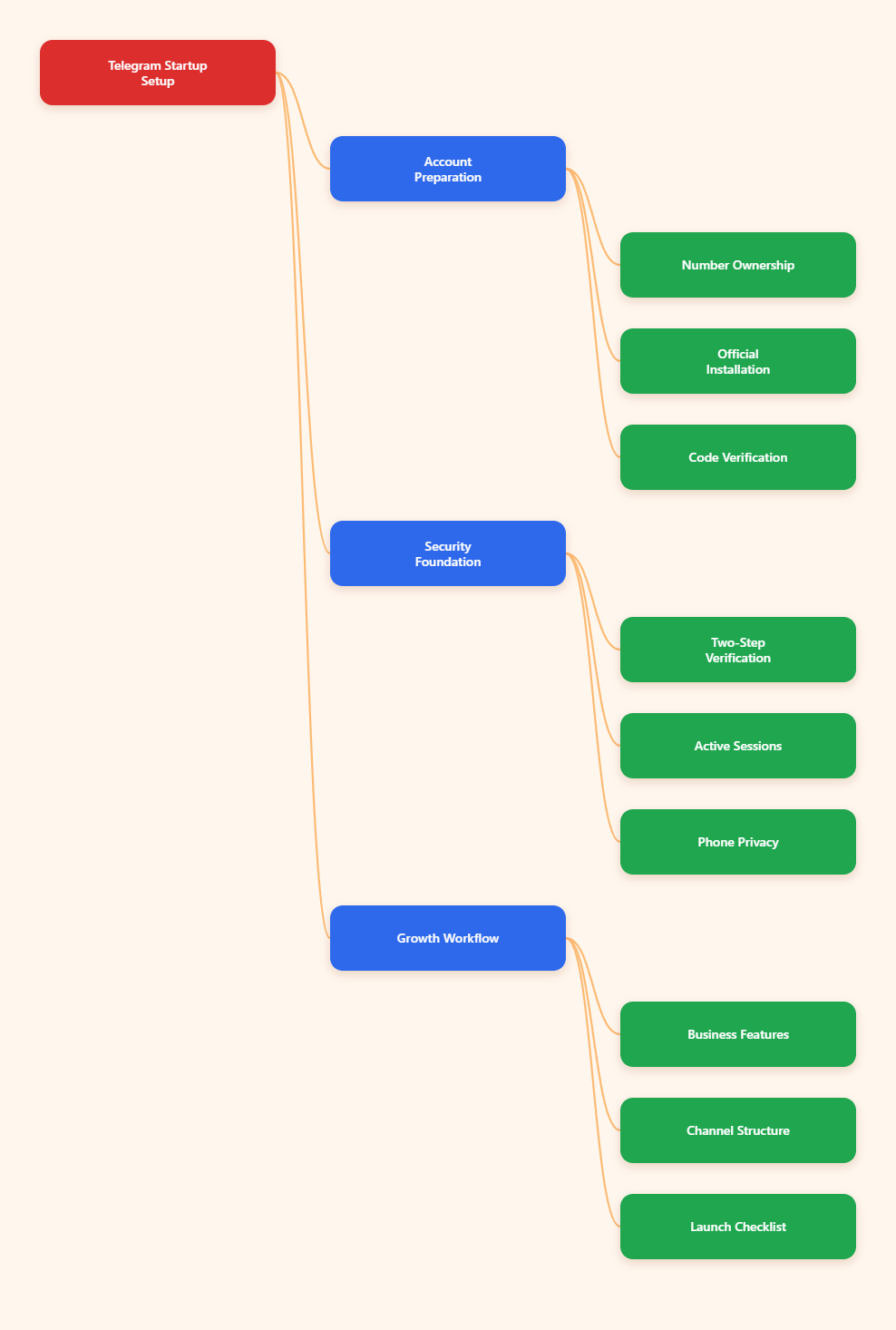
Why Startups Still Use Telegram in 2026
Telegram remains popular because it combines fast messaging, public channels, large communities, bots, cloud sync, desktop apps, and lightweight business features. For startup teams, that mix can reduce the need for several separate tools during early growth.
Unlike a traditional inbox, Telegram can support internal coordination, public updates, support conversations, founder-led communities, and bot-powered workflows. The key is setting it up carefully from day one.
Where Telegram Fits Best
Telegram is useful when your team needs quick communication and a low-friction way to bring users into a community. It works especially well for product-led startups, crypto and fintech communities, SaaS support groups, creator businesses, education products, and local service teams.
- Internal coordination: quick chats between founders, contractors, and support staff.
- Customer community: groups for users, beta testers, or paid members.
- Broadcast updates: channels for product releases, alerts, and announcements.
- Automation: bots for routing questions, collecting leads, or sending structured replies.
What Telegram Is Not
Telegram is not a replacement for legal compliance, customer data governance, or a dedicated CRM. It should also not be used for unsolicited bulk messaging.
Telegram’s Terms of Service prohibit spam, scams, impersonation, and illegal activity. If your startup uses Telegram for marketing, keep it opt-in, transparent, and respectful.
Create Telegram Account Fast for Startup Teams: The Setup Checklist
The fastest safe path is to prepare account ownership before installation. A Telegram account is tied to a phone number, so startups should decide who controls that number and what happens if a founder leaves, changes devices, or loses access.
Telegram uses phone numbers as account identifiers, and verification normally happens through a code sent by SMS, call, or an existing Telegram session. That means your number choice is an operational decision, not just a signup detail.
Step 1: Choose the Right Phone Number
Use a number your company can continue to control. For very small teams, this may be a founder’s number, but that creates transfer risk later.
Better options include a company-owned mobile line or a long-term business number that can receive verification codes reliably. Avoid public temporary numbers because they can expose verification messages and may create recovery problems.
- Best for ownership: company-controlled mobile number.
- Acceptable for early testing: founder number with clear recovery planning.
- Risky: free public SMS inboxes or disposable numbers.
- Never recommended: buying pre-made Telegram accounts.
Step 2: Install Telegram from Official Sources
Download Telegram only from official app stores or Telegram’s official website. Telegram is available on mobile and desktop, but mobile setup is usually the simplest first step because registration is phone-number based.
Once the account is active, you can add desktop apps for Windows, macOS, Linux, or use Telegram Web. Cloud sync lets your chats appear across devices after login.
Step 3: Complete Verification
Open Telegram, tap start, enter the phone number, and wait for the verification code. If you already have Telegram on another device, Telegram may send the code there instead of SMS.
Enter the code only inside the official Telegram app or website. Never share Telegram verification codes with teammates, agencies, bots, or support accounts claiming to help.
After verification, add the account name. Use a clear startup identity if this will be a public-facing account, such as “Acme Support” or “Acme Community,” instead of a vague personal name.
| Setup Choice | Fastest Option | Safer Startup Option | Main Risk |
|---|---|---|---|
| Phone number | Founder mobile | Company-controlled mobile | Founder lock-in |
| Account name | Personal name | Brand plus role | User confusion |
| Login devices | One phone | Phone plus secured desktop | Lost access |
| Privacy settings | Default settings | Restricted visibility | Phone exposure |
| Security | SMS only | Two-step verification | Account takeover |
Secure the Account Before Inviting Users
Speed matters, but the first ten minutes after signup are the best time to reduce future risk. Do not invite customers, investors, or community members until the account is protected.
The minimum startup security baseline is simple: hide unnecessary personal details, enable two-step verification, review active sessions, and define who owns recovery access.
Enable Two-Step Verification
Telegram’s two-step verification adds a password that is required when logging in from a new device, in addition to the verification code. This protects the account if someone gets access to your SMS code or an active device.
Go to Settings → Privacy and Security → Two-Step Verification, then create a strong password. Add a recovery email controlled by the company, not a personal inbox that may disappear later.
- Use a unique password stored in a team password manager.
- Add a recovery email that leadership can access securely.
- Document who can approve new device logins.
- Review the setting after any team change.
Review Active Sessions
Telegram supports multiple active sessions across devices. That is convenient for startups, but it can also create access sprawl.
Check Settings → Devices or the active sessions area in privacy settings. Remove unknown devices immediately, especially after contractor turnover or lost hardware.
For teams, avoid logging the same account into many personal laptops. If several people need to answer customers, consider structured workflows with groups, business features, or bots rather than sharing one login widely.
Set Phone Number Privacy
Telegram’s privacy controls let you choose who can see your phone number and who can find you by it. For a startup account, the safer default is usually to limit visibility.
Go to Settings → Privacy and Security → Phone Number. Set “Who can see my phone number” to “Nobody” or “My Contacts,” depending on your business use case.
- Public community account: choose “Nobody” for phone visibility.
- Small partner account: “My Contacts” may be acceptable.
- Founder personal account: restrict discovery if joining public groups.
Optimize the Profile for Trust and Speed
A startup Telegram account should look legitimate within seconds. Users often decide whether to message, join, or ignore based on name, photo, username, and first response.
Keep the profile clear, consistent, and easy to verify against your website or other official channels.
Choose a Clear Username
A Telegram username allows people to find or contact the account without seeing the phone number. Choose a username that matches your brand as closely as possible.
Avoid names that look like impersonation, support scams, or unofficial resellers. If your exact brand name is unavailable, use a simple variation such as “brandapp,” “brand_support,” or “brandhq.”
Add a Recognizable Profile Photo
Use your official logo or a simple branded mark. If the account belongs to a founder, use a professional headshot and mention the company clearly in the bio.
Also review profile photo visibility. For most startup accounts, public visibility is fine if the image is a logo, but personal founder accounts should be more restrictive.
Write a Useful Bio
The bio should explain what the account is for. Keep it direct and avoid exaggerated claims.
- “Official support account for Acme.”
- “Product updates and beta community.”
- “Founder account for partnerships and investor contact.”
If you have a website, link to the official domain from your channel, group description, or pinned message. This helps users confirm they are speaking with the real team.
Use Telegram Business Features When They Help
Telegram Business lets users turn an account into a business account with features such as opening hours, location, quick replies, automated messages, custom start pages, and chatbot support. According to Telegram’s developer documentation, business features are available to Premium subscribers, while connected bots can also be available to non-Premium users.
For startups, Telegram Business is most useful when customer conversations repeat often. If users ask the same onboarding, pricing, or troubleshooting questions every day, quick replies and automated greetings can save time.
Set Business Hours and Expectations
If your team is not online 24/7, say so. Business hours reduce frustration and help users understand when to expect a reply.
Use automated messages carefully. A helpful greeting should guide users, not pretend a human is instantly available.
Create Quick Replies
Quick replies are ideal for common startup workflows. They keep support consistent without forcing agents to rewrite the same instructions.
- Trial setup instructions.
- Refund or billing policy links.
- Bug report format.
- Demo booking link.
- Community rules.
Connect Bots Thoughtfully
Telegram bots can process messages, answer simple questions, and connect workflows. In 2026, Telegram’s bot ecosystem is increasingly useful for AI assistants, routing, and lightweight automation.
Do not connect a bot before defining what data it can see and how it should behave. Bot interactions should comply with Telegram rules and your own privacy obligations.
Build the Right Telegram Structure
Many startups create one group and try to use it for everything. That usually becomes noisy fast.
A better structure separates announcements, discussion, support, and internal coordination. This makes moderation easier and helps users find the right place.
Use Channels for Announcements
Channels are best for one-to-many communication. Use them for product updates, release notes, event reminders, investor-safe public news, and community announcements.
Keep posts concise. Pin the most important message, such as a welcome note, roadmap link, or support instructions.
Use Groups for Discussion
Groups are better for interaction. They work well for beta communities, customer feedback, partner networks, and user education.
Before inviting users, write rules that cover spam, promotions, support expectations, and prohibited content. Telegram communities grow faster when rules are visible and enforced.
Use Internal Chats Carefully
Telegram can be useful for urgent internal communication, but it should not become the only source of truth. Keep decisions, customer records, and product specs in durable systems such as your CRM, helpdesk, project tracker, or documentation tool.
Use Telegram for speed, not long-term knowledge storage.
A Fast Launch Workflow for Startup Teams
If you need to launch today, follow a compressed but safe workflow. This lets you create telegram account fast for startup teams without leaving obvious gaps.
The 30-Minute Setup
- Pick a company-controlled number.
- Install Telegram from an official source.
- Verify the number.
- Add brand name, logo, and username.
- Enable two-step verification.
- Hide or restrict phone number visibility.
- Add a secured desktop session if needed.
- Create a channel for announcements.
- Create a group only if discussion is needed.
- Pin rules, links, and support instructions.
The First-Day Checklist
On day one, focus on clarity and control. Invite only the people who need access, and test the user journey before sharing links publicly.
- Send a test message from a user account.
- Confirm profile and username are recognizable.
- Check whether the phone number is hidden.
- Test desktop login and active sessions.
- Add moderators before opening a public group.
- Prepare standard replies for common questions.
The First-Week Review
After a week, review what users actually do. Many teams discover they need fewer chats, clearer rules, or better routing.
Measure practical signals: repeated questions, response time, spam attempts, unclear links, and whether users join the wrong place. Improve the structure before the community grows larger.
Common Mistakes to Avoid
Most Telegram setup mistakes happen because teams optimize only for speed. Fast setup is good, but rushed ownership and security decisions can become expensive later.
Using a Personal Number Without a Plan
A founder’s number is fast, but it can create access problems if the founder changes phones, leaves the company, or wants privacy. If you must start this way, document a migration plan.
Telegram allows users to change their phone number in settings, but the team should plan that change carefully to avoid losing control or confusing users.
Sharing Verification Codes
No legitimate setup process requires posting a Telegram login code in a group chat. Treat codes like passwords.
If someone asks for a code, assume risk. Use official login screens only and remove unknown active sessions immediately.
Buying Accounts or Spamming Users
Purchased accounts, fake engagement, unsolicited outreach, and automation abuse can damage your brand and violate platform rules. They also create security and ownership risks because you may not truly control the account history.
Build with opt-in channels, clear group rules, and useful communication. Sustainable Telegram growth comes from trust, not shortcuts.
Final Recommendations
The best way to create Telegram account fast for startup teams in 2026 is to combine speed with ownership, security, and clear communication. Start with a company-controlled number, verify through official Telegram apps, enable two-step verification, restrict phone visibility, and create only the chats your users actually need.