
This guide explains what you can do, what you should avoid, and how to turn real contacts into active subscribers without triggering spam reports or account restrictions.
You will learn the practical difference between channels, groups, contacts, invite links, and bot limitations. You will also get a step-by-step workflow that works for creators, brands, communities, and paid content owners.
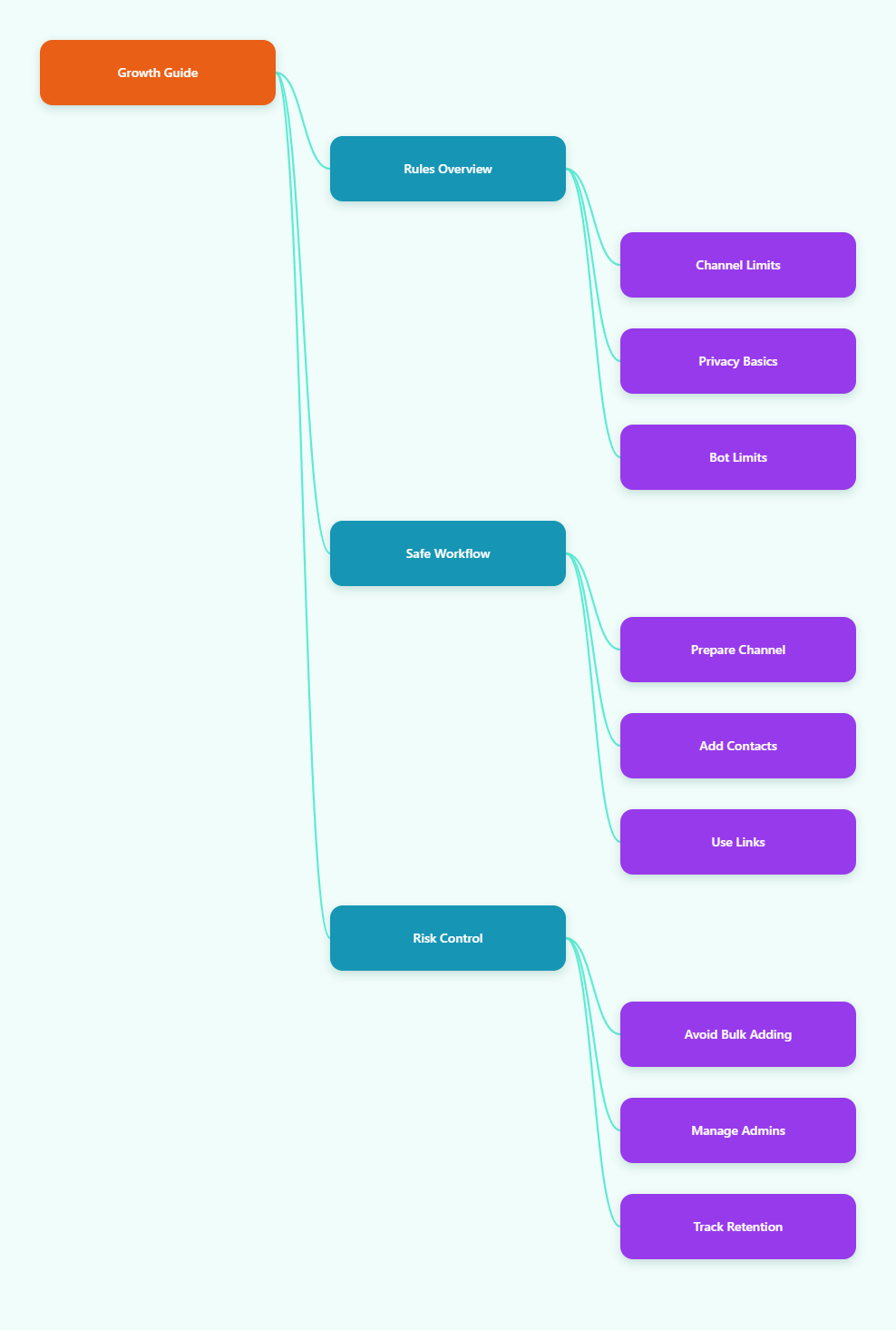
Quick Answer: Can You Add Telegram Contacts to Channel Subscribers?
Yes, but only in a limited way. Telegram channel owners can manually add a small number of contacts at the beginning, while wider growth should happen through public usernames, private invite links, join requests, and voluntary opt-ins.
Telegram’s official channel guidance states that channels can have an unlimited number of subscribers. However, the owner can only directly add the first 200 subscribers; after that, people need to join through a link or be added through allowed invitation flows.
This matters because many outdated tutorials promise “unlimited adding.” In practice, mass-adding strangers or importing huge contact lists is a fast way to get limited, reported, or blocked.
- Allowed: adding known contacts within Telegram’s built-in limits.
- Recommended: sending invite links to people who expect your message.
- Risky: uploading cold phone lists and pushing unsolicited invites.
- Not supported: using the Bot API to force-add users to a channel.
Telegram Channel Rules You Need to Understand in 2026
Before you add anyone, make sure you understand how Telegram treats channels. A channel is a broadcast tool where admins publish posts and subscribers receive updates under the channel name.
Unlike a group, subscribers usually do not talk inside the channel unless you connect a discussion group. That makes channels useful for announcements, newsletters, trading updates, education, product drops, and paid access.
Channels Can Be Unlimited, But Direct Adding Is Limited
Telegram channels can grow to an unlimited subscriber count. This does not mean you can manually add unlimited people from your contacts.
The important distinction is simple: subscriber capacity is unlimited, but direct manual adding is restricted. Once your initial add limit is reached, growth should move to links and opt-in flows.
If your goal is a large audience, build around shareable links, public discovery, cross-promotion, search traffic, and email or website conversion. Do not build around forced adding.
Public Channels vs Private Channels
A public channel has a username, such as a t.me link, and can be found through Telegram search. A private channel uses an invite link and is not openly searchable.
Choose a public channel when discoverability matters. Choose a private channel when access control, paid membership, or sensitive content matters more than search visibility.
| Channel Type | Best For | Join Method | Main Risk |
|---|---|---|---|
| Public Channel | Brands, creators, news, communities | Username link or Telegram search | Lower access control |
| Private Channel | Paid content, member-only updates, internal audiences | Invite link or admin approval | Link sharing without controls |
| Channel + Discussion Group | Communities that need comments | Channel link plus group interaction | Moderation workload |
Contacts Are Not Automatically Subscribers
Your phone contacts and your channel subscribers are separate. Syncing contacts may help Telegram identify people you know, but it does not ethically or safely turn every contact into a channel audience.
Telegram asks permission before syncing contacts and lets users manage synced contacts in privacy settings. Many users also control who can find them by phone number or add them by phone.
For that reason, treat contacts as a relationship list, not a target list. The better goal is to invite people clearly and let them decide.
How to Add Telegram Contacts to Channel Subscribers Safely
The safest workflow combines manual adding for a small trusted group, invite links for scale, and tracking so you know which source brings real readers. This approach protects your account and improves retention.
Use the steps below when launching a new channel or moving an existing audience into Telegram.
Step 1: Prepare the Channel Before Inviting Anyone
Do not invite people into an empty channel. New subscribers decide quickly whether a channel is useful, trustworthy, and worth keeping unmuted.
Before you share the link, publish a small content base. Add a clear name, profile image, description, pinned post, and at least several posts that show what subscribers will receive.
- Channel name: make it recognizable and easy to search.
- Description: explain the topic, audience, and posting frequency.
- Pinned post: introduce the value proposition and next action.
- First posts: publish practical examples, not generic welcomes.
- Admin setup: limit permissions to only what each admin needs.
A good pinned message should answer three questions: who is this for, what will they get, and how often will they hear from you?
Step 2: Manually Add Only Relevant Known Contacts
Manual adding should be used carefully. Add people who know you, expect the channel, or have already shown interest in the topic.
In Telegram, open your channel, go to the subscriber or member area, choose add subscribers, and select eligible contacts. The exact wording can vary slightly across mobile and desktop versions.
Keep this stage small and high-quality. If someone would be surprised to appear in your channel, send a personal invite instead of adding them directly.
This protects your reputation. A small group of engaged early subscribers is better than a larger group that mutes, leaves, or reports the channel.
Step 3: Create Invite Links for Scalable Growth
Invite links are the correct way to scale beyond the initial manual add limit. Telegram supports public usernames, private invite links, and enhanced link management for admins with the right permission.
For a public channel, your username link can be shared anywhere: website, email footer, social profile, YouTube description, podcast notes, landing pages, and partner posts.
For a private channel, create invite links from the channel settings. If you run promotions from multiple sources, create separate links so you can compare which source brings better subscribers.
- Create one link for your website.
- Create one link for your email list.
- Create one link for each partner campaign.
- Use join requests when you need manual approval.
- Revoke links that are leaked, abused, or no longer relevant.
This is the cleanest way to add Telegram contacts to channel subscribers while respecting user choice.
What Not to Do When Growing Telegram Subscribers
Telegram has anti-spam systems and user reporting tools. If people report your messages as unwanted, your account can be limited temporarily, which may block you from messaging strangers or participating normally.
Avoid any method that depends on volume, deception, or automation against user expectations.
Do Not Bulk Import Random Phone Numbers
Some tools claim they can import thousands or millions of contacts and convert them into subscribers. This is not a sustainable Telegram growth strategy.
Even if a technical API method exists for importing contacts, Telegram privacy settings and platform limits affect what happens next. More importantly, importing cold numbers creates a spam risk and damages trust.
If you collected phone numbers for one purpose, do not assume you have permission to promote a Telegram channel. Consent should be specific, clear, and easy to withdraw.
Do Not Rely on Bots to Force-Add Users
Telegram bots are useful for automation, support, onboarding, reminders, payments, and checking membership status. They are not a loophole for forcing people into channels.
The Bot API does not provide a normal method for a bot to create a channel and add arbitrary users as subscribers. Bots can be added as admins, post content if allowed, and manage workflows, but users still need to join properly.
If you use a bot for onboarding, let it send a clear invite link after the user starts the bot or completes a permitted action. Do not use it for cold spam.
Do Not Buy Fake Subscribers
Fake subscribers may inflate the visible number, but they do not read, click, forward, buy, or build community. In 2026, healthy Telegram growth is about engagement and retention, not only raw subscriber count.
Inactive subscribers can make your channel look weak because post views, forwards, reactions, and click behavior do not match the audience size. Serious partners and advertisers often notice this mismatch.
If you spend money, spend it on targeted sponsorships, creator partnerships, useful content, and tracked landing pages.
A Practical 2026 Workflow for Turning Contacts Into Subscribers
The best way to grow from your existing contacts is to use a permission-based funnel. This creates fewer complaints and better long-term engagement.
Here is a simple workflow that works for most businesses and creators.
Build a Consent-Based Invite Message
Write a short message that explains why you are reaching out. Keep it personal, honest, and easy to ignore.
Example: “Hey, I started a Telegram channel where I share weekly ecommerce checkout tips. If that is useful, you can join here: [link]. No pressure.”
This message works because it gives context, value, and choice. It does not pretend the person subscribed already.
- Mention the relationship or reason for the message.
- Describe the channel in one sentence.
- Set expectations for posting frequency.
- Use one clear invite link.
- Avoid repeated follow-ups if they do not respond.
Segment Contacts Before Sending
Not every contact belongs in the same invite campaign. Segment first, then invite only the people who are likely to care.
For example, a crypto research channel should not invite every personal contact. It should invite people who previously requested market updates, attended a webinar, bought a related product, or joined a relevant community.
Useful segments include customers, newsletter readers, event attendees, community members, course students, and support users who opted into updates.
Track Retention, Not Just Joins
Subscriber growth is only useful if people keep reading. Track whether new subscribers view posts, click links, forward content, react, and stay after the first week.
Telegram channels show post view counts, and invite link dashboards can help compare acquisition sources. If a source brings many joins but poor views, it may be low-quality traffic.
Review performance weekly. Improve the pinned post, adjust the posting schedule, and remove promotion sources that create low engagement.
Admin Permissions and Privacy Settings That Matter
Many growth problems come from messy admin permissions. In 2026, Telegram gives channel owners granular control over what admins can do.
Give each admin only the permissions they need. For example, a content editor may need post and edit rights, while a community manager may need invite link and ban permissions.
Use Invite Permissions Carefully
The permission to invite users or manage invite links is powerful. Only give it to admins you trust, because invite links can affect privacy, paid access, and attribution.
If you run a private or paid channel, use separate links for different campaigns and revoke any link that spreads outside its intended audience.
For sensitive communities, enable join requests so admins approve users before they enter.
Protect Paid and Private Channels
Private invite links can be forwarded. If access is paid, leaked links can let unpaid users request or enter the channel unless you manage the link properly.
Use expiring links, limited-use links, join approval, and regular audits. Remove users who should no longer have access, and revoke old links after campaigns end.
Telegram also supports paid subscription-style access through Telegram Stars in supported contexts, which may be useful for some creators and communities.
Respect Contact Privacy
Telegram’s privacy policy explains that contact syncing stores names and phone numbers needed for contact discovery and notifications. Users can stop syncing and delete synced contacts from settings.
If you manage a brand channel, be more careful than a casual user. Do not upload address books collected from employees, partners, scraped sites, or old databases without a lawful and user-friendly reason.
Privacy-friendly growth is not slower in the long run. It creates fewer complaints and a better audience.
Best Practices to Grow a Telegram Channel After the First 200 Subscribers
Once manual adding is no longer the focus, your growth system needs traffic, value, and attribution. Telegram does not work like a social feed that automatically recommends every good channel to millions of users.
You need to create reasons for people to join and reminders in places where they already spend time.
Use Content That Is Worth Forwarding
Forwarding is one of Telegram’s strongest growth signals. People share concise, useful, timely posts more often than vague announcements.
Create posts that solve one problem at a time. Use checklists, templates, alerts, mini-guides, short analysis, and practical examples.
- One tip per post.
- Clear headline in the first line.
- Useful context in two or three short paragraphs.
- One call to action when needed.
- Consistent posting rhythm.
Place Your Invite Link Where Intent Exists
The best subscribers usually come from high-intent sources. These include blog posts, comparison pages, product documentation, email newsletters, webinars, niche communities, and partner channels.
Do not simply say “join our Telegram.” Explain what is exclusive there. For example: “Join the Telegram channel for weekly templates and release notes.”
If the channel supports a business, connect each invite link to a measurable campaign so you can see what drives signups and sales.
Clean Up Weak Onboarding
If people join but do not stay, the problem may be onboarding. New subscribers need immediate proof that the channel is worth keeping.
Refresh your pinned post every few weeks. Link to your best posts, explain how often you publish, and tell people whether comments or support happen elsewhere.
A strong onboarding post can raise retention without adding a single new traffic source.
Final Checklist Before You Invite Contacts
Use this checklist before you try to add Telegram contacts to channel subscribers. It will help you avoid spam signals and create a better first experience.
- Your channel has a clear topic, description, profile image, and pinned post.
- You understand that direct adding is limited and should stay selective.
- You created invite links for scalable, voluntary joining.
- You segmented contacts by relevance and consent.
- You avoided bulk importing cold phone numbers.
- You gave admins only the permissions they need.
- You track joins, views, forwards, clicks, and retention.
The practical rule is simple: use manual adding only for people who genuinely expect it, then rely on invite links and valuable content for scale. That is the safest and most effective way to grow Telegram channel subscribers in 2026.
Conclusion
Adding Telegram contacts to a channel is possible, but it is not meant to be a mass-growth hack. Telegram allows unlimited channel subscribers, while direct manual adding remains limited and sensitive to user expectations.
If you want durable growth, build a permission-based system: prepare the channel, invite relevant contacts, use tracked links, protect privacy, and measure retention. This approach helps you add Telegram contacts to channel subscribers without damaging your account, brand, or audience trust.