
Marketing agencies use Telegram for client support, community management, creator outreach, crypto communities, lead nurturing, and campaign coordination. The challenge is not simply finding the best safe dual telegram app for marketing agency teams; it is choosing a setup that keeps accounts separated, secure, compliant, and easy for staff to manage every day.
This guide explains the safest practical options in 2026, including official Telegram multi-account features, Telegram Desktop, browser profiles, Android Work Profile, device-level app cloning, and business bot workflows. The goal is to help agency owners build a reliable system without relying on risky automation or spam tactics.
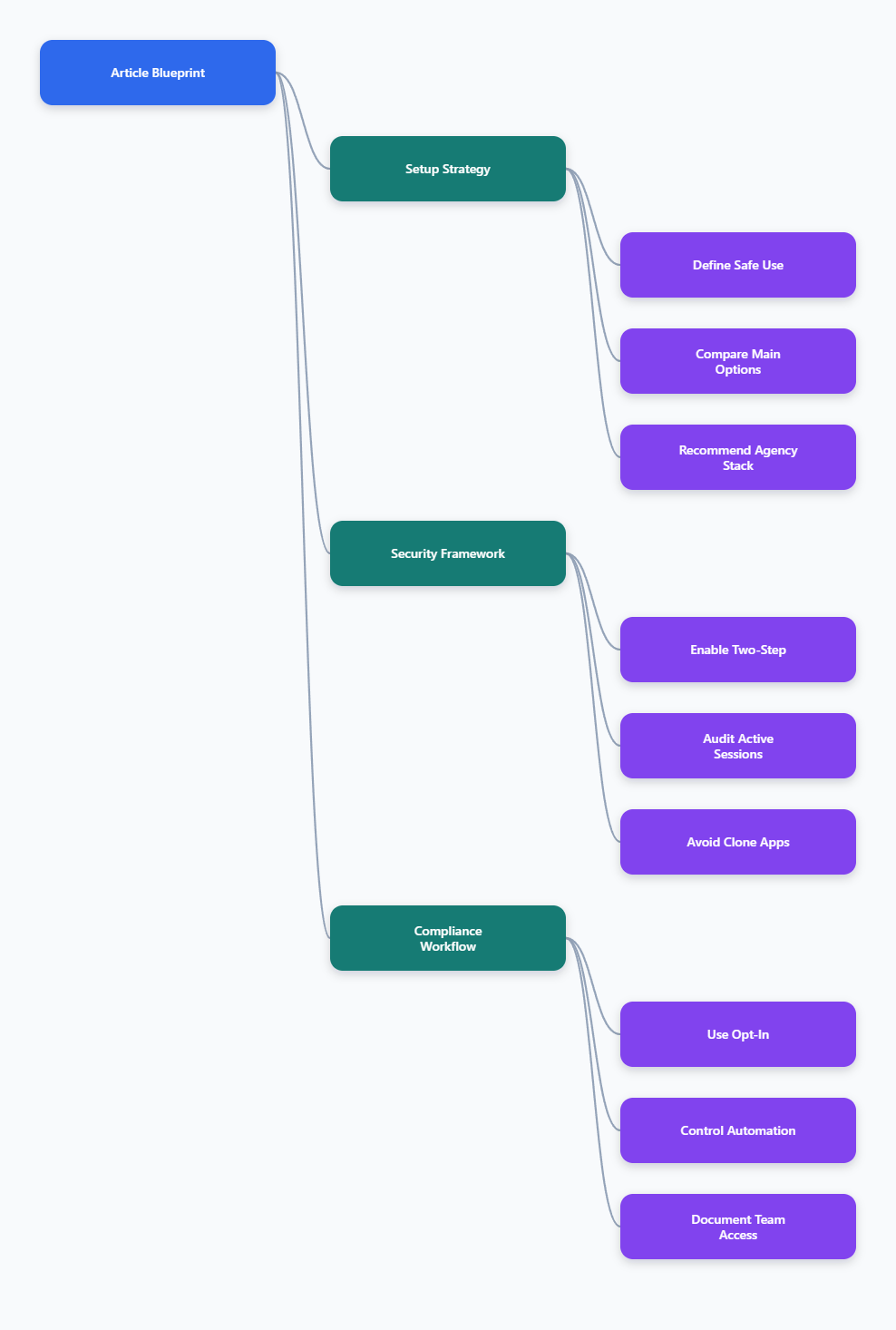
What “Safe Dual Telegram App” Really Means in 2026
A safe dual Telegram setup is not just two copies of the same app. For an agency, safety means account separation, controlled access, session visibility, strong authentication, and compliant messaging behavior.
Telegram allows users to add several accounts in the official apps, and each account must use a unique phone number. Official Telegram posts have long documented multi-account support, including switching between up to three phone numbers in the app.
For small teams, the safest default is usually the official Telegram app with built-in account switching. For larger agency workflows, the better answer may be a mix of official apps, separate browser profiles, managed work profiles, and role-based access policies.
Why agencies need more than account switching
Account switching solves convenience, not governance. If every strategist, media buyer, and support agent shares the same device or login, your agency loses control over accountability.
A safer system should answer simple questions:
- Which team member can access each client account?
- Which devices are currently logged in?
- Can work chats be separated from personal chats?
- Are recovery emails and passwords controlled by the agency?
- Can suspicious sessions be terminated quickly?
These questions matter because Telegram accounts often hold leads, customer complaints, payment discussions, community moderation history, and private campaign details.
Best Safe Dual Telegram App for Marketing Agency Teams: Main Options
The best safe dual telegram app for marketing agency teams depends on team size, device policy, compliance needs, and how many client accounts you manage. There is no single perfect app for every agency.
Below is a practical comparison of the safest approaches. The highest-safety options rely on official Telegram clients and operating-system separation, not unknown modified apps.
| Option | Best For | Safety Level | Main Limitation |
|---|---|---|---|
| Official Telegram mobile app | Solo operators and small teams | High | Limited account slots in one app |
| Telegram Desktop | Account managers on computers | High | Requires careful device control |
| Telegram Web in browser profiles | Separating clients by workspace | Medium to high | Each browser profile needs discipline |
| Android Work Profile | Separating agency work from personal use | High | Usually one work profile per device |
| Native app clone features | Two-account personal workflows | Medium | Varies by phone brand |
| Unknown third-party clone apps | Not recommended | Low | Security and privacy uncertainty |
The safest pattern is simple: use official Telegram apps whenever possible, then use device or browser isolation to separate workspaces. Avoid apps that ask for unnecessary permissions, promise unlimited accounts, or require you to import sessions into tools you do not fully trust.
Option 1: Official Telegram multi-account
The official Telegram app is the first place agencies should start. It supports adding multiple accounts and switching without logging out, which is enough for many boutique agencies.
Use this setup when one person manages a small number of client-facing accounts. It is also useful for founders who want one personal account and one or two work accounts on the same phone.
Recommended steps:
- Use a separate phone number for each account.
- Assign one account to one clear business function.
- Enable two-step verification on every account.
- Add a recovery email controlled by the agency.
- Review active sessions weekly.
This option is safe because it uses Telegram’s official client and avoids giving credentials to third-party software.
Option 2: Telegram Desktop for agency operations
Telegram Desktop is practical for support teams, community managers, and outreach coordinators who work from laptops. It gives faster typing, easier file handling, and better multitasking than a phone-only workflow.
However, desktop access creates a different risk. If an employee leaves the company, loses a laptop, or shares a workstation, active sessions can remain open unless the agency has a removal process.
Agencies should create a desktop access checklist:
- Use company-managed computers where possible.
- Lock operating-system accounts with strong passwords.
- Do not save recovery emails in shared browsers.
- Terminate desktop sessions when staff roles change.
- Keep Telegram Desktop updated from official sources.
This setup works well when paired with a written offboarding policy.
Option 3: Telegram Web with separate browser profiles
Telegram Web can be useful when agencies need clean separation between client workspaces. A browser profile can hold its own cookies, sessions, extensions, bookmarks, and notification settings.
For example, an agency can create separate browser profiles for Client A, Client B, and internal operations. This reduces the chance of replying from the wrong account or mixing client assets.
Use this method carefully:
- Name each browser profile after the client or function.
- Use separate bookmarks for each Telegram Web login.
- Disable unnecessary browser extensions.
- Do not let staff sync profiles to personal accounts.
- Review active Telegram sessions from the mobile app.
This is not a magic way to bypass Telegram rules. It is a workspace organization method, not a license to create unlimited accounts or run spam campaigns.
Security Rules Every Agency Should Apply
Before choosing the best safe dual Telegram app for marketing agency teams, fix the security basics. Most account problems come from weak passwords, shared devices, phishing, and forgotten active sessions.
Telegram’s own security guidance recommends using two-step verification, checking active sessions, and using Secret Chats for highly sensitive communication. Agencies should make these steps mandatory, not optional.
Enable two-step verification
Telegram login starts with a phone-based code, but two-step verification adds a password layer. This matters because a stolen SMS code or compromised device should not be enough to take over a client account.
Set a strong password that is not reused anywhere else. Add a recovery email that belongs to the agency, not to a freelancer’s personal inbox.
A good internal rule is: no Telegram account goes into production until two-step verification is enabled. Document who owns the recovery email and where emergency access is stored.
Audit active sessions
Telegram allows users to view logged-in devices under privacy and security settings. This is one of the most important controls for agencies managing multiple people and accounts.
Check sessions after onboarding, after offboarding, after travel, and after any suspicious message. If you see a device, location, or login time that does not make sense, terminate it immediately and change the password.
For agency teams, create a simple monthly audit:
- Export a list of client accounts.
- Open active sessions for each account.
- Remove old phones, browsers, and desktops.
- Confirm two-step verification is still active.
- Record the audit date internally.
This takes time, but it prevents many avoidable account incidents.
Avoid unknown clone apps
Many apps promise dual Telegram, unlimited Telegram accounts, or advanced account farming. Agencies should be extremely cautious with these tools.
If an app is not official, not open about its permissions, or asks you to import Telegram session data, treat it as a risk. Client conversations may include personal data, contracts, invoices, ad budgets, or customer complaints.
A safer standard is: do not install unofficial Telegram clones on devices that handle client accounts. If you need separation, use official apps, operating-system work profiles, managed devices, or browser profiles.
How to Structure Telegram Accounts for Agency Teams
The safest technical setup will fail if the account structure is messy. Agencies should separate Telegram accounts by business purpose, not by convenience.
Do not let one account handle sales outreach, customer support, community moderation, personal chats, and bot administration at the same time. That creates confusion and increases the impact of any mistake.
Use role-based accounts
Role-based accounts are easier to manage than person-based accounts. For example, use one account for support, one for partnerships, and one for community operations.
This reduces disruption when an employee changes roles. The agency can rotate access without rebuilding the entire Telegram presence.
Good role examples include:
- Client support inbox
- Community moderation account
- Partnership outreach account
- Founder announcement account
- Bot administration account
Each account should have a named owner, a recovery email, two-step verification, and a documented purpose.
Separate personal and work data
Android Work Profile is useful because it separates work apps and data from personal apps and data. Google’s Android Enterprise documentation describes it as a way to keep work and personal information separate on the same device.
For agencies with bring-your-own-device policies, this can be safer than letting staff mix personal Telegram and client Telegram in one unmanaged space. Some phone brands also offer native app cloning features, but behavior varies by manufacturer.
For higher-risk clients, use company-owned devices. The agency should control installation, updates, screen locks, and offboarding.
Document access rules
Every Telegram account used for client work needs an access policy. It does not have to be complicated, but it must be written.
Include these details:
- Account purpose
- Phone number owner
- Recovery email owner
- Approved devices
- Approved team members
- Offboarding procedure
- Emergency contact
This documentation is especially important for agencies using contractors. When a campaign ends, access should end too.
Marketing Compliance: What Not to Do on Telegram
Telegram is not a cold-spam machine. Its Terms of Service prohibit spam and scams, and Telegram’s spam FAQ explains that users can report unwanted messages, which may lead to temporary account limitations.
This matters for agencies because a banned or limited Telegram account can harm client trust. Safe account management must include safe messaging behavior.
Do not scrape and blast strangers
Telegram username search is not a prospecting database. Telegram’s spam guidance is clear that people generally do not like being contacted by strangers and may report annoying messages.
Instead of blasting unknown users, build opt-in paths:
- Invite users from your website.
- Promote channels through owned media.
- Use clear subscription promises.
- Ask for consent before direct messages.
- Let users leave easily.
Permission-based messaging is safer, more sustainable, and better for brand reputation.
Be careful with automation
Telegram supports bots and business workflows, including business features such as quick replies, automated messages, custom start pages, and connected business bots. These can help agencies respond faster and route conversations.
Automation becomes risky when it sends high-volume, repetitive, or unsolicited messages. Even if a tool works technically, it may still violate platform rules or annoy users.
Use automation for service quality, not spam:
- Answer common support questions.
- Route leads to the right team.
- Confirm opt-ins and preferences.
- Send expected updates.
- Escalate sensitive issues to humans.
Human review is still essential for outreach, complaints, and high-value client conversations.
Keep content and identity consistent
Agencies often get into trouble when multiple staff members message from the same brand account without a shared standard. Tone, claims, links, and timing can become inconsistent.
Create approved templates for common replies, but personalize them before sending. Avoid identical mass messages to unknown users.
Also keep identity clear. Profiles should use recognizable names, correct bios, and legitimate links so users know who is contacting them.
A Practical 2026 Setup Recommendation
For most small and mid-sized agencies, the best setup is not one “magic” dual app. It is a layered system using official Telegram tools and controlled separation.
Start with this recommended stack:
- Official Telegram mobile app for account ownership and emergency control.
- Telegram Desktop for daily work on managed computers.
- Browser profiles for separating client web sessions.
- Android Work Profile or company devices for staff who need mobile access.
- Two-step verification and session audits for every account.
This gives agencies the practical benefits of a dual Telegram workflow without depending on risky clone apps. It also scales better because each account has a clear purpose and access process.
Small agency setup
A small agency managing one to three Telegram accounts can usually rely on the official mobile app and Telegram Desktop. Keep ownership centralized and limit access to one or two trusted people.
Use one phone number per account and one recovery email under the agency domain. Review active sessions at least once a month.
Growing agency setup
A growing team should separate accounts by client or function. Use browser profiles, managed desktops, and written access rules.
Do not share one login across the whole team. Instead, assign specific people to specific accounts and remove sessions as soon as roles change.
High-risk client setup
For finance, crypto, legal, health, or crisis communications, use stricter controls. Prefer company-owned devices, minimal access, stronger approval workflows, and manual review for outbound messages.
For sensitive conversations, consider whether Telegram is the right channel at all. Telegram recommends Secret Chats for sensitive information, but agencies should still follow client data policies and legal requirements.
Final Checklist Before You Choose
Before adopting any dual Telegram app or workflow, run through this checklist. It will quickly reveal whether the setup is safe enough for client work.
- Does it use official Telegram apps where possible?
- Does each account have a unique phone number?
- Is two-step verification enabled?
- Is the recovery email controlled by the agency?
- Can active sessions be reviewed and terminated?
- Are work and personal chats separated?
- Are staff permissions documented?
- Does the workflow avoid unsolicited bulk messaging?
- Is there an offboarding process?
- Can the agency explain the setup to a client?
If the answer to any of these is no, fix the process before scaling the account count. More accounts do not create a better marketing operation if the foundation is weak.
Conclusion
The best safe dual telegram app for marketing agency teams in 2026 is usually not an unknown cloning tool. It is a secure workflow built around official Telegram apps, browser or device separation, two-step verification, active session audits, and permission-based messaging.