
A brand publishes three posts a week, but the numbers barely move. One post gets views but no meaningful interaction. Another receives comments but reaches very few people. A third attracts attention but produces almost no profile visits or followers.
If this sounds familiar, the problem may not be that you need to post more. Learning how to improve social media post performance starts with finding where the current process breaks down.
A better approach is to treat every post as part of a growth system: define the audience, choose the right topic, build the post for the platform, create paths for discovery, encourage useful interaction, and then use the results to decide what to change next.
Start by Defining What “Better Performance” Means
Before changing a caption, thumbnail, hook, or posting schedule, choose one primary outcome.
For example, a business promoting a new product may care primarily about reach and qualified profile visits. A creator building an audience may prioritize views and follower conversion. A community may care more about reactions, comments, or recurring participation.
The important point is that a post can perform well on one metric while performing poorly against the actual business objective.
A post with thousands of views is not automatically successful if almost nobody takes the next relevant action. Likewise, a post with modest reach may be valuable if it consistently attracts the right audience.
Start with a simple question:
What should this post accomplish?
Once that answer is clear, the rest of the optimization process becomes easier to evaluate.
Diagnose the Post Before You Rewrite It
When a post underperforms, resist the temptation to change everything at once.
Instead, identify the stage where performance is weakest.
Think of a typical journey:
Discovery → Consumption → Interaction → Profile Visit → Follow or Action
A weak result at each stage points toward a different problem.
If few people discover the post, examine distribution, topic selection, platform fit, and searchability.
If people see it but leave quickly, examine the opening, format, relevance, and clarity.
If people consume the content but rarely interact, ask whether the post gives them a natural reason to comment, save, share, or react.
If engagement is strong but profile visits remain low, the connection between the post and the account may be unclear.
This diagnosis prevents a common mistake: trying to solve every social media problem by simply publishing more content.
Build Posts Around a Specific Audience Problem
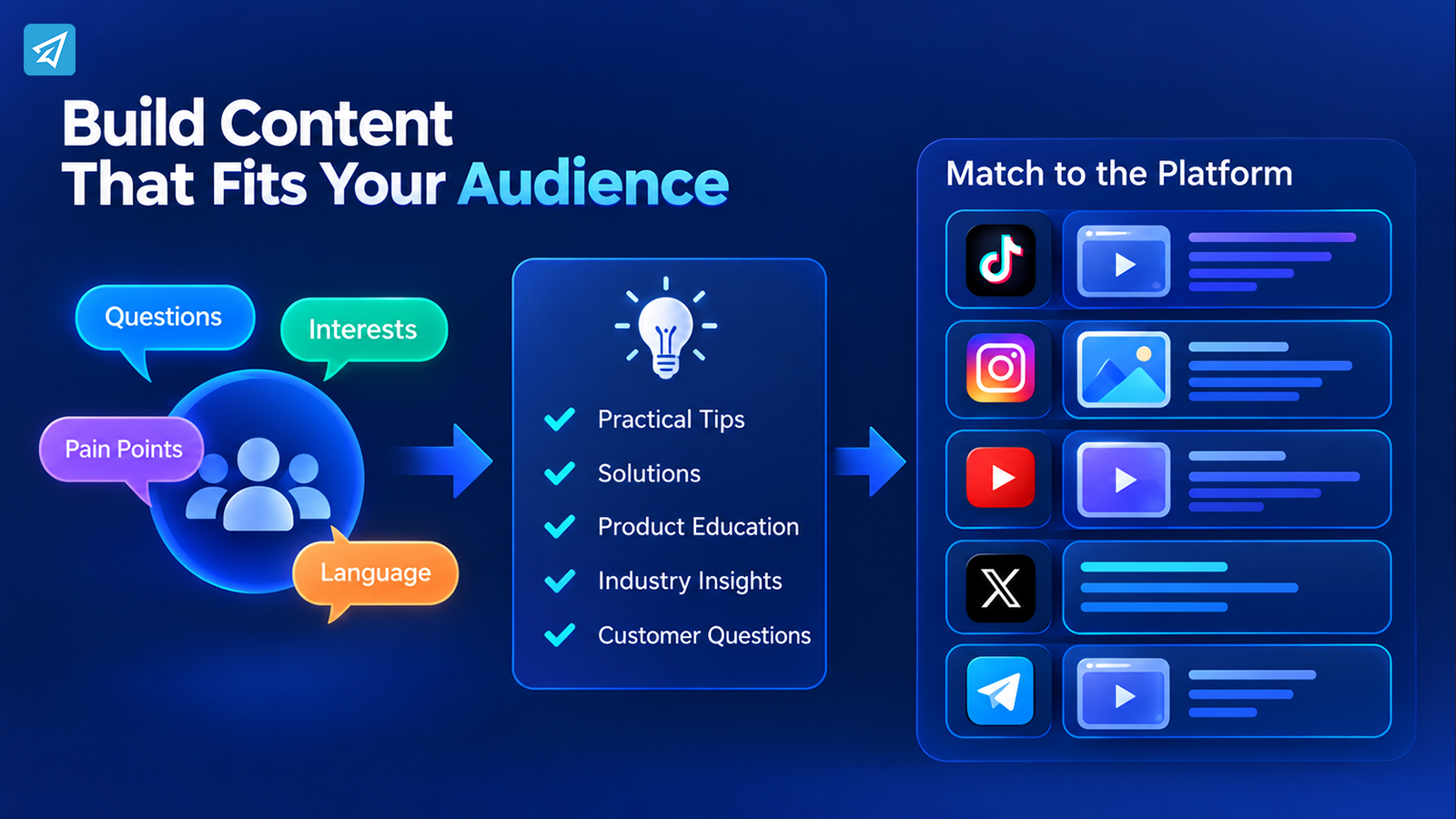
The next step is to move from “What should we post?” to “What does this audience need from us?”
Suppose a small e-commerce brand sells skincare products. Instead of creating another generic product announcement, the team could identify a specific audience question such as choosing a routine for a particular skin concern.
That changes the post from:
“Here is our new product.”
to:
“Here is how to solve a problem your audience already recognizes.”
Audience research can come from comments, customer questions, search behavior, community discussions, previous posts, and social listening.
The goal is not to insert as many keywords as possible. It is to understand the language, questions, frustrations, and interests that matter to the people you want to reach.
This also helps with social media post optimization because natural language is more useful than forcing a list of unrelated search terms into a caption.
Create Repeatable Content Themes
Once several audience needs have been identified, group them into a few recurring content themes.
For example, a SaaS company might build posts around:
- Practical tips
- Common workflow problems
- Product education
- Industry observations
- Customer questions
These themes make content production more consistent without making every post identical.
More importantly, they create a basis for comparison. If posts around one topic repeatedly generate stronger profile activity or discussion, that is a useful signal for the next content cycle.
Match the Post to the Platform
The same idea does not necessarily perform the same way everywhere.
A short educational video may be appropriate for TikTok or Instagram. A longer explanation may work better as a YouTube video. A concise update may suit X, while a Telegram channel may rely more heavily on direct subscriber distribution and community context.
The question is not simply:
“Which platform is popular?”
Ask instead:
“Where does this audience naturally discover and consume this type of content?”
Then adapt the post accordingly.
For visual platforms, the opening frame and visual hierarchy can determine whether someone stops scrolling. For short-form video, the opening seconds and pacing matter. For text-heavy environments, clarity and context become more important.
Platform-specific optimization also means adapting captions, keywords, calls to action, formats, and distribution methods instead of copying one post unchanged across every channel.
Improve the Path From Attention to Interaction
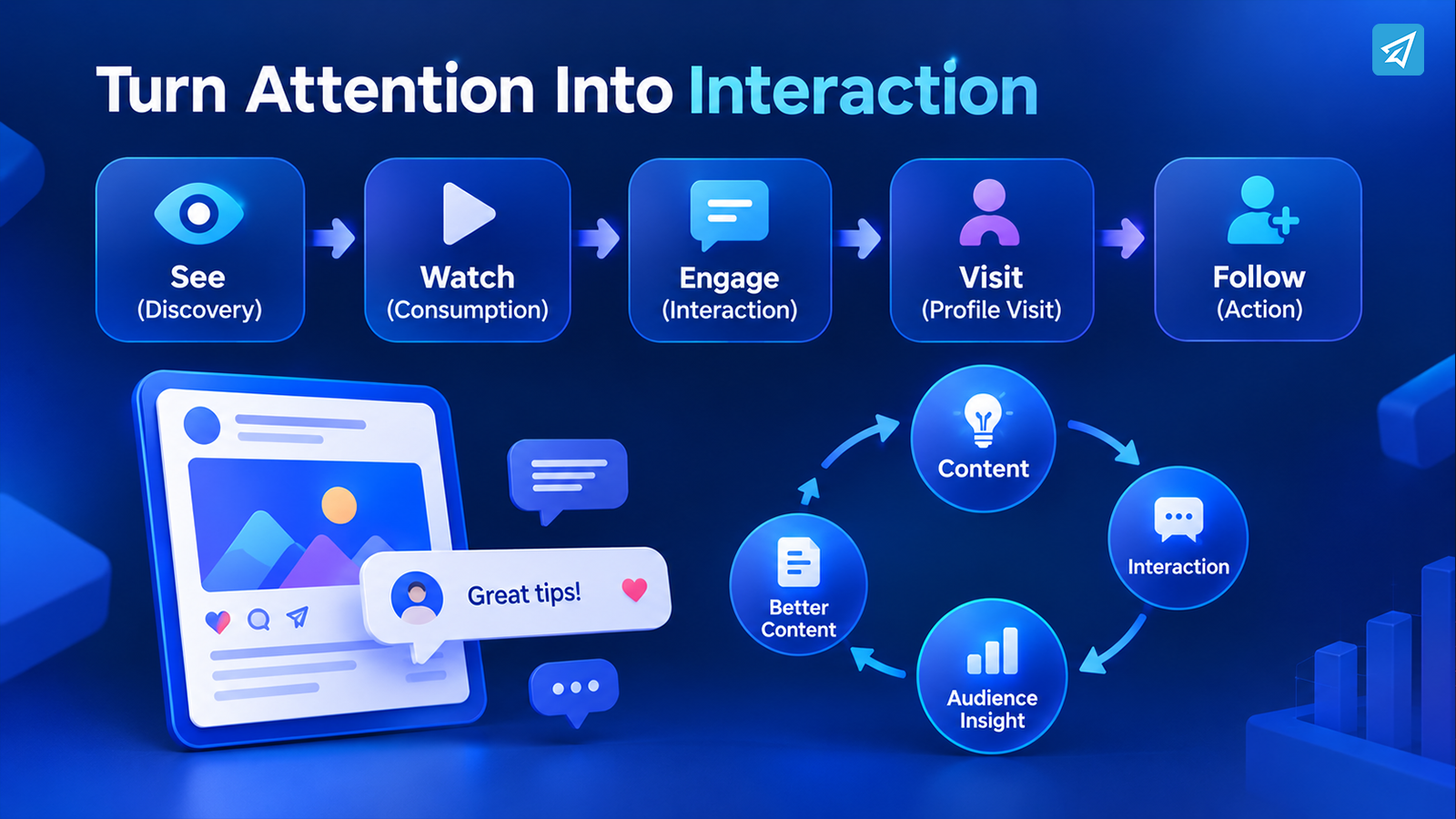
Getting someone to see a post is only one part of performance.
The post should make the next action obvious and relevant.
For example, an educational post could end with a question that invites readers to describe the problem they are facing. A tutorial could encourage people to save the post for later. A product-focused post could direct interested viewers to the profile for more information.
The action should match the content.
Do not ask for a comment simply because engagement is a metric. Give people a reason to participate.
This is where community management becomes part of content performance. When people ask questions or leave useful comments, responding to them can create additional conversations and reveal topics for future posts.
A successful post can therefore produce more than one result:
Content → Interaction → Audience Insight → Better Content
That feedback loop is more useful than treating each post as an isolated event.
Make Discovery Part of the Post, Not an Afterthought
A strong post still needs a path to its intended audience.
Depending on the platform and content type, discovery can come from:
- Social search
- Recommendations and feeds
- Cross-platform distribution
- Communities
- Collaborations
- Existing followers
- Search-friendly captions and descriptions
- Repurposed content
But optimization should serve the content rather than replace it.
For example, if your audience searches for “how to improve Instagram engagement,” using that concept naturally in a relevant caption or video can make the post easier to understand. Repeating the same phrase excessively can make the content less useful and less natural.
Discovery works best when the topic, wording, profile, and actual content all communicate the same message.
Use Metrics to Decide What to Change
Social media analytics become useful when they lead to decisions.
Instead of asking only whether a post “did well,” compare the result with the stage you are trying to improve.
| Performance Signal | What It May Indicate | Next Action |
|---|---|---|
| High reach but weak interaction | The topic attracts attention but may not create enough participation | Test a stronger point of view, question, or interaction prompt |
| Strong views but few profile visits | The content is being consumed without creating enough curiosity about the account | Strengthen the connection between the post and the profile |
| Good engagement but limited reach | The content resonates with current viewers but discovery is constrained | Review distribution, topic demand, and platform fit |
| More profile visits but few follows | The post creates interest but the account does not clearly communicate ongoing value | Improve profile positioning and the reason to follow |
| Declining performance across similar posts | Audience interest, format, timing, or topic relevance may have changed | Compare recent patterns and test a different content variable |
The purpose is not to find one universal “best” metric.
It is to connect each metric to a specific decision.
For example, if views are rising while follower conversion remains weak, creating even more views may not solve the actual problem. The next experiment could instead focus on the profile, content positioning, or the connection between individual posts and the broader account.
Run Small Experiments Instead of Changing Everything
Once you identify a weakness, change one meaningful variable at a time where practical.
Imagine a creator has several posts covering the same subject. Instead of changing topic, format, posting time, caption, and visual style simultaneously, test a stronger opening while keeping the other elements reasonably consistent.
Then compare the results over multiple posts.
Useful experiments might include:
- Different hooks
- Different content formats
- Different topic angles
- Shorter or longer explanations
- Different calls to action
- Different distribution channels
- Different visual treatments
The objective is not to chase a single unusually high-performing post.
The objective is to discover patterns that can be repeated.
Where Supporting Tools Fit
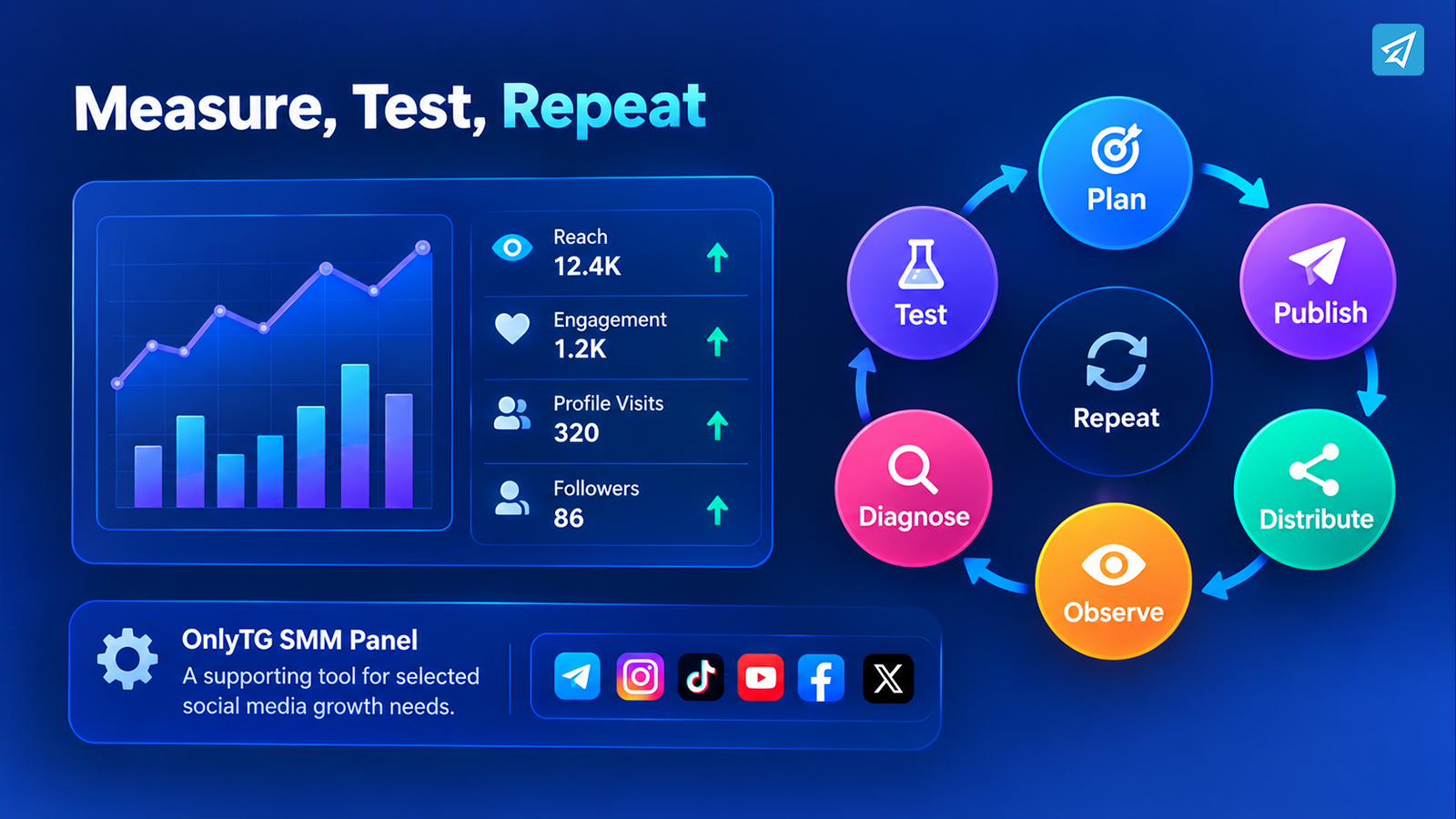
At this stage, you may identify an operational requirement involving a specific social media metric. This is where an SMM Panel can sit inside the workflow.
OnlyTG SMM Panel currently supports social media services across Telegram, Instagram, TikTok, YouTube, Facebook, and X, with available service categories including followers, views, reactions, and other listed metrics. The exact service, limits, pricing, and processing information should be checked in the current catalog before placing an order.
The distinction matters:
Strategy determines what should happen.
Content determines what people see.
Distribution determines how people discover it.
Analytics determine what needs to change.
Supporting tools can assist with selected execution tasks.
An SMM Panel should therefore not be treated as a substitute for audience research, content development, community management, platform strategy, or analytics. A change in a metric does not automatically mean that the content became more relevant or that the business generated more customers.
How to Use OnlyTG SMM Panel as a Supporting Tool
If an SMM panel fits a specific operational need, OnlyTG keeps the ordering process relatively straightforward. You can use the Telegram bot or the OnlyTG Console. The official documentation describes selecting a platform and growth type, choosing a service, reviewing its available details, entering the target link and quantity, and confirming the order.
Option 1: Telegram Bot
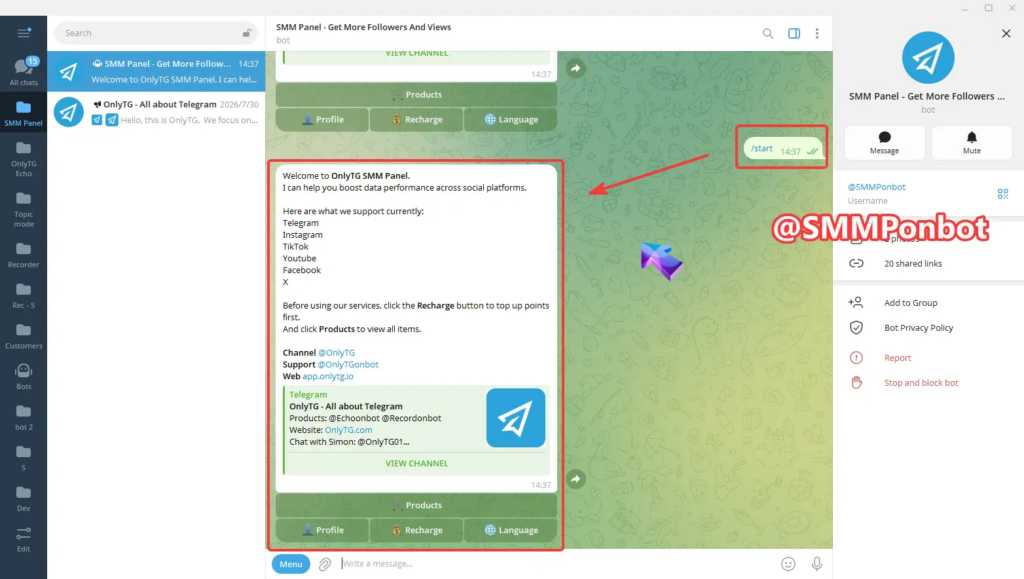
Step 1 — Open the Bot
Find @SMMPonbot on Telegram and send /start.
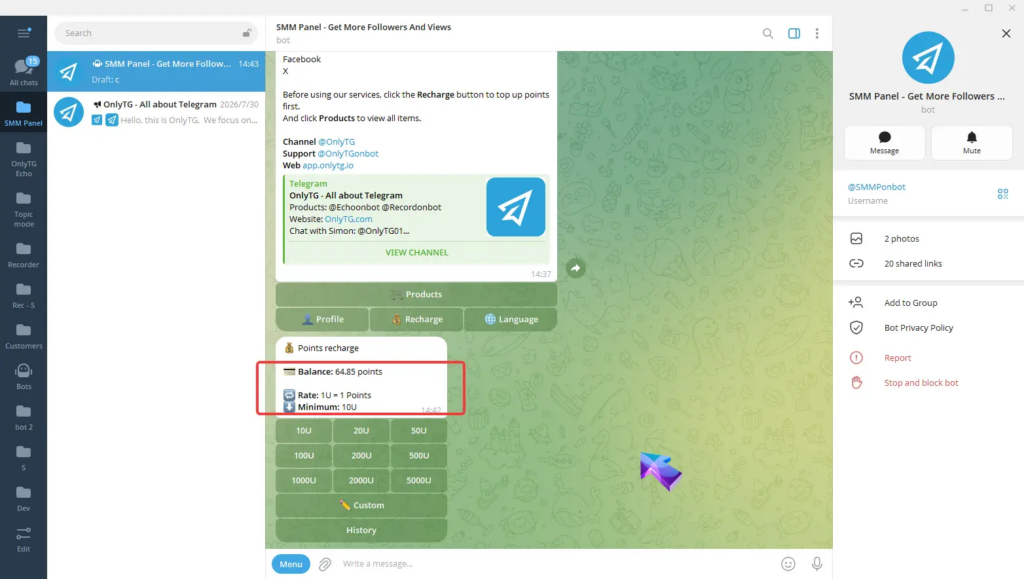
Step 2 — Add Balance
Use Recharge to fund the account. OnlyTG’s documentation currently lists 1 USDT = 1 point and a minimum recharge of 10 USDT.
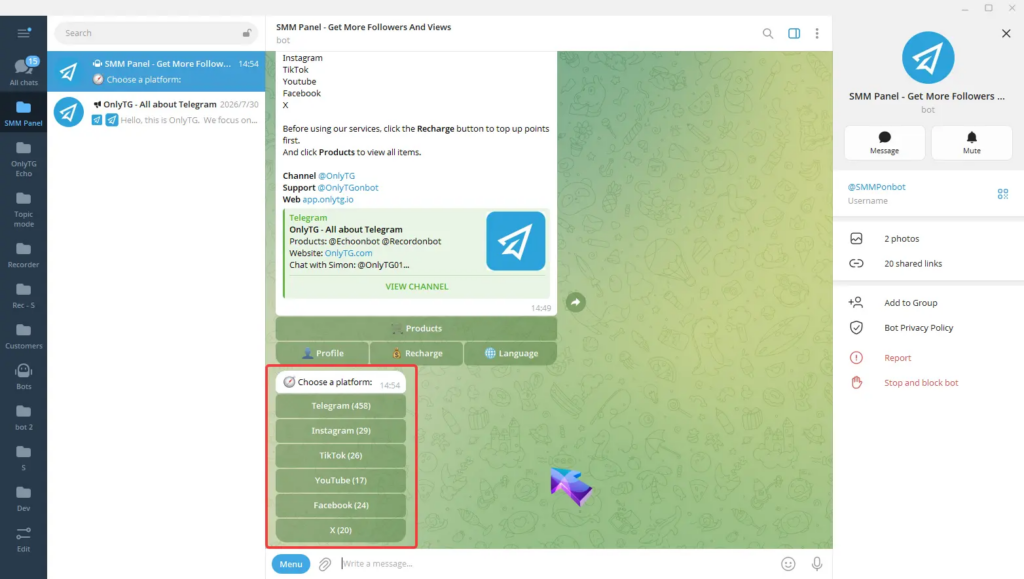
Step 3 — Select the Platform and Growth Type
Open Products, choose the platform, then select the relevant growth category.
Step 4 — Review the Service
Check the service information, including price, quantity information, estimated waiting time, and notes.
Step 5 — Create the Order
Select Buy, enter the target link and quantity, review the details, and confirm.
Step 6 — Monitor the Order
Use Profile → Orders to review order records and status.
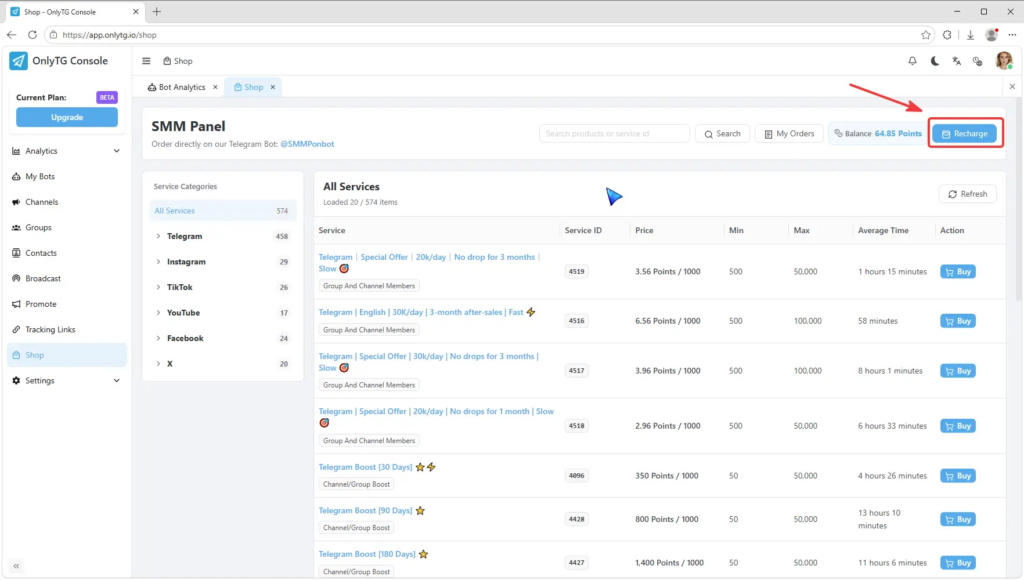
Option 2: OnlyTG Console
The Console provides a browser-based workflow.
Open app.onlytg.io, log in, and select Shop. Choose a platform and growth category, review the available services, enter the target link and quantity, and create the order. The Console also provides service details and an My Orders area for reviewing order records and statuses.
Build a Repeatable Optimization Cycle
Improving social media post performance should become a cycle rather than a one-time project.
A practical cycle looks like this:
Plan → Publish → Distribute → Observe → Diagnose → Test → Repeat
Start with a defined audience and objective.
Create content that addresses a recognizable need.
Adapt the content to the platform.
Give the post multiple appropriate discovery paths.
Respond to meaningful interaction.
Measure the metrics connected to your objective.
Then identify the weakest stage and make the next change there.
This approach also makes failure easier to understand.
A weak post does not necessarily mean the entire strategy is wrong. It may reveal a problem with the topic, format, distribution, audience fit, or conversion path.
The job of optimization is to identify which part needs attention.
Common Failure Points in the Workflow
Posting More Without Diagnosing the Problem
More posts cannot automatically fix weak audience relevance or poor distribution.
Optimizing for a Number Instead of an Outcome
A higher view count can be useful, but only when views are connected to the purpose of the campaign.
Copying One Platform’s Format Everywhere
A content idea can travel across platforms, but its presentation should reflect how people use each platform.
Changing Too Many Variables
If everything changes simultaneously, it becomes difficult to understand what caused the improvement or decline.
Treating Supporting Metrics as Business Results
Followers, views, reactions, and other social metrics are signals. They should not automatically be treated as customers, sales, revenue, or long-term audience relationships.
Final Takeaway
If you want to know how to improve social media post performance, start by looking at the complete journey rather than the post in isolation.
Define the outcome. Understand the audience. Build content around a relevant need. Adapt it to the platform. Create paths for discovery. Encourage meaningful interaction. Measure the stage that matters. Then use the evidence to decide what to test next.
Supporting tools can be useful when a specific execution requirement appears inside that process. OnlyTG SMM Panel can provide selected social media growth services across supported platforms, but the larger growth system still depends on strategy, content, distribution, audience relevance, and measurement.
The goal is not simply to make one post perform better. It is to build a process that makes the next post more informed than the last one.
Frequently Asked Questions
1. How can I improve social media post performance quickly?
Start by identifying the weakest stage of the post journey: discovery, consumption, interaction, profile conversion, or another relevant action. Then change one important variable, such as the topic angle, opening, format, distribution method, or call to action, and compare the results with similar posts.
2. Why do my social media posts get views but little engagement?
Views show that people are seeing the content, but they do not necessarily show that the content gives them a reason to participate. Review audience relevance, the value communicated in the post, the interaction prompt, and whether the content creates a natural reason to comment, save, share, or follow.
3. Can an SMM Panel improve social media post performance?
An SMM Panel can support selected social media growth and metric-related execution tasks, but it does not replace content strategy, audience research, platform selection, community management, or analytics. OnlyTG currently supports services across Telegram, Instagram, TikTok, YouTube, Facebook, and X, with the exact available services shown in its current catalog.