
Skip to content
OnlyTG Icon
  • ProductsExpand
    • Echo
    • Recorder
  • ResourcesExpand
    • Help
    • Blog
  • PricingExpand
    • Echo Pricing
  • EnglishExpand
    • 中文 (中国)
    • Русский
    • English
Contact us
OnlyTG Echo

Telegram Bot Analytics, Unlock Marketing Success

Home » Blog » OnlyTG Echo » Telegram Bot Analytics, Unlock Marketing Success

In today’s data-driven marketing and sales environment, Telegram Bot Analytics is fundamental to informed decision-making. For brands engaging customers on Telegram, actionable analytics are essential for optimizing operations and driving growth. However, Telegram’s native limitations—such as restricted access to user data and the absence of a dedicated marketing backend—create significant challenges for marketers aiming to understand and engage their audience effectively.

The Power of Telegram Bot Analytics

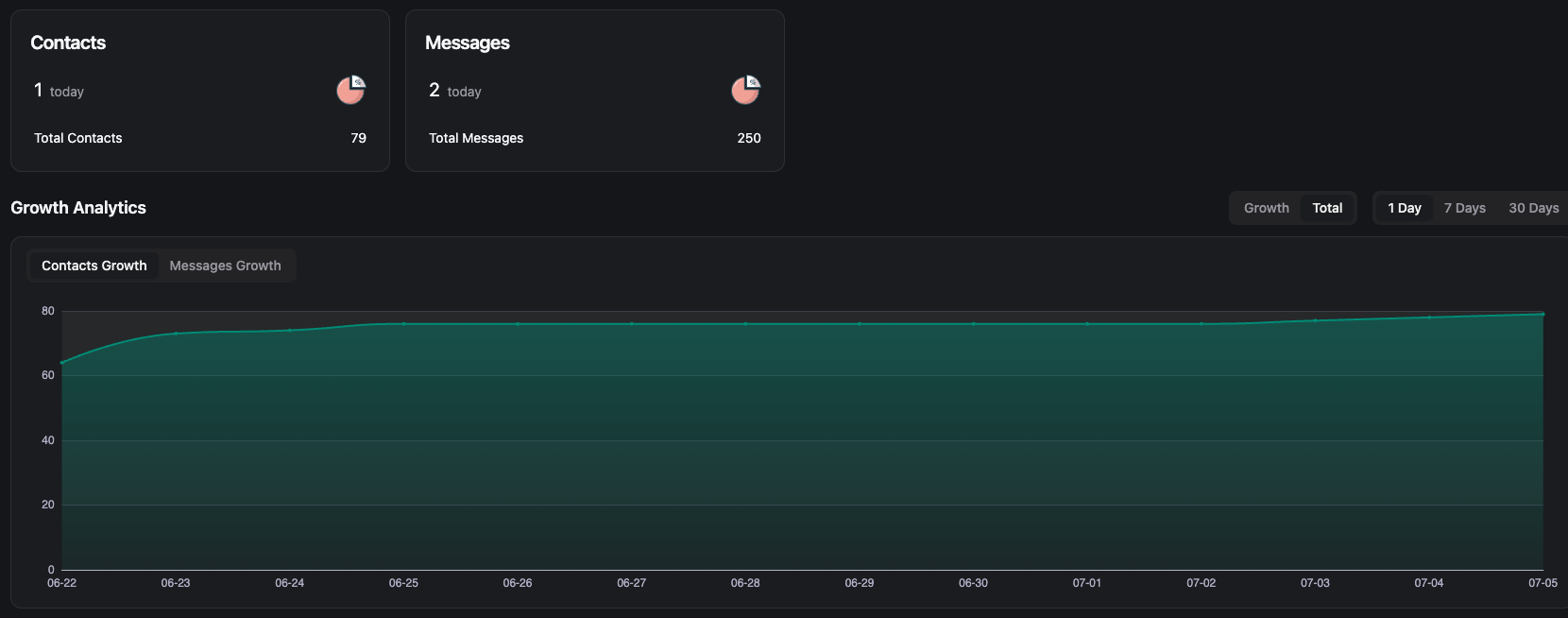
Telegram Bot Analytics bridges these gaps by providing deep insights into user behavior, campaign performance, and lead generation. By integrating analytics tools with your Telegram Bot, you can:
Telegram Bot Analytics
  • Track and analyze user engagement: Monitor message delivery, open rates, and interaction patterns.
  • Attribute leads to specific campaigns: Understand which marketing channels and messages drive the most conversions.
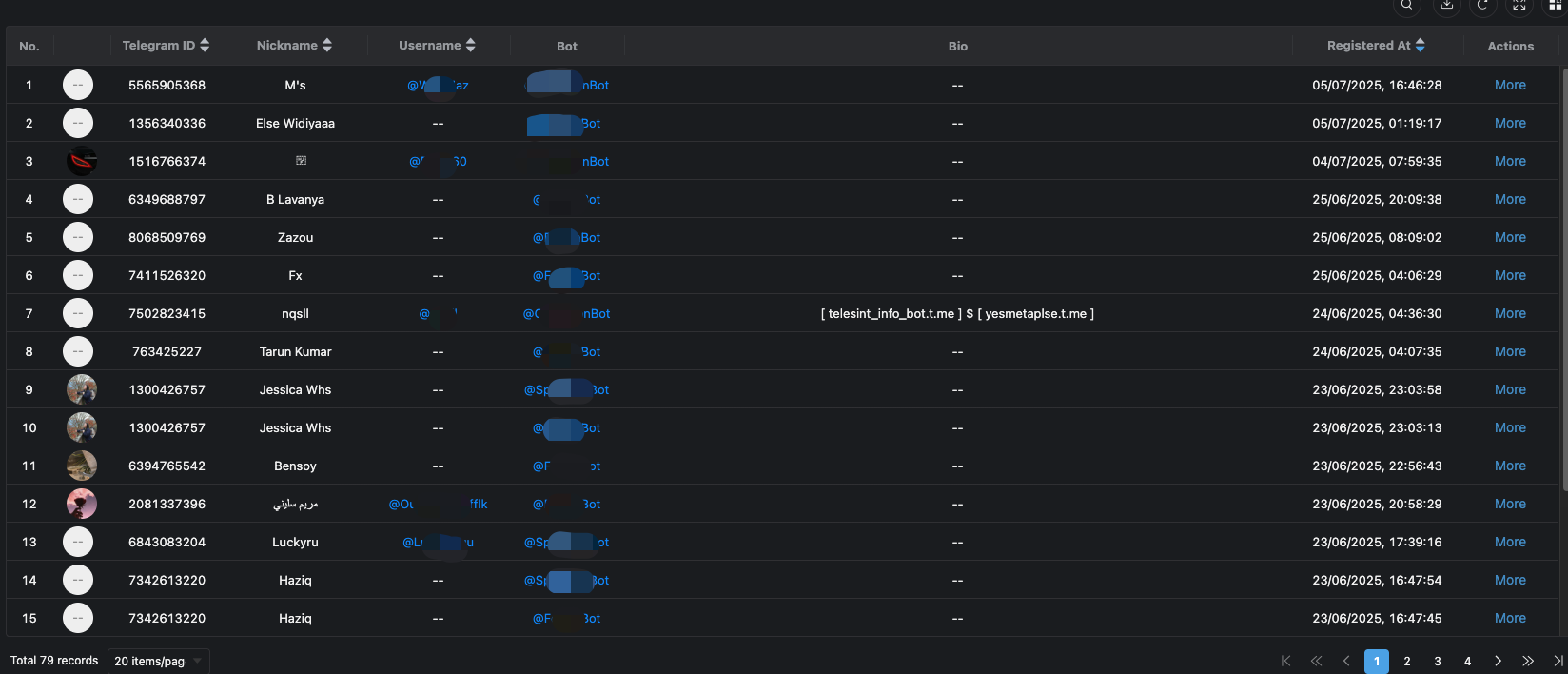
  • Gain visibility into customer profiles: Access data such as usernames, aliases, chat histories, and profile images for more personalized engagement.

OnlyTG Echo: Advanced Analytics for Telegram Bots

OnlyTG Echo elevates your Telegram marketing with a comprehensive analytics backend, empowering you to:

  • Automate conversation flows for seamless customer interactions.
  • Implement efficient keyword-based responses to boost productivity.
  • Customize user menus for tailored engagement experiences.

Through the OnlyTG Echo dashboard, marketers can:

  • View detailed customer data, including usernames, previous aliases, chat histories, and profile pictures.
  • Track every lead and measure the effectiveness of each marketing channel in real time.
  • Generate actionable insights to refine strategies and optimize product recommendations.

Key Benefits for Marketers
Telegram Bot Analytics
  • Data-Driven Decisions: Leverage analytics to make smarter marketing choices and maximize ROI.
  • Enhanced Customer Understanding: Use comprehensive data to personalize communication and improve engagement.
  • Streamlined Operations: Centralize analytics and reporting for efficient campaign management.

Maximize your Telegram marketing impact and streamline your operations—harness the full potential of Telegram Bot Analytics with OnlyTG Echo.

Create Your Own Telegram Business Bot by OnlyTG Echo!

OnlyTG Echo, your 24/7 marketing assistant. Let it handle routine queries, protect your account, and keep customers engaged—all while you focus on growing your business. Try it now and transform how you connect on Telegram!

OnlyTG Echo Bot: https://t.me/echoonbot

Official Telegram Channel: https://t.me/onlytg

Source: https://onlytg.io/onlytg/telegram-bot-analytics-unlock-marketing-success.html

Post Tags: #bot#Telegram

Post navigation

Previous Previous
Trigger Keywords and Auto-reply, Telegram Smart Bot Building  
NextContinue
Which Telegram Bots Can Help Sending Canned Responses
Table of Contents
  • The Power of Telegram Bot Analytics
  • OnlyTG Echo: Advanced Analytics for Telegram Bots
  • Key Benefits for Marketers
  • Create Your Own Telegram Business Bot by OnlyTG Echo!
Echo Sidebar
  • Latest Post
  • Echo
  • Recorder
  • Tips
Telegram Tips

How to find similar Telegram groups and channels via related recommendations

There are many public channels and groups on Telegram. Each channel or group usually focuses on a specific topic, and…

Telegram Tips

How to Advertise on Telegram

There are mainly three ways to advertise on Telegram: official ad direct placement, third-party cooperative ads, and promotion within your…

Telegram Tips

How to Buy Cryptocurrency/USDT

The first step in buying cryptocurrencies is usually to purchase USDT, then exchange USDT for other coins like BTC, ETH,…

Telegram Tips

How to Buy Telegram Stars

Stars is a virtual currency officially launched by Telegram for purchasing paid content within Telegram. Stars is not classified as…

Telegram Tips

What is the purpose of Telegram group and channel levels? How to boost?

In Telegram, Levels act like an “experience bar” for public groups and channels. As a community reaches higher levels, it…

Telegram Tips

What are the actual benefits of a Telegram Premium subscription, and how to purchase it?

Telegram Premium is a subscription service that unlocks enhanced limits and exclusive features while supporting the app’s independent development. What…

Telegram Tips

How to change the display language in Telegram

To change the language on Telegram, you can head into the settings. Telegram supports dozens of languages, and many are…

Telegram Tips

What exactly is the difference between Telegram channels and groups?

The main difference is the direction of communication: Groups are for chatting with others (two-way), while Channels are for broadcasting…

How to Loop Post in Channel via Telegram Bot

OnlyTG Echo provides the function to automatically loop posts in your channel. Firstly, you need to create a new bot via @botfather and…

How to Configure Multiple Media when Setting OnlyTG Echo Features

OnlyTG Echo provides the function to configure multiple media to a single message when setting Start Message/Auto Reply/Quick Reply/Broadcast and other features. Firstly, you need…

How to Upgrade Channel to Pro Channel in Telegram

OnlyTG Echo provides the function to upgrade your channel to Pro Channel. This will consume your Pro Communities slots and unlock more advanced features….

How to Edit a Published Post via Telegram Bot

OnlyTG Echo provides the function to Edit Channel Post via your bot. Firstly, you need to create a new bot via @botfather and…

How to Publish Channel Post via Telegram Bot

OnlyTG Echo provides the function to Publish Channel Post via your bot. Firstly, you need to create a new bot via @botfather and…

How to Manage Channel via Telegram Bot

OnlyTG Echo provides the function to Manage Channel via your bot. Firstly, you need to create a new bot via @botfather and send its…

How to Send Group Greeting via Telegram Bot

OnlyTG Echo provides the function to send the Greeting Message to new members joining the group. Firstly, you need to create a new…

How to Set Group CAPTCHA via Telegram Bot

OnlyTG Echo provides the function to send the CAPTCHA test to new members joining the group. Firstly, you need to create a new bot…

How to Use OnlyTG Recorder?

Welcome to OnlyTG Recorder! Developed by our dedicated bot development team, OnlyTG Recorder is designed to serve as an assistant…

How to find similar Telegram groups and channels via related recommendations

There are many public channels and groups on Telegram. Each channel or group usually focuses on a specific topic, and…

How to Advertise on Telegram

There are mainly three ways to advertise on Telegram: official ad direct placement, third-party cooperative ads, and promotion within your…

How to Buy Cryptocurrency/USDT

The first step in buying cryptocurrencies is usually to purchase USDT, then exchange USDT for other coins like BTC, ETH,…

How to Buy Telegram Stars

Stars is a virtual currency officially launched by Telegram for purchasing paid content within Telegram. Stars is not classified as…

What is the purpose of Telegram group and channel levels? How to boost?

In Telegram, Levels act like an “experience bar” for public groups and channels. As a community reaches higher levels, it…

What are the actual benefits of a Telegram Premium subscription, and how to purchase it?

Telegram Premium is a subscription service that unlocks enhanced limits and exclusive features while supporting the app’s independent development. What…

How to change the display language in Telegram

To change the language on Telegram, you can head into the settings. Telegram supports dozens of languages, and many are…

What exactly is the difference between Telegram channels and groups?

The main difference is the direction of communication: Groups are for chatting with others (two-way), while Channels are for broadcasting…

  • OnlyTG
  • Echo
  • Recorder
  • Help
  • Blog
  • Echo Pricing
OnlyTG EchoTelegram VK YouTube Facebook X Email

© 2026 OnlyTG

Scroll to top
  • Products
    • Echo
    • Recorder
  • Resources
    • Help
    • Blog
  • Pricing
    • Echo Pricing
Contact us