
If you want to create Telegram account for e-commerce leads in 2026, the goal is not just signing up and sending messages. The real goal is building a reliable Telegram presence that can capture inquiries, protect customer trust, organize conversations, and support repeat sales.
Telegram is now much more than a private messaging app. Its official Business features, channels, groups, bots, and advertising options make it useful for stores that sell physical products, digital products, services, subscriptions, or community-based offers.
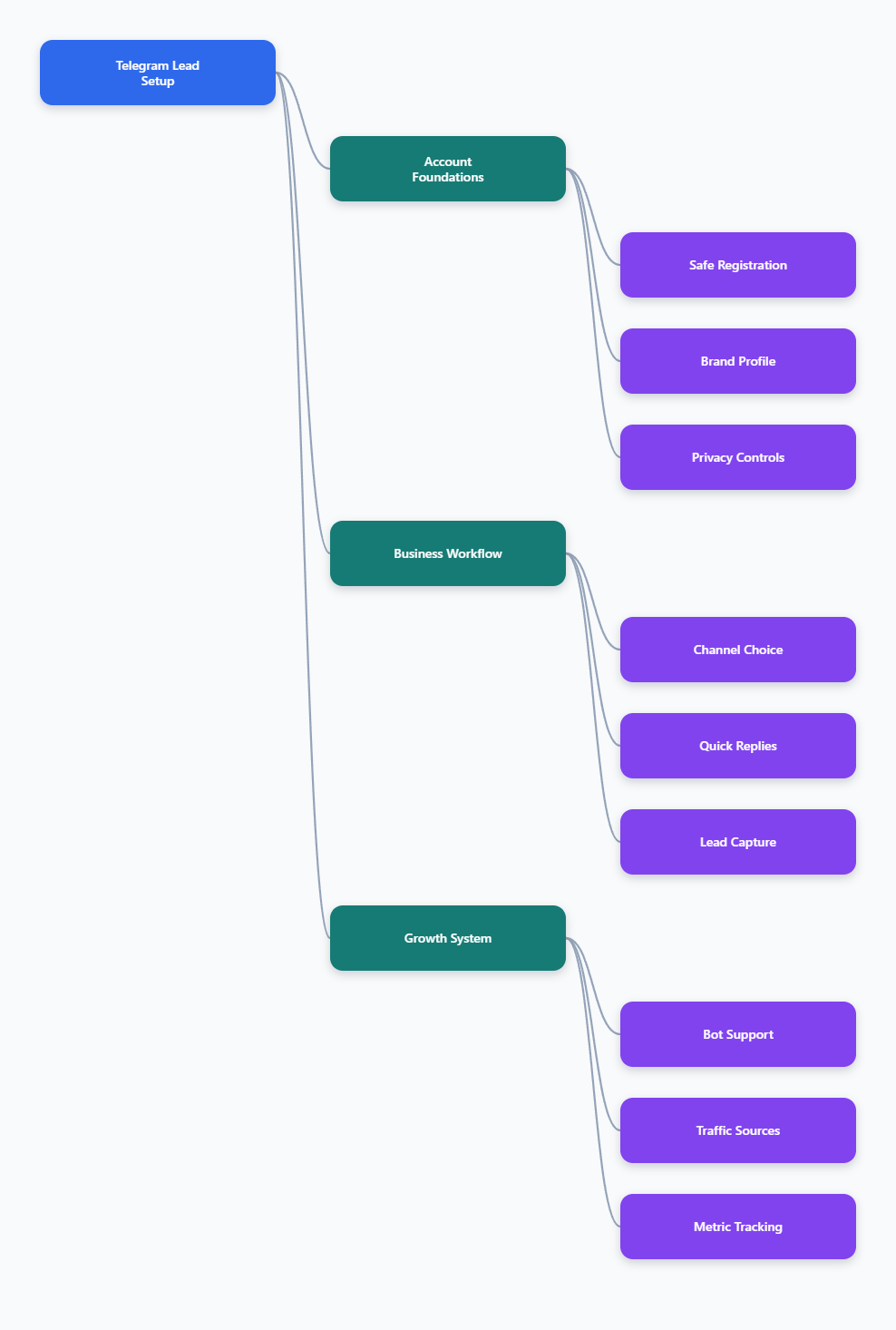
This guide walks you through the full setup in a practical way. You will learn how to register correctly, configure privacy, choose between a channel and a group, use Telegram Business tools, and build a simple lead workflow that works for e-commerce.
Why Telegram Matters for E-Commerce Leads in 2026
Telegram has become a serious customer communication channel because it combines speed, low friction, and direct reach. According to Telegram Ads, Telegram reaches 1 billion monthly users and public broadcast channels generate massive monthly views.
For e-commerce, that matters because buyers often want quick answers before they purchase. They may ask about sizing, shipping, payment options, product availability, returns, or discounts.
Telegram gives brands a place to handle those questions without forcing users through long forms or slow email threads. It also gives you tools to broadcast updates, build private communities, and connect bots for automation.
Where Telegram Fits in the Buyer Journey
Telegram is especially useful between discovery and purchase. A shopper may discover your brand through search, social media, ads, influencers, or a marketplace listing, then use Telegram to ask a question before buying.
Common lead moments include:
- Asking whether a product is in stock
- Requesting a coupon or bundle offer
- Checking delivery times before checkout
- Joining a product drop or VIP list
- Getting support after the first purchase
The best setup turns these moments into structured conversations instead of scattered chats.
What Telegram Is Not
Telegram is not a replacement for your website, checkout, CRM, or email list. It works best as a fast communication layer that supports those systems.
You should not use Telegram for spam outreach, fake accounts, scraped lists, or misleading promotions. Those tactics damage deliverability, trust, and brand reputation.
How to Create Telegram Account for E-Commerce Leads Safely
To create Telegram account for e-commerce leads, start with a stable phone number that your business can control long term. Telegram uses phone numbers as the core identity layer for account registration, even though you can later hide the number from most users.
Do not build your store’s customer channel on a temporary number or a number controlled by a contractor. If you lose access to the number, you may lose reliable recovery access to the account.
Step 1: Download the Official Telegram App
Install Telegram only from the official app stores or Telegram’s official website. This reduces the risk of fake apps, credential theft, or modified clients.
You can use Telegram on iPhone, Android, desktop, and web. For business operations, it is common to use mobile for account control and desktop for faster customer replies.
Step 2: Register With a Reliable Number
Open Telegram, choose your country code, enter your phone number, and verify the code sent by Telegram. In some cases, Telegram may send the login code through an existing Telegram session if the number has been used before.
For e-commerce, use one of these safer options:
- A dedicated business mobile number
- A long-term eSIM line from a reputable carrier
- A company-controlled phone line assigned to customer communication
Avoid one-time verification services. They may work for initial signup, but they are risky for recovery, account ownership, and future verification.
Step 3: Set a Brand-Friendly Profile
Your profile should make it obvious that customers are talking to the right business. Use a clean logo, a simple display name, and a username that matches your store or brand as closely as possible.
Set up these basics before inviting customers:
- Profile photo: Use your logo or product mark
- Name: Use your brand name, not a personal nickname
- Username: Choose a short, memorable handle
- Bio: Explain what customers can ask here
Telegram usernames are public. Telegram’s FAQ explains that people can find you through global search and message you if you set a public username, even if they do not know your phone number.
Privacy and Security Settings You Should Configure First
Before using Telegram for business leads, configure privacy settings. This protects your number, reduces abuse, and makes the account safer for daily use.
Go to Settings > Privacy and Security and review each option carefully. Do this before you add your Telegram link to your website, ads, packaging, or social profiles.
Hide Your Phone Number
Telegram lets you control who can see your phone number. In most e-commerce cases, set phone number visibility to Nobody or restrict it to trusted contacts only.
This is important because customers do not need your registration number to contact your brand. They can use your public username, channel link, group link, or business chat link instead.
Control Who Can Add You
Review settings for calls, groups, profile photos, forwarded messages, and last seen status. A public business account can attract spam, so limit unnecessary exposure.
Useful defaults include:
- Limit who can call the account
- Restrict who can add the account to groups
- Keep personal profile details minimal
- Use a business-facing profile image
Turn On Two-Step Verification
Telegram supports two-step verification, which adds a password in addition to login codes. This is essential if multiple people help manage customer conversations.
Use a strong password and a recovery email that belongs to the business. Do not store credentials in shared chat messages.
Choose the Right Telegram Structure for Your Store
Many stores create a Telegram account and immediately invite everyone into one chat. That usually becomes messy.
Instead, choose the right structure based on how you want to communicate. Telegram channels, groups, business chats, and bots each serve a different purpose.
Channel, Group, Business Chat, or Bot?
A channel is best for broadcasting product drops, announcements, content, and offers. Telegram says channels can have unlimited subscribers, and only admins can post by default.
A group is best for discussion and community. Telegram supergroups can support large communities, but they need moderation, rules, and anti-spam controls.
A business chat is best for one-to-one sales and support. A bot is best for repetitive workflows such as FAQs, order status routing, lead qualification, or collecting preferences.
| Telegram Tool | Best Use | E-Commerce Lead Example | Main Risk |
|---|---|---|---|
| Business Account | Direct customer conversations | Answer product questions before checkout | Slow replies if unmanaged |
| Channel | One-way broadcasts | Launch new arrivals or flash sales | Low interaction without comments |
| Group | Community discussion | VIP buyer club or product community | Spam and moderation workload |
| Bot | Automation and routing | Collect size, budget, and product interest | Poor UX if overcomplicated |
Recommended Setup for Most Stores
For a small or medium e-commerce brand, the cleanest setup is simple. Use one public-facing business account, one announcement channel, and optional automation through a bot.
A practical structure looks like this:
- Business account: Handles direct leads and support
- Channel: Publishes offers, product education, and launches
- Discussion group: Optional for community-based brands
- Bot: Optional for FAQs and lead qualification
This keeps sales conversations private while still giving your audience a public place to follow updates.
When to Avoid a Public Group
Do not create a public group just because competitors have one. Groups require active moderation, clear rules, and fast spam removal.
A public group is useful if customers benefit from talking to each other. It is not ideal if your product involves sensitive orders, private support, medical topics, financial issues, or high complaint risk.
Set Up Telegram Business Features
Telegram Business lets users turn a regular account into a business-ready profile with features such as opening hours, location, quick replies, greeting messages, away messages, start pages, chat labels, and chatbot support. Telegram introduced these features to make customer communication easier inside the regular app.
Some Business features have been associated with Telegram Premium access, while connected business bots may also be available to non-Premium users according to Telegram’s developer documentation. Check the current Telegram app because availability and pricing can change by region and account status.
Add Hours, Location, and Start Page
If your store has support hours, publish them clearly. This sets expectations and reduces frustration when customers message outside working hours.
Your start page should answer three questions quickly:
- What does your store sell?
- What can customers ask here?
- How fast should they expect a reply?
For example: “Message us for sizing help, order questions, and restock alerts. Support hours: Mon-Fri, 9:00-18:00.”
Create Quick Replies
Quick replies are one of the most useful Telegram Business tools for e-commerce. They help your team answer common questions without typing from scratch.
Create short templates for:
- Shipping times
- Return policy
- Size guide
- Payment methods
- Wholesale inquiries
- Restock notifications
Keep replies human. A good quick reply saves time but still sounds like your brand.
Use Greeting and Away Messages
Telegram Business supports automated greeting messages for new conversations and away messages when you are offline or outside business hours. These features are useful because lead response time affects conversion.
A strong greeting message can say:
“Thanks for messaging BrandName. Tell us the product you are interested in, your country, and your question. A team member will reply during support hours.”
Away messages should be honest and specific. Do not promise instant replies if your team cannot deliver them.
Build a Simple Lead Capture Workflow
Once the account is ready, design the lead flow. A good Telegram workflow should collect enough information to help the buyer without making the conversation feel like a form.
The simplest workflow has four stages: attract, qualify, answer, and convert. You can run it manually at first, then automate repeated steps later.
Stage 1: Attract the Right People
Place your Telegram link where high-intent shoppers already are. Do not only put it in your footer.
Useful placements include:
- Product pages for expensive or complex items
- Checkout help sections
- Instagram, TikTok, YouTube, and X profiles
- Email campaigns for VIP drops
- Packaging inserts for repeat purchases
- Post-purchase support pages
Use clear calls to action such as “Ask us on Telegram before you order” or “Join Telegram for restock alerts.”
Stage 2: Qualify Without Friction
Ask only what you need. For most e-commerce leads, three questions are enough.
- Which product are you interested in?
- Where should we ship it?
- What do you need help deciding?
If you sell apparel, add size and fit questions. If you sell B2B products, ask about quantity, timeline, and company type.
Stage 3: Convert the Conversation
Do not leave qualified leads inside Telegram with no next step. Send them to the correct product page, checkout page, quote form, or payment flow.
Use specific links instead of your homepage. If the customer asked about a red leather bag, link directly to that product or collection.
After sending the link, add a helpful closing line: “If you want, send a screenshot before payment and we will confirm the correct option.”
Use Bots Carefully for Scale
Telegram bots can handle repetitive work, but they should not make buying harder. Telegram’s Bot API allows developers to build bots that interact through messages, buttons, commands, and integrations.
In 2026, Telegram also supports business bot connections and more advanced automation options. However, your first bot should be simple.
Good Bot Use Cases
Start with tasks that are repetitive and low risk. These are ideal for automation:
- FAQ menus
- Order status routing
- Product recommendation intake
- Restock alert signup
- Warranty or return instructions
- Lead tagging before human reply
A bot should help the customer reach the right answer faster. If it blocks human support, it will reduce trust.
What Not to Automate First
Do not automate complex complaints, refunds, high-ticket negotiations, or sensitive customer issues too early. These conversations need human judgment.
Also avoid asking for unnecessary personal information inside Telegram. Collect only what you need for sales or support, and move payment or account-sensitive steps to secure systems.
BotFather and Development Options
Telegram’s official bot setup starts with BotFather, Telegram’s tool for creating and managing bots. Developers can then connect the bot to the Telegram Bot API.
If you do not have a developer, start with no-code chatbot tools or keep the workflow manual. A simple manual system often beats a complicated bot that customers abandon.
Promote Your Telegram Lead Channel Without Spamming
After you create Telegram account for e-commerce leads, growth depends on trust. People join and message when the value is clear.
Make your Telegram offer specific. “Follow us on Telegram” is weak. “Join Telegram for early restock alerts and private launch reminders” is stronger.
Use Organic Traffic First
Start with your existing audience before buying traffic. Add Telegram CTAs to your website, emails, packaging, social bios, and post-purchase flows.
Organic traffic helps you test whether the channel converts. If current customers do not find it useful, cold traffic probably will not either.
Consider Telegram Ads Carefully
Telegram’s official ad platform lets advertisers display sponsored messages in public one-to-many channels with at least 1,000 subscribers. Telegram ads are based on channel context rather than personal user tracking.
This can work well if you know which channels your buyers read. Start with small tests, strong landing offers, and clear tracking links.
Track Basic Metrics
You do not need a complex dashboard at first. Track the numbers that show whether Telegram is helping sales.
- New Telegram conversations per week
- Channel subscriber growth
- Click-throughs to product pages
- Qualified leads from Telegram
- Orders influenced by Telegram chats
- Average response time
If response time is slow, fix operations before increasing promotion.
Common Mistakes to Avoid
Most Telegram lead problems come from weak setup, unclear ownership, or aggressive promotion. Avoid these mistakes before they become expensive.
Using a Disposable Number
A disposable number may seem convenient, but it creates recovery risk. Use a number your business controls long term.
Your Telegram account is a customer asset. Treat access like you would treat your store admin login.
Mixing Personal and Business Identity
Do not use a personal profile for serious e-commerce operations. Customers should see a consistent brand identity, not a random personal account.
If a founder is the face of the brand, make that intentional. Otherwise, use a brand profile and business-friendly username.
Creating Too Many Telegram Spaces
One account, three channels, two groups, and multiple bots can confuse customers. Start with the smallest structure that solves the problem.
For most stores, one business account and one channel are enough at the beginning.
Final Checklist for 2026
Before you publish your Telegram link, run through this checklist. It will prevent most setup problems.
- Use an official Telegram app or website
- Register with a long-term business-controlled number
- Set a brand name, logo, username, and clear bio
- Hide or restrict phone number visibility
- Enable two-step verification
- Create quick replies for common e-commerce questions
- Add greeting and away messages if available
- Choose channel, group, bot, or business chat based on purpose
- Place Telegram CTAs on high-intent pages
- Track leads, clicks, response time, and sales influence
The safest way to create Telegram account for e-commerce leads in 2026 is to build it like a real customer communication system, not a throwaway chat account. Start with secure registration, protect privacy, use Telegram Business features where they help, and design every conversation around a clear next step.