
A Button in Telegram looks simple, but it often decides whether a subscriber reads, clicks, joins, buys, or disappears. In 2026, Telegram is no longer just a broadcast app for crypto alerts or private communities. It is a full marketing layer with channels, groups, bots, Mini Apps, paid subscriptions, and automation-friendly APIs.
The challenge is that most operators still use buttons like decoration. They add too many choices, link to weak landing pages, or force users to type commands that should be one tap away.
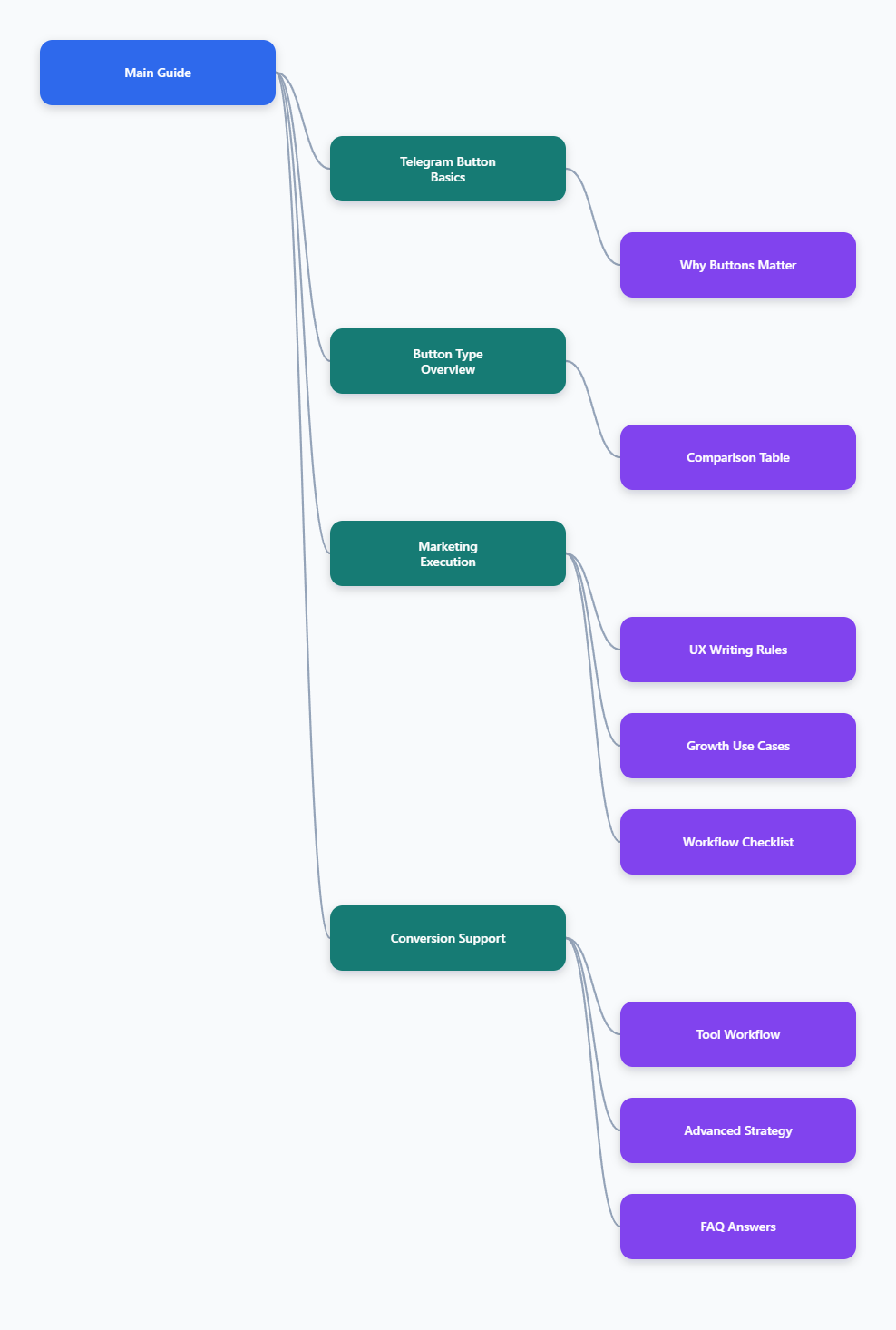
This guide explains how to use a Button in Telegram correctly across channels, bots, and marketing funnels. You will learn the main button types, UX rules, funnel use cases, common mistakes, and a practical workflow for turning passive Telegram traffic into measurable action.
Why Does a Button in Telegram Matter More in 2026?
Telegram passed 1 billion monthly active users in 2025, according to public statements from Pavel Durov reported by major tech media. That scale changes how marketers should think about Telegram. A channel post is no longer only a message. It can become a clickable entry point into a funnel.
A well-placed button reduces friction at the exact moment attention is highest. Instead of asking users to copy a link, search a bot, or scroll for a pinned post, you give them a clear next step.
For channel operators, buttons help with:
- Driving traffic to websites, product pages, lead forms, or community groups.
- Segmenting users by interest with different calls to action.
- Sending readers from a public broadcast into a private support or sales flow.
- Improving content navigation inside long-running communities.
- Making campaigns easier to track through tagged URLs and bot events.
The core rule is simple: every button should answer one user question. What should I do next?
What Types of Telegram Buttons Can Marketers Use?
Telegram supports several interaction patterns. The best choice depends on whether you are publishing to a channel, building a bot, or designing a more complex in-app experience.
Inline Buttons
Inline buttons appear directly under a message. They are commonly used for links, callbacks, Mini App launches, and quick actions. Telegram Bot API documentation describes inline keyboard buttons as buttons attached to messages, with each button using one action type such as a URL, callback data, Web App, or copy text.
For marketers, inline buttons are the most visible option because they sit beside the content that created the intent.
Reply Keyboards
Reply keyboards replace the user’s typing area with predefined options. They are useful inside bots when users need to choose from repeat actions such as “Support,” “Pricing,” “My Account,” or “Back.”
They are less suitable for channel posts because they belong to bot conversations, not broadcast publishing.
Command Menus
Command menus let users select bot commands without typing slash commands manually. They are useful for orientation, especially when a bot has several features.
However, commands are not a replacement for good button design. A user who just read a post about a product launch should see a direct launch button, not a generic menu.
Mini App Buttons
Telegram Mini Apps allow developers to open web-based interfaces inside Telegram. Telegram’s official Mini Apps documentation describes support for custom web interfaces, device storage, secure storage, and deeper bot integration.
Use a Mini App when a simple button flow becomes too complex, such as product catalogs, onboarding dashboards, games, wallets, or checkout-like experiences.
Button in Telegram: Comparison Table for Real Marketing Use
The table below compares common Telegram button patterns using platform-supported behavior and practical marketing fit.
| Button Type | Where It Appears | Best Use Case | Key Limitation | Marketing Tip |
|---|---|---|---|---|
| Inline URL Button | Under a bot or channel message sent through a bot | Website visits, landing pages, checkout pages, campaign links | Requires a clear destination; weak pages waste clicks | Add UTM tags to separate Telegram traffic from other sources |
| Inline Callback Button | Under bot messages | Polls, menus, lead qualification, multi-step flows | Callback data is limited by Bot API rules and needs backend handling | Use short labels and store complex state on your server |
| Reply Keyboard | Inside bot chat input area | Support menus, account actions, repeat navigation | Can feel intrusive if it stays visible too long | Show only the top actions and include a reset or back option |
| Command Menu | Bot menu near message field | Basic bot discovery and help navigation | Less contextual than buttons attached to content | Keep commands predictable: start, help, settings, support |
| Mini App Button | Bot menu, inline button, or app entry point | Catalogs, onboarding, dashboards, interactive tools | Requires web development and Telegram Web App integration | Use when users need more than two or three taps |
How Should You Design a Button in Telegram for Higher Clicks?
Button design is not only a technical decision. It is a UX decision. Telegram users scan quickly, especially in busy channels where several posts arrive every hour.
Good button design starts before the button. The post must create enough context so the button feels like the obvious next step.
Use One Primary Action
A common mistake is adding four buttons under every post: website, group, support, offer, and sometimes a second language version. Too many options slow the user down.
For most marketing posts, use one primary button and one secondary button at most. For example:
- Primary: “Get the Checklist”
- Secondary: “Ask a Question”
If a post has multiple audience segments, split the post into separate messages instead of forcing one button row to do everything.
Write Button Labels Like Micro-Copy
A button label should be specific. “Click Here” is weak because it hides the value. “Download SEO Checklist” is stronger because the user knows what happens next.
Useful label formulas include:
- Verb + asset: “Download Report”
- Verb + outcome: “Start Free Audit”
- Audience + path: “For Channel Owners”
- Time-based action: “Join Today’s Briefing”
Keep labels short. Telegram is mobile-first, and long labels can become visually heavy.
Match Button Intent to Funnel Stage
Do not ask a cold subscriber to buy immediately after a generic educational post. Use the button to move the user one logical step forward.
A practical funnel looks like this:
- Awareness post: button to a guide, checklist, or explainer.
- Problem post: button to a case study, comparison, or calculator.
- Decision post: button to a demo, bot flow, or offer page.
- Retention post: button to support, feedback, or loyalty content.
This is especially important for Telegram channels where users may join because of content, not because they are ready to buy.
Where Do Telegram Operators Usually Get Buttons Wrong?
Most Telegram button problems are not caused by the API. They are caused by unclear intent, poor post structure, or missing tracking.
Here are the most common issues.
- Too many buttons: Users hesitate when every option looks equally important.
- Unclear labels: “More,” “Open,” or “Go” gives no reason to tap.
- Broken context: The post promises one thing, but the button opens another.
- No mobile testing: Labels that look fine on desktop may wrap badly on phones.
- No tracking: Without tagged links or bot events, you cannot tell which post worked.
- Dead-end flows: The user taps, enters a bot, and receives no clear next step.
The fix is to treat buttons as part of the content system, not as an afterthought. Write the post, define the action, choose the button, then test the full path.
How Can a Button in Telegram Improve Channel Growth?
Growth on Telegram depends on trust, repeat attention, and low-friction sharing. Buttons can support all three when used carefully.
For public channels, a button can move readers into a discussion group where community signals are stronger. For private communities, buttons can direct users to onboarding rules, support, or member-only resources.
For paid newsletters or premium channels, buttons can guide users to subscription information. Telegram Premium and Telegram Business features have also made users more familiar with paid, structured experiences inside the app.
Here are practical growth patterns:
- Referral posts: Add a button linking to an invite explanation page or bot flow.
- Content hubs: Use buttons to send users to evergreen guides instead of repeating links.
- Event reminders: Add a button for registration, calendar details, or replay access.
- Lead magnets: Send users from a channel post into a bot that delivers a file or checklist.
- Community routing: Use separate buttons for “Join Discussion” and “Read Rules.”
The best operators review button performance weekly. If users see the post but do not tap, the problem may be the offer. If they tap but do not convert, the destination may be weak.
Practical Workflow: Adding Buttons Without Creating Friction
Teams that publish often need a repeatable process. A simple workflow prevents rushed posts and inconsistent button behavior.
- Define the post objective. Choose one action: read, join, reply, download, buy, or share.
- Choose the button type. Use URL buttons for external pages, callback buttons for bot flows, and Mini Apps for complex tasks.
- Write the label last. The label should summarize the value created by the post.
- Test on mobile. Check tap target clarity, line breaks, link destination, and loading speed.
- Track the result. Use UTM parameters, bot analytics, or campaign-specific links.
- Review after 24 to 72 hours. Telegram posts often get fast early engagement, then a longer tail from pinned posts and forwards.
This workflow keeps the button connected to the content and the business goal.
Advanced Button Strategy for 2026 Telegram Marketing
In 2026, the strongest Telegram funnels combine three layers: content, interaction, and data. Buttons sit in the middle.
Start by mapping your channel content into categories. For example, a digital marketing channel may publish news, tutorials, case studies, offers, and community prompts. Each category should have its own button logic.
News posts may not need a button every time. Tutorials may point to templates. Case studies may point to a full breakdown. Offers may point to a demo or checkout. Community prompts may point to a discussion group.
This prevents button fatigue. If every post has a call to action, users learn to ignore them. If buttons appear when they are genuinely useful, users treat them as shortcuts.
Segment by Intent
Use different buttons to learn what your audience wants. For example, under a post about Telegram automation, one button could say “Bot Setup Guide” and another could say “Channel Growth Plan.” The click split reveals intent.
Do not overdo this. Two choices are enough for most tests. More choices create noise.
Connect Buttons to Retargeting Assets
If the button opens a website, use standard campaign tags. If it opens a bot, store the entry source when possible. The goal is to know which content created which action.
Telegram does not behave like a classic open web channel. Forwards, private groups, and dark social sharing can blur attribution. Clean button links are one of the few ways to keep measurement useful.
Use Buttons for Support Deflection
Buttons are not only for sales. They can reduce repetitive admin work. Add buttons to FAQs, refund rules, setup guides, and community guidelines.
This is especially valuable for channels attached to groups. When users ask the same question every week, turn the answer into a button-driven resource.
Operational Checklist for Better Telegram Buttons
Before publishing a post with a button, run this short checklist.
- One post has one primary action.
- The button label explains the benefit, not just the action.
- The destination matches the promise in the post.
- The link opens correctly on iOS, Android, and desktop if possible.
- Tracking parameters are added before publication.
- The bot or landing page gives users a clear next step.
- The button is not used only because competitors use one.
- The result is reviewed and documented for future posts.
This checklist looks basic, but it prevents the majority of campaign mistakes.
FAQ: Button in Telegram
What is a Button in Telegram?
A Button in Telegram is an interactive element attached to a bot message, channel post sent through a bot, bot menu, reply keyboard, or Mini App entry point. It lets users tap instead of typing or copying links.
Can I add a button to a normal Telegram channel post?
Native channel posting is limited compared with bot-powered posting. Many button workflows require a bot or an admin tool that can publish messages with inline keyboards. Always test permissions in a private channel before using it publicly.
What is the best button type for marketing?
For most campaigns, an inline URL button is the simplest choice because it sends users directly to a page. For qualification, support, or multi-step flows, callback buttons inside a bot are usually better.
How many buttons should I use under one post?
Use one primary button when possible. Two buttons can work if they represent clear choices. Avoid large button grids unless the user is inside a bot flow and expects navigation.
Do Telegram buttons improve SEO?
Telegram buttons do not directly improve Google rankings. They can indirectly support SEO by sending engaged users to indexed content, increasing content discovery, and helping distribute guides, landing pages, or blog posts.
Can a Button in Telegram open a Mini App?
Yes. Telegram supports Web App and Mini App experiences through its bot platform. This is useful when the user needs an interface more advanced than a simple link or menu.
How do I measure Telegram button performance?
Use UTM-tagged URLs for website traffic, campaign-specific links for channel posts, and bot-side event tracking for callback flows. Review clicks, conversions, replies, and drop-off points together.
Final Takeaway
A Button in Telegram is most powerful when it feels like a natural continuation of the post. It should not interrupt the user or force a decision too early. It should remove the next piece of friction.
In 2026, Telegram operators who win will not be the ones adding the most buttons. They will be the ones matching each button to intent, timing, content, and measurement. If you need a simpler publishing layer, tools like OnlyTG Echo@EchoOnBot can be tested carefully, but the real advantage still comes from clear strategy and useful content.