
Skip to content
OnlyTG Icon
  • ProductsExpand
    • Echo
    • Recorder
  • ResourcesExpand
    • Help
    • Blog
    • Channel & Bot Finder
    • SMM Panel
  • PricingExpand
    • Echo Pricing
  • EnglishExpand
    • 中文 (中国)
    • Русский
    • English
Contact us
Telegram Tips

How to Advertise on Telegram

Home » Blog » Telegram Tips » How to Advertise on Telegram

There are mainly three ways to advertise on Telegram: official ad direct placement, third-party cooperative ads, and promotion within your own channel. In general, the first two methods can show results in the short term, while the third requires long-term operation.

Advertising on Telegram’s Official Ad Platform

  1. Visit the official ad platform at https://ads.telegram.org, log in with your Telegram account, and top up with TON.

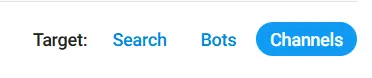
  2. Click “Create a New Ad,” which will display a template with many blank fields. First, select the target type in the upper right corner—currently supporting search, bot, and channel.

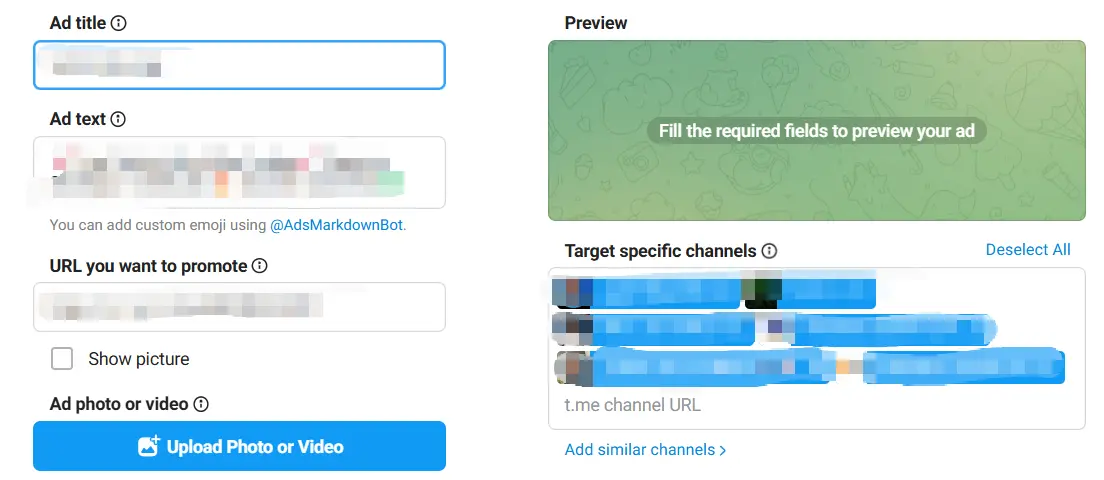
  3. Fill in the required information, including ad name, text, image, promotion link, and targeting (channel, bot, search queries), etc.
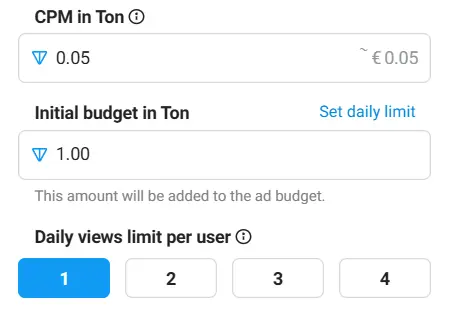
  4. Set the initial budget and CPM (cost per 1,000 impressions), and you can also limit daily impressions per user.
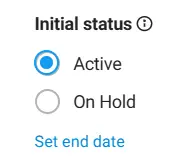
  5. Set the ad’s initial status—whether it goes Active or On Hold after approval. You can also click Ad Schedule to book a start time.
  6.  After completing all settings, click Create Ad in the lower right, then wait for ad approval to start running.
Third-Party Cooperative Ads

This method involves finding channels in Telegram suitable for your product or with a large number of subscribers, or searching online for larger third-party ad platforms like Telega.io. Contact the channel or platform operators to negotiate ad details and fees, then have them promote your product in their channels or on the platform.

Promotion in Your Own Channel

This approach requires you to first operate a channel and gradually grow the subscriber base to a certain scale, then post promotional content directly in the channel. This model usually takes longer to see results but can attract precise target users and conveniently handle user retention.

Post Tags: #Telegram

Post navigation

Previous Previous
How to Buy Cryptocurrency/USDT
NextContinue
How to find similar Telegram groups and channels via related recommendations
Table of Contents
  • Advertising on Telegram's Official Ad Platform
  • Third-Party Cooperative Ads
  • Promotion in Your Own Channel
Echo Sidebar
  • Latest Post
  • Echo
  • Recorder
  • Tips
Telegram Tips

Auto Reply Telegram Bot for Business Growth in 2026

Learn how businesses can use an Auto Reply Telegram Bot to improve Telegram customer support, lead capture, channel operations, and community marketing with OnlyTG Echo.

Telegram Tips

Auto Reply Telegram Bot Booking Service in 2026: Practical Playbook for Faster Leads, Cleaner Chats, and Better Conversions

Learn how to build an auto reply Telegram bot booking service in 2026, with practical workflows, message templates, automation rules, comparison tables, FAQ, and a light tool example for Telegram operators.

Telegram Tips

Auto Reply Telegram Bot for Store Inquiries in 2026: Practical Guide for Faster Customer Replies

Learn how to use an auto reply Telegram bot for store inquiries in 2026, reduce repetitive support work, improve response speed, and build a practical Telegram customer service workflow.

Telegram Tips

Auto Reply Telegram Bot for Business Support in 2026: A Practical Playbook for Faster Replies

Learn how an auto reply Telegram bot for business support can reduce response delays, handle FAQs, and improve handoffs in 2026 without making support feel robotic.

Telegram Tips

No Code Auto Reply Telegram Bot in 2026: A Practical Guide for Faster Community Support

Learn how to plan, set up, and optimize a no code auto reply Telegram bot in 2026 for community management, customer support, and Telegram marketing without over-automation.

Telegram Tips

Auto Reply Telegram Bot Off Hours in 2026: Practical Setup Guide for Teams, Channels, and Communities

Learn how to plan, write, and manage an auto reply Telegram bot off hours workflow in 2026, including business-hour rules, message templates, bot limits, community use cases, and practical automation tips.

Telegram Tips

Auto Reply Telegram Bot to Collect Leads in 2026: Practical Playbook for Marketers

Learn how to use an auto reply Telegram bot to collect leads, qualify prospects, reduce response time, and build a compliant Telegram marketing funnel in 2026.

Telegram Tips

Custom Message Auto Reply Telegram Bot Strategy in 2026: Practical Automation for Channels, Groups, and Business Chats

A practical 2026 guide to using a custom message auto reply Telegram bot without hurting community trust, including strategy, workflows, moderation tips, use cases, FAQs, and light tool recommendations.

How to Get Unbanned from Telegram in 2026: A Practical Step-by-Step Guide

If your Telegram account or phone number has been restricted, this guide explains how to confirm the ban, appeal to Telegram support, reduce spam flags, and avoid getting blocked again in 2026.

How to create telegram bot in 2026?

Learn how to create a Telegram bot in 2026 using BotFather, with step-by-step coding and no-code methods, plus tips for security, deployment, and choosing the best setup.

How to Loop Post in Channel via Telegram Bot

OnlyTG Echo provides the function to automatically loop posts in your channel. Firstly, you need to create a new bot via @botfather and…

How to Configure Multiple Media when Setting OnlyTG Echo Features

OnlyTG Echo provides the function to configure multiple media to a single message when setting Start Message/Auto Reply/Quick Reply/Broadcast and other features. Firstly, you need…

How to Upgrade Channel to Pro Channel in Telegram

OnlyTG Echo provides the function to upgrade your channel to Pro Channel. This will consume your Pro Communities slots and unlock more advanced features….

How to Edit a Published Post via Telegram Bot

OnlyTG Echo provides the function to Edit Channel Post via your bot. Firstly, you need to create a new bot via @botfather and…

How to Publish Channel Post via Telegram Bot

OnlyTG Echo provides the function to Publish Channel Post via your bot. Firstly, you need to create a new bot via @botfather and…

How to Manage Channel via Telegram Bot

OnlyTG Echo provides the function to Manage Channel via your bot. Firstly, you need to create a new bot via @botfather and send its…

How to Use OnlyTG Recorder?

Welcome to OnlyTG Recorder! Developed by our dedicated bot development team, OnlyTG Recorder is designed to serve as an assistant…

Auto Reply Telegram Bot for Business Growth in 2026

Learn how businesses can use an Auto Reply Telegram Bot to improve Telegram customer support, lead capture, channel operations, and community marketing with OnlyTG Echo.

Auto Reply Telegram Bot Booking Service in 2026: Practical Playbook for Faster Leads, Cleaner Chats, and Better Conversions

Learn how to build an auto reply Telegram bot booking service in 2026, with practical workflows, message templates, automation rules, comparison tables, FAQ, and a light tool example for Telegram operators.

Auto Reply Telegram Bot for Store Inquiries in 2026: Practical Guide for Faster Customer Replies

Learn how to use an auto reply Telegram bot for store inquiries in 2026, reduce repetitive support work, improve response speed, and build a practical Telegram customer service workflow.

Auto Reply Telegram Bot for Business Support in 2026: A Practical Playbook for Faster Replies

Learn how an auto reply Telegram bot for business support can reduce response delays, handle FAQs, and improve handoffs in 2026 without making support feel robotic.

No Code Auto Reply Telegram Bot in 2026: A Practical Guide for Faster Community Support

Learn how to plan, set up, and optimize a no code auto reply Telegram bot in 2026 for community management, customer support, and Telegram marketing without over-automation.

Auto Reply Telegram Bot Off Hours in 2026: Practical Setup Guide for Teams, Channels, and Communities

Learn how to plan, write, and manage an auto reply Telegram bot off hours workflow in 2026, including business-hour rules, message templates, bot limits, community use cases, and practical automation tips.

Auto Reply Telegram Bot to Collect Leads in 2026: Practical Playbook for Marketers

Learn how to use an auto reply Telegram bot to collect leads, qualify prospects, reduce response time, and build a compliant Telegram marketing funnel in 2026.

Custom Message Auto Reply Telegram Bot Strategy in 2026: Practical Automation for Channels, Groups, and Business Chats

A practical 2026 guide to using a custom message auto reply Telegram bot without hurting community trust, including strategy, workflows, moderation tips, use cases, FAQs, and light tool recommendations.

  • OnlyTG
  • Echo
  • Recorder
  • Help
  • Blog
  • Echo Pricing
  • Channel & Bot Finder
  • SMM Panel
OnlyTG EchoTelegram VK YouTube Facebook X Email

© 2026 OnlyTG

Scroll to top
  • Products
    • Echo
    • Recorder
  • Resources
    • Help
    • Blog
    • Channel & Bot Finder
    • SMM Panel
  • Pricing
    • Echo Pricing
Contact us