
Skip to content
OnlyTG Icon
  • ProductsExpand
    • Echo
    • Recorder
  • ResourcesExpand
    • Help
    • Blog
    • Channel & Bot Finder
    • SMM Panel
  • PricingExpand
    • Echo Pricing
  • EnglishExpand
    • 中文 (中国)
    • Русский
    • English
Contact us
OnlyTG Echo

4 Ways to Broadcast Messages on Telegram

Home » Blog » OnlyTG Echo » 4 Ways to Broadcast Messages on Telegram

In our daily use of Telegram, we sometimes need to send messages to multiple recipients. The optimal way to do this is via a Telegram bot (which we’ll cover later). Here are the main methods available:

1. Broadcast via Telegram Channel

Invite your contacts to follow your personal channel—this lets you send messages that need to reach multiple people at once. However, if a contact mutes your channel or hasn’t followed you, your messages may fail to get proper engagement.

2. Broadcast via Telegram Story

Telegram allows you to post public Stories, which you can use to share updates with your contacts. That said, these messages don’t appear in one-on-one chats; instead, they’re displayed in a separate section. Additionally, Stories have an expiration period, so your contacts might not see them in time.

3. Broadcast via Personal Account (Not Recommended)

We advise against this method. If the target accounts haven’t added you as a contact, frequent message-sending may trigger Telegram’s rules—resulting in message restrictions or, in severe cases, account suspension. While there are tools on the market that claim to automate message-sending via personal accounts (using scripts), avoid them to protect your account security.

4. Broadcast via Telegram Bot (Highly Recommended)

Telegram Bots offer robust third-party development interfaces—and our team at OnlyTG Echo specializes in Telegram Bot development. Using a Bot to send broadcast messages to contacts eliminates the risk of account restrictions, as this practice fully complies with Telegram’s official guidelines.
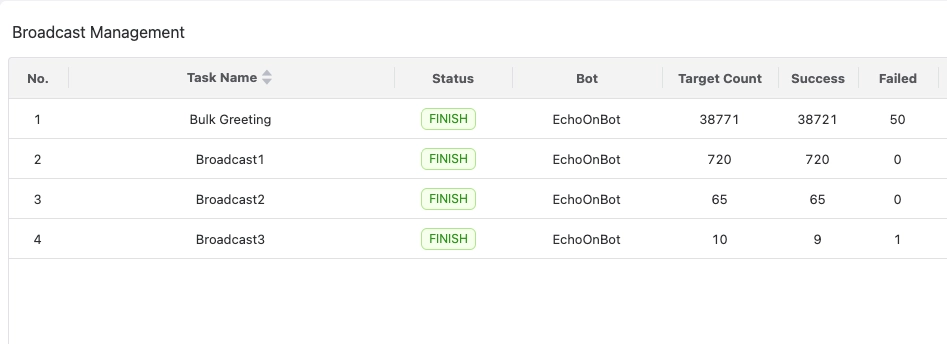
Broadcast Bulk Messages

Beyond basic text messages, OnlyTG Echo provides a rich selection of targeting options and a Multi-form Message Builder. In the OnlyTG backend, you can freely select your target contacts and send them comprehensive messages containing media, text, and buttons—something regular personal accounts can’t do.

What’s more, OnlyTG Echo enables you to communicate with contacts directly through your Telegram Bot. Combined with its broadcast feature, this lets you easily turn the Bot into a “communication agent” for interacting with your contacts. Beyond automated daily conversations, it can also support you in scenarios like customer support, marketing, and sales.

Through years of development, OnlyTG Echo has built a full suite of Bot auxiliary features to help you create your own Smart Telegram Bot. It covers all your daily Bot needs: greeting messages, auto-replies, quick replies, broadcasts, and analytics. Best of all: no programming knowledge is required! Simply start with OnlyTG Echo—all features are free for you to use.

Create Your Own Telegram Bot by OnlyTG Echo!

OnlyTG Echo helps you build your own Telegram bot. Power up your connection on Telegram with strong features!

OnlyTG Echo Bot: https://t.me/echoonbot

Official Telegram Channel: https://t.me/onlytg

Post Tags: #bot#Telegram

Post navigation

Previous Previous
Details About the Public Post Search in Telegram’s Latest Update
NextContinue
How to Bulk Messages on Telegram
Table of Contents
  • 1. Broadcast via Telegram Channel
  • 2. Broadcast via Telegram Story
  • 3. Broadcast via Personal Account (Not Recommended)
  • 4. Broadcast via Telegram Bot (Highly Recommended)
  • Create Your Own Telegram Bot by OnlyTG Echo!
Echo Sidebar
  • Latest Post
  • Echo
  • Recorder
  • Tips
Telegram Tips

Telegram Group Rules: How to Manage Communities More Efficiently

Learn how Telegram group rules and automation streamline moderation, onboarding, and engagement.

Telegram Tips

Social Media Follower Acquisition: How to Turn Reach Into a Growing Audience

Strategies to gain relevant social media followers through content, profiles, and analytics.

Telegram Tips

Keyword Triggered Auto Reply on Telegram

Learn how keyword-triggered Telegram auto replies automate FAQs, support, and community workflows.

Telegram Tips

How to Get More Reach on Social Media

Learn how to grow social media reach with relevant content, platform strategy, and testing.

Telegram Tips

Welcome Message on Telegram: Build a Better Automated Customer Workflow

Learn how Telegram welcome messages automate onboarding, support, and customer communication.

Telegram Tips

How to Increase Reach and Views on Instagram: A Practical Growth Strategy

Practical Instagram growth tips to increase reach, views, and followers.

Telegram Tips

Manage Telegram Groups: Automate Community Management

Learn how to automate Telegram group management with greetings, rules, FAQs, and scheduled posts.

Telegram Tips

Get More Telegram Channel Members: A Practical Growth Strategy That Works

Practical strategies to grow Telegram channel members through content, funnels, and metrics.

How to Get Unbanned from Telegram in 2026: A Practical Step-by-Step Guide

If your Telegram account or phone number has been restricted, this guide explains how to confirm the ban, appeal to Telegram support, reduce spam flags, and avoid getting blocked again in 2026.

How to create telegram bot in 2026?

Learn how to create a Telegram bot in 2026 using BotFather, with step-by-step coding and no-code methods, plus tips for security, deployment, and choosing the best setup.

How to Loop Post in Channel via Telegram Bot

OnlyTG Echo provides the function to automatically loop posts in your channel. Firstly, you need to create a new bot via @botfather and…

How to Configure Multiple Media when Setting OnlyTG Echo Features

OnlyTG Echo provides the function to configure multiple media to a single message when setting Start Message/Auto Reply/Quick Reply/Broadcast and other features. Firstly, you need…

How to Upgrade Channel to Pro Channel in Telegram

OnlyTG Echo provides the function to upgrade your channel to Pro Channel. This will consume your Pro Communities slots and unlock more advanced features….

How to Edit a Published Post via Telegram Bot

OnlyTG Echo provides the function to Edit Channel Post via your bot. Firstly, you need to create a new bot via @botfather and…

How to Publish Channel Post via Telegram Bot

OnlyTG Echo provides the function to Publish Channel Post via your bot. Firstly, you need to create a new bot via @botfather and…

How to Manage Channel via Telegram Bot

OnlyTG Echo provides the function to Manage Channel via your bot. Firstly, you need to create a new bot via @botfather and send its…

How to Use OnlyTG Recorder?

Welcome to OnlyTG Recorder! Developed by our dedicated bot development team, OnlyTG Recorder is designed to serve as an assistant…

Telegram Group Rules: How to Manage Communities More Efficiently

Learn how Telegram group rules and automation streamline moderation, onboarding, and engagement.

Social Media Follower Acquisition: How to Turn Reach Into a Growing Audience

Strategies to gain relevant social media followers through content, profiles, and analytics.

Keyword Triggered Auto Reply on Telegram

Learn how keyword-triggered Telegram auto replies automate FAQs, support, and community workflows.

How to Get More Reach on Social Media

Learn how to grow social media reach with relevant content, platform strategy, and testing.

Welcome Message on Telegram: Build a Better Automated Customer Workflow

Learn how Telegram welcome messages automate onboarding, support, and customer communication.

How to Increase Reach and Views on Instagram: A Practical Growth Strategy

Practical Instagram growth tips to increase reach, views, and followers.

Manage Telegram Groups: Automate Community Management

Learn how to automate Telegram group management with greetings, rules, FAQs, and scheduled posts.

Get More Telegram Channel Members: A Practical Growth Strategy That Works

Practical strategies to grow Telegram channel members through content, funnels, and metrics.

  • OnlyTG
  • Echo
  • Recorder
  • Help
  • Blog
  • Echo Pricing
  • Channel & Bot Finder
  • SMM Panel
OnlyTG EchoTelegram VK YouTube Facebook X Email

© 2026 OnlyTG

Scroll to top
  • Products
    • Echo
    • Recorder
  • Resources
    • Help
    • Blog
    • Channel & Bot Finder
    • SMM Panel
  • Pricing
    • Echo Pricing
Contact us