
If you want to create telegram account for freelance sales in 2026, the goal is not just signing up. The real goal is to build a Telegram presence that looks trustworthy, protects your personal number, and makes it easy for prospects to contact you.
Telegram is useful for freelancers because it supports fast chats, usernames, public profile links, QR codes, channels, groups, bots, and business features. But it also has strict limits around spam, account identity, and phone number verification.
This guide walks you through the setup process in a practical way. You will learn what Telegram actually requires, how to choose the right number, which privacy settings to change, and how to use Telegram for client communication without looking unprofessional or risky.
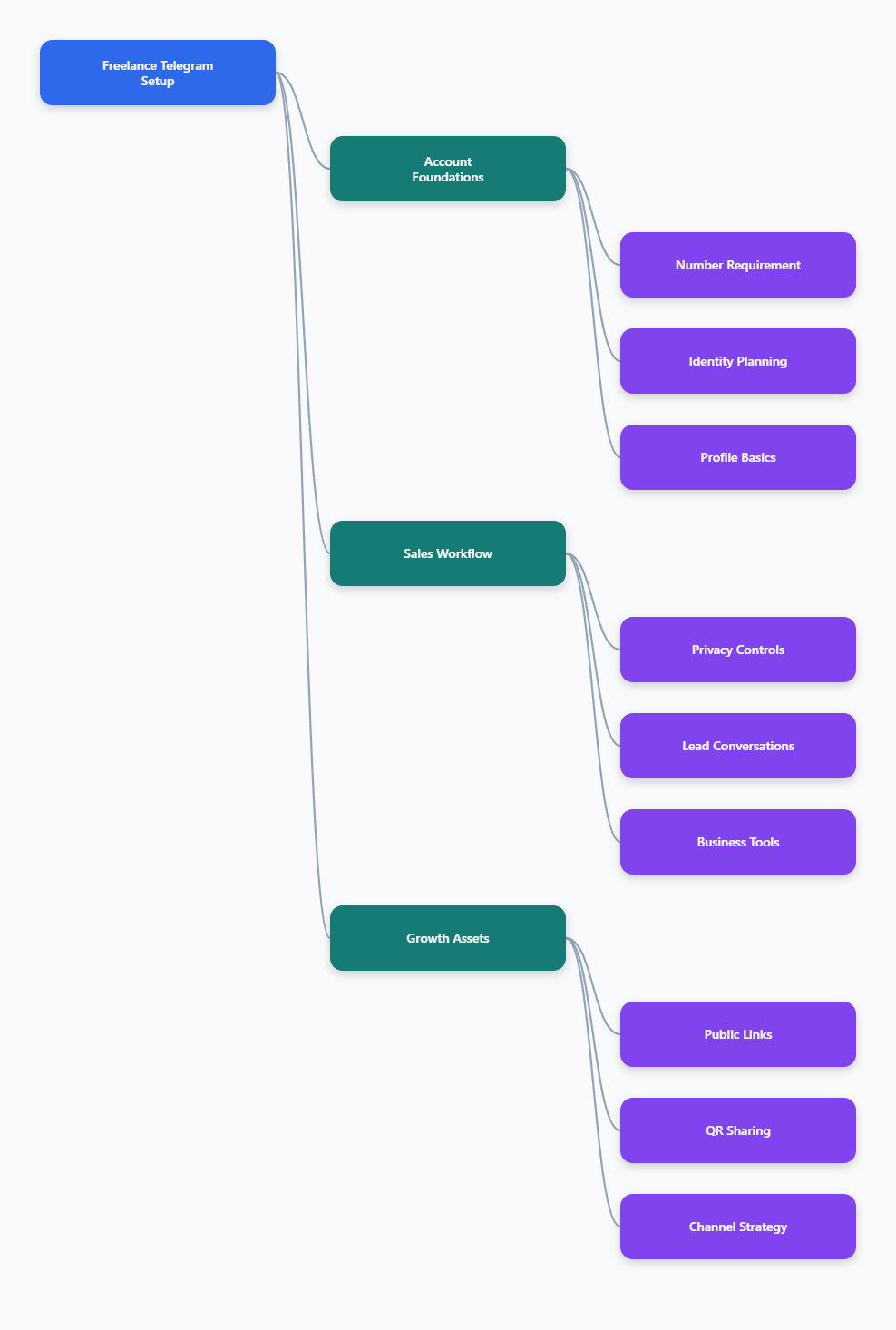
What You Need Before You Create Telegram Account for Freelance Sales
Telegram still uses a phone number as the main account identifier. You cannot create a new Telegram account with only an email address, a username, or a password.
That does not mean you must expose your personal mobile number to every lead. Telegram lets you control who can see your phone number, who can find you by number, and how people contact you through a username or t.me link.
Understand the Phone Number Rule
During registration, Telegram sends a verification code to the phone number you enter. For a new account, that number must be able to receive the code.
For existing accounts, Telegram may deliver login codes inside an active Telegram session on another device. That is useful when moving devices, but it is not the same as creating a brand-new account without a number.
- Required: a working phone number for initial signup.
- Optional later: hiding the number from most users.
- Recommended: keeping long-term access to the number.
- Risky: using disposable numbers you cannot recover.
Choose the Right Number Type
Freelancers often want a separate identity for sales work. A secondary SIM, business mobile plan, eSIM with a real number, or reputable virtual number can help separate client conversations from private life.
Avoid one-time public SMS websites for serious business accounts. If you lose access to the number, account recovery can become difficult because Telegram identifies users by phone number.
| Option | Best For | Main Benefit | Main Risk |
|---|---|---|---|
| Personal SIM | Solo freelancers starting fast | Reliable verification | Mixes private and sales identity |
| Secondary SIM | Long-term client outreach | Clear separation | Extra monthly cost |
| eSIM with number | Remote workers and travelers | Convenient setup | Not all eSIMs include SMS numbers |
| Virtual number | Privacy-focused users | Protects personal number | Quality varies by provider |
Prepare Your Sales Identity
Before signup, decide how you want clients to recognize you. Telegram is casual by design, so your profile needs to do extra work to signal credibility.
Prepare these items first:
- A clear display name, such as your real name plus role.
- A professional profile photo or simple brand mark.
- A short bio that explains who you help.
- A public username that is easy to type and remember.
- A simple offer statement for your first message template.
Step-by-Step Setup for a Freelance Sales Telegram Account
The signup process is simple, but small choices affect deliverability, trust, and recovery. Treat this account like a business asset, not a throwaway chat app login.
Install Telegram and Register
Download Telegram from the official app store for your device or from Telegram’s official website. Open the app and enter the phone number you want linked to the account.
When the verification code arrives, enter it in the app. If Telegram asks for basic profile information, use the professional identity you prepared instead of a nickname that may confuse prospects.
After registration, install Telegram on your desktop if you handle sales from a laptop. Desktop access makes it easier to write detailed replies, manage files, and respond during work hours.
Set a Username and Public Link
Your username creates a public contact link in the format https://t.me/yourusername. This is one of the most useful features for freelance sales because prospects can message you without seeing your phone number.
Go to Settings, choose Username, and create a handle using Latin letters, numbers, or underscores. Keep it close to your name, niche, or brand.
- Good: alexdesigns, mariawrites, daniel_ads.
- Weak: random numbers, joke names, or hard-to-read abbreviations.
- Best practice: use the same handle across your website and social profiles when possible.
Once saved, test the link in a browser. Add it to your portfolio, email signature, proposal templates, landing pages, and invoices where direct messaging makes sense.
Build a Profile That Converts
A freelance sales profile should answer three questions quickly: who you are, what you do, and why the prospect should reply. Avoid hype and long bios.
A simple formula works well:
- Role: Freelance UX designer.
- Audience: Helping SaaS startups improve trial activation.
- Proof: Portfolio link, case study, or short credibility marker.
- Action: Message me for a quick audit.
Use a real photo if your sales process depends on personal trust. Use a brand image only if your freelance work operates under a studio name.
Privacy and Security Settings Freelancers Should Change First
Privacy settings matter because Telegram can connect people through contacts, phone numbers, groups, and usernames. A good setup helps you stay reachable without exposing more than necessary.
Hide or Limit Your Phone Number
Open Settings, then Privacy and Security, then Phone Number. Telegram lets you choose who can see your phone number and who can find you by it.
For most freelance sales accounts, a balanced setup is:
- Who can see my phone number: Nobody or My Contacts.
- Who can find me by my number: My Contacts.
- Exceptions: add trusted clients only when needed.
This keeps your public sales identity centered on your username and link. It also reduces the chance that old personal contacts are mixed into business conversations.
Control Last Seen, Calls, and Groups
Sales work needs availability, but not full visibility. You do not need every prospect to know when you were last online or add you to unrelated groups.
Review these settings:
- Last Seen & Online: set to My Contacts or Nobody.
- Profile Photos: keep public only if it supports trust.
- Calls: limit to contacts if you do not want surprise calls.
- Groups and Channels: restrict who can add you.
These controls are especially important if you join public communities for prospecting. They help you network without giving strangers full access to your activity patterns.
Enable Two-Step Verification
Two-step verification adds a password on top of Telegram’s login code process. This is important because sales accounts often contain client names, project details, files, and payment discussions.
Go to Settings, Privacy and Security, then Two-Step Verification. Create a strong password and add a recovery email you control.
Also review Active Sessions regularly. If you see a device you do not recognize, terminate that session immediately.
How to Use Telegram for Freelance Sales Without Spamming
Telegram can support freelance sales, but it is not a license to cold-message strangers at scale. Telegram’s rules prohibit spam and unwanted commercial harassment, and users can report messages they find annoying.
Use Permission-Based Entry Points
The safest sales conversations begin when the prospect expects your message. Use your Telegram link as a low-friction contact option instead of pushing unsolicited outreach.
Good entry points include:
- A Contact me on Telegram button on your portfolio.
- A Telegram link in your email signature.
- A QR code on a business card or event slide.
- A link in a proposal after the prospect has shown interest.
- A community profile where direct messages are allowed.
If you contact someone first, keep it relevant, brief, and respectful. Do not send bulk promotions, repeated follow-ups, or scraped messages.
Create Useful Quick Replies
Telegram Business features can help freelancers manage repetitive sales conversations. Telegram Business includes tools such as business hours, location, quick replies, greeting messages, away messages, custom start pages, and chatbot support.
Availability may depend on the account and current Telegram product rules, so check your app settings. Telegram has stated that business features are available to Premium subscribers, while connected business bots are also available to non-Premium users.
Useful quick replies include:
- A short services overview.
- A discovery call booking link.
- A portfolio or case study link.
- A pricing range explanation.
- A qualification question list.
Write replies in a human tone. Templates should speed up your workflow, not make every conversation feel automated.
Organize Leads and Follow-Ups
Telegram is not a full CRM by itself, so create a simple system. You can use folders, pinned chats, saved messages, or an external CRM to track lead status.
A practical freelance pipeline might include:
- New lead: first message received.
- Qualified: problem, budget, and timeline are clear.
- Proposal sent: waiting for decision.
- Client: project is active.
- Follow-up: check back later with permission.
Keep sensitive client data out of casual notes. For contracts, invoices, and private documents, use secure tools designed for business records.
Telegram Profile Links, QR Codes, Channels, and Groups
Once the account is ready, make it easy for the right people to start the right conversation. Telegram supports direct links, QR codes, channels, and groups, but each one serves a different sales purpose.
Use t.me Links for Direct Contact
Your t.me link is the simplest contact path. It works well on websites, landing pages, newsletters, and social profiles.
Use clear call-to-action text around the link. For example, write Message me on Telegram for a 10-minute project fit check instead of only displaying the raw URL.
Use QR Codes for Offline and Event Sales
Telegram includes native QR code options for profiles, and you can also create QR codes from your t.me link. This is useful for conferences, local meetups, workshops, printed brochures, and presentation slides.
Before printing anything, scan the QR code from another device. Confirm it opens the correct chat, profile, group, or channel.
Decide Between Channels and Groups
A channel is best for broadcasting updates, insights, offers, and case studies. A group is best for discussion, community, feedback, and peer interaction.
For most freelancers, a small channel is easier to manage than a public group. You can publish useful tips, project examples, and availability updates without moderating constant discussions.
If you create a group, set clear rules. Public communities attract spam, so moderation matters.
Common Mistakes to Avoid in 2026
Many freelancers create Telegram accounts quickly and then wonder why prospects do not reply. The problem is usually trust, privacy, or messaging quality.
Do Not Use a Disposable Identity
A random profile photo, unclear username, and temporary number make a sales account look suspicious. Prospects need confidence that they are talking to a real professional.
Use consistent branding across Telegram, your website, and your public portfolio. Consistency reduces friction before the first reply.
Do Not Treat Telegram Like a Bulk Outreach Tool
Telegram users can report unwanted messages. Accounts that send spam or scam-like messages may become limited.
Keep outreach specific and permission-aware. If someone does not reply, do not keep pushing.
Do Not Ignore Recovery Access
If your account is tied to a number you cannot access, you may have trouble recovering it later. This is a serious risk for anyone using Telegram for client relationships.
Maintain access to the number, keep two-step verification updated, and review active sessions. A sales account becomes more valuable over time, so protect it early.