
If you want to add telegram contacts for marketing outreach in 2026, the safest path is not scraping usernames, importing random phone numbers, or blasting cold messages. Telegram is useful for business communication, but it is also strict about unwanted contact, spam reports, and privacy controls.
This guide explains how to build a practical Telegram contact workflow that respects user consent, works with Telegram’s privacy model, and still helps you turn real interest into leads, customers, or community members.
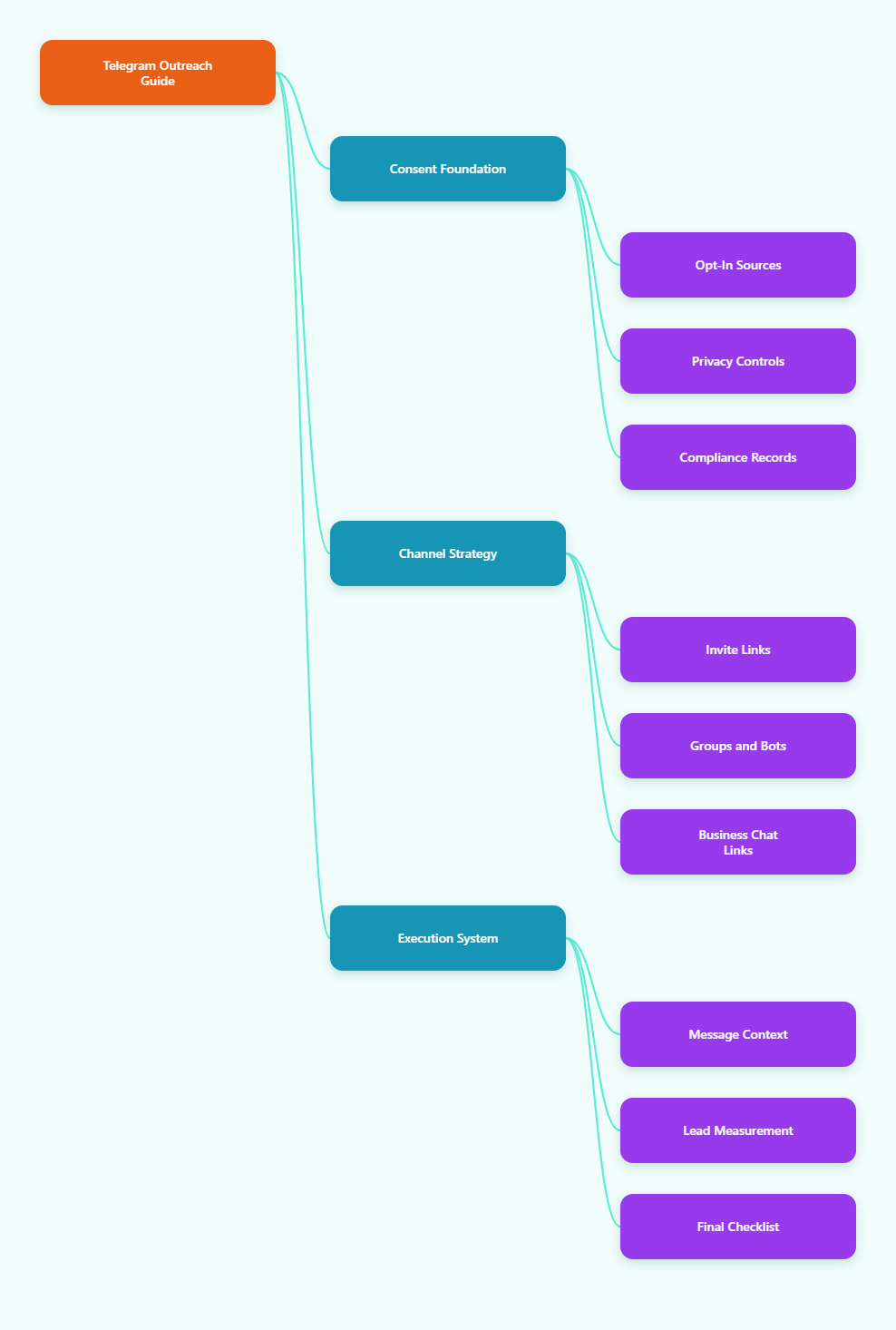
Why Telegram Outreach Works Differently in 2026
Telegram is not just a private messenger anymore. It now supports channels, large communities, bots, business profiles, automated replies, chat links, mini apps, and customer support workflows.
That makes it attractive for marketers, creators, SaaS teams, ecommerce stores, and service businesses. But the same direct access that makes Telegram powerful also makes spam easy to detect and easy for users to report.
Telegram’s own spam guidance is clear: people usually do not like being contacted by strangers, especially for promotions. If users report unwanted messages, accounts can lose the ability to message non-contacts or post in groups temporarily.
So the goal is not to add as many contacts as possible. The goal is to create a consent-based path where people expect your message before you send it.
What “Adding Contacts” Actually Means on Telegram
Before building a campaign, understand the difference between a Telegram contact, a subscriber, a group member, and a bot user. These are not interchangeable.
A Telegram contact is usually someone saved to your contact list or added through a chat or profile action. Telegram’s API documentation also confirms that users can be added as contacts without relying only on phone numbers, but privacy settings can still affect discovery and lookup.
A channel subscriber follows one-way broadcasts. A group member joins a conversation space. A bot user starts an interaction with your bot and can receive bot messages within Telegram’s platform rules.
For marketing, the most reliable asset is not a raw contact list. It is an audience that has taken a clear action, such as:
- Joining your Telegram channel from a landing page
- Entering a group after reading the rules
- Starting your bot for a lead magnet or support request
- Clicking a business chat link from your website
- Giving explicit permission during checkout or signup
That action gives your outreach context. Without context, even a well-written message can feel intrusive.
How to Add Telegram Contacts for Marketing Outreach Safely
The safest way to add telegram contacts for marketing outreach is to use a permission ladder. Each step asks for a little more engagement instead of forcing a sales conversation immediately.
Step 1: Start With an Opt-In Source
Do not begin with scraped usernames or purchased lists. Begin where the user has already shown interest.
Good opt-in sources include newsletter forms, product waitlists, webinar registrations, customer support forms, order updates, community landing pages, and in-app account settings. If the message is promotional, make the Telegram consent specific instead of hiding it inside general terms.
A strong opt-in line is simple: “Send me product updates and launch alerts on Telegram.” It names the channel, the purpose, and the expected content.
Step 2: Use a Public Username or Invite Link
Telegram allows people to communicate by username without exposing phone numbers, depending on privacy settings. This is usually better than asking for a phone number too early.
For most campaigns, send users to one of these destinations:
- A public channel for announcements and educational content
- A private channel for customers, paid members, or beta users
- A moderated group for discussion and peer support
- A bot flow for onboarding, qualification, or content delivery
- A business chat link for direct support or sales conversations
Invite links scale better than manually adding people one by one. They also make the user’s action obvious: the user chooses to join.
Step 3: Add Only High-Intent People as Contacts
Adding someone as a contact makes sense when there is a real relationship or active conversation. Examples include customers, partners, applicants, paid members, booked leads, suppliers, and support cases.
It is not a good fit for cold promotion. If the person has never asked to hear from you, adding them can create privacy concerns and increase the chance of reports.
Use contact adding for relationship management, not mass acquisition.
Telegram Privacy Settings That Affect Outreach
Telegram gives users granular controls over phone number visibility, phone number discovery, calls, groups, and contact syncing. These settings directly affect whether you can find, add, or message someone by number.
Telegram’s privacy materials explain that users can control who sees their phone number and who can find them by number. Users can also add exceptions that override default rules.
Contact syncing is another important issue. Telegram says it asks permission before syncing contacts and stores names and phone numbers to help users find people they know. Privacy-focused users may disable sync or delete uploaded contacts.
For marketers, this means three practical rules:
- Do not assume a phone number gives you permission to message.
- Do not treat contact discovery as a lead generation database.
- Do not design campaigns that depend on bypassing privacy settings.
If users cannot be found by number, respect that. Offer a username, invite link, QR code, or bot start link instead.
Best Outreach Paths: Contacts vs Channels vs Groups vs Bots
The best Telegram setup depends on the type of relationship you want. A direct contact list is rarely the first choice for broad marketing.
| Telegram Asset | Best Use | Outreach Risk | Best Practice |
|---|---|---|---|
| Contact | Known leads, customers, partners | High if cold | Use after consent or conversation |
| Channel | Broadcasts, launches, updates | Low when opt-in | Promote with invite links |
| Group | Community, feedback, support | Medium | Moderate and set rules |
| Bot | Automation, onboarding, qualification | Low when user starts | Use clear commands and opt-outs |
| Business Chat Link | Sales and support entry point | Low | Place on site and profiles |
For most brands, the strongest setup is a channel plus a group plus a bot. The channel keeps announcements clean, the group creates discussion, and the bot handles repeatable tasks.
A Practical 2026 Workflow for Telegram Lead Capture
Here is a simple workflow that works for newsletters, communities, course launches, SaaS onboarding, and ecommerce product drops.
Build the Landing Page First
Create a page that explains why someone should join you on Telegram. Do not just say “join our Telegram.” Tell people what they will receive.
Include three details near the button:
- Message type, such as tips, alerts, deals, or support
- Message frequency, such as weekly or launch-only
- Exit option, such as leaving the channel or stopping the bot
This reduces confusion and improves lead quality.
Send Users to the Right Telegram Entry Point
If you need one-way updates, send people to a channel. If you need discussion, send them to a group. If you need segmentation, send them to a bot.
For example, a SaaS company could use a bot to ask whether the user is a founder, marketer, developer, or agency. Then it can recommend the right channel, demo link, or support resource.
Keep the first interaction short. Telegram is fast, so users expect simple steps.
Move Qualified Leads to Direct Chat
Direct messaging should come after intent is clear. Good triggers include a demo request, support question, paid plan inquiry, failed checkout, or reply to a campaign prompt.
When you send the first message, mention the context immediately: “You asked for the pricing checklist from our Telegram bot, so I’m sending the comparison here.”
Context lowers friction. It also shows the message is expected, not random.
What Not to Do When Adding Telegram Contacts
Many Telegram outreach problems come from treating the platform like an email scraper. That is the wrong mindset.
Avoid these behaviors:
- Scraping usernames from groups and sending cold promotions
- Importing purchased phone lists into Telegram
- Adding strangers to groups without permission
- Sending the same sales pitch to many non-contacts
- Using bots to imitate personal consent
- Hiding promotional intent behind vague community language
Telegram’s Terms of Service prohibit using the service to send spam or scam users. Its spam FAQ also warns that unwanted messages to random strangers can lead to limitations.
Even if a tactic works for a day, it can damage deliverability, reputation, and trust. A smaller opt-in list is usually more valuable than a large audience that did not ask to hear from you.
Compliance Basics for Telegram Marketing
Telegram rules are only one part of the picture. If you market to users in regions with privacy or electronic communications laws, you may also need consent records and clear unsubscribe options.
In the EU and UK, direct electronic marketing often requires specific, informed consent unless a narrow exception applies. GDPR consent standards also emphasize that consent should be freely given, specific, informed, and unambiguous.
For practical purposes, keep a record of:
- Who opted in
- When they opted in
- Where the opt-in happened
- What wording they saw
- Which message category they accepted
- How they can opt out
This is not just legal housekeeping. It also helps your team avoid sending product offers to people who only requested support updates.
Message Templates That Feel Human
Your first Telegram message should be short, specific, and tied to the user’s action. Long sales paragraphs feel out of place in a messenger app.
Use this structure:
- Context: why you are messaging
- Value: what the user receives
- Choice: what they can do next
- Exit: how to stop or ignore future messages
Example for a lead magnet:
“Hi Alex, you requested the 2026 Telegram outreach checklist from our site. Here it is: [link]. If you want, I can also send the short setup version for channels, groups, and bots.”
Example for a product waitlist:
“Thanks for joining the beta list. We’ll use this Telegram chat only for launch access and setup help. Reply ‘demo’ if you want a walkthrough.”
These messages work because they do not pretend to be personal when they are not. They are transparent, useful, and easy to answer.
How to Measure Telegram Outreach Quality
Do not judge Telegram only by contact count. A bloated contact list can hide weak intent and high complaint risk.
Track metrics that show trust and engagement:
- Invite link clicks
- Channel joins
- Group activation rate
- Bot completion rate
- Replies from qualified leads
- Opt-out or leave rate
- Spam complaints or account limits
If many people join but quickly leave, your promise and content do not match. If many people start the bot but do not finish, the flow is probably too long.
Review your first 48 hours of user behavior after each campaign. Telegram responses are quick, so weak positioning usually appears fast.
Recommended Setup for Small Teams
If you are starting from zero, keep the system simple. You do not need a complicated automation stack on day one.
Use this setup:
- A public Telegram channel for content and announcements
- A private group for customers or serious leads
- A simple bot for welcome messages and segmentation
- A website landing page with clear Telegram consent
- A spreadsheet or CRM field for opt-in records
- A weekly review of joins, replies, and exits
Once this works, add business features such as quick replies, opening hours, away messages, or connected bots. Telegram Business features are designed to make customer communication easier, but they should support a clear strategy rather than replace one.
Final Checklist Before You Add a Telegram Contact
Before adding or messaging anyone, ask five questions:
- Did this person ask to hear from us on Telegram?
- Do we know what topic they opted into?
- Is direct chat better than a channel, group, or bot?
- Can the user easily stop receiving messages?
- Would this message feel expected if I received it?
If the answer is no, use an invite link or public entry point instead of direct outreach.
The best way to add telegram contacts for marketing outreach in 2026 is to earn the contact before you use it. Build opt-in paths, respect privacy settings, send messages with clear context, and treat direct chat as a high-intent relationship channel.
That approach may grow slower than scraping, but it creates a list people actually want to be on. In Telegram marketing, that is the difference between a contact list and a real audience.