
Skip to content
OnlyTG Icon
  • ProductsExpand
    • Echo
    • Recorder
  • ResourcesExpand
    • Help
    • Blog
  • EnglishExpand
    • 中文 (中国)
    • Русский
    • English
Contact us
OnlyTG Echo

How to Bulk Messages on Telegram

Home » Blog » OnlyTG Echo » How to Bulk Messages on Telegram

When using Telegram daily, there are often scenarios where messages need to be sent to multiple recipients simultaneously. The most effective approach is using a Telegram bot (which will be discussed later). Below are the main methods available for sending bulk messages:

1. Bulk Messages via Telegram Channel

You can invite your contacts to join your personal channel. This allows you to send messages to a large audience at once. However, if recipients mute your channel or have not subscribed, your messages may not achieve the desired engagement.

2. Bulk Messages via Telegram Story

Telegram Stories enable you to share public updates with your contacts. These messages appear in a dedicated section rather than in individual chats. Note that Stories have a limited visibility period, so contacts may miss them if not viewed in time.

3. Bulk Messages via Personal Account (Not Recommended)

This method is generally discouraged. Frequently sending messages to users who haven’t added you as a contact may violate Telegram’s policies and result in message restrictions or even account suspension. Although some tools claim to automate message sending through personal accounts using scripts, using them risks your account’s security.

4. Bulk Messages via Telegram Bot (Highly Recommended)

Telegram Bots offer powerful development interfaces, and our team at OnlyTG Echo specializes in developing such bots. Using a Telegram bot to send bulk messages to your contacts eliminates the risk of account restrictions, as this method fully complies with Telegram’s official guidelines.
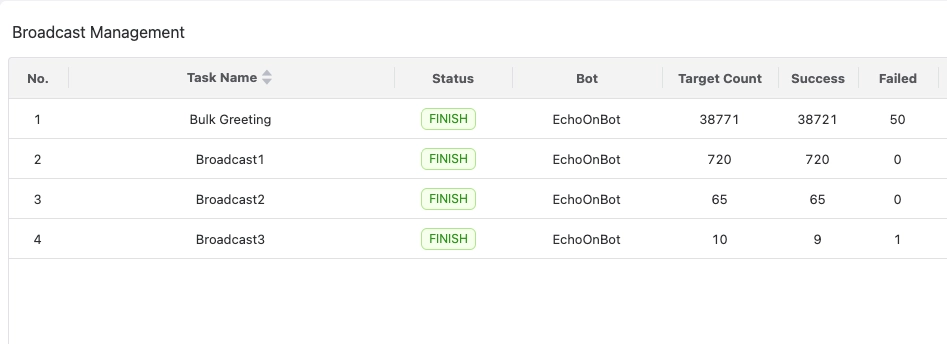
Broadcast Bulk Messages

Beyond simple text, OnlyTG Echo offers advanced targeting options and a Multi-form Message Builder within its backend. This enables users to select target contacts freely and send rich content—including media, text, and interactive buttons—which personal accounts cannot provide.

Moreover, OnlyTG Echo allows direct communication with contacts through your Telegram Bot. Coupled with bulk messaging, this feature transforms the bot into a “communication agent” that supports automated conversations, customer service, marketing, and sales scenarios.

After years of development, OnlyTG Echo has created a comprehensive suite of bot auxiliary features covering all daily needs: greeting messages, auto-replies, quick replies, bulk messages, and analytics. Best of all, no programming skills are required—simply start with OnlyTG Echo and enjoy all features for free.

Create Your Own Telegram Bot by OnlyTG Echo!

OnlyTG Echo helps you build your own Telegram bot. Power up your connection on Telegram with strong features!

OnlyTG Echo Bot: https://t.me/echoonbot

Official Telegram Channel: https://t.me/onlytg

Post Tags: #bot#Telegram

Post navigation

Previous Previous
4 Ways to Broadcast Messages on Telegram
NextContinue
How to Create A new Bot on Telegram without Code Skills
Table of Contents
  • 1. Bulk Messages via Telegram Channel
  • 2. Bulk Messages via Telegram Story
  • 3. Bulk Messages via Personal Account (Not Recommended)
  • 4. Bulk Messages via Telegram Bot (Highly Recommended)
  • Create Your Own Telegram Bot by OnlyTG Echo!
Echo Sidebar
  • Latest Post
  • Echo
  • Recorder
  • Tips
Telegram Tips

How to Get Out of Block & Report on Telegram

Being reported or blocked on Telegram can significantly hinder your ability to communicate, particularly with anonymous users. While limitations may…

OnlyTG Echo

How to Loop Post in Channel via Telegram Bot

OnlyTG Echo provides the function to automatically loop posts in your channel. Firstly, you need to create a new bot via @botfather and…

OnlyTG Echo

How to Configure Multiple Media when Setting OnlyTG Echo Features

OnlyTG Echo provides the function to configure multiple media to a single message when setting Start Message/Auto Reply/Quick Reply/Broadcast and other features. Firstly, you need…

OnlyTG Echo

How to Upgrade Channel to Pro Channel in Telegram

OnlyTG Echo provides the function to upgrade your channel to Pro Channel. This will consume your Pro Communities slots and unlock more advanced features….

OnlyTG Echo

How to Edit a Published Post via Telegram Bot

OnlyTG Echo provides the function to Edit Channel Post via your bot. Firstly, you need to create a new bot via @botfather and…

OnlyTG Echo

How to Publish Channel Post via Telegram Bot

OnlyTG Echo provides the function to Publish Channel Post via your bot. Firstly, you need to create a new bot via @botfather and…

OnlyTG Echo

How to Manage Channel via Telegram Bot

OnlyTG Echo provides the function to Manage Channel via your bot. Firstly, you need to create a new bot via @botfather and send its…

OnlyTG Echo

How to Send Group Greeting via Telegram Bot

OnlyTG Echo provides the function to send the Greeting Message to new members joining the group. Firstly, you need to create a new…

How to Loop Post in Channel via Telegram Bot

OnlyTG Echo provides the function to automatically loop posts in your channel. Firstly, you need to create a new bot via @botfather and…

How to Configure Multiple Media when Setting OnlyTG Echo Features

OnlyTG Echo provides the function to configure multiple media to a single message when setting Start Message/Auto Reply/Quick Reply/Broadcast and other features. Firstly, you need…

How to Upgrade Channel to Pro Channel in Telegram

OnlyTG Echo provides the function to upgrade your channel to Pro Channel. This will consume your Pro Communities slots and unlock more advanced features….

How to Edit a Published Post via Telegram Bot

OnlyTG Echo provides the function to Edit Channel Post via your bot. Firstly, you need to create a new bot via @botfather and…

How to Publish Channel Post via Telegram Bot

OnlyTG Echo provides the function to Publish Channel Post via your bot. Firstly, you need to create a new bot via @botfather and…

How to Manage Channel via Telegram Bot

OnlyTG Echo provides the function to Manage Channel via your bot. Firstly, you need to create a new bot via @botfather and send its…

How to Send Group Greeting via Telegram Bot

OnlyTG Echo provides the function to send the Greeting Message to new members joining the group. Firstly, you need to create a new…

How to Set Group CAPTCHA via Telegram Bot

OnlyTG Echo provides the function to send the CAPTCHA test to new members joining the group. Firstly, you need to create a new bot…

How to Use OnlyTG Recorder?

Welcome to OnlyTG Recorder! Developed by our dedicated bot development team, OnlyTG Recorder is designed to serve as an assistant…

How to Get Out of Block & Report on Telegram

Being reported or blocked on Telegram can significantly hinder your ability to communicate, particularly with anonymous users. While limitations may…

Details About the Public Post Search in Telegram’s Latest Update

Telegram has recently rolled out the Public Post Search feature, and from this update, we see potential for further SEO…

  • OnlyTG
  • Echo
  • Recorder
  • Help
  • Blog
OnlyTG EchoTelegram VK YouTube Facebook X Email

© 2026 OnlyTG

Scroll to top
  • Products
    • Echo
    • Recorder
  • Resources
    • Help
    • Blog
Contact us