
If you are trying to figure out how to register Telegram without sharing personal data, the first thing to know is simple: Telegram still does not offer a true email-only signup. In most cases, you need some form of phone number to create the account, but that does not mean your personal SIM has to be the one tied to it.
This guide breaks the process into clear steps. You will see the signup options that still make sense in 2026, the privacy settings that matter most, and the mistakes that create avoidable risk. The goal is practical privacy, not hype.
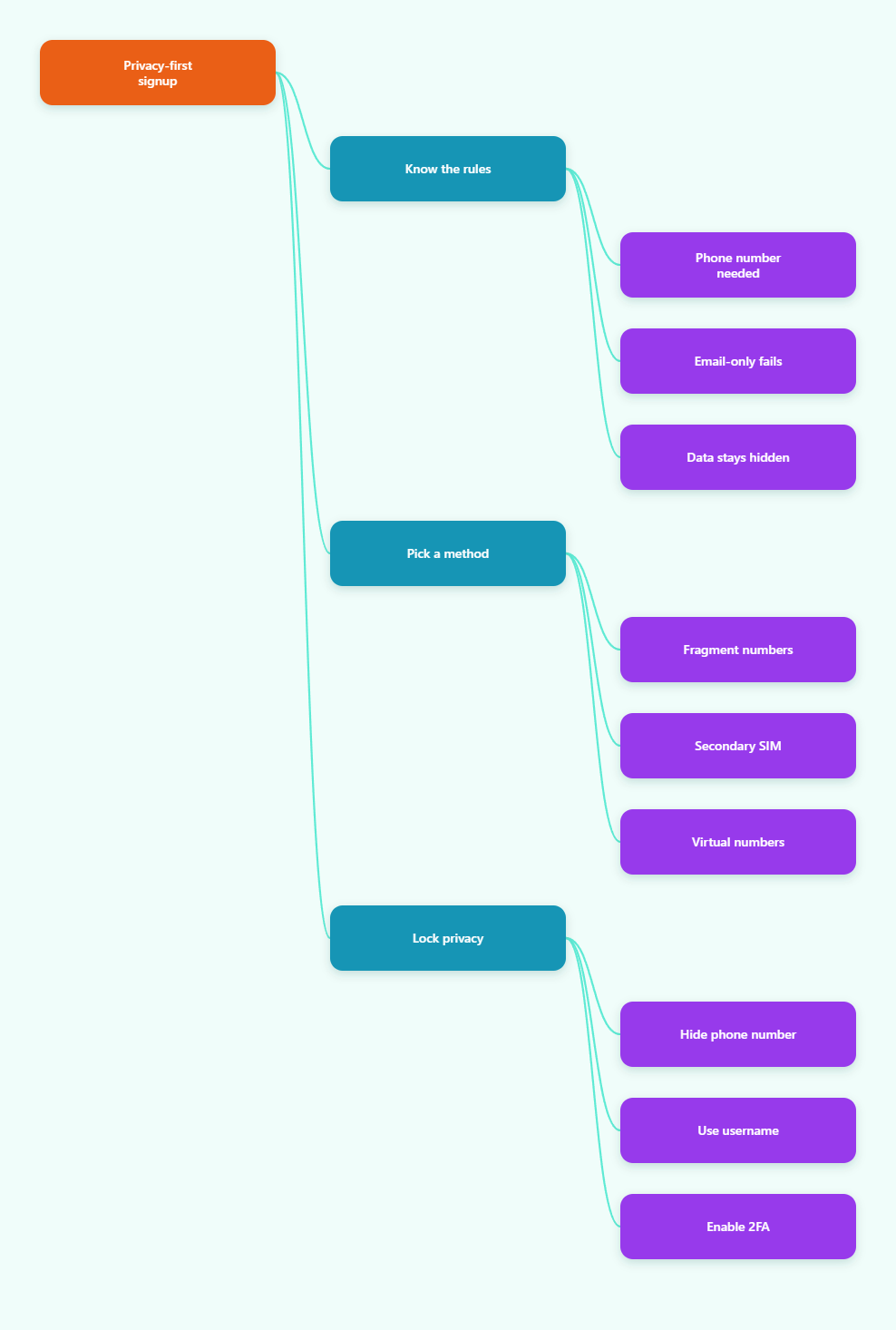
Can you register Telegram without sharing personal data in 2026?
The short answer is: not completely, but you can get close enough for most use cases. Telegram uses phone numbers as the default account identifier, and its own help pages show that users can control who sees their number and who can find them by it.
That means the real target is to separate your Telegram account from your personal identity. If you use a secondary number, a dedicated virtual number, or Telegram’s official anonymous-number route through Fragment, you can register without exposing your main phone number to other users.
- Possible: hide your number from strangers, use a username, and keep your main SIM off the account.
- Not possible: creating a normal Telegram account with only an email address.
- Best mindset: think in terms of exposure reduction, not total invisibility.
That distinction matters, because many guides overpromise. A good 2026 setup is one that is private, stable, and recoverable.
What are the real ways to sign up?
There are only a few realistic paths if you want to keep your personal number out of Telegram. Some are official, some are practical, and some look easy but create long-term problems.
Use Telegram’s anonymous number route
Telegram has an official SIM-less option through Fragment’s anonymous numbers. This is the closest thing to a number-free signup, because the account is not built on your personal mobile line.
It is also the least convenient option for most people. Availability can be limited, and it is not the best choice if you just want a simple private account for daily messaging.
Use a secondary SIM or eSIM
A second line is usually the most reliable option for long-term use. Because it behaves like a real phone number, it tends to work more smoothly during verification and future logins.
This is a good fit if you want a stable account, a clean separation from your main identity, and a recovery path you can actually control.
Use a dedicated virtual number
A reputable virtual number can also work, especially if it is designed for real SMS delivery rather than public inbox scraping. The quality of the provider matters a lot here.
Not every virtual number will be accepted by Telegram, and some VoIP-style numbers are blocked or unstable. If you choose this route, avoid free or recycled services that may disappear when you need them most.
Avoid disposable public SMS services
These services are tempting because they are fast and cheap. They are also the easiest way to lose access later, because the number may be reused, blocked, or unavailable when you need a login code.
If your account matters, treat disposable numbers as a test-only option, not a real privacy strategy.
| Method | Best for | Main upside | Main risk |
|---|---|---|---|
| Fragment anonymous number | Maximum separation | Official SIM-less route | Limited availability and higher friction |
| Secondary SIM or eSIM | Long-term accounts | Reliable signup and recovery | Extra cost and extra line management |
| Dedicated virtual number | Privacy-focused users | Keeps your main number private | Provider quality varies |
| Disposable SMS service | Short tests only | Fast and cheap | High lockout risk |
How do you register Telegram without exposing your main number?
Once you pick a number that is not your primary SIM, the setup itself is straightforward. The key is to treat the first five minutes as the privacy window that matters most.
Step 1: Choose the right number
Pick the number you want to attach to Telegram before you open the app. If you are using a secondary line, make sure you can still receive SMS later.
If the number cannot be recovered, shared with a provider, or used again, think twice before using it for an account you care about.
Step 2: Create the account
Install Telegram and enter the chosen number during signup. Then complete the verification code step as normal.
At this stage, do not rush through profile setup. The most important work comes immediately after the account is created.
Step 3: Add a username
A username lets people contact you without needing your phone number. That is one of Telegram’s most useful privacy features, because it gives you a public identity that is separate from your number.
If you plan to use Telegram in groups, channels, or for business, a username should be one of the first things you set.
Step 4: Tighten privacy settings
Go to Settings > Privacy and Security > Phone Number and review the controls carefully. This is where you decide who can see your number and who can find you by it.
Do this before you start joining groups or chatting with strangers. Early setup prevents a lot of accidental exposure.
Which Telegram privacy settings should you change first?
The default settings are not always the most private settings. If your goal is to keep Telegram separate from your personal identity, these are the controls that deserve attention first.
Who can see my phone number?
Set this to Nobody if you do not want your number visible to other users. If you only want trusted contacts to see it, choose My Contacts instead.
This is one of the most important controls for people using Telegram in public groups or for semi-private communication.
Who can find me by my number?
This setting controls whether other people can discover your Telegram account by entering your phone number. For privacy, set it to My Contacts unless you specifically want broad discoverability.
That small change can stop strangers who already have your number from linking it back to your Telegram profile.
Stop unnecessary contact syncing
Telegram can use your contacts to help you find people and display names. That is useful, but it also increases linking between your address book and your account.
If privacy is the priority, avoid syncing contacts unless you need it. If you already synced them, remove what you do not want Telegram to keep using.
Turn on two-step verification
Two-step verification adds a password on top of your login code. Telegram’s own security docs support this, and it is one of the easiest ways to prevent account takeover if someone gets access to your number.
Use a strong password and a recovery email you actually control. Do not reuse a password from another service.
- Best first changes: hide your phone number, limit discovery by number, and enable 2FA.
- Best identity move: use a username so people can reach you without your number.
- Best hygiene move: keep your contacts and recovery options clean.
Which method should you choose?
The best option depends on whether you care most about privacy, convenience, or long-term reliability. There is no single winner for everyone.
If you want the cleanest separation from your personal life, Telegram’s official anonymous-number route is the strongest privacy story. If you want the smoothest long-term experience, a secondary SIM or eSIM is usually easier to manage.
For most regular users, a dedicated virtual number from a reliable provider sits in the middle. It is more practical than Fragment for everyday use, but safer than a throwaway SMS inbox.
- Choose Fragment if the main goal is official anonymity and you are comfortable with extra friction.
- Choose a secondary SIM or eSIM if you want the best balance of reliability and privacy.
- Choose a virtual number if you want convenience, but only from a provider with stable SMS delivery.
What should you not choose? Free temporary numbers for an account you intend to keep. They are fine for a quick experiment and poor for a real identity boundary.
What mistakes should you avoid?
Most Telegram privacy problems come from rushed setup, not from the app itself. The wrong number, the wrong settings, or the wrong recovery choice can undo the privacy you wanted.
Using a number you cannot keep
If you lose the number, you may lose the account. That risk is especially high with temporary services and public SMS inboxes.
Always ask one question first: can I still receive a login code on this number six months from now?
Skipping 2FA
A number alone is not enough protection. If someone takes over the number, your account may be exposed unless you have a second password in place.
This is why two-step verification matters even for privacy-focused users.
Leaving discoverability wide open
If you leave number visibility too broad, people can connect your Telegram profile to the number you tried to protect. That defeats the point of using a separate line in the first place.
Review the number settings as soon as the account is active.
Ignoring your contact list
Syncing your address book can make Telegram more convenient, but it also creates more connections between your messaging life and your real-world contacts.
If your goal is minimal exposure, keep syncing under control from day one.
Conclusion
If your goal is to register Telegram without sharing personal data in the public sense, the answer in 2026 is yes, but with limits. You still need some form of number for most signups, yet you do not need to attach your main SIM to the account.
The safest practical approach is to use a separate number, lock down Phone Number visibility, restrict discovery by number, set a username, and enable two-step verification. That combination gives you a private Telegram setup without relying on weak shortcuts.