
If you want to add telegram contacts for business leads in 2026, the goal is not to collect the biggest list possible. The goal is to turn real conversations into qualified opportunities without annoying people, breaking privacy expectations, or triggering Telegram’s anti-spam systems.
This guide explains the safest ways to add contacts, when each method makes sense, how to organize leads, and how to build a workflow that your team can actually use.
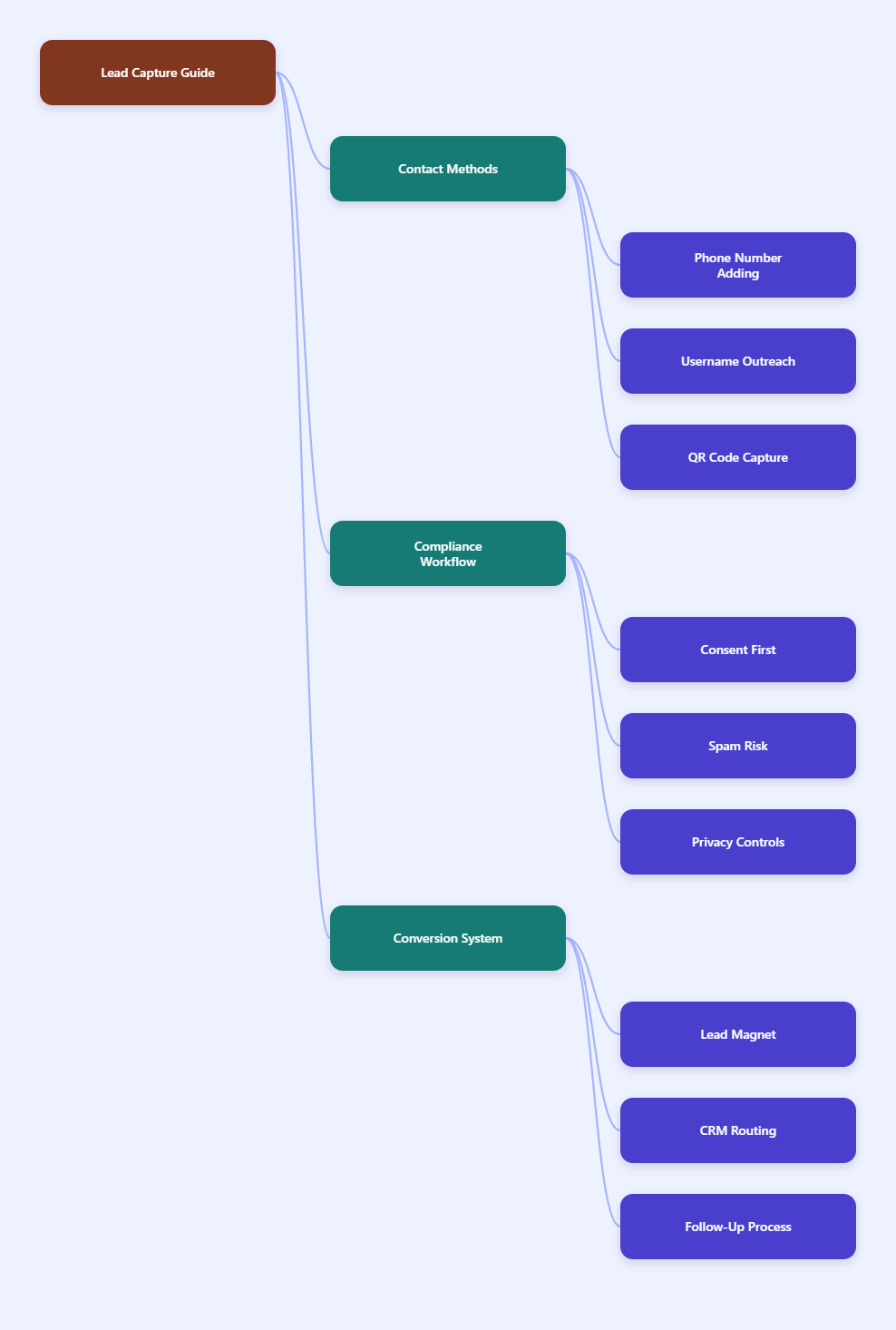
What “Adding Telegram Contacts” Means in 2026
Adding a Telegram contact can mean several different things depending on your workflow. You may save someone by phone number, connect through a username, scan a QR code, open a t.me link, or capture an inbound lead through a bot.
For business leads, the practical definition is simple: a Telegram contact is someone your team can identify, message appropriately, and follow up with in context.
Telegram Is Contact-Based, Not List-Based
Telegram uses phone numbers as unique identifiers, but users can control who sees their phone number and who can find them by it. Telegram also lets people use public usernames so others can contact them without seeing their number.
That means a lead may be reachable even if you do not know their phone number. It also means you should not assume that every phone number, username, or group member is fair game for outreach.
Consent Matters More Than Volume
Telegram’s spam FAQ makes one thing clear: when users report unwanted messages, accounts can be limited from contacting strangers. Limited accounts can usually still reply to people who message first, but outbound outreach becomes much harder.
For businesses, this changes the strategy. Warm, opt-in, and context-driven contact collection is safer than aggressive adding or mass messaging.
Business Leads Need More Than a Username
A username alone is not enough to run a sales process. You also need the source, intent, topic, next step, and owner.
Before adding anyone, decide what information your team needs:
- Lead name or Telegram display name
- Telegram username or phone number when voluntarily shared
- Source channel, group, ad, website, event, or referral
- Reason for contact, such as pricing, demo, support, or partnership
- Follow-up status and assigned team member
Best Ways to Add Telegram Contacts for Business Leads
The best method depends on how the lead found you. A website visitor should not be handled the same way as an event attendee, a group member, or a customer who already messaged your support bot.
Use the method that matches the user’s intent. This keeps your process natural and reduces friction.
Method 1: Add Contacts by Phone Number
Phone number adding works best when the lead has clearly shared their number with your business. Examples include event signups, demo forms, CRM records, customer support requests, or existing client lists.
On mobile, you can save the number in your phone contacts and allow Telegram contact syncing if your privacy policy and internal rules permit it. Telegram asks permission before syncing contacts and stores the name and number needed to display contacts and notify you when contacts join.
Use this method carefully:
- Only import numbers collected through a legitimate business process
- Do not upload purchased or scraped phone lists
- Label the source in your CRM before outreach
- Send a contextual first message, not a generic pitch
A good first message might say, “Hi Maya, this is Alex from Northline CRM. You requested our Telegram setup checklist on our website, so I’m sending the link here as promised.”
Method 2: Add Contacts by Username
Usernames are often better for business networking because they do not require phone number exchange. Telegram’s FAQ explains that usernames let people contact you without knowing your number.
This works well when a lead publicly shares a username in a community, event chat, social profile, or website. Search the exact username in Telegram, open the profile, and start a conversation only if the context supports it.
Keep the first message short and specific:
- Reference the group, post, event, or request
- Explain why you are reaching out
- Ask one simple permission-based question
- Avoid links in the first message unless the user asked for one
For example: “Hi Daniel, I saw your question in the SaaS Ops group about routing Telegram leads to HubSpot. We solved a similar workflow last month. Want me to share the setup outline?”
Method 3: Use QR Codes for In-Person Leads
QR codes are excellent for conferences, trade shows, workshops, retail counters, and local service businesses. They let people initiate the connection themselves, which is safer than collecting cards and messaging everyone later.
In Telegram, users can access profile QR features from settings on mobile. Businesses can also place Telegram links behind QR codes on printed material, landing pages, invoices, or packaging.
Make the QR promise clear:
- “Scan to get the pricing sheet”
- “Scan to book a Telegram consultation”
- “Scan to join the customer support chat”
- “Scan to receive the event slides”
The QR code should lead to a useful action, not just a blank chat window. If people scan and do not know what to do next, the lead is likely to go cold.
Method 4: Use t.me Links and Business Chat Links
Telegram supports t.me links that can open chats, usernames, groups, channels, and bots. The official FAQ also notes that a t.me link can use a phone number in international format, but it only works if the person’s privacy settings allow others to find them by phone number.
For businesses, a username-based t.me link is usually cleaner. Put it in your website header, contact page, email signature, product documentation, and post-purchase emails.
Telegram Business features also support richer business profiles, including elements such as opening hours, location, quick replies, automated messages, start pages, and chatbot support. These features help users understand who they are contacting before they send a message.
Method 5: Capture Inbound Leads With Bots
Bots are one of the most scalable ways to handle Telegram business leads. A bot can greet users, ask qualifying questions, collect contact details, tag intent, and send the lead to a CRM or spreadsheet.
This is especially useful when your traffic comes from ads, content, a Telegram channel, a group, or a lead magnet. Instead of asking users to fill out a long external form, the bot can guide them through a short chat flow.
A simple bot flow can ask:
- What are you trying to solve?
- Are you an individual, team, or company?
- What tool or process are you using now?
- Would you like pricing, a demo, or support?
- What email or phone should our team use if needed?
The bot should not pretend to be human. It should be transparent, useful, and easy to exit.
Contact Method Comparison for Lead Generation
Use this table to choose the right contact method for each lead source. The safest workflows are the ones where the user understands why you are contacting them.
| Method | Best Use Case | Main Risk | Best Practice |
|---|---|---|---|
| Phone number | Existing customers, form leads, event signups | Privacy complaints if consent is unclear | Use only voluntarily shared numbers |
| Username | Community networking, public profiles | Cold outreach can feel intrusive | Reference the exact context |
| QR code | Events, retail, local services | Low intent if offer is vague | Attach a clear benefit |
| t.me link | Websites, emails, landing pages | Untracked conversations | Use source-specific links or tags |
| Bot flow | Lead magnets, support, qualification | Poor questions reduce completion | Keep the flow under one minute |
How to Build a Safe Telegram Lead Workflow
A safe workflow does not begin with adding people. It begins with a reason for people to contact you.
When users start the conversation, your team can reply, qualify, and follow up with far less risk. This is the foundation of sustainable Telegram lead generation.
Step 1: Create a Clear Entry Point
Every lead source should have one obvious Telegram action. Do not send people to five different channels, bots, and profiles at once.
Choose one entry point based on intent:
- Use a Telegram bot for lead magnets and qualification
- Use a business profile for direct sales conversations
- Use a channel for announcements and education
- Use a group for community discussion
- Use a support chat for existing customers
If the user is coming from a pricing page, send them to a sales chat or bot. If they are coming from a tutorial, send them to a resource delivery bot or channel.
Step 2: Ask for Minimal Information
Do not ask for ten fields before giving value. Telegram works because it feels fast.
Start with the minimum information needed to route the lead:
- Name
- Company or role if relevant
- Main goal
- Timeline
- Preferred follow-up method
Collect more data only after the lead has shown intent. A person asking for a PDF does not need the same questionnaire as someone requesting an enterprise demo.
Step 3: Tag Every Lead by Source
Most Telegram lead systems fail because conversations disappear into chat history. The fix is simple: tag every lead by source and stage as soon as possible.
Use consistent labels such as:
- Website pricing page
- Webinar attendee
- Telegram group question
- Conference QR scan
- Customer referral
- Paid Telegram ad
Source tagging helps you measure which entry points produce qualified conversations, not just message volume.
Step 4: Connect Telegram to Your CRM
For small teams, a spreadsheet may be enough at first. For sales teams, Telegram conversations should flow into a CRM so owners, stages, reminders, and notes are visible.
A typical setup looks like this:
- User starts a Telegram bot or business chat
- Bot collects basic information
- Webhook sends data to the CRM
- CRM creates or updates the contact
- Sales rep receives a task or notification
- Follow-up outcome is logged
This turns Telegram from a busy inbox into a trackable pipeline.
Step 5: Write Better First Messages
Your first message determines whether the conversation feels helpful or spammy. It should be personal, specific, and easy to answer.
Use this structure:
- Context: why you are messaging
- Relevance: what problem you noticed
- Permission: whether they want help
- Next step: one simple action
Weak message: “Hello, we provide the best marketing automation. Are you interested?”
Better message: “Hi Omar, you asked in the RevOps group how to capture Telegram leads in Pipedrive. We use a short bot flow plus webhook setup for that. Want the checklist?”
Privacy, Anti-Spam, and Compliance Rules to Respect
Anyone trying to add telegram contacts for business leads should treat privacy as part of conversion. People respond better when they understand who you are, why you are messaging, and how you got their contact.
Telegram gives users privacy controls for phone numbers, contact syncing, and discoverability. Your workflow should respect those controls instead of trying to bypass them.
Do Not Scrape and Blast Group Members
Public groups can be useful for learning, networking, and answering questions. They are not permission to scrape every member and send a pitch.
Instead, contribute value in the group, answer relevant questions, and invite people to message you if they want a resource. This creates a cleaner path: the user chooses to continue privately.
Avoid Aggressive Bulk Adding
Telegram and third-party documentation around Telegram workflows consistently warn that aggressive contact adding and messaging can lead to restrictions, flood waits, spam blocks, or account limitations. Exact thresholds can vary by account trust, behavior, and user reports.
Do not build your system around pushing limits. Build it around relevance and permission.
Safer rules include:
- Prioritize inbound conversations over cold outreach
- Warm up new accounts naturally
- Do not send identical messages at scale
- Stop messaging if someone does not respond
- Give people a clear way to opt out
Use Contact Sync Carefully
Contact sync can be convenient, but it also uploads contact names and numbers so Telegram can match and display contacts. If your company handles customer data, make sure this fits your privacy policy and regional obligations.
For sensitive industries, it may be better to use bot-based opt-ins, CRM integrations, or direct user-initiated chats instead of syncing large address books.
How to Turn Added Contacts Into Qualified Leads
Adding contacts is only the beginning. The business value comes from qualification, routing, follow-up, and timing.
A Telegram lead should move through a simple path: new conversation, qualified need, next action, follow-up, and outcome.
Use a Lead Magnet That Fits Telegram
Telegram works best with small, immediate assets. Think checklists, templates, pricing sheets, setup guides, coupon codes, demo links, or short audits.
A strong lead magnet is:
- Specific to one problem
- Delivered instantly
- Easy to consume on mobile
- Connected to a logical next step
For example, a CRM consultant could offer “Telegram-to-HubSpot routing checklist” instead of a vague “free sales guide.”
Score Leads With Simple Signals
You do not need a complex scoring model at the start. Use behavioral and conversation signals.
High-intent signals include:
- Asking about price
- Requesting a demo
- Sharing company details
- Describing an urgent problem
- Asking about integration or implementation
Low-intent signals include only joining a channel, downloading a general resource, or asking broad educational questions.
Route Leads Quickly
Telegram conversations move fast. If someone asks about pricing and waits two days, the channel loses its advantage.
Set routing rules before traffic grows:
- Sales questions go to sales
- Technical questions go to support or solutions
- Partnership questions go to business development
- Existing customers go to account management
- Unqualified users receive automated education
Speed matters, but accuracy matters too. A fast wrong answer can damage trust.
Common Mistakes to Avoid
Most Telegram lead problems come from treating the platform like a broadcast list. It performs better when you treat it like a conversation layer.
Using One Generic Pitch
Generic pitches are easy to ignore and easy to report. If your message could be sent to anyone, it is probably not specific enough.
Write messages based on source, need, and stage. A webinar attendee, support user, and public group member should receive different openings.
Sending Links Too Early
Links can be useful, but unsolicited links in a first message may look suspicious. Start with context and ask permission before sending resources unless the user requested the link.
This small change can make your outreach feel more human and less automated.
Forgetting the CRM
Telegram chats are easy to lose. If your team relies only on memory, strong leads will slip away.
At minimum, record the contact, source, status, next step, and owner. If the channel matters to revenue, connect it to your CRM.
Conclusion: Build a Permission-First Telegram Contact System
The best way to add telegram contacts for business leads in 2026 is to make the contact feel expected. Use phone numbers only when they are shared legitimately, use usernames with context, use QR codes for opt-in moments, and use bots to qualify inbound interest.
A strong Telegram lead system is not about mass adding. It is about clear entry points, respectful messaging, fast routing, and reliable CRM tracking.