
Telegram bots remain one of the fastest ways to automate customer support, content delivery, alerts, onboarding, and internal workflows in 2026.
This guide explains how to create a Telegram bot in 2026 using two practical paths: a coding approach for developers and a no-code approach for non-technical users.
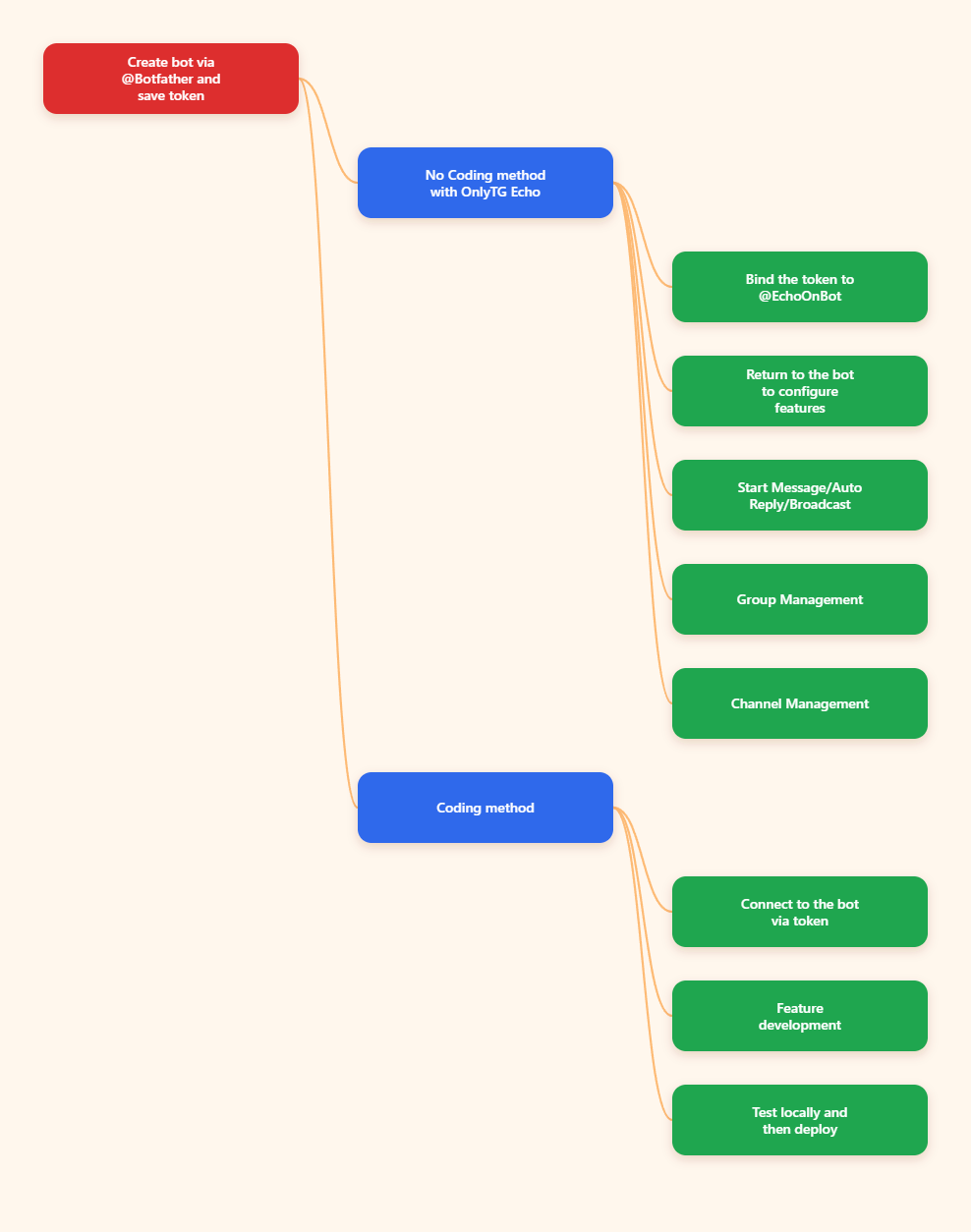
How Do You Create a Telegram Bot Step by Step?
Below are the most reliable steps for creating a bot in 2026. The first part is the same for both coding and no-code methods.
- Open Telegram and start a chat with @BotFather. Search for the verified BotFather account and open it. This is the official starting point for every Telegram bot.
- Send the /newbot command. BotFather will prompt you to provide a display name first, then a username for the bot.
- Choose a clear bot name. Pick a name that reflects the bot’s purpose. This is the public-facing name users will see.
- Set a unique username ending in bot. Telegram requires the bot username to end with bot. If the username is already taken, BotFather will ask you to try another one.
- Copy and store the API token securely. BotFather returns a token that authorizes your bot. Treat it like a password and do not post it in public repositories or chats.
If you want a no-code workflow, you can connect the token to a platform like OnlyTG Echo and configure automations without writing code. If you are building with code, the next step is to connect the token to a bot framework in your preferred language.
No-Code Method: How to Build a Telegram Bot with OnlyTG Echo
If you want to create a bot without programming, a no-code platform can save time and reduce setup complexity. In this workflow, OnlyTG Echo is used as the no-code layer that connects to your Telegram bot token and lets you configure behavior through a visual or guided interface.
- Create the bot in BotFather first. No-code tools still require a Telegram bot token, so the bot must be created through @BotFather first.
- Connect the token to OnlyTG Echo. Add the token inside the platform so it can communicate with your bot.
- Set up the features you need. OnlyTG Echo offers features such as Start Messages, Auto-Reply, and Broadcast, and each feature comes with a detailed tutorial.
- Add your groups and channels to the bot. OnlyTG also offers features for managing groups and channels, such as loop posts and greeting messages for new members.
This approach is especially useful if you want to launch quickly, avoid code deployment, or let non-technical teams manage content. It also reduces the need for infrastructure work, though you should still protect the bot token and review the platform’s access controls.
Coding Method: How to Build a Telegram Bot for Developers
The coding path is best for teams that need custom logic, database integration, advanced routing, or full control over hosting and security. Telegram’s official documentation provides examples for multiple languages, including Python, TypeScript, Go, and C#.
- Choose a development stack. Common choices include Python, Node.js/TypeScript, Go, or C#. Pick the one your team already knows.
- Install a Telegram bot library. Use a maintained library that supports the Bot API and your runtime.
- Store the token in an environment variable. Do not hardcode the token in source files. Keep secrets outside your repository.
- Create the bot client and connect to Telegram. Initialize the library using the token from BotFather.
- Decide between long polling and webhook delivery. Long polling is simpler for prototypes. Webhooks are generally better for production because your server receives updates directly.
- Implement commands and handlers. Add logic for /start, /help, custom commands, inline buttons, or message parsing.
- Test locally and then deploy. Verify message delivery, command handling, and error handling before going live.
- Monitor logs and failures. Watch for token issues, timeout errors, and malformed messages.
A simple coding workflow is ideal if you need custom business logic. However, it does require development skills, server maintenance, and basic operational security.
Which Setup Method Is Best: Coding or No-Code?
| Method | Best For | Advantages | Limitations | Risks |
|---|---|---|---|---|
| Coding with Bot API | Custom workflows, integrations, and production systems | Full control, flexible logic, scalable architecture | Requires programming skills, hosting, and maintenance | Token exposure, webhook misconfiguration, server downtime |
| No-code with OnlyTG Echo | Fast launches, simple automation, non-technical teams | Quick setup, low technical barrier, easier updates | Less flexible than custom code, depends on the platform | Platform dependency, limited customization, access control issues |
| Long polling | Prototypes and simple testing | Easy to start, minimal infrastructure | Less ideal for larger production deployments | Missed updates if the process stops, performance limits |
| Webhook | Production bots with stable hosting | Fast delivery, efficient update handling | Requires HTTPS endpoint and server setup | Endpoint outages, certificate or routing errors |
In practical terms, choose coding if you need custom logic or integrations. Choose OnlyTG Echo if your goal is to automate common actions quickly without building and maintaining a backend.
Safety and Risks: How to Keep Your Telegram Bot Secure
Creating a Telegram bot is straightforward, but safety matters. The most important rule is to protect your bot token. Anyone with the token can control the bot through the API.
Key risks and how to reduce them:
- Token leakage: Never commit tokens to public repositories, paste them in shared documents, or send them in unsecured chats. Store them in environment variables or secret managers.
- Unauthorized access: Limit who can view bot settings in BotFather and who can edit your no-code workspace or server.
- Webhook mistakes: If you use webhooks, verify the HTTPS endpoint, routing, and server availability. A broken webhook can stop updates.
- Over-automation: Not every action should be automatic. Keep human escalation paths for sensitive messages.
- Spam and abuse: Add rate limits, filters, and moderation rules if your bot is public.
For safe operation, review permissions regularly, test changes in a staging environment when possible, and keep a rollback plan.
What Are the Most Common Questions About Creating a Telegram Bot?
Do I need programming skills to create a Telegram bot?
No. You can create the bot through BotFather and then use a no-code platform such as OnlyTG Echo to configure automations without writing code. Programming is only necessary if you want custom behavior or direct API integration.
Is the BotFather token safe to share?
No. Treat the token like a password. If it is exposed, someone else may be able to control the bot. If you suspect exposure, regenerate the token immediately through BotFather.
Should I use long polling or a webhook?
Long polling is simpler for prototypes and testing. Webhooks are generally better for production because they deliver updates directly to your server and are more efficient at scale.
Can I change my bot name later?
Yes. BotFather lets you manage existing bots, including updating key details. However, choose the username carefully because it should stay consistent and must follow Telegram’s naming rules.
What is the fastest way to launch a simple bot in 2026?
The fastest route is usually: create the bot with BotFather, then connect it to a no-code tool like OnlyTG Echo and configure the first responses or workflows. This avoids backend setup and speeds up testing.
Conclusion
Creating a Telegram bot in 2026 is still a practical and high-value automation project. The process begins with @BotFather, continues with secure token handling, and then branches into either a coding workflow or a no-code workflow such as OnlyTG Echo.