Skip to content
OnlyTG Icon
  • ProductsExpand
    • Echo
    • Recorder
  • ResourcesExpand
    • Help
    • Blog
  • PricingExpand
    • Echo Pricing
  • EnglishExpand
    • 中文 (中国)
    • Русский
    • English
Contact us
Telegram Tips

How to Buy Cryptocurrency/USDT

Home » Blog » Telegram Tips » How to Buy Cryptocurrency/USDT

The first step in buying cryptocurrencies is usually to purchase USDT, then exchange USDT for other coins like BTC, ETH, etc.

There are generally two common ways to buy USDT: buying with fiat currency on an exchange or buying through C2C/OTC.

Exchange Fiat Purchase Process:

Best suited for beginners, with the fewest steps—typically register and then buy USDT directly with a bank card, credit card, or local transfer. The advantages are speed and simplicity; the disadvantages are that prices and fees are usually more transparent than C2C but not necessarily the lowest.

  • Choose a compliant, reputable trading platform. Here are some recommended platform: Binance/OKX/Bybit

  • Register an account and complete identity verification.

  • Bind a bank card, credit card, or use other payment methods supported by the platform.

  • Select USDT, enter the amount, and confirm the purchase.

  • The purchased USDT will enter your account.

C2C/OTC Purchase Process:

C2C involves buying USDT from merchants on the platform, where the platform typically holds the merchant’s coins first and releases them after you pay. The advantages are more payment options and common use for local fiat deposits; the disadvantages require careful merchant selection to avoid low-price traps and payment errors.

  • Register and complete real-name verification.

  • Go to the platform’s C2C/OTC page and filter for USDT.

  • Select a merchant, enter the amount or USDT quantity you want to buy.

  • Complete payment according to the seller’s receiving information and wait for the seller to confirm receipt.

  • After the seller releases the coins, USDT will enter your platform account.

Example: Buying USDT on Binance:

  • Open the Binance app, register a Binance account, and complete identity verification.

  • Bind a bank card or payment methods like Apple Pay/Google Pay.

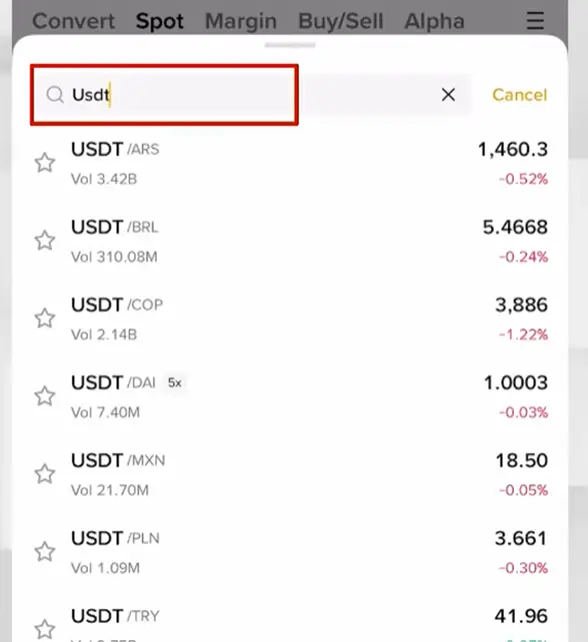
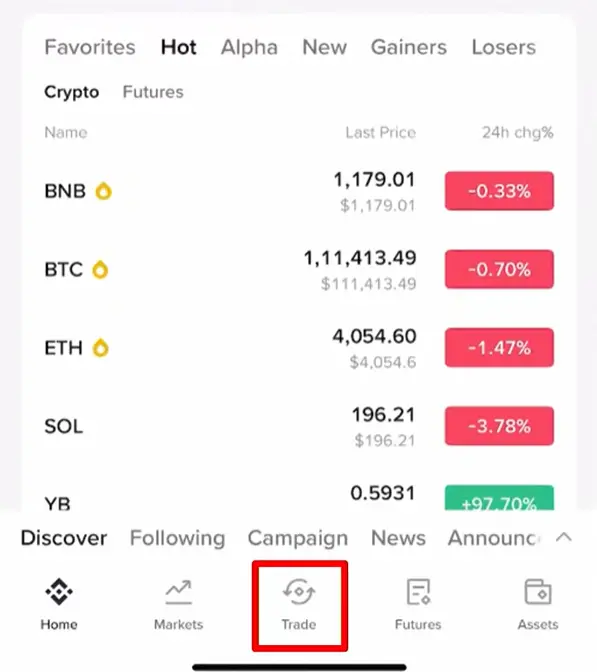
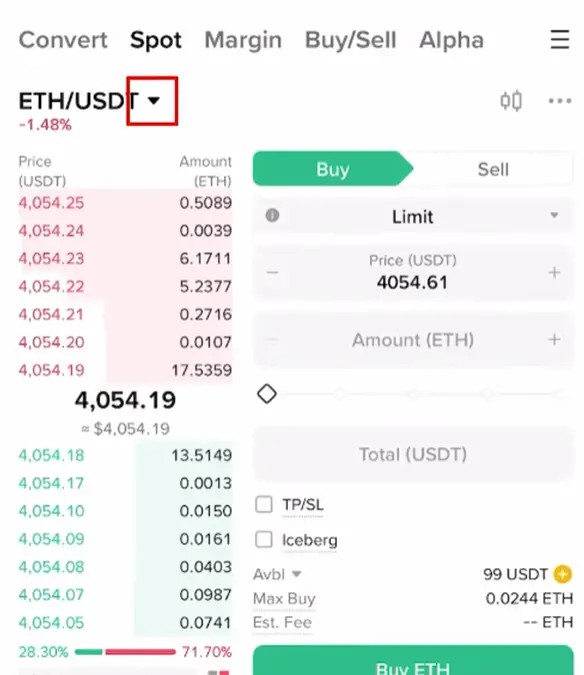
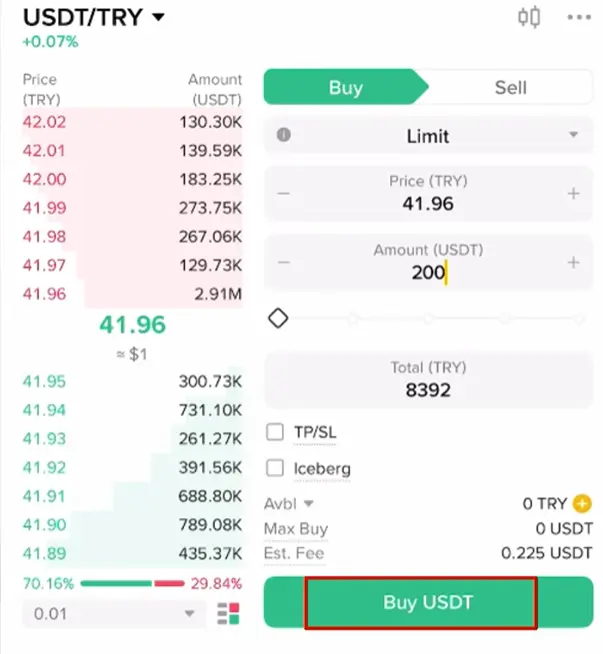
  • Tap “Trade” at the bottom, then tap the dropdown arrow in the upper left, search for USDT, and select a currency to buy USDT with.
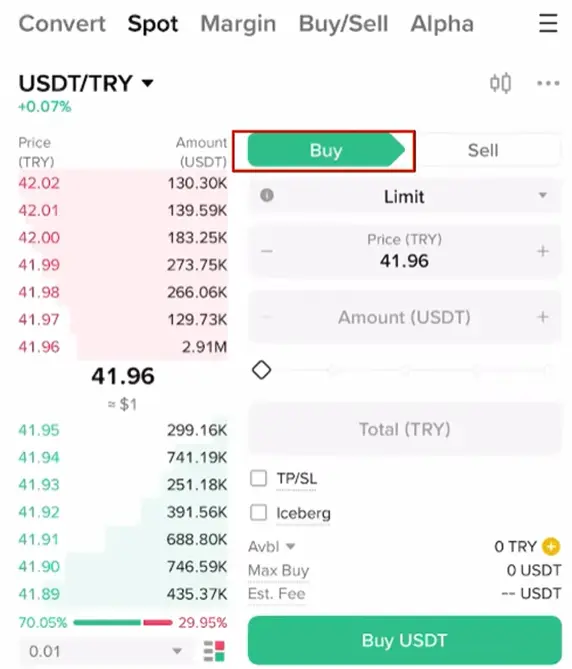
  • Tap “Buy” in the upper right, enter the USDT amount to purchase, then tap “Buy USDT” in the lower right to complete the purchase.
Post Tags: #Telegram

Post navigation

Previous Previous
How to Buy Telegram Stars
Table of Contents
  • Exchange Fiat Purchase Process:
  • C2C/OTC Purchase Process:
  • Example: Buying USDT on Binance:
Echo Sidebar
  • Latest Post
  • Echo
  • Recorder
  • Tips
Telegram Tips

How to Buy Telegram Stars

Stars is a virtual currency officially launched by Telegram for purchasing paid content within Telegram. Stars is not classified as…

Telegram Tips

What is the purpose of Telegram group and channel levels? How to boost?

In Telegram, Levels act like an “experience bar” for public groups and channels. As a community reaches higher levels, it…

Telegram Tips

What are the actual benefits of a Telegram Premium subscription, and how to purchase it?

Telegram Premium is a subscription service that unlocks enhanced limits and exclusive features while supporting the app’s independent development. What…

Telegram Tips

How to change the display language in Telegram

To change the language on Telegram, you can head into the settings. Telegram supports dozens of languages, and many are…

Telegram Tips

What exactly is the difference between Telegram channels and groups?

The main difference is the direction of communication: Groups are for chatting with others (two-way), while Channels are for broadcasting…

Telegram Tips

What can I do if my Telegram group or channel has been banned?

If your Telegram channels or groups have been banned, the actions you should take depend on whether the ban was…

Telegram Tips

How to hide the Telegram group member list?

To hide your group’s member list, your group must first be a Supergroup (usually having more than 100 members or…

Telegram Tips

What is a Telegram Super Group? How to convert to a Super Group?

A Supergroup is an enhanced version of a standard Telegram group designed to host large communities of up to 200,000…

How to Loop Post in Channel via Telegram Bot

OnlyTG Echo provides the function to automatically loop posts in your channel. Firstly, you need to create a new bot via @botfather and…

How to Configure Multiple Media when Setting OnlyTG Echo Features

OnlyTG Echo provides the function to configure multiple media to a single message when setting Start Message/Auto Reply/Quick Reply/Broadcast and other features. Firstly, you need…

How to Upgrade Channel to Pro Channel in Telegram

OnlyTG Echo provides the function to upgrade your channel to Pro Channel. This will consume your Pro Communities slots and unlock more advanced features….

How to Edit a Published Post via Telegram Bot

OnlyTG Echo provides the function to Edit Channel Post via your bot. Firstly, you need to create a new bot via @botfather and…

How to Publish Channel Post via Telegram Bot

OnlyTG Echo provides the function to Publish Channel Post via your bot. Firstly, you need to create a new bot via @botfather and…

How to Manage Channel via Telegram Bot

OnlyTG Echo provides the function to Manage Channel via your bot. Firstly, you need to create a new bot via @botfather and send its…

How to Send Group Greeting via Telegram Bot

OnlyTG Echo provides the function to send the Greeting Message to new members joining the group. Firstly, you need to create a new…

How to Set Group CAPTCHA via Telegram Bot

OnlyTG Echo provides the function to send the CAPTCHA test to new members joining the group. Firstly, you need to create a new bot…

How to Use OnlyTG Recorder?

Welcome to OnlyTG Recorder! Developed by our dedicated bot development team, OnlyTG Recorder is designed to serve as an assistant…

How to Buy Telegram Stars

Stars is a virtual currency officially launched by Telegram for purchasing paid content within Telegram. Stars is not classified as…

What is the purpose of Telegram group and channel levels? How to boost?

In Telegram, Levels act like an “experience bar” for public groups and channels. As a community reaches higher levels, it…

What are the actual benefits of a Telegram Premium subscription, and how to purchase it?

Telegram Premium is a subscription service that unlocks enhanced limits and exclusive features while supporting the app’s independent development. What…

How to change the display language in Telegram

To change the language on Telegram, you can head into the settings. Telegram supports dozens of languages, and many are…

What exactly is the difference between Telegram channels and groups?

The main difference is the direction of communication: Groups are for chatting with others (two-way), while Channels are for broadcasting…

What can I do if my Telegram group or channel has been banned?

If your Telegram channels or groups have been banned, the actions you should take depend on whether the ban was…

How to hide the Telegram group member list?

To hide your group’s member list, your group must first be a Supergroup (usually having more than 100 members or…

What is a Telegram Super Group? How to convert to a Super Group?

A Supergroup is an enhanced version of a standard Telegram group designed to host large communities of up to 200,000…

  • OnlyTG
  • Echo
  • Recorder
  • Help
  • Blog
  • Echo Pricing
OnlyTG EchoTelegram VK YouTube Facebook X Email

© 2026 OnlyTG

Scroll to top
  • Products
    • Echo
    • Recorder
  • Resources
    • Help
    • Blog
  • Pricing
    • Echo Pricing
Contact us